FaceTime Like a Pro
Get our exclusive Ultimate FaceTime Guide 📚 — absolutely FREE when you sign up for our newsletter below.

FaceTime Like a Pro
Get our exclusive Ultimate FaceTime Guide 📚 — absolutely FREE when you sign up for our newsletter below.


XChat is a new privacy-focused messaging app from X (formerly Twitter). Explore the feature and security features it offers.
Recently, X Corp (formerly Twitter) launched the XChat app, positioning it as more than just another chat tool. It promised encryption, disappearing messages, media sharing, and tighter integration with the broader X ecosystem. On paper, it looked like a direct competitor to WhatsApp.
In reality, after using XChat as my primary messaging app, I understood that it is not trying to replace WhatsApp, but rather about setting a new standard of chatting. Here is my complete comparison of XChat vs WhatsApp, including features, security, and privacy concerns.
| Feature | XChat | |
|---|---|---|
| Account system | Based on X profile | Phone number-based |
| Platform availability | Limited (iOS-first rollout) | Android, iOS, Web, Desktop |
| Contact discovery | X network | Phone contacts |
| Group chats | Up to 350 members | Up to 1024 members |
| Media sharing | Yes | Yes (more optimized) |
| Voice/video calls | Not yet | Highly reliable |
| Payments | Not yet | Available in some regions |
| Business ecosystem | No | Massive with WhatsApp Business |
| AI integration | No | Native Meta AI |
The first thing I noticed after installing XChat was how fast everything felt. No restoring backups or scanning for contacts. You only need to sign up with your X account using your phone number, email address, Gmail, or Apple ID.
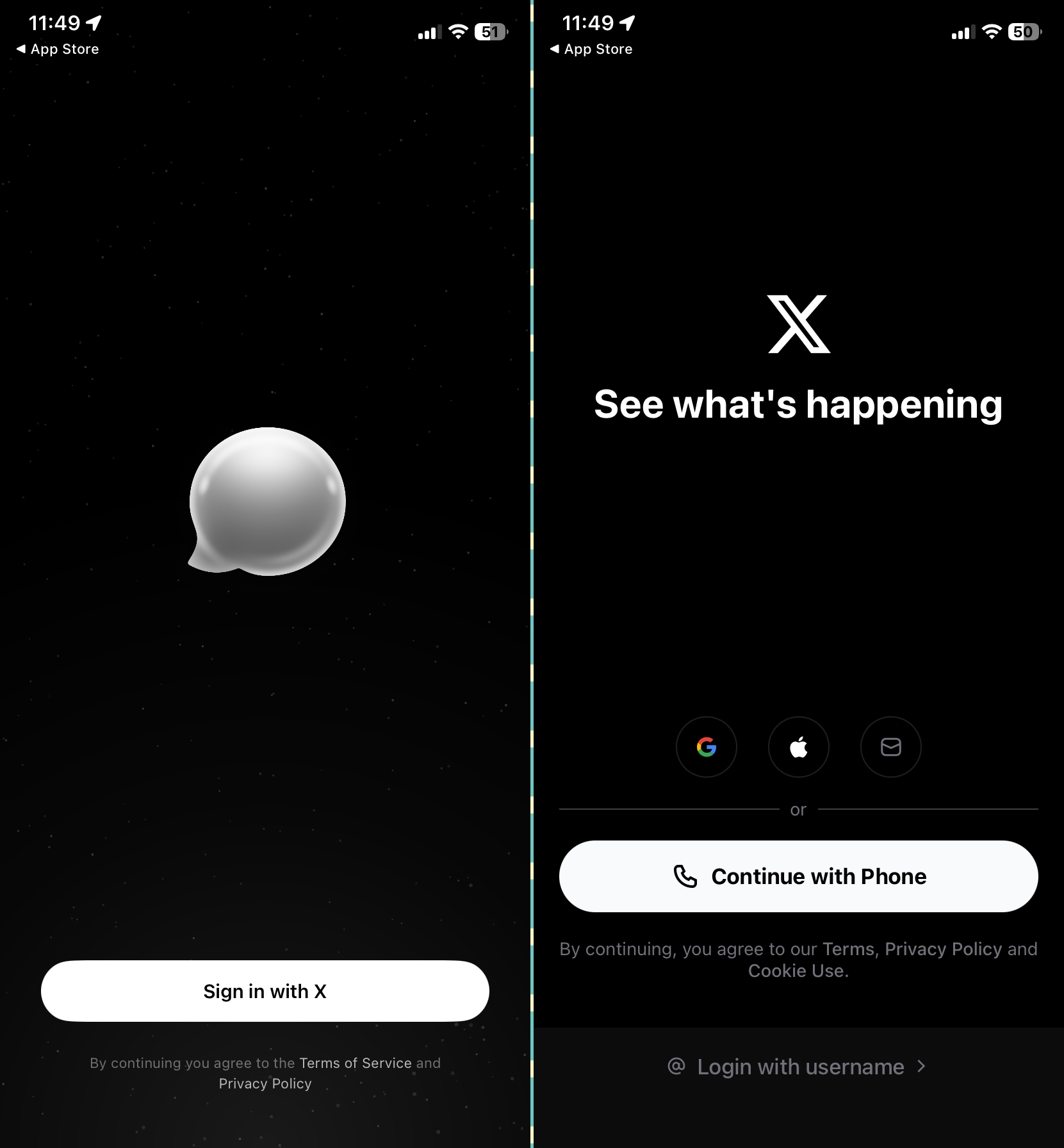
But that clean feeling comes at a cost. Unlike WhatsApp, which instantly populates your chat list using your phone contacts, XChat depends entirely on your X network. As a result, if a person does not have an X account or does not activate XChat on his/her device, you won’t be able to message them.
Platform limitations proved to be rather significant. At launch, XChat rolled out primarily on iPhone and iPad, leaving Android versions for later release. WhatsApp, on the other hand, is everywhere: on phones, browsers and desktops, making it almost impossible to escape.
I have tested the key features of XChat and compared them to WhatsApp. Here’s everything you need to know.
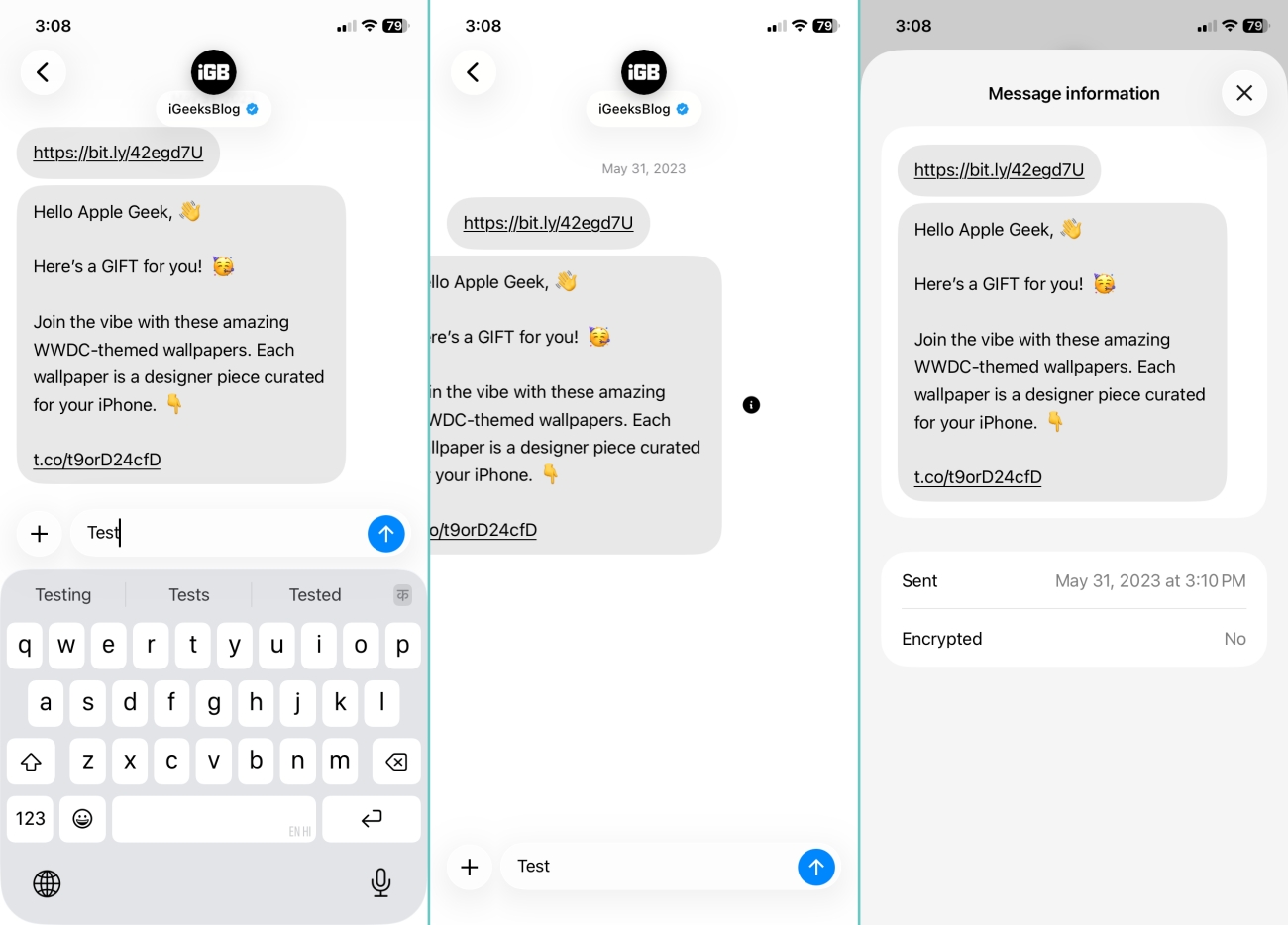
During one-on-one chats, I found XChat to be speedy, and at times it was faster than WhatsApp. Messages were delivered instantly, and the interface didn’t feel weighed down by years of legacy features. A simple left swipe likes the message or shows the text details based on your Interaction settings.
But reliability isn’t just about speed. It’s about consistency across networks, devices, and user types. WhatsApp has spent years optimizing for poor connections and low-end devices.
XChat, at least in my testing, isn’t there yet. Also, there is no way to see if the recipient is online or has seen your message yet. The only good part is that you can edit messages and delete them for everyone.
XChat supports sending images, videos, GIFs, and files, but it still seems to be in its early stages of development. WhatsApp has perfected compression, previews, and file handling through time. You can send HD images, Live Photos on iOS, and make the media view once.
With XChat, media sharing felt functional. I could share photos and videos without the usual limitations found in other chatting apps. But it’s not polished yet. File previews were less intuitive, and large media handling wasn’t always smooth.
I have set the Upload Quality to High for better sharing by going to my profile picture > Data Usage. You can also change whether the captured photos in the chat will be saved to your camera roll.
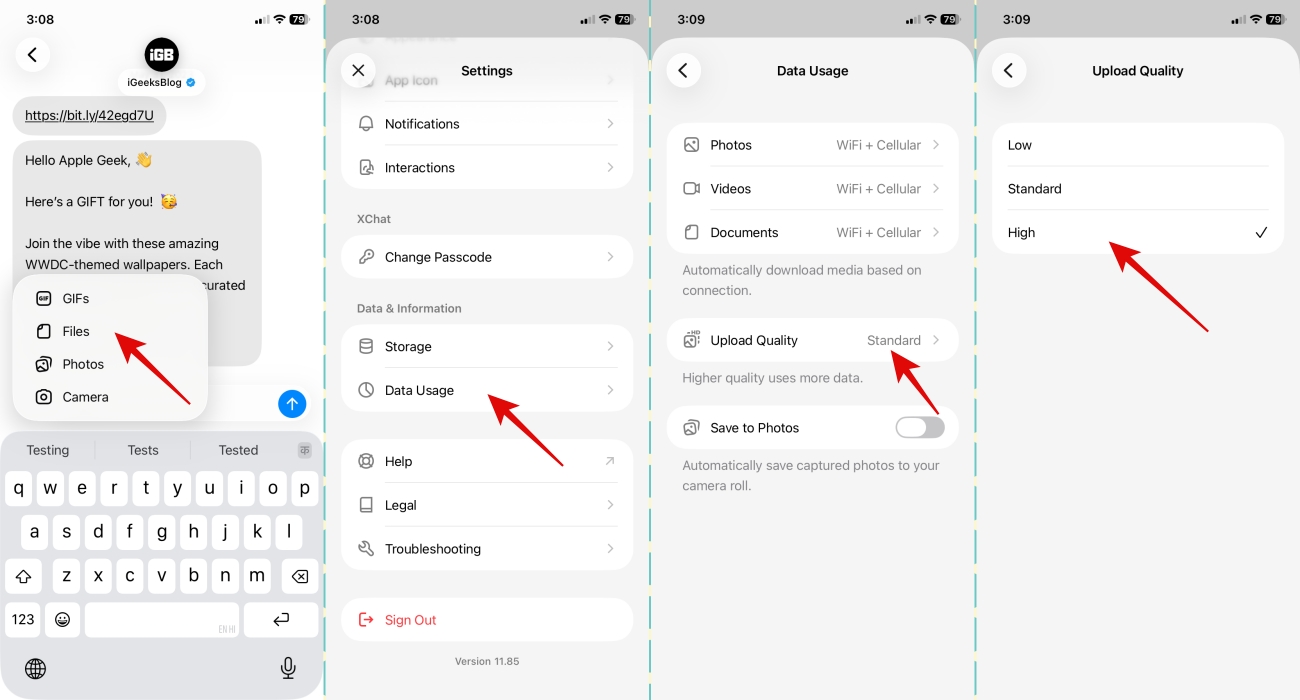
This is where I felt a real difference. XChat notifications are quieter. You can change the chat notifications from the X
WhatsApp has trained us to respond instantly with granular control per chat and lets you silence notifications for less important threads. XChat doesn’t carry that same behavioral pressure yet. And that’s both a strength and a weakness.
I found myself checking XChat less often. Not because it was better, but because fewer people were using it.
WhatsApp groups are chaotic, yes, but they’re also essential. Family, work, communities, services, everything runs through them. Also, it has advanced features like Group Message history for new members, mentions, event reminders, member tags, and more.
On XChat, groups feel like an afterthought. You can create a group with comparatively fewer participants by tapping the pen icon. However, after using so many intuitive features, XChat feels technically complete but practically empty.
In my testing, calls are not yet available on XChat. But I hope to see the calling facility in the next updates, as encrypted calls are available on the X app itself.
So right now, WhatsApp calls are still more reliable, especially on unstable networks, due to years of optimizing global call quality.
This is where things get interesting.
WhatsApp supports location sharing and, in some regions, payments. You can also send polls and event reminders. It’s super convenient. Moreover, you can generate and send AI images and chat with Meta AI.
I didn’t find myself using XChat for anything beyond messaging yet. However, being part of the broader X ecosystem, integration with AI tools, potential payment systems, and further content sharing is expected.
Security is where XChat tries to position itself aggressively. I didn’t need to share my phone number or invite someone to the messaging app. Simply search for their X handle and start chatting.
It offers disappearing messages, screenshot blocking, and claims of end-to-end encryption, no tracking, and zero ads, unlike WhatsApp status ads. Each message is secured with a key pair unique to you. Also, you need to set a passcode to access the chats.
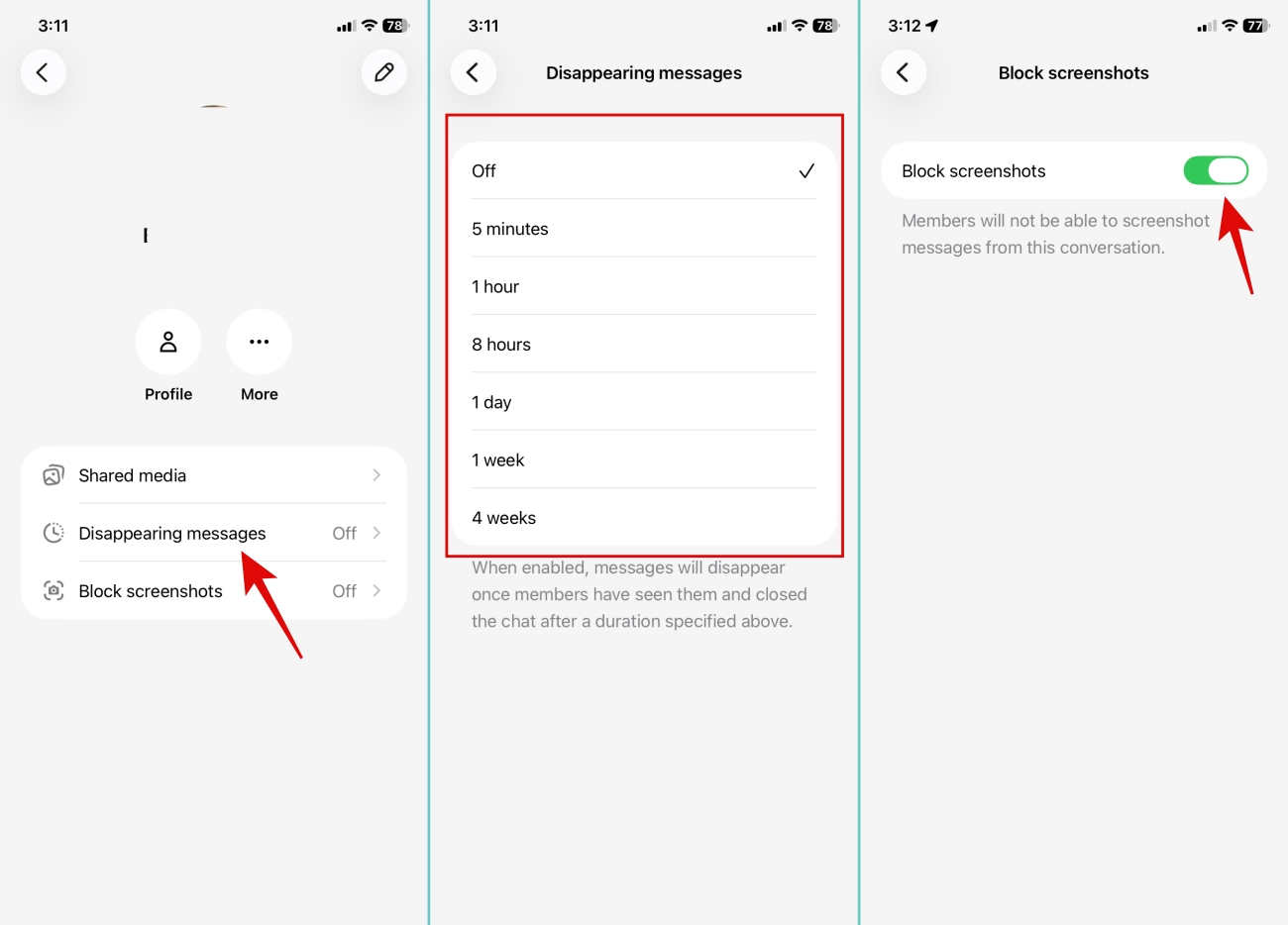
But here’s where things get complicated. WhatsApp’s encryption model is well-documented and widely audited. It’s not perfect, but it’s trusted. XChat’s encryption, on the other hand, has raised questions. The implementation details aren’t as transparent, and security experts have pointed out that it behaves more like a centralized system.
Also, removing phone numbers doesn’t automatically mean better privacy. With XChat, your identity is tied to your X profile, your posts, interactions, and activity. That’s a different kind of data exposure.
From my perspective, if privacy is your top priority today, WhatsApp (or even Signal) is still a safer choice.
XChat’s biggest strength is its philosophy. It’s cleaner, less noisy, and more intentional. Starting from zero felt liberating. There was no spam or forced contact sync.
It also aligns with a broader vision. WhatsApp is a standalone tool. XChat is part of something bigger, a unified platform where messaging, content, payments, and AI might eventually merge. But that vision is also its biggest weakness. Because right now, it’s incomplete.
WhatsApp wins where it matters most: network, reliability, and ecosystem. Businesses rely on it, services depend on it, and people trust it. XChat, by comparison, feels like a product waiting for its moment. Not failing, but not essential either.
I went into this experiment expecting a clean break. I thought I’d uninstall WhatsApp and never look back. That didn’t happen. Instead, I ended up running both apps. XChat for curiosity, WhatsApp for everything that actually matters.
If you’re expecting XChat to replace WhatsApp today, it won’t. The network, ecosystem, and reliability aren’t fully there. But if you’re interested in where messaging is heading, XChat is worth paying attention to. Not because it’s better, but because it’s different.
Have you tried the XChat app yet? Let me know your thoughts below!
Must like: