FaceTime Like a Pro
Get our exclusive Ultimate FaceTime Guide 📚 — absolutely FREE when you sign up for our newsletter below.

FaceTime Like a Pro
Get our exclusive Ultimate FaceTime Guide 📚 — absolutely FREE when you sign up for our newsletter below.


Some iPhone beta testers can now pick WhatsApp over iCloud for chat backups, with 2 GB free and mandatory encryption, but no cross-platform restores.
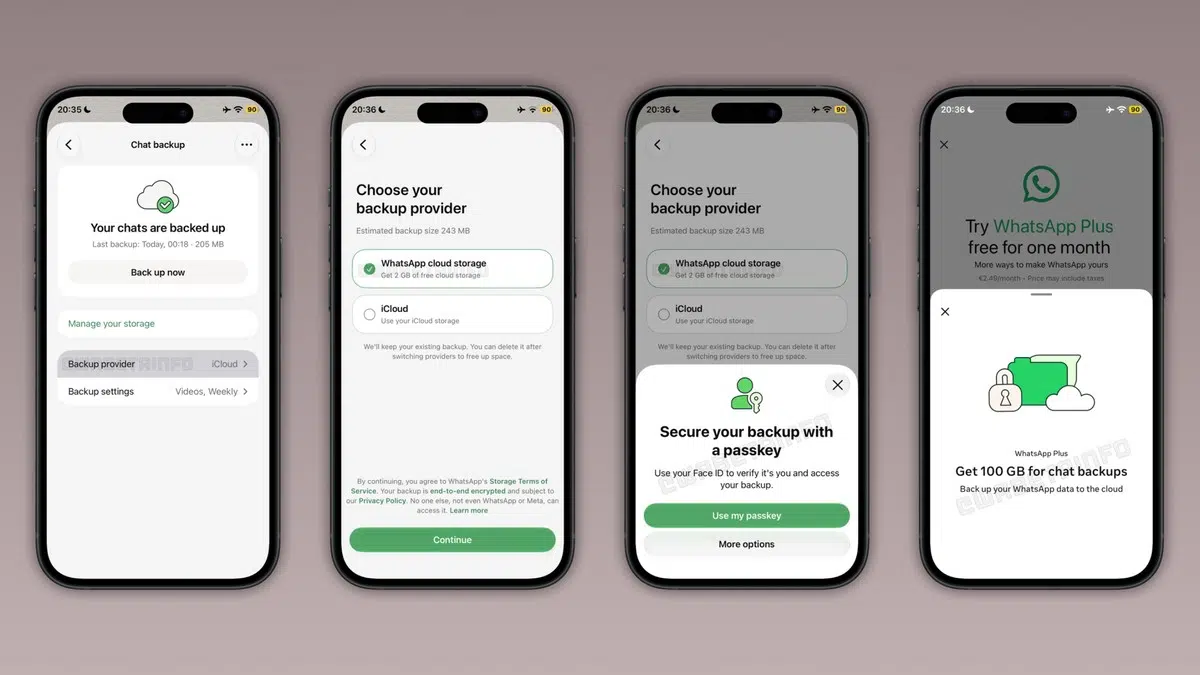
WhatsApp has begun letting some iPhone beta users back up chats to its own servers instead of iCloud, with 2 GB of free storage. WABetaInfo spotted the new option in WhatsApp’s iOS beta, version 26.45.10.71 on TestFlight. The rollout is gradual and will reach more accounts over the coming weeks, so installing the beta does not guarantee you will see the option yet.
The appeal is straightforward. The new option could keep your WhatsApp backup data separate from iCloud’s shared storage. In WhatsApp Settings > Chats > Chat Backup, users can choose iCloud or WhatsApp as the backup provider. The WhatsApp-hosted free tier offers 2 GB. That should help people with smaller chat histories, but anyone who saves years of photos and videos may outgrow it quickly.
For more space, WABetaInfo reports that WhatsApp Plus subscribers get 100 GB and Meta One plans offer up to 4 TB.
The feature first appeared in an earlier beta, version 26.28.10.16, in July. Now the option is showing up for some testers, which makes this an active rollout rather than a code find. Anyone dealing with iCloud backup problems may welcome another place to store backups, though the free allowance still caps out at 2 GB.
The choice applies to backups only. Active conversations are not affected, and iCloud remains an option, so people who do not need the extra space can keep their current setup.
WhatsApp requires end-to-end encryption for backups stored on its own servers. Users can set a passkey, which is the default, or use a 64-digit encryption key. Requiring end-to-end encryption is the right call, but it also puts more weight on the setup. A lost passkey or key could make a backup difficult or impossible to restore.
WhatsApp-hosted backups cannot yet be used to restore chats on the other mobile platform. To move from iPhone to Android or vice versa, use WhatsApp’s chat transfer tool. Before you change phones, review WhatsApp’s current backup and restore process.
For now, this beta feature is available to some iPhone beta accounts, and WhatsApp has not announced a general release date. The 2 GB free tier may ease iCloud pressure for some users, but it does not make cross-platform moves any simpler.

As an Amazon Associate, iGeeksBlog earns from qualifying purchases.