FaceTime Like a Pro
Get our exclusive Ultimate FaceTime Guide 📚 — absolutely FREE when you sign up for our newsletter below.

FaceTime Like a Pro
Get our exclusive Ultimate FaceTime Guide 📚 — absolutely FREE when you sign up for our newsletter below.


Apple rolls out iOS 26.1 with smoother customization, improved Lock Screen controls, expanded language support, and refined visuals across iPhone and iPad.
 ByVikhyat
Apple continues its iOS 26 journey with the release of iOS 26.1, offering a range of enhancements aimed at improving the user experience for both iPhone and iPad holders. This update delivers a mix of user-driven tweaks, visual polish, and practical improvements.
With this release, Apple has included more flexible customization options for Liquid Glass, aligning with user requests. For those eager to disable the persistent Lock Screen camera gesture, there’s now a straightforward solution. Here’s what to expect from iOS 26.1 and iPadOS 26.1.
Previously, anyone looking to adjust the liquid glass effect had to dive into Accessibility settings. iOS 26.1 makes it easier with a new tint control for Liquid Glass. Users can now toggle between Clear and Tinted styles, providing better contrast in notifications and apps. To access this, navigate to Settings, then Display & Brightness.
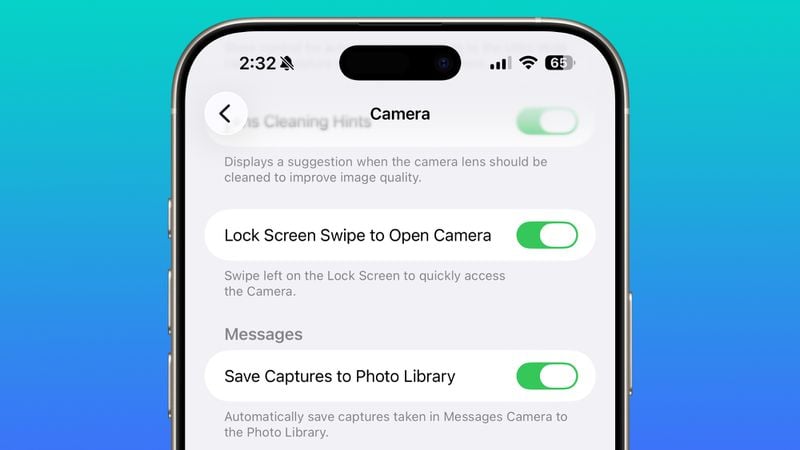
At last, users can deactivate the Lock Screen camera gesture. The newly added setting under Camera options lets you disable the left-swipe shortcut while still keeping the camera functional.
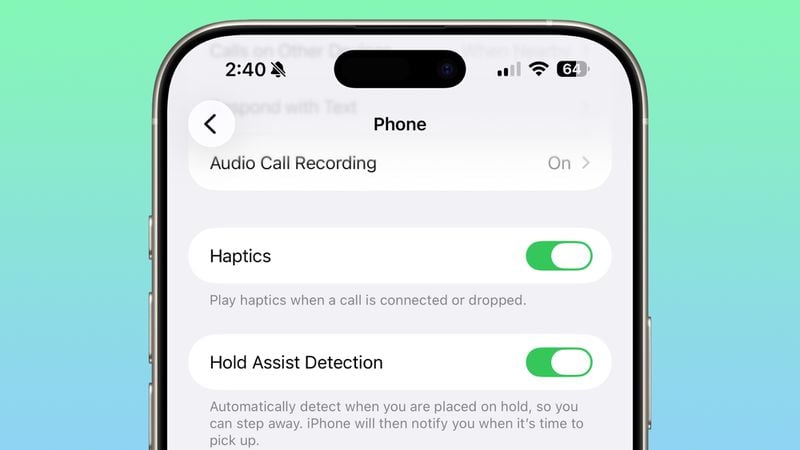
The new update also lets users choose to turn off the subtle vibration that happens when a call connects or ends, providing more control over phone haptic feedback.
An updated swipe-to-stop gesture replaces the old tap-to-stop button for alarms, intending to cut down on accidental dismissals.
Apple Intelligence has broadened its language support, now accommodating Danish, Dutch, Norwegian, Portuguese (Portugal), Swedish, Turkish, Traditional Chinese, and Vietnamese.
AirPods now support Live Translation in Japanese, Korean, Italian, and both Simplified and Traditional Chinese. This feature is compatible with AirPods Pro 2, Pro 3, and AirPods 4 that include ANC.
The Apple TV app has received a visual refresh, adopting a Liquid Glass-inspired icon while simplifying its branding to “Apple TV.”
In a bid to enhance fitness tracking, users can now design their own workouts in the Fitness app, tailoring them by workout type, caloric goals, effort, and duration.
FaceTime audio has been upgraded for better clarity in low-bandwidth scenarios, improving call quality under less-than-ideal network conditions.
Apple has made adjustments to communication safety settings on teen accounts, removing automatic restrictions. Parents now need to manually review these settings for child accounts aged 13-17.
A new Local Capture setting under Settings → General → Local Capture lets you choose a save location in the Files app for call recordings, including audio and video.
When using an external microphone with local capture, iOS 26.1 adds a control to adjust input gain. This gives you more flexibility to fine-tune your recording levels directly from the Settings app.
iOS 26.1 also makes several minor but visible changes:
Apple has restructured the Privacy and Security section, allowing users to toggle automatic downloads and installations of security improvements. This change aims to ease the delivery of smaller security patches without requiring a complete iOS update.
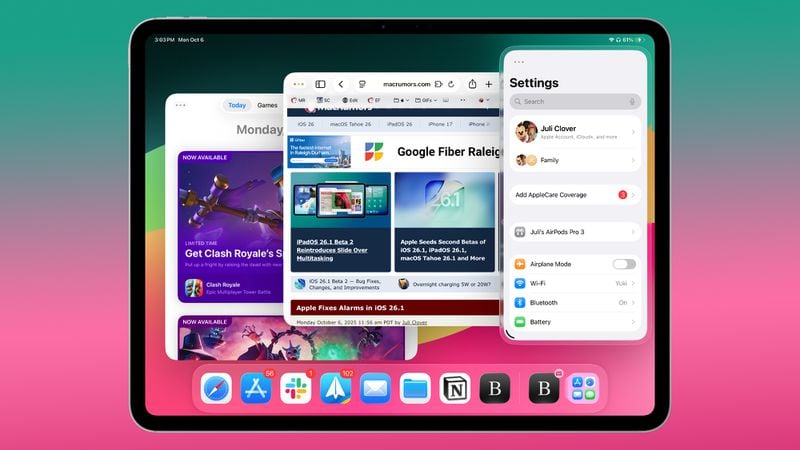
For iPad users, Slide Over functionality returns with iPadOS 26.1, permitting a floating app view when using multiple windows. The update also integrates the Vision Pro app, boosting Apple’s ecosystem synergy.
Ready to update? Simply head to Settings, General, then Software Update. iOS 26.1 is compatible with the iPhone 11 lineup and newer models, including the 2nd-generation iPhone SE and later. iPadOS 26.1 is available for all iPads running iPadOS 26.
Have you experienced iOS 26.1 yet? What’s your favorite feature in this update? Let us know below.