
FaceTime Like a Pro
Get our exclusive Ultimate FaceTime Guide 📚 — absolutely FREE when you sign up for our newsletter below.

FaceTime Like a Pro
Get our exclusive Ultimate FaceTime Guide 📚 — absolutely FREE when you sign up for our newsletter below.


The Weather app in iOS 27 gets smarter with dedicated rain and wind forecasts, a new Highlights section, and more useful widgets. Here’s everything new after testing the update.
For years, Apple’s Weather app had one frustrating flaw. It offered plenty of useful weather data, but actually finding the information I needed often took more taps than it should have. If I wanted to quickly check when the rain would stop or whether the evening would be too windy for a bike ride, I usually had to jump between multiple views.
That’s exactly the kind of everyday frustration Apple is addressing in iOS 27. Instead of stuffing the app with even more weather data, Apple is making the information easier to understand at a glance. After spending some time using iOS 27, I found the improvements aren’t about adding more information. They’re about surfacing the right information at the right time.
Here are all the new Apple Weather app features in iOS 27, including forecast interface changes and the new rain and wind tracking views.
Instead of adding dozens of new weather metrics, Apple focused on making existing forecasts easier to understand. The result is a Weather app that feels faster, cleaner, and far more practical for everyday use.
Apple isn’t trying to reinvent the Weather app with flashy AI features. Instead, I found that everyday forecasting has become much more practical.
Rather than opening Weather and scanning through several cards, iOS 27 surfaces the information that’s most relevant first. Whether it’s incoming rain, strong winds, or unusual weather conditions, the app now does a much better job of prioritizing what deserves your attention.
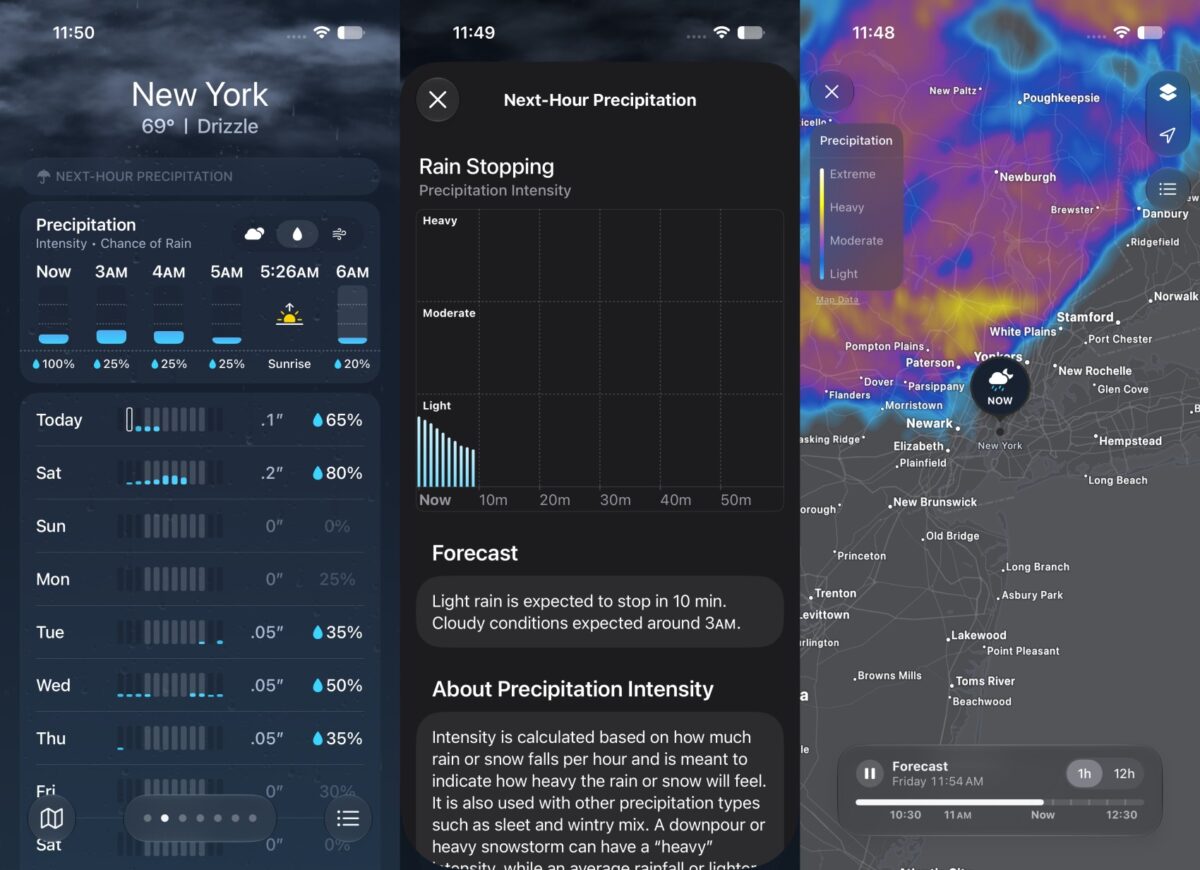
Rain is probably the weather condition I check most often, whether I’m heading out for work, planning a run, or deciding if I should carry an umbrella. In iOS 27, Apple introduces a dedicated precipitation forecast directly on the main Weather screen. Instead of digging through menus, you can switch to a layout built entirely around rainfall predictions from the Conditions section.
The view updates both hourly forecasts and the 10-day outlook, making it much easier to answer simple questions like:
If you tap any day’s precipitation forecast, the Weather app opens a dedicated screen showing total expected rainfall, an hour-by-hour precipitation chart, and a graph illustrating how rain probability changes throughout the day. Apple also displays rainfall totals for the previous 24 hours and the next 24 hours.
One feature I ended up using more than expected is the interactive precipitation map. Apple has moved it to a much more prominent position, making it easier to track approaching weather systems. You can zoom out to follow rain bands moving across nearby cities, while color coding helps indicate rainfall intensity.
I particularly like Apple’s decision to separate rain into its own dedicated forecast instead of burying it alongside temperature and humidity. For anyone who regularly plans walks, workouts, travel, or outdoor activities, this alone saves time every day.
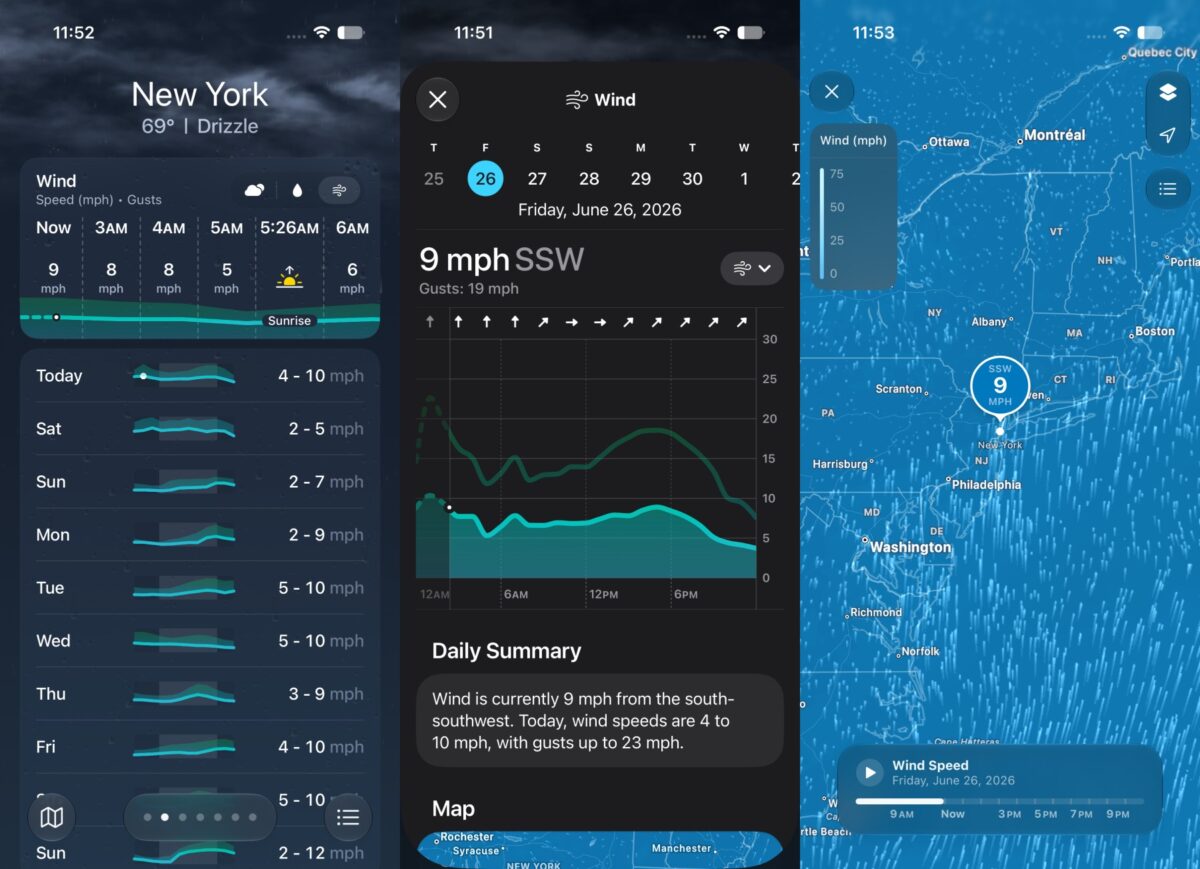
Wind is one of those weather metrics most people ignore until it suddenly affects their plans.
Whether you’re cycling, flying a drone, going boating, or simply deciding whether to sit outside, wind conditions can completely change your day. That’s why I think the new Wind view is one of the most useful additions in iOS 27.
Apple has added a dedicated wind forecast alongside temperature and precipitation. From the Conditions section, you can quickly switch to a dedicated wind view displaying hourly forecasts, a 10-day outlook, an interactive wind map, wind gust charts, and daily comparisons.
I never realized how often I checked wind forecasts until Apple made them this easy to access.
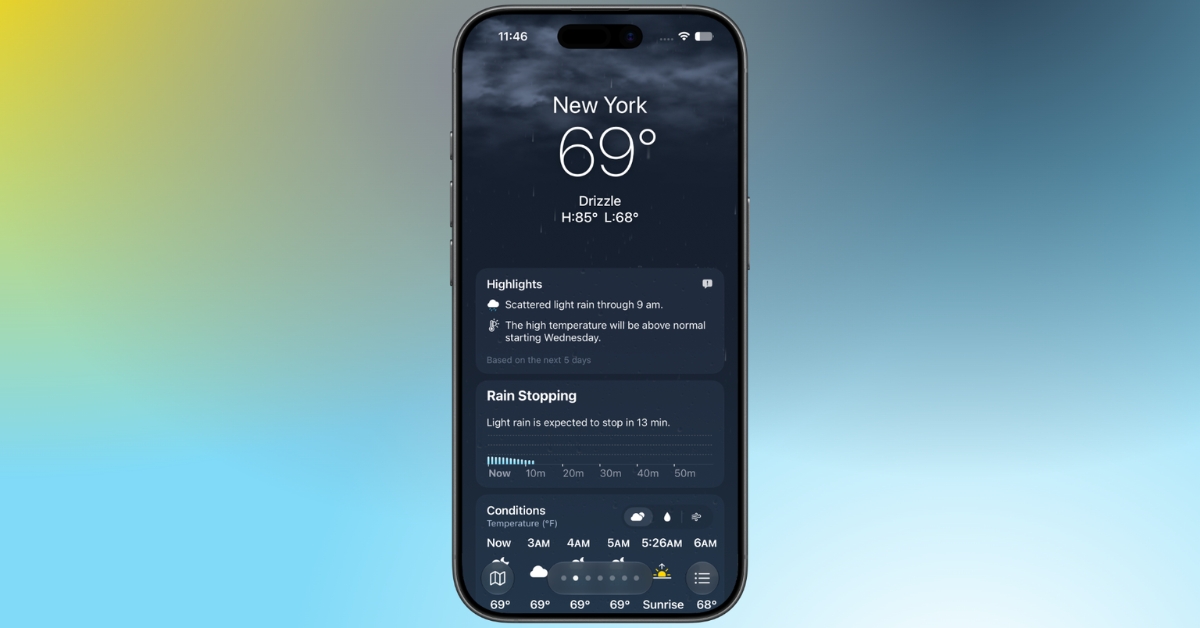
If I had to pick one feature that changes how I use the Weather app every day, it would be the new Highlights section.
Weather forecasts often overwhelm users with information. iOS 27 finally attempts to solve that.
At the top of the Weather app, you’ll now see a dedicated Highlights section displaying the day’s most important weather updates. If heavy rain is expected later, unusually strong winds are approaching, or temperatures are changing dramatically, those alerts appear immediately without requiring you to scroll through multiple forecast cards.
Most people don’t want to analyze graphs every morning. They simply want to know whether they need an umbrella or a jacket before leaving home. Apple finally seems to understand that.
The improvements aren’t limited to hourly forecasts. Apple has also redesigned the 10-day forecast so it adapts dynamically based on the weather category you’ve selected.
For example, switching to the precipitation view replaces the traditional temperature forecast with a rain-focused outlook for the next 10 days. Likewise, selecting the Wind view transforms the forecast into a wind overview.
It sounds like a small change, but after using it for a while, I found myself opening individual daily forecasts far less often.
If I’m planning a weekend trip or deciding which day is best for outdoor activities, I can now scan the entire week based on the weather conditions that actually matter instead of just comparing temperatures.
Apple is also bringing these improvements to Weather widgets.
Instead of only displaying the current temperature or today’s forecast, the updated widgets can now surface more meaningful information like approaching rain or changing wind conditions.
Since installing the iOS 27, I’ve opened the full Weather app much less often because the widgets already show the information I usually need.
Thankfully, Apple hasn’t hidden these features behind complicated menus. After installing iOS 27, open the Weather app and choose your current location or any saved city.
Scroll down to the Conditions section and tap the waterdrop icon to switch to the precipitation forecast or the wind icon to view wind conditions. The new Highlights section appears near the top of the interface automatically.
No additional setup is required. Once your device is running iOS 27, these new views become available immediately.
After using the updated Weather app for a while, I don’t think Apple needed to reinvent it. The biggest improvements come from making everyday forecasts easier to understand rather than adding more weather data.
The dedicated precipitation and wind views save time, the new Highlights section surfaces the information that actually matters, and the smarter 10-day forecast makes planning ahead considerably easier.
Power users may still prefer third-party weather apps for advanced radar, hyperlocal forecasting, and severe weather analysis. But for most iPhone users, Apple’s built-in Weather app has become much harder to criticize.
It’s one of those updates that didn’t receive much attention during WWDC, yet quickly becomes noticeable once you start using it every day.
Which new Apple Weather feature are you most excited to try in iOS 27? Let us know in the comments below.
You Might Also Like:












