FaceTime Like a Pro
Get our exclusive Ultimate FaceTime Guide 📚 — absolutely FREE when you sign up for our newsletter below.

FaceTime Like a Pro
Get our exclusive Ultimate FaceTime Guide 📚 — absolutely FREE when you sign up for our newsletter below.


Instagram now lets creators add different captions to individual carousel slides. Here's how the Multiple Captions feature works and how to use it in your posts.
 ByVikhyat
Instagram carousels have evolved into much more than simple photo galleries. Creators now use them to share tutorials, travel guides, editing tips, product showcases, and even mini blog posts. The problem is that every slide has traditionally shared the same caption, even when each image or video served a completely different purpose.
Fortunately, Instagram now supports captions for individual carousel slides. You can add different captions to different photos and videos, making carousel posts far more useful for tutorials, travel content, product breakdowns, and other posts that benefit from slide-by-slide context.
Combined with newer features that let creators rearrange their profile grid layouts, Instagram is continuing to give users more control over how their content is presented.
Here’s everything you need to know about Instagram’s new Multiple Captions feature and how to use it.
Instagram’s Multiple Captions feature allows each slide in a carousel post to have its own caption.
As viewers swipe through the carousel, the caption automatically changes to match the content currently displayed on screen. This makes carousel posts easier to follow and significantly improves the experience for tutorials, travel stories, educational content, product showcases, and other multi-step posts.
Instead of relying on a single caption to explain an entire carousel, creators can now provide context exactly where it’s needed.
When carousel posts were primarily used to share collections of related photos, a single caption wasn’t a major limitation.
Today, however, creators use carousels very differently.
Tutorials often contain multiple steps. Travel posts may highlight several locations. Educational content frequently breaks topics into smaller sections. Product reviews can cover different features on each slide.
In all of these scenarios, each slide benefits from its own explanation.
To work around the old limitation, creators often wrote extremely long captions or added large amounts of text directly onto images. Neither solution was ideal when the goal was to keep information organized, readable, and easy to follow.
The new Multiple Captions feature solves that problem by attaching context directly to individual slides.
The Multiple Captions feature is available during the carousel creation process, although it’s easy to miss if you haven’t looked for it before.
Here’s how to use it:
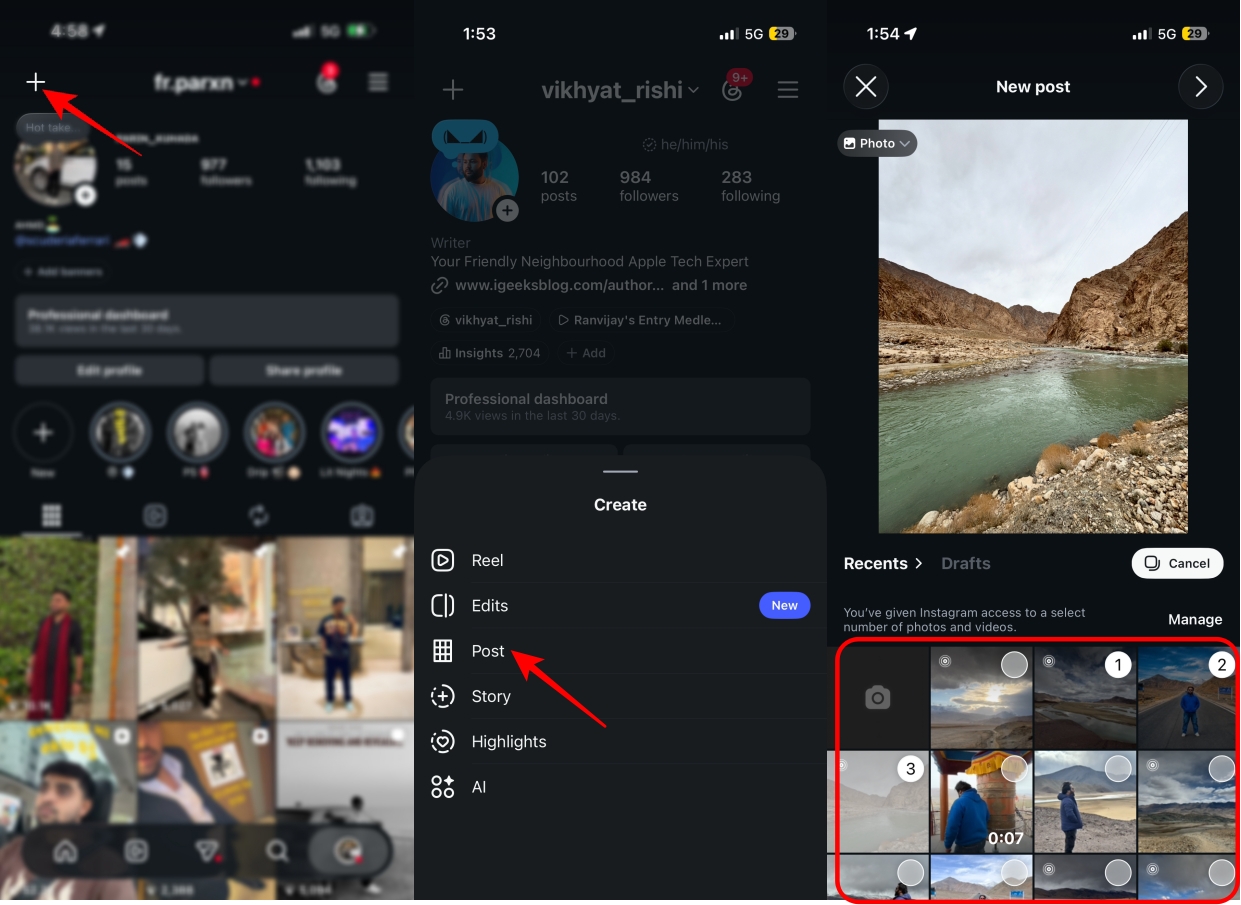
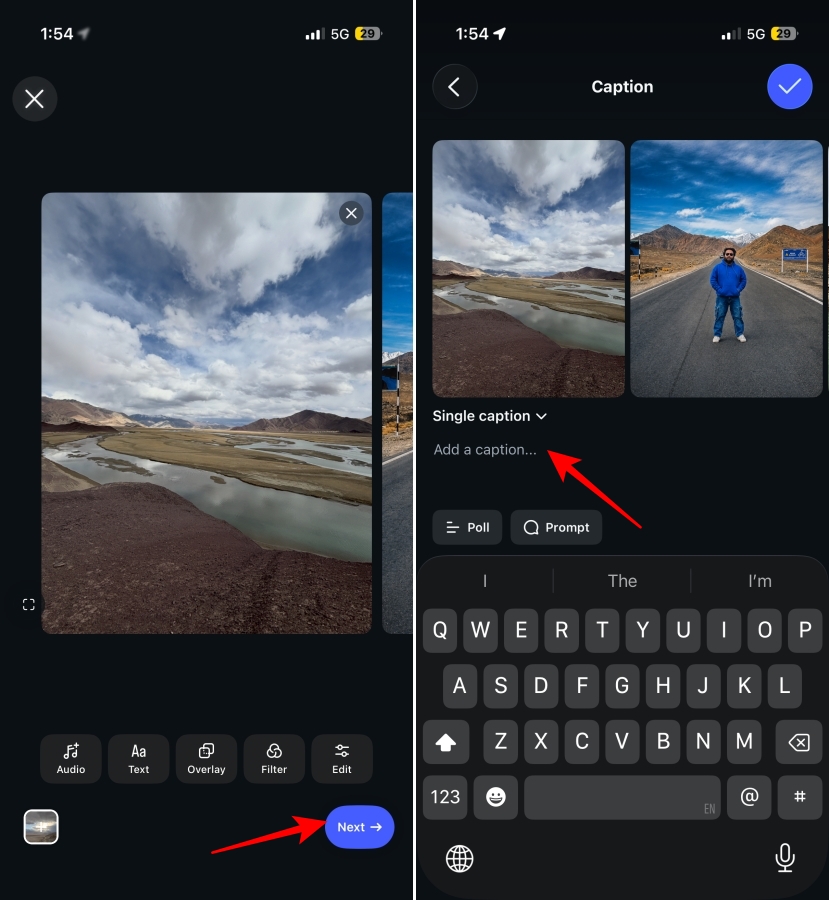
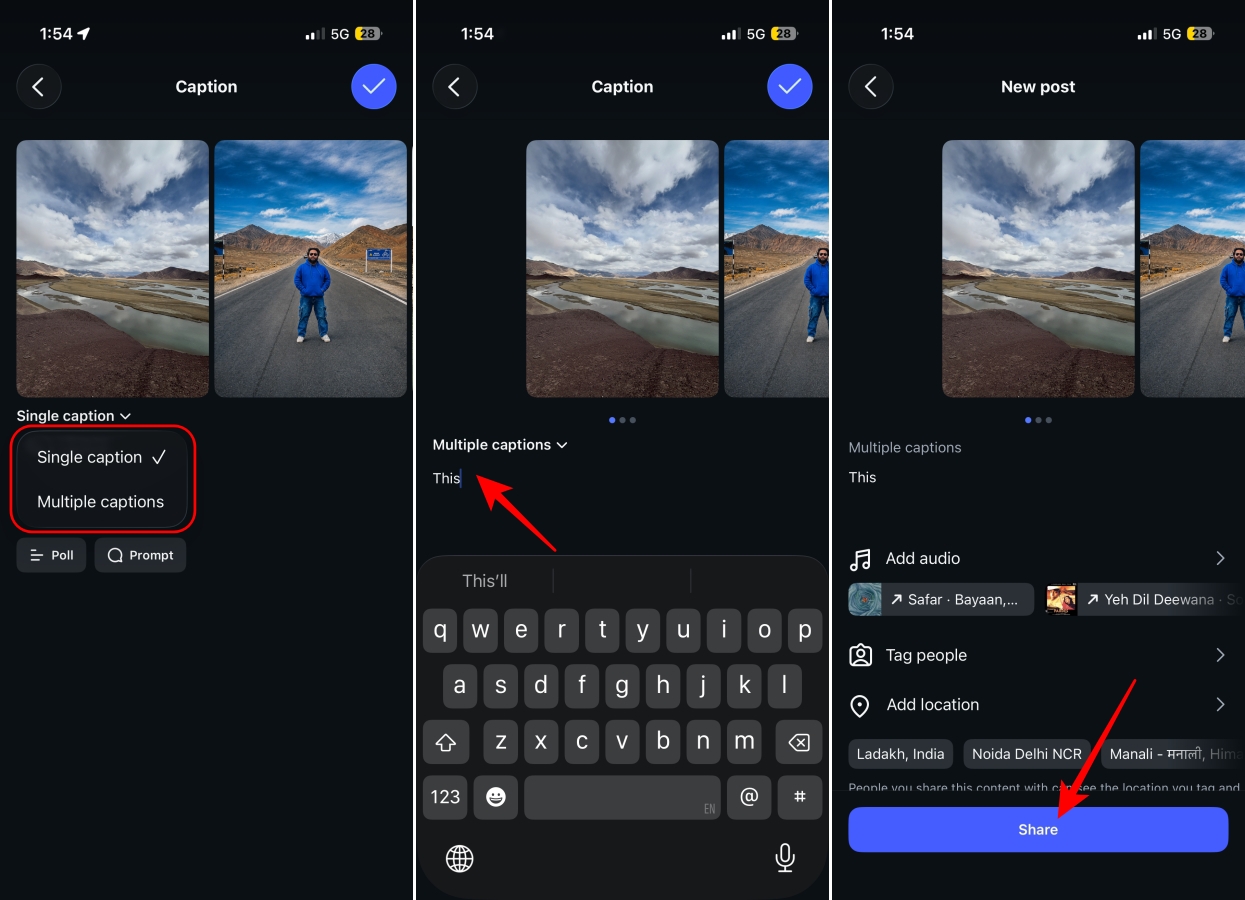
Once published, each slide will display its own caption as viewers move through the post.
When someone views your carousel, they’ll initially see the caption attached to the first slide.
As they swipe to the next image or video, the caption automatically updates to display the caption associated with that specific slide.
No extra taps or interactions are required. The transition happens seamlessly as viewers navigate through the carousel, helping maintain context throughout the entire post.
This makes the overall experience feel more polished and intentional while ensuring viewers always see the most relevant information for the content they’re currently viewing.
Per-slide captions work best when they provide context without overwhelming the viewer.
Here are a few ways to get the most out of the feature:
Instagram has started rolling out Multiple Captions for Carousel Posts globally. If you don’t see the option yet, make sure your Instagram app is updated to the latest version.
Like many Instagram features, the rollout is happening gradually, so it may take several days before it appears on all accounts.
That’s all there is to it. If you already use carousel posts to share detailed information, Multiple Captions gives you another way to organize your content and improve the viewing experience.
The feature also reflects Instagram’s broader push toward giving creators more customization options and greater control over how content is consumed.
The next time you’re creating a tutorial, travel guide, educational post, or product showcase, try using slide-specific captions and see whether they work better than a single caption for your audience.
How would you use multiple captions in your Instagram carousel posts? Let us know in the comments below.
Don’t miss these related reads: