FaceTime Like a Pro
Get our exclusive Ultimate FaceTime Guide 📚 — absolutely FREE when you sign up for our newsletter below.

FaceTime Like a Pro
Get our exclusive Ultimate FaceTime Guide 📚 — absolutely FREE when you sign up for our newsletter below.


iOS 27 finally fixes the iPhone Lock Screen's biggest annoyances. Here are the five new features, from the compact clock to AI wallpapers, and how to use each one.
The Lock Screen got its big redesign back in iOS 16, and since then, Apple has mostly left it alone. iOS 27 changes that. This year’s update brings a smaller movable clock, AI-generated wallpapers, a fix for photos that never fit the screen, and, finally, a way to dismiss that stubborn Now Playing widget.
The Lock Screen clock has always sat large and centered, right where the best part of your wallpaper usually is. iOS 27 adds a compact mode that shrinks the clock and tucks it up next to the date, leaving your wallpaper almost completely uncovered.
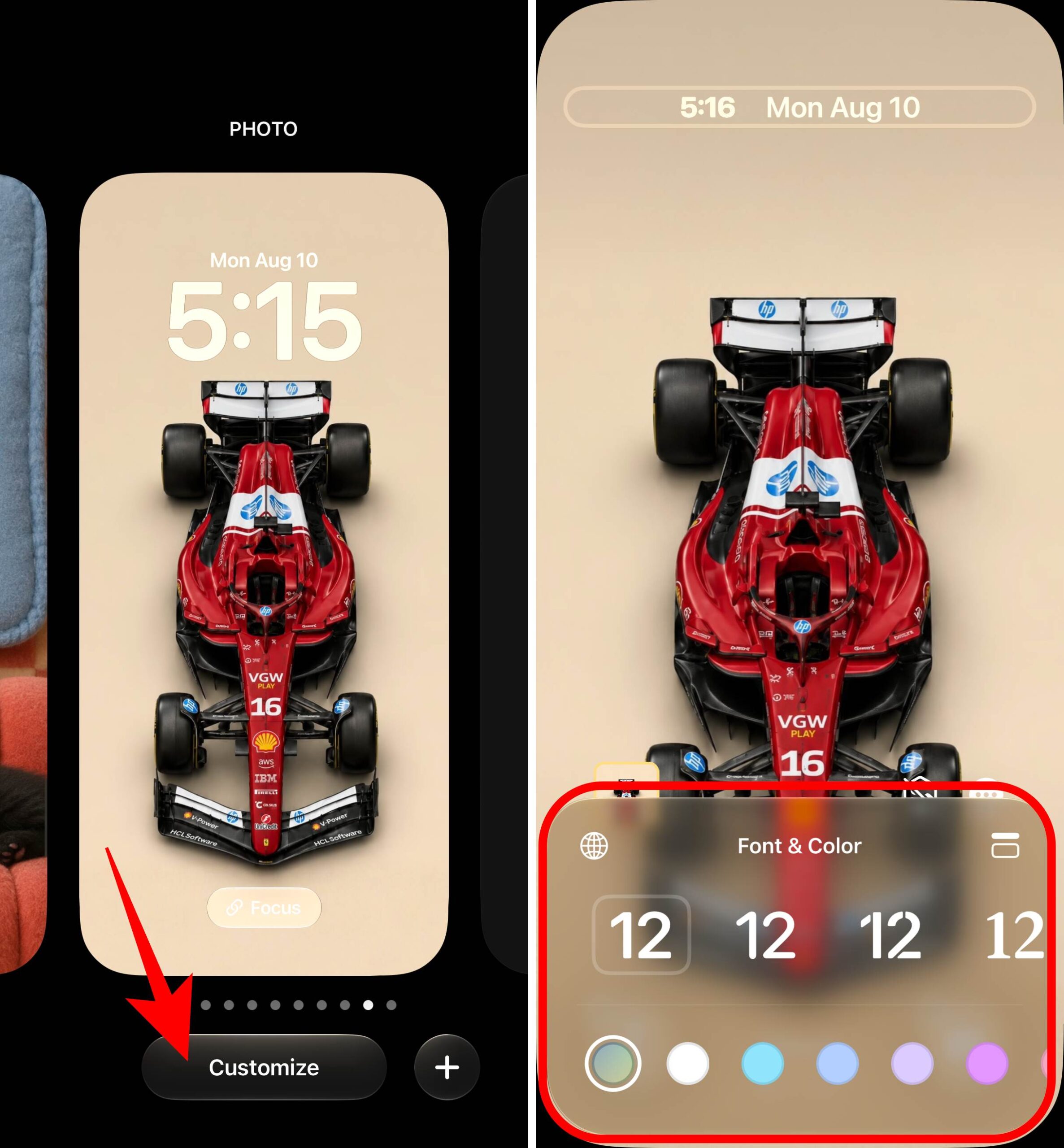
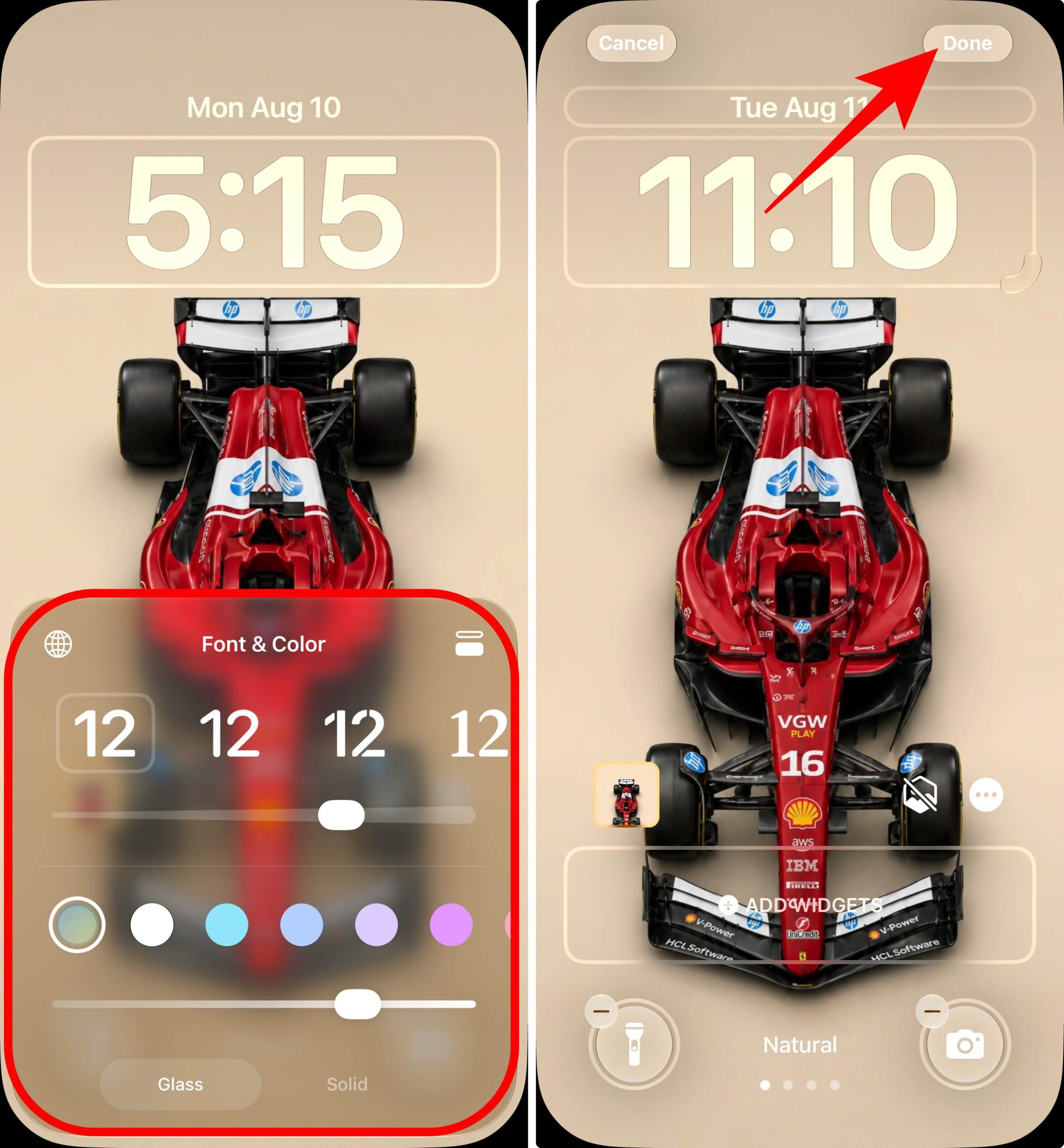
The clock instantly shrinks and moves to the top row. You can still change its font, weight, and color in compact mode, though the Liquid Glass slider for the clock isn’t available while it’s compact. The setting applies per wallpaper, so you can keep a big clock on one Lock Screen and a compact one on another. Tap the same icon again to go back to the full-size clock.
Instead of hunting for the perfect wallpaper, you can now describe one and let your iPhone make it. iOS 27 builds Image Playground directly into the wallpaper picker, so you don’t need to create an image elsewhere and set it manually.
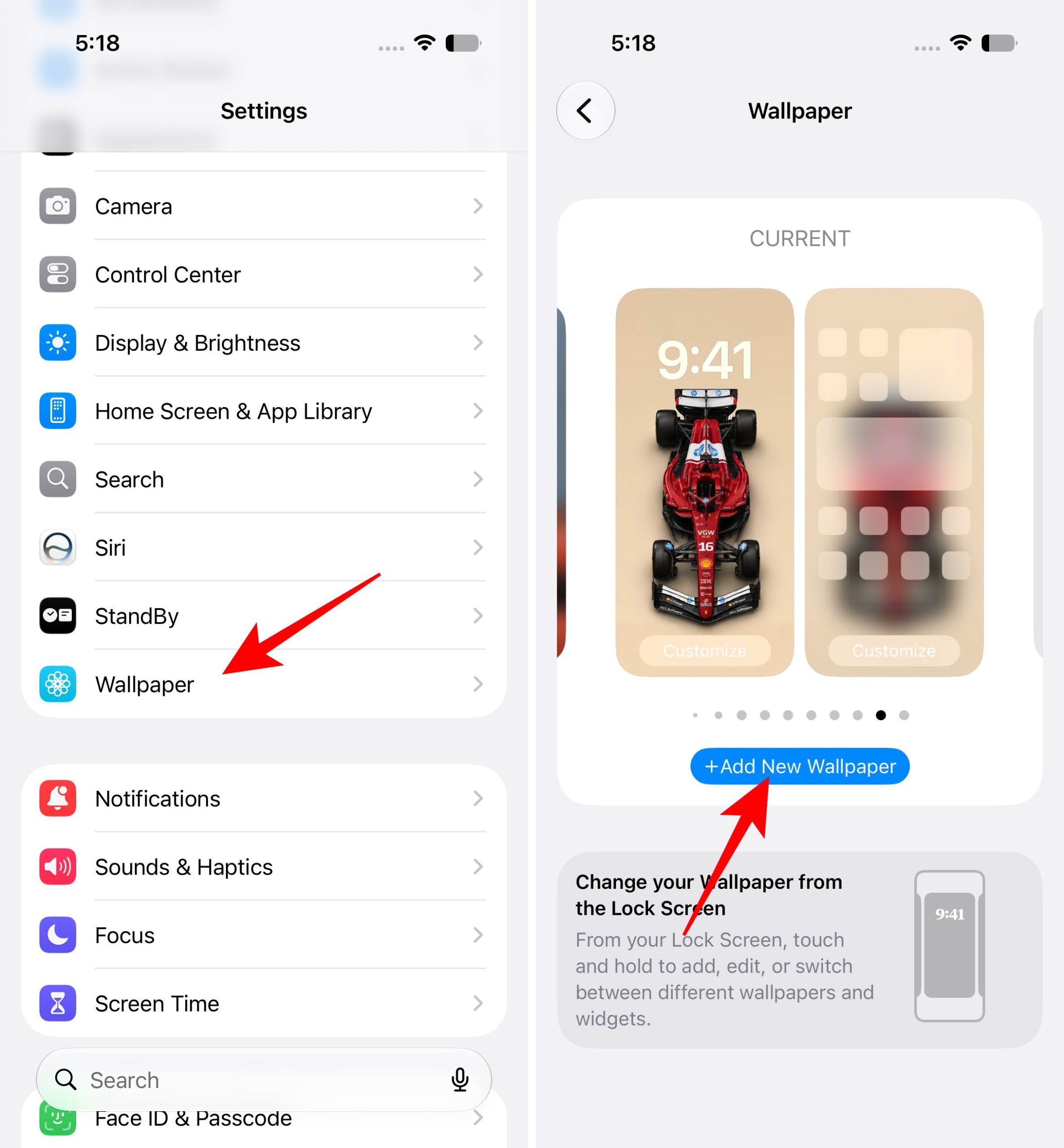
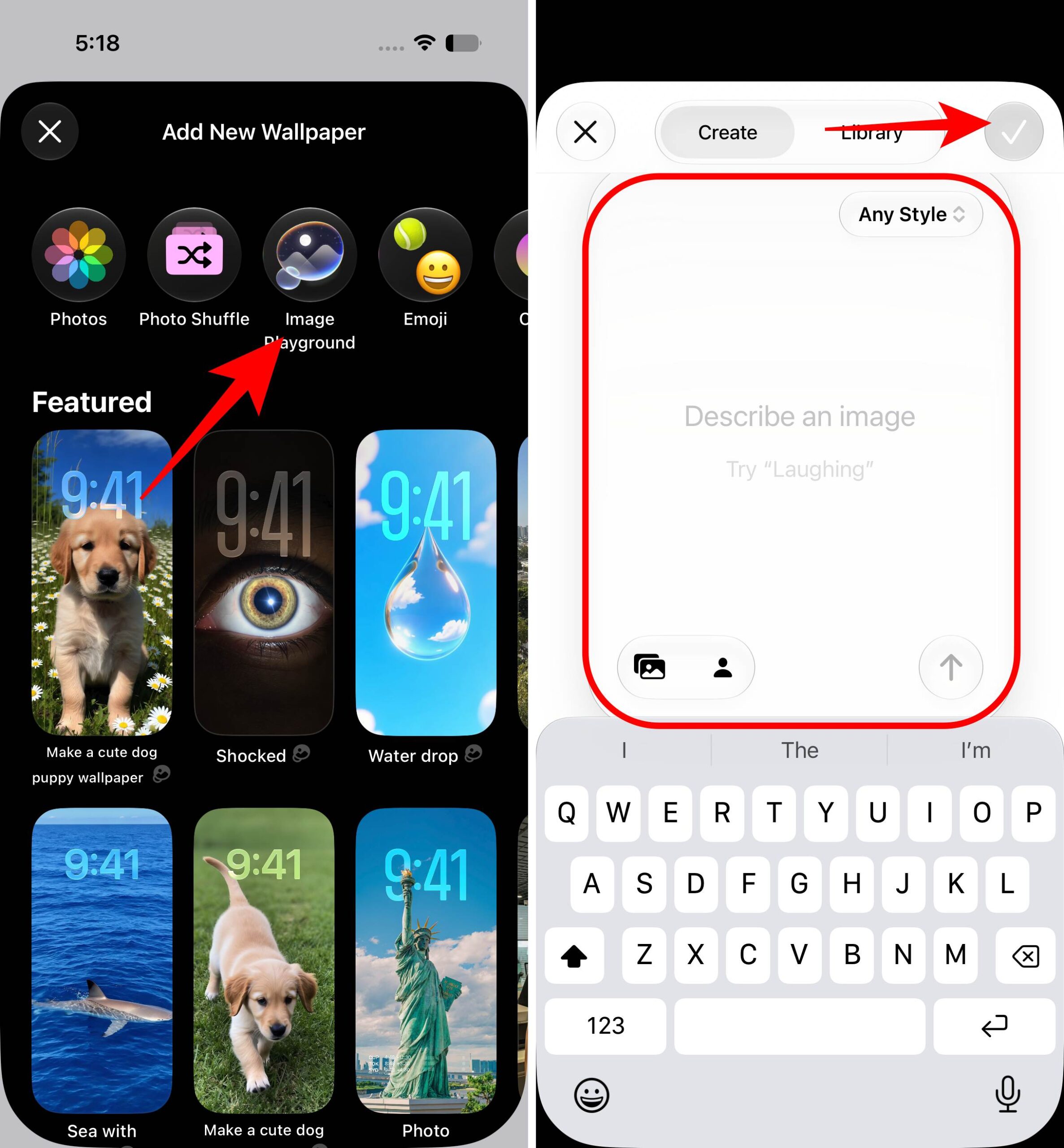
This needs Apple Intelligence, so it works on iPhone 15 Pro and later, including all iPhone 16 and 17 models. The results have the usual Image Playground look, stylized and illustration-like rather than photorealistic, so it’s better for fun, personalized wallpapers than realistic scenery.
Everyone has a favorite photo that falls apart as a wallpaper because it’s cropped too tight or shot in the wrong orientation. The new Extend option uses Apple Intelligence to generate matching detail around the edges of the photo, so it fills the entire screen naturally instead of getting zoomed and cropped.
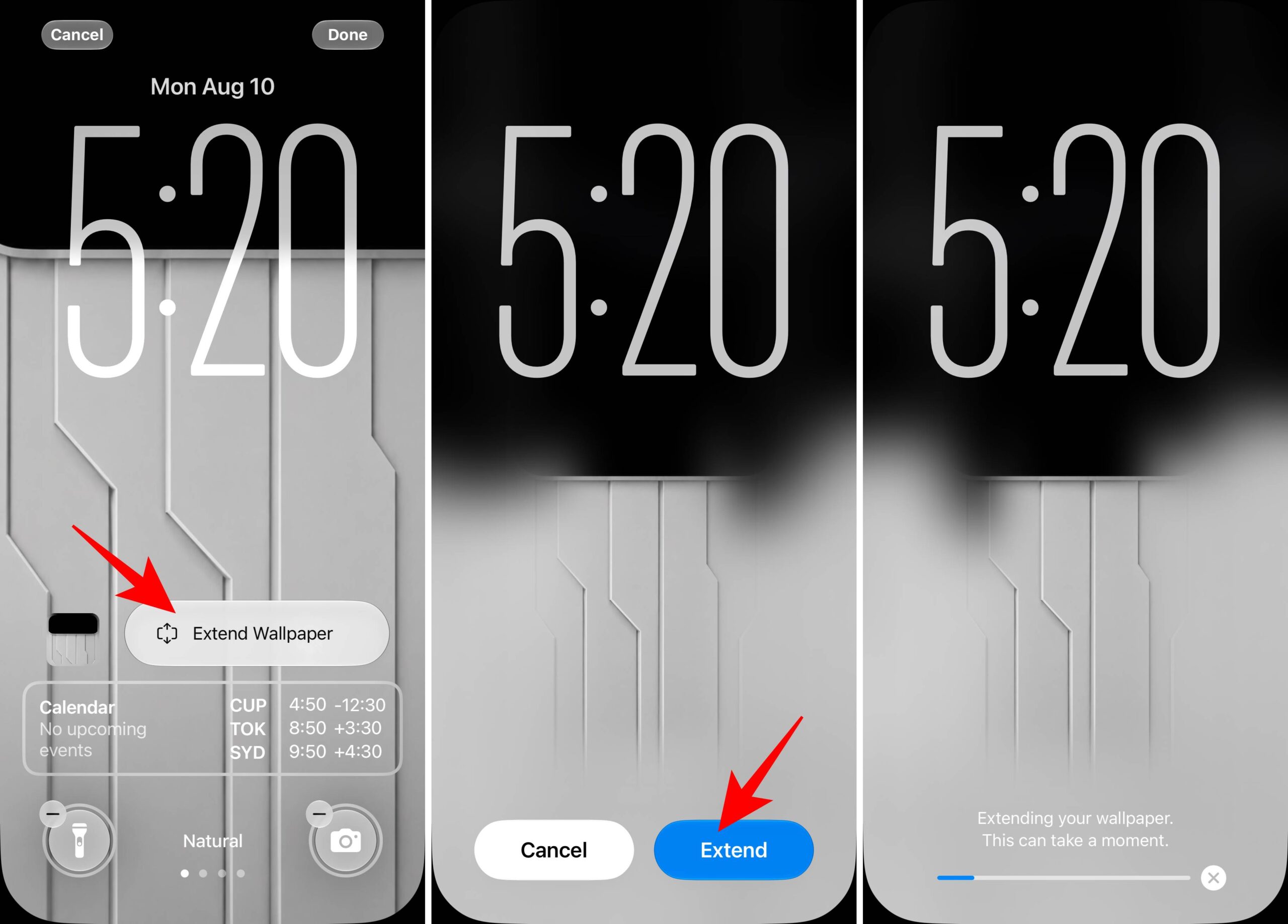
It can also straighten a tilted horizon or add breathing room around a subject that’s too close to the frame. It won’t work on every image, and since the fill is AI-generated, simple backgrounds like skies and landscapes blend better than busy, detailed ones. There’s also a daily limit on how many images you can extend, though Apple hasn’t said the exact number.
Until now, once you played music or a video, the Now Playing widget parked itself on your Lock Screen until you were done. In iOS 27, you can finally clear it: swipe left across the playback controls, and a Clear button slides in. Tap it, and the widget disappears without stopping your audio.
Dismissing it also removes the Now Playing bubble from the Dynamic Island, so your music keeps playing in the background with a completely clean screen. The widget comes back if you pause and resume playback, and it’s per app, so starting media in a different app brings up a fresh widget.
If you found Liquid Glass too see-through in iOS 26, or you actually liked the clear look and wanted more of it, iOS 27 gives you a full slider instead of the old two-position toggle.
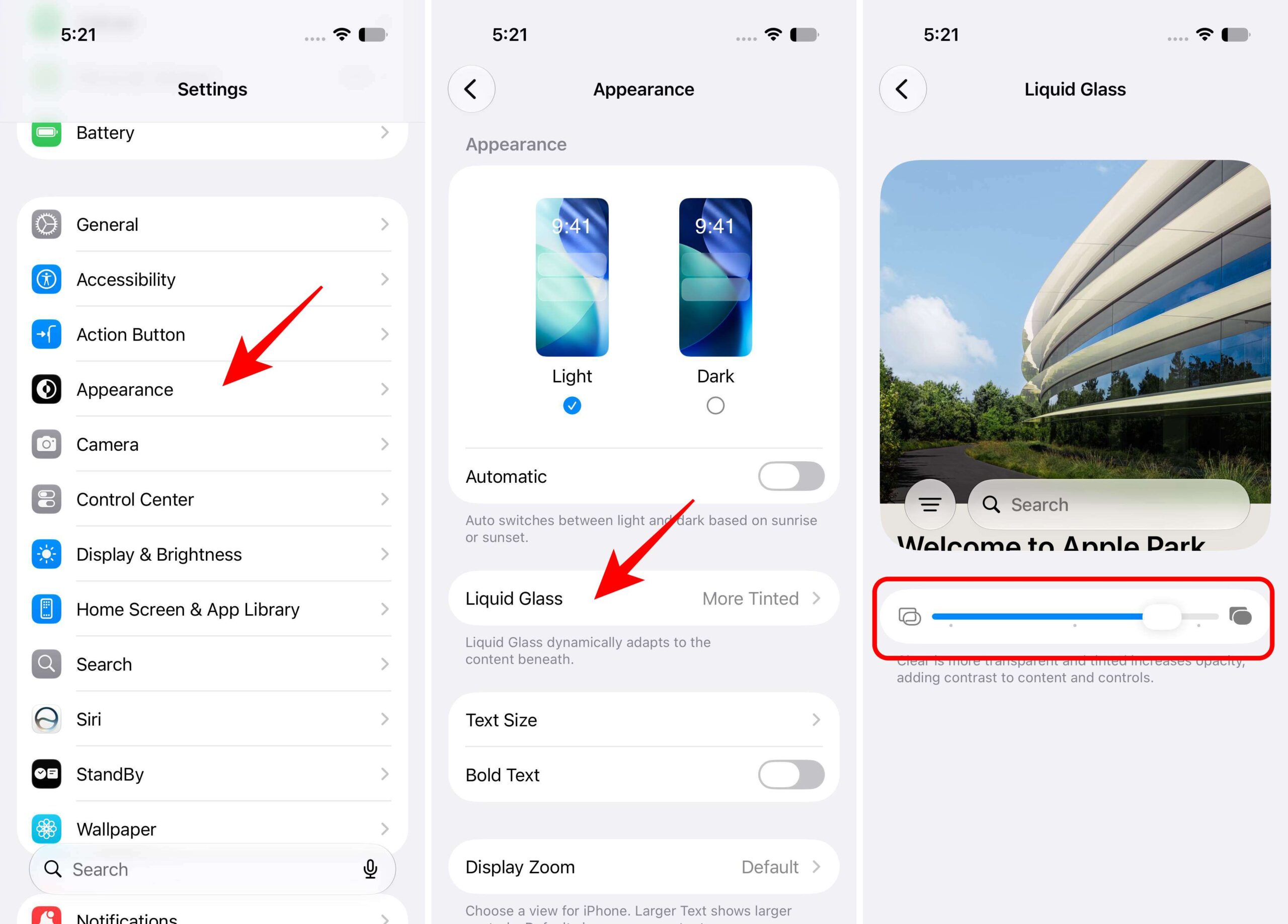
The change applies system-wide, and on the Lock Screen, it affects the clock, widgets, and notifications, so text stays readable even on busy wallpapers if you push the slider toward tinted. Appearance is a new Settings section in iOS 27 that also holds Light/Dark mode and text size. If the slider still isn’t enough, Reduce Transparency under Settings → Accessibility → Display & Text Size removes nearly all translucency.
None of these are headline features on their own, but together they fix most of the long-standing Lock Screen complaints: the clock covering wallpapers, photos that don’t fit, and the Now Playing widget that wouldn’t leave. If you’re on the iOS 27, the compact clock and Extend are the two worth trying first. Everyone else gets them in September; until then, there’s still plenty you can customize on your Lock Screen in iOS 26.
iOS 27 may not completely reinvent the Lock Screen, but these small changes make it noticeably more useful and personal. The compact clock gives your wallpaper more room to shine, Image Playground lets you create custom backgrounds, and Extend finally fixes those photos that never quite fit the screen.
I also appreciate the ability to dismiss the Now Playing widget without stopping playback, while the new Liquid Glass controls give you more freedom to fine-tune how the interface looks.
If you’re already running the iOS 27, I’d recommend trying the compact clock and Extend feature first.
More to explore: