FaceTime Like a Pro
Get our exclusive Ultimate FaceTime Guide 📚 — absolutely FREE when you sign up for our newsletter below.

FaceTime Like a Pro
Get our exclusive Ultimate FaceTime Guide 📚 — absolutely FREE when you sign up for our newsletter below.


Adaptive Power makes small, smart tweaks on iPhone 15 Pro and newer, while Low Power Mode cuts features aggressively. Here is how each works and when to use them.

 ByVikhyat and Ravi Teja KNTS
An iPhone excels in almost everything it offers, except when it comes to battery capacity compared to its competition. For years, Low Power Mode has been the go-to feature for users wanting to squeeze extra hours out of their iPhones. Since iOS 26, Apple has offered a feature called Adaptive Power alongside the long-standing Low Power Mode.
While both aim to extend your iPhone’s battery life, they work in very different ways: Adaptive Power is limited to iPhone 15 Pro and newer, while Low Power Mode works on almost every iPhone. So, if you’re wondering which one to use, Adaptive Power or Low Power Mode, you’re in the right place. This guide explains how each works, their differences, and the best situations to use them.
Low Power Mode has been around since iOS 9 and is available on all modern iPhones. Once enabled, it immediately reduces system activity and pauses power-hungry background tasks to extend battery life.
The mode reduces overall iPhone power usage by:
You can enable or disable Low Power Mode manually at any time. If Adaptive Power is on, Low Power Mode turns on by itself when your battery dips below 20%. Without Adaptive Power, iOS prompts you to turn it on at that level. Once your iPhone charges to 80% or higher, it turns off automatically.
When active, the battery icon turns yellow in the status bar instead of white.
Although you can use Low Power Mode even when your iPhone is fully charged, Apple designed it as an emergency power-saving feature, making it best when your iPhone is running low and you can’t plug it in right away.
Adaptive Power debuted in iOS 26 as Apple’s smart battery optimization tool, and it’s still part of iOS 27. Unlike Low Power Mode, which aggressively reduces power usage until turned off, Adaptive Power runs quietly in the background. It uses on-device analysis of your recent usage to predict when you’ll need extra battery life.
Think of it as a smart efficiency assistant, fine-tuning your iPhone’s power usage in real time without making the phone feel sluggish.
Example: If you’re editing a batch of RAW photos, Adaptive Power may dim the display slightly, limit background activity, or adjust performance to save energy, all while remaining almost unnoticeable. It leaves performance alone while you use the camera or play games with Game Mode on.
Adaptive Power is available on iPhone 15 Pro and newer models, including the latest iPhone 18 Pro, iPhone 18 Pro Max, and iPhone Duo.
Here’s a quick comparison:
| Feature | Adaptive Power (iOS 26 and later) | Low Power Mode (iOS 9+) |
|---|---|---|
| Trigger | Automatic, based on your recent usage (can be toggled) | Manual toggle or prompt at 20% battery |
| Performance Impact | Minimal, subtle adjustments | Noticeable slowdown in apps and animations |
| Battery Savings | Moderate, balances smooth usage with efficiency | Maximum, aggressively cuts features |
| Feature Availability | iPhone 15 Pro and newer | Available on almost every iPhone |
| Best Scenario | Everyday heavy use such as editing, gaming, or video | Emergency use when battery is critically low |
The answer depends on your iPhone model:
On iPhone 15 and later, Low Power Mode sits on the Power Mode screen, and on models that support Adaptive Power, both switches live there together.
Low Power Mode:
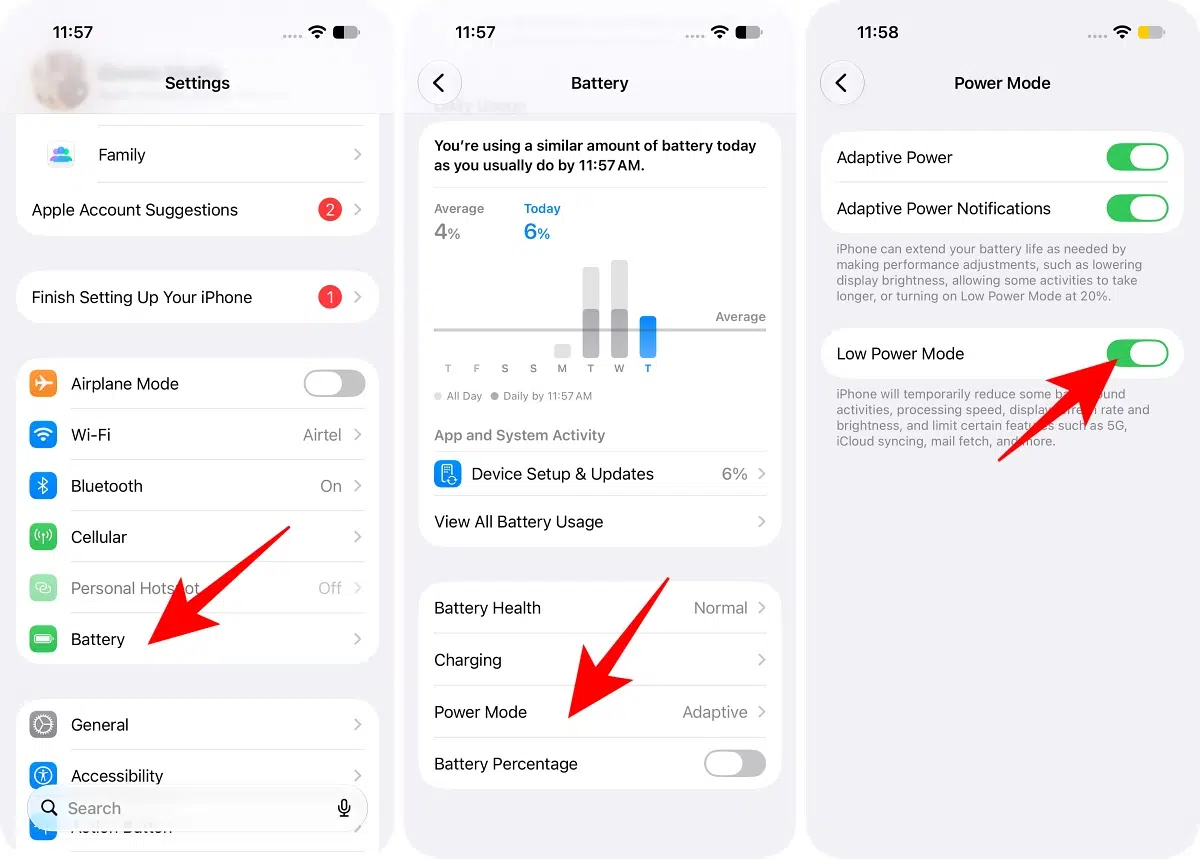
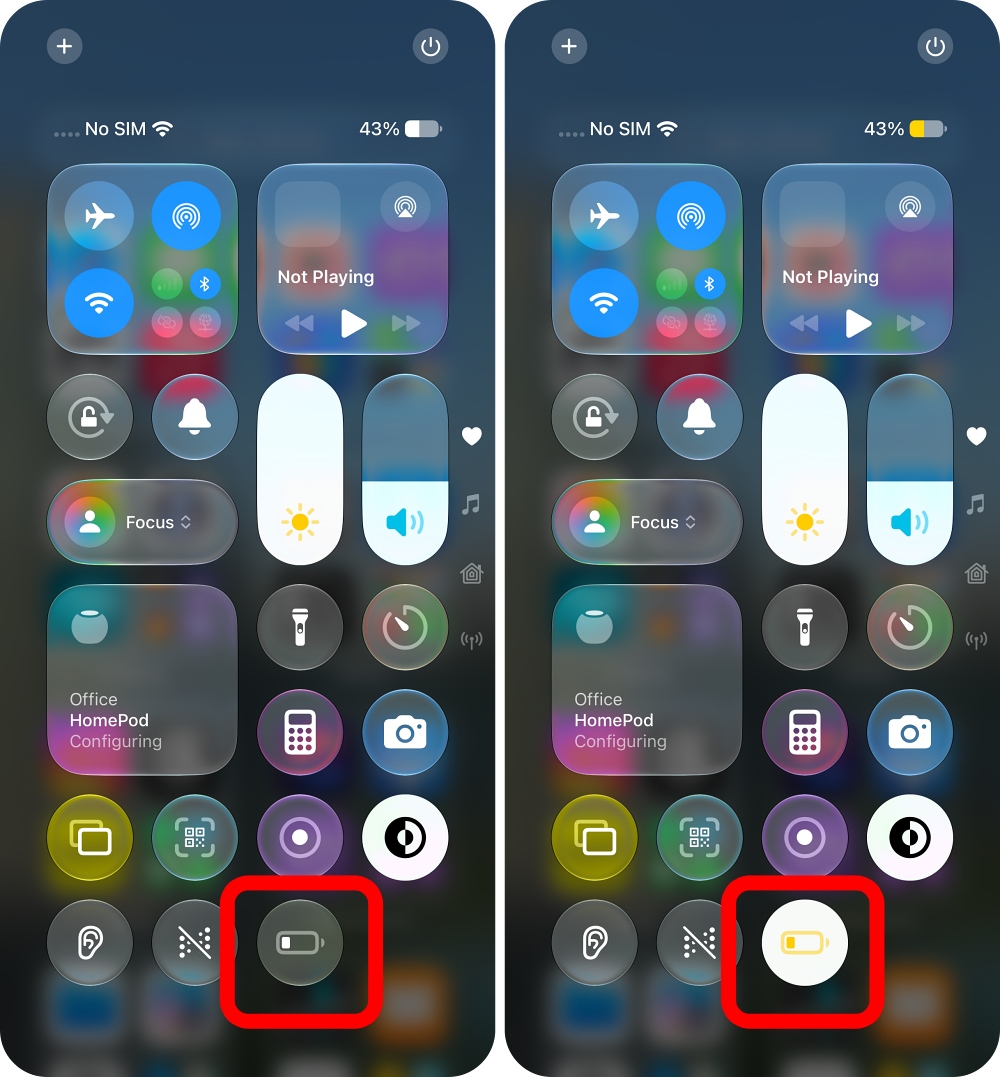
You can also ask Siri to enable it.
Adaptive Power:
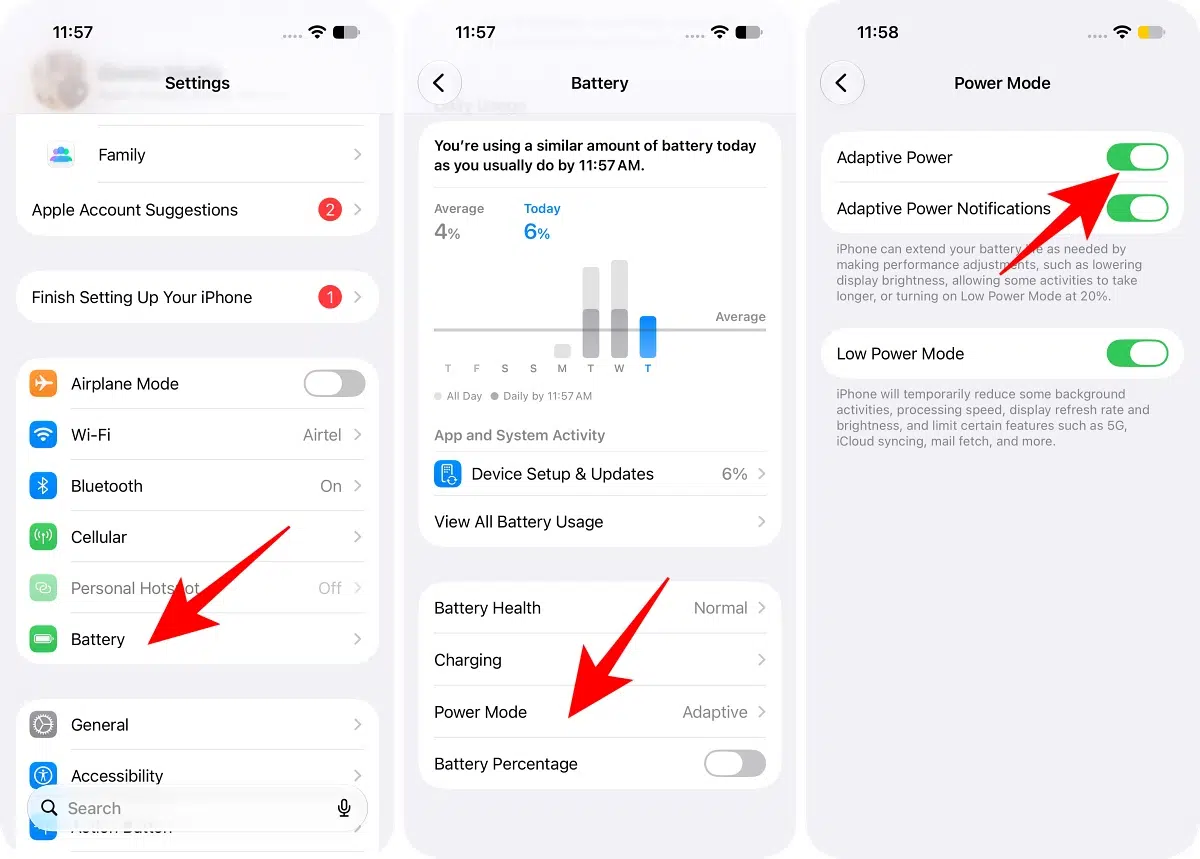
Adaptive Power is on by default on iPhone Duo, iPhone 18 Pro, iPhone 18 Pro Max, iPhone 17, iPhone 17e, iPhone 17 Pro, iPhone 17 Pro Max, and iPhone Air. It starts off on iPhone 16 models, iPhone 16e, and iPhone 15 Pro models, so you need to switch it on yourself. It also needs at least 7 days to learn your charging habits before it kicks in. Adaptive Power Notifications is a separate toggle on the same screen, and turning it off doesn’t stop Adaptive Power from saving battery.
Besides relying on these two features, here are everyday habits that can boost battery life:
Both Adaptive Power Mode and Low Power Mode are valuable, but they serve different purposes.
The best strategy is to use both. Let Adaptive Power handle daily efficiency, and switch to Low Power Mode when your iPhone’s battery gets critically low.
Which one do you prefer, the subtle efficiency of Adaptive Power or the aggressive savings of Low Power Mode? Share your thoughts in the comments.