FaceTime Like a Pro
Get our exclusive Ultimate FaceTime Guide 📚 — absolutely FREE when you sign up for our newsletter below.

FaceTime Like a Pro
Get our exclusive Ultimate FaceTime Guide 📚 — absolutely FREE when you sign up for our newsletter below.


Optimized Battery Charging helps reduce iPhone battery wear by adjusting when charging finishes. Here's how it works, how to enable it, and how it differs from Charge Limit.
No matter how advanced your iPhone’s processor or camera may be, all those cutting-edge features are only as good as your battery. You’re not alone if you’ve ever reached for a charger sooner than you’d like. Every lithium-ion battery gradually loses capacity, which means less time between charges as the months go by. The good news? Apple has your back with Optimized Battery Charging. This clever iOS feature is built to help slow down battery aging so you can enjoy your iPhone for longer without worrying about constant battery replacements.
In this guide, I’ll explain everything you need to know about Optimized Battery Charging: what it is, how it works, the pros and cons, and how you can set it up to fit your daily routine. Whether you’re a longtime iPhone user or just curious about getting the most out of your device, you’ll find practical tips to help your battery stay healthier and last longer.
Think of Optimized Battery Charging as your iPhone’s way of looking out for you and itself. This innovative feature is designed to help your battery last longer by cutting down on your phone’s time sitting at a full 100% charge. Once you turn it on, your iPhone learns your charging habits and determines the best time to finish charging so your battery isn’t under unnecessary stress. After all, letting a lithium-ion battery linger at 100% for too long can speed up its aging process, but with this feature, your device does the heavy lifting to help keep your battery healthy for the long haul.
Note: While this feature is currently designed for iPhones, similar battery optimization features are available on some Android devices and laptops. And if you use an Apple Watch, you can learn how to manage its optimized charging settings in our dedicated Apple Watch guide.
Figuring out the difference between traditional charging and Optimized Battery Charging can help you make the smartest choice for your daily routine and your iPhone’s long-term health.
| Aspect | Standard charging | Optimized Battery Charging |
|---|---|---|
| Charging process | Charges rapidly to 100% and maintains full charge | Charges quickly to 80%, then pauses and completes based on your routine |
| Convenience | Always provides a full charge as soon as possible | May delay the final 20% to align with your usage patterns |
| User experience | Predictable; device always reaches 100% when plugged in | Works best with regular routines; may not be fully charged if your schedule changes unexpectedly |
| Battery health | Can accelerate battery aging due to prolonged time at 100% | Designed to minimize battery wear and extend overall lifespan |
If you’re the type who always needs your phone to hit 100% as fast as possible, no matter what time it is, standard charging is probably your best bet. It’s quick and predictable, but keep in mind that always rushing to full charge can wear out your battery faster over time. On the other hand, Optimized Battery Charging takes a more thoughtful approach. It might hold off on that last bit of charging sometimes, but it’s doing so to help your battery last longer, so you can keep your phone running strong day after day.
Here’s how the feature operates:
Example: If you typically plug in your iPhone at 10 PM and unplug it at 7 AM, the device will charge to 80% quickly, then wait. Around 6:30 AM, it will resume charging so you have a full battery when you wake up.
Charge Limit is available on iPhone 15 and later. That covers the iPhone 15, 16, and 17 series, iPhone Air, iPhone 16e and 17e, and the iPhone 18 Pro and 18 Pro Max. Pick any limit from 80% to 100%, in 5% steps, and your iPhone will generally stop charging at that number. For instance, if you choose 85%, your phone will stay around that level instead of topping up to 100%.
Apple added this option to give you more control over your battery’s health and long-term performance. It’s a good way to slow battery aging even further. Remember, though, that a lower limit means your iPhone might not last quite as long between charges as it would at 100%. Even with a limit set, your iPhone will occasionally charge to 100% to keep its battery readings accurate. It’s all about finding the best balance for your daily routine!
When you let Optimized Battery Charging do its thing, your iPhone spends less time sitting at 100%, and that’s a big win for your iPhone battery’s health. This simple tweak helps slow down the chemical aging process, so you’re less likely to need a battery replacement anytime soon and can enjoy smoother performance from your device for longer.
The numbers can vary, but studies and real-world user experiences show that constantly keeping your battery at 100% can speed up capacity loss, sometimes by as much as 20% over two years! Optimized Battery Charging gives your phone a better shot at holding onto its original capacity so that you can get more life out of every charge.
A healthy battery helps your iPhone maintain peak performance. When battery health declines, iOS may activate performance management features (sometimes called “throttling”) to prevent unexpected shutdowns. Optimized Battery Charging can help your device avoid slowdowns and deliver a more consistent user experience by maintaining battery health.
Users who consistently use this feature often report higher battery health percentages (as seen in Settings > Battery > Battery Health) even after a year or more, compared to those who disable the feature.
Optimized Battery Charging works seamlessly with fast charging technologies. Your iPhone will still fast-charge up to 80%, then pause as needed to protect battery health. This means you get the convenience of rapid charging without sacrificing long-term performance.
The effectiveness of Optimized Battery Charging may be even greater on newer iPhones (iPhone 15 and later) thanks to more advanced battery chemistry and the added option to set custom charging limits. However, even older iPhones benefit from reduced wear and more stable performance over time.
Maintaining higher battery health can directly impact your iPhone’s resale or trade-in value. Devices with a battery health above 85% are more desirable and may fetch higher prices on the secondhand market.
Lithium-ion batteries degrade faster when kept at full charge, especially in warm conditions. Reducing time at 100% helps preserve your battery’s ability to hold a charge.
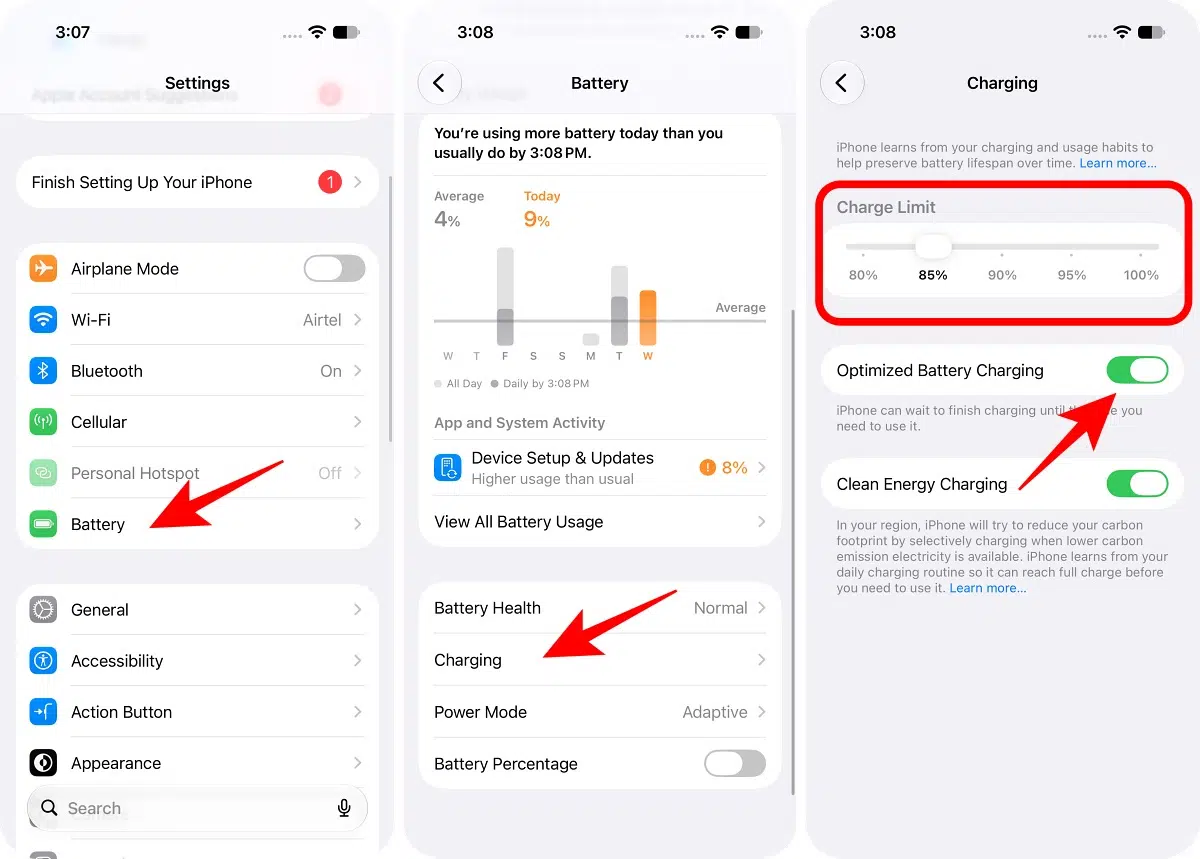
This covers iPhone 11 through iPhone 14, including both iPhone SE models. Charge Limit starts at iPhone 15, so these models only get the on/off switch.
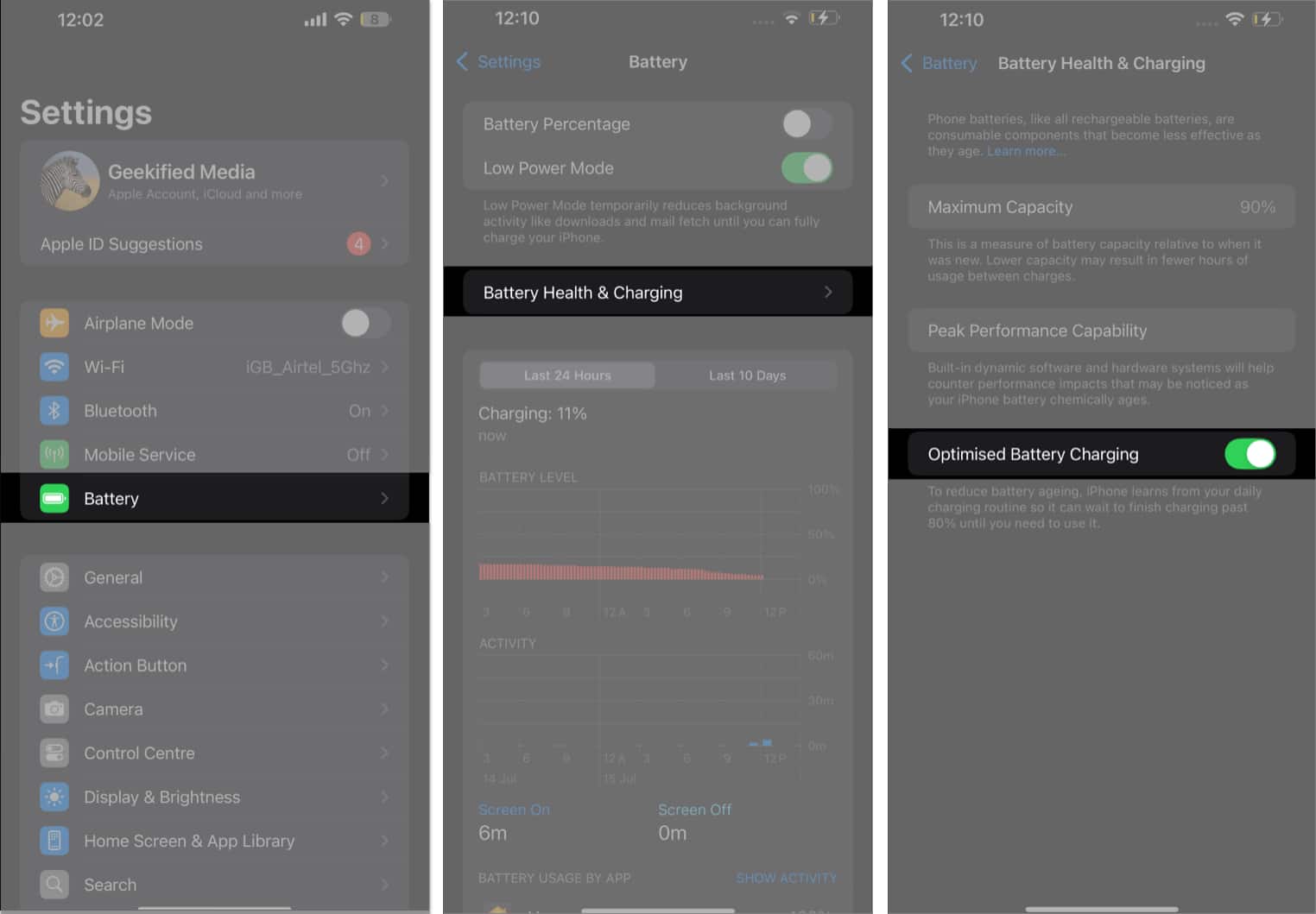
If you need a full charge sooner than usual, touch and hold the charging notification on your Lock Screen and tap “Charge Now.” That finishes charging sooner instead of waiting for your usual unplug time.
Optimized Battery Charging is on by default when you set up your iPhone.
In most cases, leaving Optimized Battery Charging enabled is best. However, you might want to disable it if:
Tip: If you’re leaving for the airport at 4 AM instead of your usual 7 AM, consider turning off Optimized Battery Charging the night before to ensure a full charge.
Example: Avoid charging your iPhone in direct sunlight or leaving it plugged in inside a hot car.
Optimized Battery Charging is a powerful tool for extending your iPhone’s battery lifespan and maintaining long-term performance. By learning your routine and managing the charging process, it helps you get the most out of your device with minimal effort. For most users, leaving the feature enabled is the best way to keep your iPhone running smoothly for years to come. If your needs change, Apple makes it easy to customize or disable the feature as needed.
FAQs
No. Your iPhone charges at normal speed up to 80%. The last 20% is intentionally delayed to protect battery health, but you can override this if needed.
Yes. Fast charging is supported up to 80%. The optimization only affects the timing of the final portion of the charge.
Absolutely. For most users, keeping the feature enabled is the best way to preserve battery health. If your needs change, you can always disable it.
The feature works best with consistent charging habits. If your schedule varies, you may not see the full benefits, but it won’t harm your device.
Read more: