FaceTime Like a Pro
Get our exclusive Ultimate FaceTime Guide 📚 — absolutely FREE when you sign up for our newsletter below.

FaceTime Like a Pro
Get our exclusive Ultimate FaceTime Guide 📚 — absolutely FREE when you sign up for our newsletter below.


The Pixel 11 Pro’s HiLight is subtle, smart, and surprisingly useful, but Google may be holding back the feature that could make it truly special.
For months, the Pixel 11 rumors had me genuinely excited about “Pixel Glow”. The leaks suggested the Pixel phone could use its camera bar as a smart, glowing notification system, and I was imagining all sorts of clever ways those LEDs could quietly communicate with me.
Then Google launched HiLight, and it’s not quite what the rumors made me expect. Selected Pixel 11 phones feature LEDs around the camera flash, primarily for important calls and Gemini interactions. What makes HiLight so interesting is that Google may have created a genuinely useful Pixel feature, but it could also be holding back its best version.
Here’s what HiLight LED is in Pixel 11, how it works, all the features it currently offers, and my biggest concern with it.
HiLight is Google’s new LED-based notification system for the Pixel 11 Pro, Pixel 11 Pro XL, and Pixel 11 Pro Fold.
Instead of putting a traditional notification LED somewhere on the front of the phone, Google has integrated an array of ambient LEDs into the rear camera area. On the Pro and Pro XL, the lights sit alongside the camera bar; on the Pro Fold, the placement is adapted to its different camera design.
The concept is refreshingly straightforward. Whenever I put the phone face down, I can get a subtle visual signal from the back rather than constantly checking the display. A favorite contact calls? HiLight can glow. Is Gemini interacting with you? HiLight can provide a visual cue.
There is something almost nostalgic about it, too. Older Android phones used tiny notification LEDs to tell you that something was waiting. HiLight feels like that idea brought into 2026. And I love that.
At launch, Google kept the feature focused on Gemini and calls from favorite contacts. That also makes the current version of HiLight pretty easy to understand.
While testing the feature, I found the controls for customizing it. To enable the Pixel 11 Pro’s HiLight LED feature:
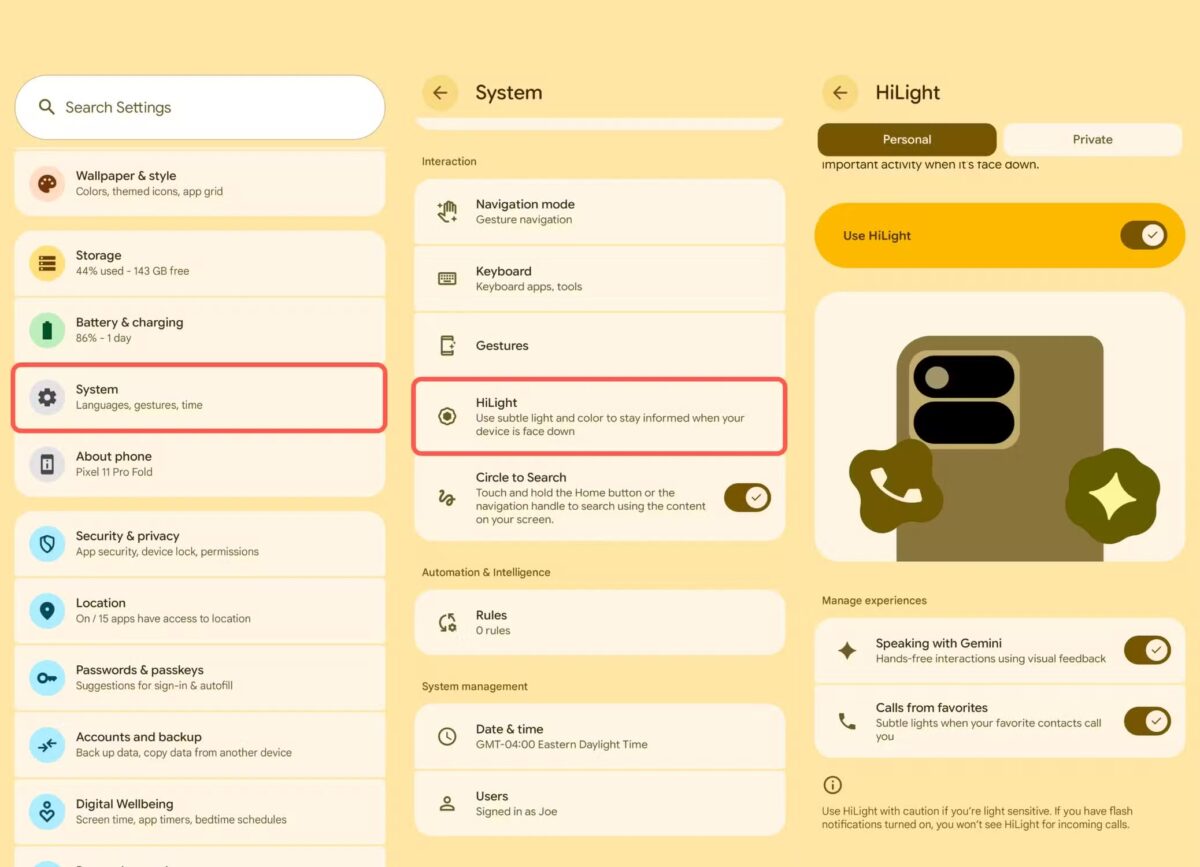
I am excited for the favorite-call feature. When a favorite contact calls via Phone by Google or WhatsApp, the LEDs on the back can give you a visual indication without requiring you to wake the display immediately. It’s a simple idea, but I can see myself appreciating it when the phone is sitting face down on a desk.
You can also give different favorite contacts their own HiLight color. For that,
In addition, Google integrated Gemini into the HiLight to display different light patterns that indicate it heard you, is processing your request, or is about to respond. It’s useful when you talk to Gemini hands-free with your phone faced down. To stop the light pulsing, simply press the power button.
And that’s pretty much the entire HiLight experience at launch. There are no Gmail alerts, Slack notifications, custom patterns, or app-by-app controls. HiLight isn’t trying to be a complete notification system yet. It’s more like a small ambient indicator that keeps you from turning the phone over just to find out whether something important happened.
And honestly, I like the restraint. I don’t want my phone glowing like a gaming PC every time a notification arrives. A subtle light that tells me who’s calling or what my phone is doing with Gemini could be genuinely useful. The idea is compelling even if the current implementation doesn’t fully deliver on it.
Here’s the frustrating part: the hardware looks much more capable than the software currently allows.
Right now, the official HiLight functionality is surprisingly limited, far from the fully customizable notification system I imagined. There aren’t even basic color options to choose from. But Google has indicated at the Made by Google launch event that additional functionality, including message notifications from your favorite contacts, is coming.
That’s a strange position for Google to put itself in. Because the moment you see a programmable, multi-color LED on the back of a $1,000-plus smartphone, your imagination immediately starts filling in the blanks.
WhatsApp could have one color, Slack could have another, a calendar reminder could produce a subtle pulse, a delivery notification could flash briefly, and if you’re gaming, maybe the LED could communicate something entirely different.
I’m not saying Google needs to ship all of those features, but it should let Android developers build them. That’s the part I can’t get past.
This is where HiLight goes from “underused” to genuinely frustrating. At launch, Google explicitly said it wasn’t opening HiLight to third-party developers.
I understand why Google might want some control. LED notifications can become obnoxious. Poorly designed apps could drain the battery and create visual clutter. Google also has legitimate reasons to think about privacy, accessibility, notification overload, and consistency.
But Android has always been at its best when developers are allowed to build on top of the platform. Locking a piece of physical hardware away from developers seems like the opposite of what made Android and Pixel interesting in the first place.
The most convincing argument for HiLight’s potential isn’t a concept video.
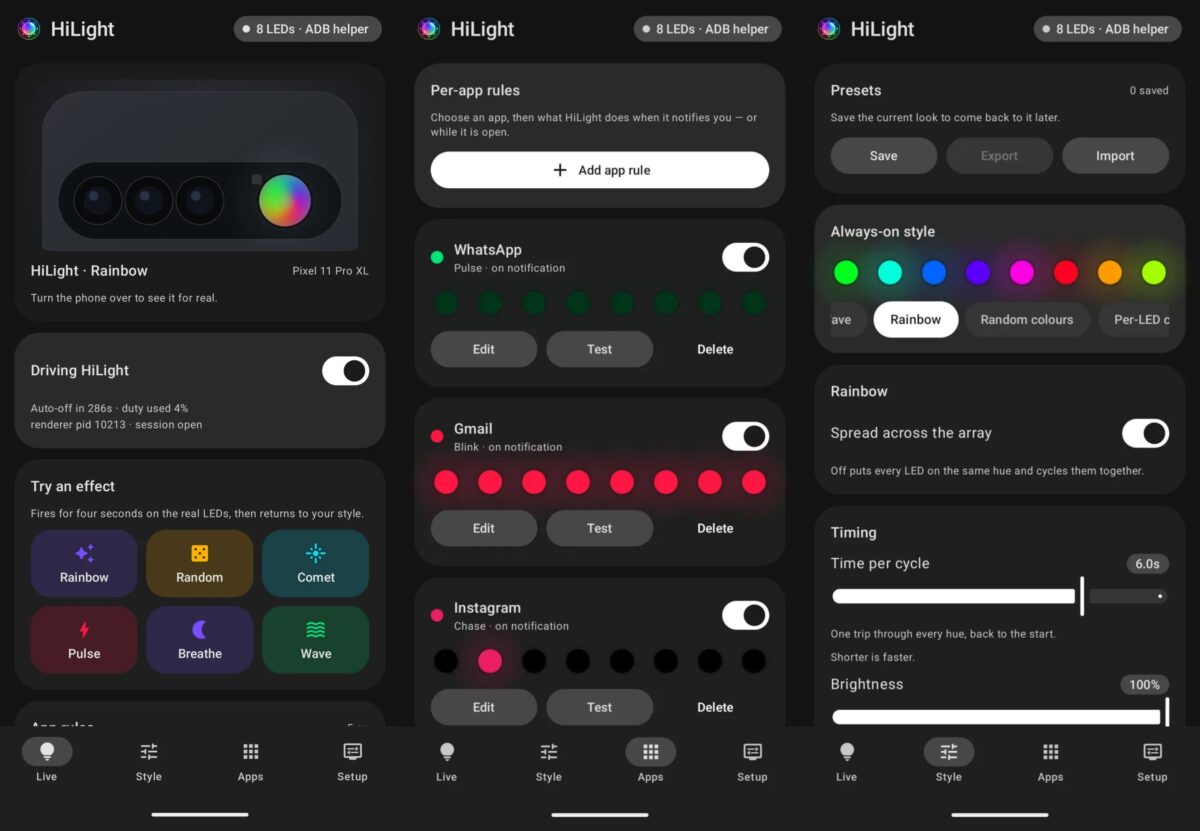
It’s HiLight Studio. Within days of the Pixel 11 Pro’s launch, a developer named @Dhananjay_Tech managed to turn Google’s relatively simple notification light into something much closer to what many of us imagined HiLight could become.
HiLight Studio can reportedly set the LED to show different colors for different apps like WhatsApp, Slack, and more. Lighting effects can be customized. You can even create and export presets. That is the HiLight I want. Not because I need eight different colors flashing at me all day. Quite the opposite. I want the choice.
However, there is a major catch. HiLight Studio isn’t a polished app sitting in the Play Store waiting for you to install it. The current workaround involves sideloading software, using Shizuku and ADB, and dealing with additional setup. It also reportedly needs to be reactivated after a reboot.
I’m still excited about HiLight. In fact, I’m probably more excited about it after seeing what the hardware can actually do. But I’m also more skeptical of Google’s approach.
There is a good argument for keeping HiLight controlled at launch. Google needs to make sure the feature doesn’t become annoying, inconsistent, or terrible for battery life. It also makes sense to establish a thoughtful default experience before throwing open the doors to every developer.
But if Google eventually makes HiLight available to all applications and develops an API, it could become a truly distinctive Pixel feature. If you’re also weighing Google’s latest flagship against Apple’s top-end iPhone, my Pixel 11 Pro vs. iPhone 17 Pro comparison breaks down the biggest differences between the two. Until then, I’ll keep looking at that little light and wondering how much more it could do.