
FaceTime Like a Pro
Get our exclusive Ultimate FaceTime Guide 📚 — absolutely FREE when you sign up for our newsletter below.

FaceTime Like a Pro
Get our exclusive Ultimate FaceTime Guide 📚 — absolutely FREE when you sign up for our newsletter below.


Turn on Transparency mode to hear nearby sounds without removing your AirPods. Use the stem, AirPods Max button, or Control Center on iPhone or iPad.

 ByKeval and Ravi Teja KNTS
There are hundreds of TWS earbuds out there on the market, but what makes AirPods Pro and AirPods Max stand out from the crowd the most is Active Noise Cancellation. With the snug-fit profile, AirPods provide an excellent shield from outside noise, and you can continue listening to your favorite tracks or indulge in hands-free calling.
In addition, Apple has implemented a super useful feature called Transparency mode. As the name suggests, it allows some external noises to pass through. It helps you pay attention while using your AirPods Pro, AirPods Max, or AirPods 5 and listening to the music you love.
While it was already there, making life super convenient, Apple introduced yet another trailblazing feature to take AirPods Pro 2 to the next level. This feature is named Adaptive Transparency mode. Read on to learn more about Transparency and Adaptive Transparency modes.
Transparency mode uses the AirPods’ microphones and audio processing to let surrounding sounds through while you listen. The stem control switches modes on AirPods Pro and AirPods 5; it does not create the effect itself.
You can switch to Transparency mode from your AirPods Pro, AirPods 5, or AirPods Max or use the connected iPhone, iPad, Apple Watch, or Mac. A chime will confirm that Transparency mode is enabled or disabled on your AirPods.
You can also switch between listening modes from Control Center on a compatible iPhone or iPad while your AirPods are connected.
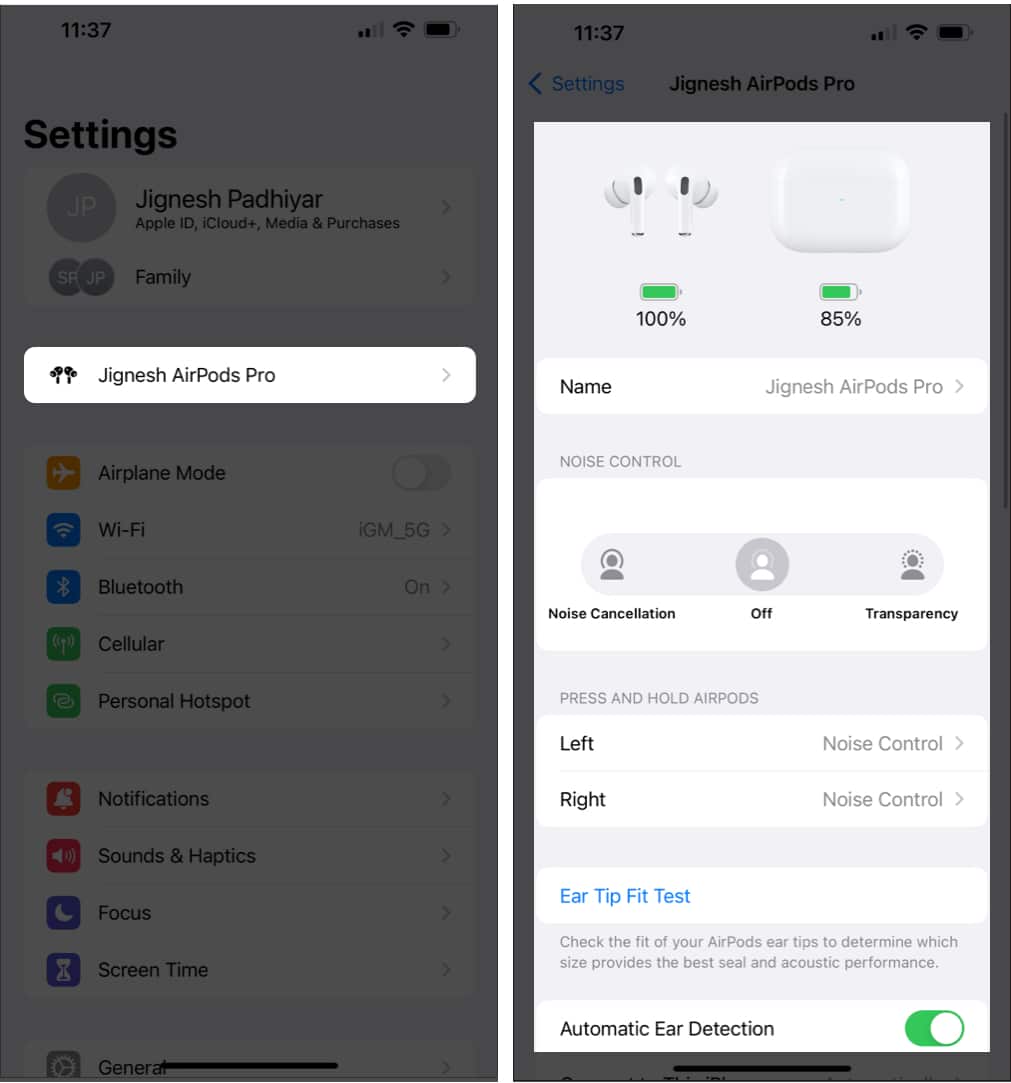
You can also open Settings, tap your connected AirPods near the top, and choose Transparency under Listening Mode.
Also check out: How to change AirPods settings on iPhone or iPad
AirPods Pro 2 introduced Adaptive Transparency, which reduces the intensity of loud environmental sounds while leaving other sounds audible.
Its H2 chip adjusts Transparency when sudden loud sounds occur, such as traffic noise. Keep using appropriate hearing protection in very loud places.
Adaptive Transparency is separate from Adaptive Audio, which blends noise cancellation and Transparency as your surroundings change. AirPods 5 supports Adaptive Audio.
It’s worth reiterating that you will be able to access the options as mentioned above from the Settings app as well.
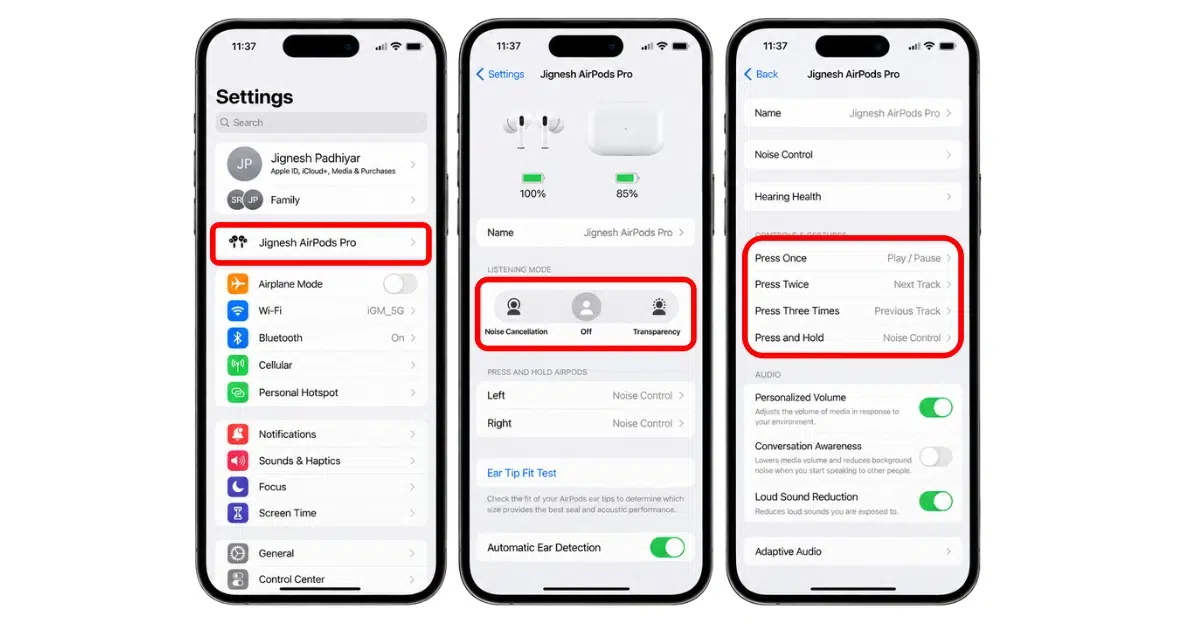
Tip: There is a slightly hidden setting through which you can use noise cancellation when using only one AirPods Pro. Besides, you also have the option to fine-tune the press speed and hold duration required to activate the Force Sensors. To get it done, launch Settings → Accessibility → AirPods. Now, turn on the switch next to Noise Cancellation with One AirPod.
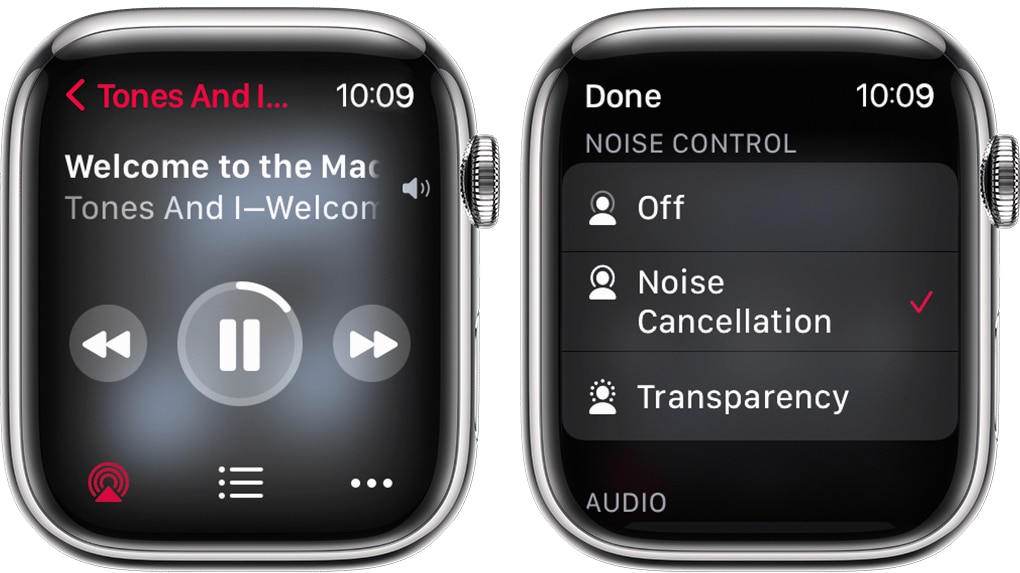
You can also take control of ANC and Transparency mode from your Apple Watch. To do so:
That concludes the talk!
Transparency is handy when you need to hear someone without removing your AirPods. If you want the sound to adjust as your surroundings change, try Adaptive Audio on a supported model.
You might also like











