FaceTime Like a Pro
Get our exclusive Ultimate FaceTime Guide 📚 — absolutely FREE when you sign up for our newsletter below.

FaceTime Like a Pro
Get our exclusive Ultimate FaceTime Guide 📚 — absolutely FREE when you sign up for our newsletter below.


Meta has launched Muse Code for macOS and Linux. Its cheaper Contributor tier cuts token prices sharply but lets Meta train on prompts and completions.
Meta has launched Muse Code, a beta AI coding agent that runs in Terminal on macOS and Linux. It is powered by the new Muse Spark 1.2 model and can plan changes, edit code, validate its work, and coordinate multiple background agents across large repositories.
There is no dedicated Mac app. Meta provides a one-line installer, after which developers work with Muse Code from the command line:
curl -fsSL https://dev.meta.ai/install.sh | bashMuse Code keeps specialized background agents active throughout a session instead of starting a new one for every small task. Meta says this avoids repeated research and reduces the amount of steering needed during complicated jobs.
It also records every model call, tool run, approval, and edit in a local append-only event log. If Muse Code or the computer crashes, the agent can replay that log and continue from where it stopped.
Three bundled commands show the kind of workflow Meta is targeting. /plan creates a plan that needs approval, /grill stress-tests that plan, and /goal keeps the agent working toward a specified objective.
Muse Spark 1.2 is a coding-focused update to Muse Spark 1.1. Meta says it improves code generation, debugging, codebase understanding, and end-to-end development. The model was trained for longer jobs, including complete repository generation and projects that need planning and context compression.
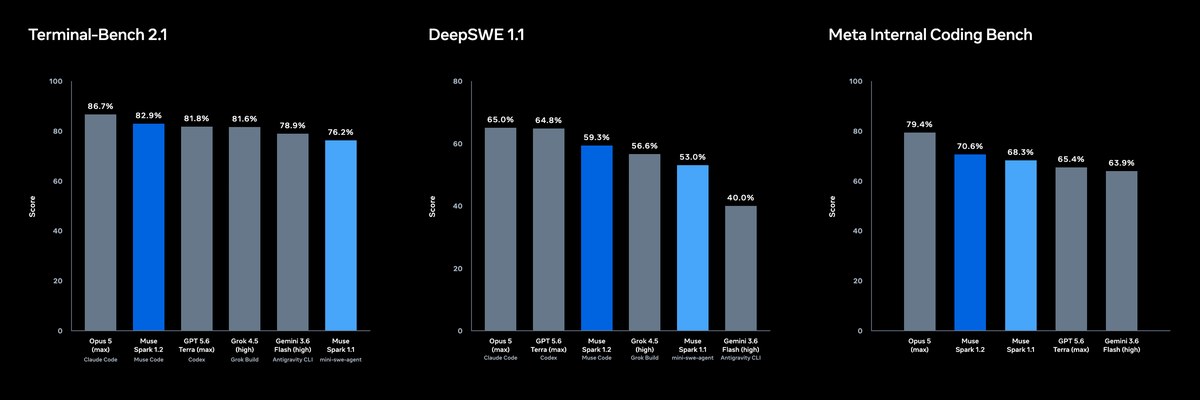
Meta’s published evaluation charts put Muse Spark 1.2 at 82.9% on Terminal-Bench 2.1, 59.3% on DeepSWE 1.1, and 70.6% on Meta Internal Coding Bench. It did not lead any of the three charts: Opus 5 topped Terminal-Bench and Meta’s internal test, while GPT 5.6 Terra led DeepSWE. These are Meta-published results, and the internal benchmark is not independently verifiable.
The biggest catch is in the pricing. MacRumors reports that Meta offers Standard and Contributor access, with a steep discount for developers who let the company use their prompts and completions to train future AI models.
The reported rates are for one million tokens:
| Tier | Meta can use prompts and completions for training | Input | Output | Rate limits |
|---|---|---|---|---|
| Standard | No | $1.25 | $4.25 | 3,000 requests and 4 million tokens per minute |
| Contributor | Yes | $0.10 | $0.20 | 60 requests and 2.1 million tokens per minute |
That makes Contributor pricing 12.5 times cheaper for input and a little over 21 times cheaper for output. The tradeoff is not subtle: developers pay far less, but Meta gets permission to learn from what they send and receive.
The Contributor tier may suit experiments and public code. Private repositories, client work, API keys, and unreleased products need more caution. For that work, the Standard tier’s higher price buys the more important feature: keeping coding sessions out of future model training.
Muse Code is Meta’s most direct answer yet to OpenAI Codex and Anthropic’s Claude Code. All three are moving beyond code completion toward agents that can inspect a project, make changes, test the result, and keep working with less supervision.
The competition on Mac is already moving quickly. OpenAI recently added Appshots to Codex for Mac for sharing app context, while Claude Code gained iOS Simulator support for building and testing iPhone apps.
Meta’s entry is more developer-focused than the consumer tools in its growing Muse family, which also includes Muse Image. Muse Spark 1.2 is available through Muse Code and the Meta Model API with expanded global access.
Muse Code is still in beta, and its Terminal-only setup will make it less approachable than a normal Mac app. For developers comfortable with the command line, the harder decision is whether the Contributor discount is worth letting Meta train on their coding sessions.