FaceTime Like a Pro
Get our exclusive Ultimate FaceTime Guide 📚 — absolutely FREE when you sign up for our newsletter below.

FaceTime Like a Pro
Get our exclusive Ultimate FaceTime Guide 📚 — absolutely FREE when you sign up for our newsletter below.


OpenAI launches Dots, always-on ChatGPT agents powered by GPT-6 Astra. Check supported plans, regional access, setup, usage limits, and privacy controls.
OpenAI has launched Dots, personal AI agents that keep working on ongoing goals between conversations. They use GPT-6 Astra, have their own cloud computer and browser, and can connect to more than 4,000 apps through plugins.
Announced on September 29, Dots are rolling out to Pro, Business Premium, and eligible Enterprise workspaces. You can name your primary dot, give it responsibilities, and return later to review its work or change direction.
A dot retains project context and learns from feedback, so you do not have to repeat the same instructions each time. It can coordinate tasks using Codex and connected tools, building on ChatGPT Work and the earlier ChatGPT Agent.
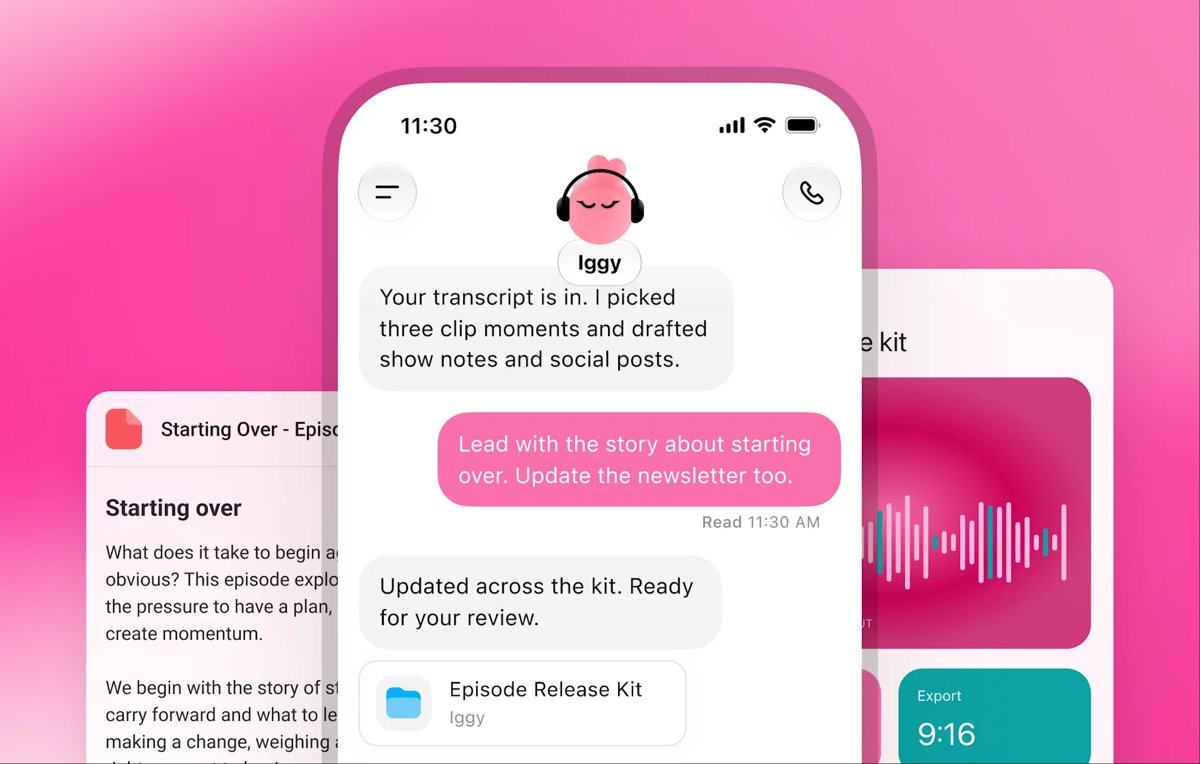
OpenAI’s examples include turning interview transcripts into show notes and draft social posts, updating presentations when new figures arrive, and preparing tested software fixes from customer feedback. One early tester’s dot noticed an unsent invoice, prepared it, and sent it after approval.
You can also ask for reminders or recurring checks and follow activity from the dot’s profile. These are intended capabilities, and results still need review.
Access depends on your plan and region. The initial rollout covers:
Free, Go, Plus, and Business Standard are not included in the announced initial rollout. Dots are unavailable to users under 18, and eligible accounts may take several days to receive access. India is not among the listed Pro exclusions.
Your first dot is included in Pro or Business Premium at no extra cost. Individual Pro plans currently cost $100, $200, or $500 per month, with different usage allowances.
Conversations with a dot do not count toward ChatGPT usage limits. Tasks it starts or manages in Codex or ChatGPT Work use the usual allowances. OpenAI is extending deeper-work limits for the first month; always-on access does not mean unlimited tasks.
Create your dot in the ChatGPT desktop app or a desktop browser, name it, connect the apps it needs, and describe your goal. Include boundaries such as asking before sharing a document or sending an email.
After setup, you can message it in the ChatGPT mobile app when mobile access is available. You cannot currently create a dot on mobile, and mobile web is unsupported.
Dots can carry context across ChatGPT, Slack, and Teams, where available. Texting is planned more broadly, with a limited beta already listed for some US Pro users. That beta is unavailable in Business and Enterprise workspaces. Dots cannot initiate calls or have their own standalone email address at launch.
Your dot’s cloud computer is separate from your laptop. Local computer access starts turned off; you must connect it before the dot can work with local files and tools.
App permissions are shared across Dots, ChatGPT, Work, and Codex, so review existing connections too. For supported website logins, secure sign-in keeps passwords outside the model’s conversation.
Background proactive research uses read-only tools. Those tools cannot directly send messages, edit connected apps, or control a browser or desktop. Follow-up actions must pass the usual permissions and safety checks.
Custom Rules let you set action boundaries. Auto-review checks certain actions against your instructions, while sensitive steps such as changing a password stay with you. You can inspect progress, redirect work, or pause the dot from its profile.
Dots can retain context from conversations, ChatGPT memories, and connected apps. Disconnecting an app stops new access but does not erase retained information. Individual dot memories cannot currently be viewed or edited; deleting the dot removes its own context, while separately stored files and ChatGPT memories need their own controls.
Business, Enterprise, and Edu data is excluded from model training by default. Personal users can control eligible use through Improve the model for everyone.
Enterprise admins can manage app, messaging, and computer capabilities. Only a dot’s owner can direct it; another person’s mention does not start work. OpenAI is also piloting specialist dots with dedicated organizational responsibilities and working on Microsoft Agent 365 integration.
Teams of dots, broader access, and options for more work capacity are planned. For now, users start with a primary dot and should review consequential work before relying on it.