
FaceTime Like a Pro
Get our exclusive Ultimate FaceTime Guide 📚 — absolutely FREE when you sign up for our newsletter below.

FaceTime Like a Pro
Get our exclusive Ultimate FaceTime Guide 📚 — absolutely FREE when you sign up for our newsletter below.


WhatsApp’s upcoming Strict Account Settings mode bundles top-tier privacy tools, like IP protection and spam call blocking, into one toggle for high-risk users.


WhatsApp is set to enhance its security offerings with a new feature aimed at users more prone to hacking or cyber threats. The feature, known as Strict Account Settings, was identified by WABetaInfo in the latest beta update (version 25.33.10.70) on TestFlight for iOS. While it’s currently under development, it’s slated for a future release on both Android and iOS.
This security mode is tailored for users who consider themselves targets for cyberattacks—think journalists, political figures, or business professionals dealing with sensitive information. It streamlines the process by activating several advanced protections in a single step, freeing users from the hassle of manually tweaking each privacy setting.
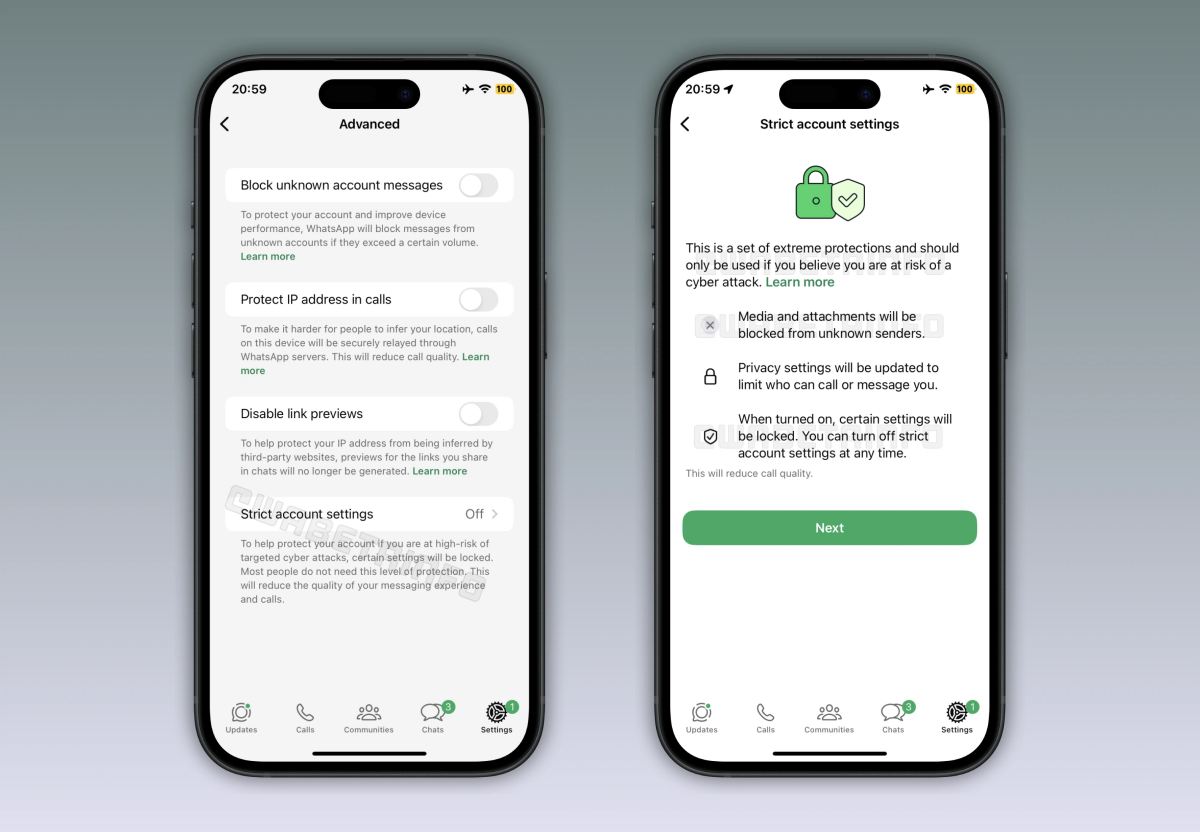
When this feature is switched on, it locks certain settings to prevent unintentional or unauthorized alterations. WhatsApp cautions that activating this mode may slightly impact call quality and some app functions because it prioritizes privacy over user experience.
According to WABetaInfo, the activation of Strict Account Settings will include current and potentially new security measures such as:
In essence, this mode bundles WhatsApp’s top privacy features into a convenient single toggle for those facing heightened security threats.
This enhanced protection mode remains optional since WhatsApp believes that the majority don’t need such heightened security, as all conversations are end-to-end encrypted by default. Strict Account Settings is predominately for those involved in high-stakes communication or who confront elevated cyber risks.
As things stand, Strict Account Settings is still in the developmental phase and isn’t accessible to beta testers just yet. WABetaInfo notes that WhatsApp plans to make it available to beta users in an upcoming release before a wider distribution. However, there’s no set timeline for its official release.
Once published, users will be able to access it through Settings > Privacy > Advanced, with the option to activate or deactivate it as needed.
Does this feature sound important to you? Share your thoughts below.



