
FaceTime Like a Pro
Get our exclusive Ultimate FaceTime Guide 📚 — absolutely FREE when you sign up for our newsletter below.

FaceTime Like a Pro
Get our exclusive Ultimate FaceTime Guide 📚 — absolutely FREE when you sign up for our newsletter below.


If X doesn’t feel the same anymore, you might be thinking about leaving the platform. Here’s how I deleted my account step by step.
 ByVikhyat
There was a time when deleting a social media account felt dramatic. Now, it’s becoming surprisingly common. Some people are trying to reduce screen time, others are frustrated with platform changes, and many simply no longer use X the way they once used Twitter.
No matter the reason, deleting your X account is not as straightforward as pressing a single “Delete” button. X still follows a two-step process where your account is first deactivated and then permanently removed after a waiting period.
If you’re planning to leave the platform, here’s everything you need to know about deactivating or permanently deleting your X account in 2026.
Before you proceed, it’s important to understand how X (formerly Twitter) handles account removal.
X does not instantly erase your account. Instead, the platform first puts your account into a deactivated state. During this period:
X keeps your account in a recoverable state for 30 days. If you do not sign back in during that time, X permanently deletes your account and associated data from the platform.
However, the moment you log back into the account during those 30 days, the account is automatically restored.
So technically, you are deactivating your account first and deleting it permanently later by staying away from it for a month.
When I deleted my X account, it created a few unexpected problems for me later, so it’s smart to prepare beforehand. Here’s how you can:
If you’ve used Twitter/X for years, your account likely contains old tweets, photos, DMs, bookmarks, and media you may want later.
X allows users to request an archive of their account data before deletion. Here’s what you need to do:
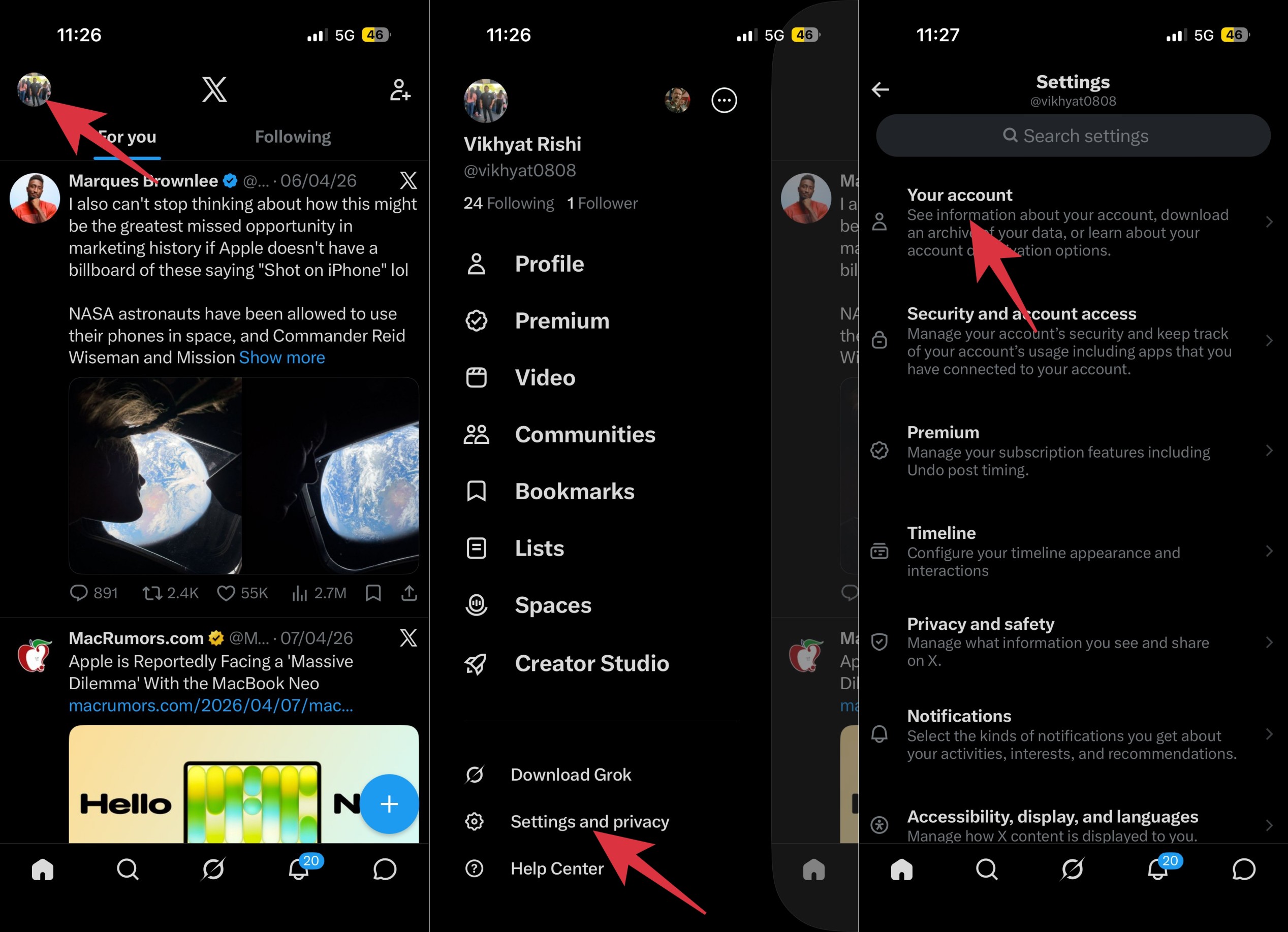
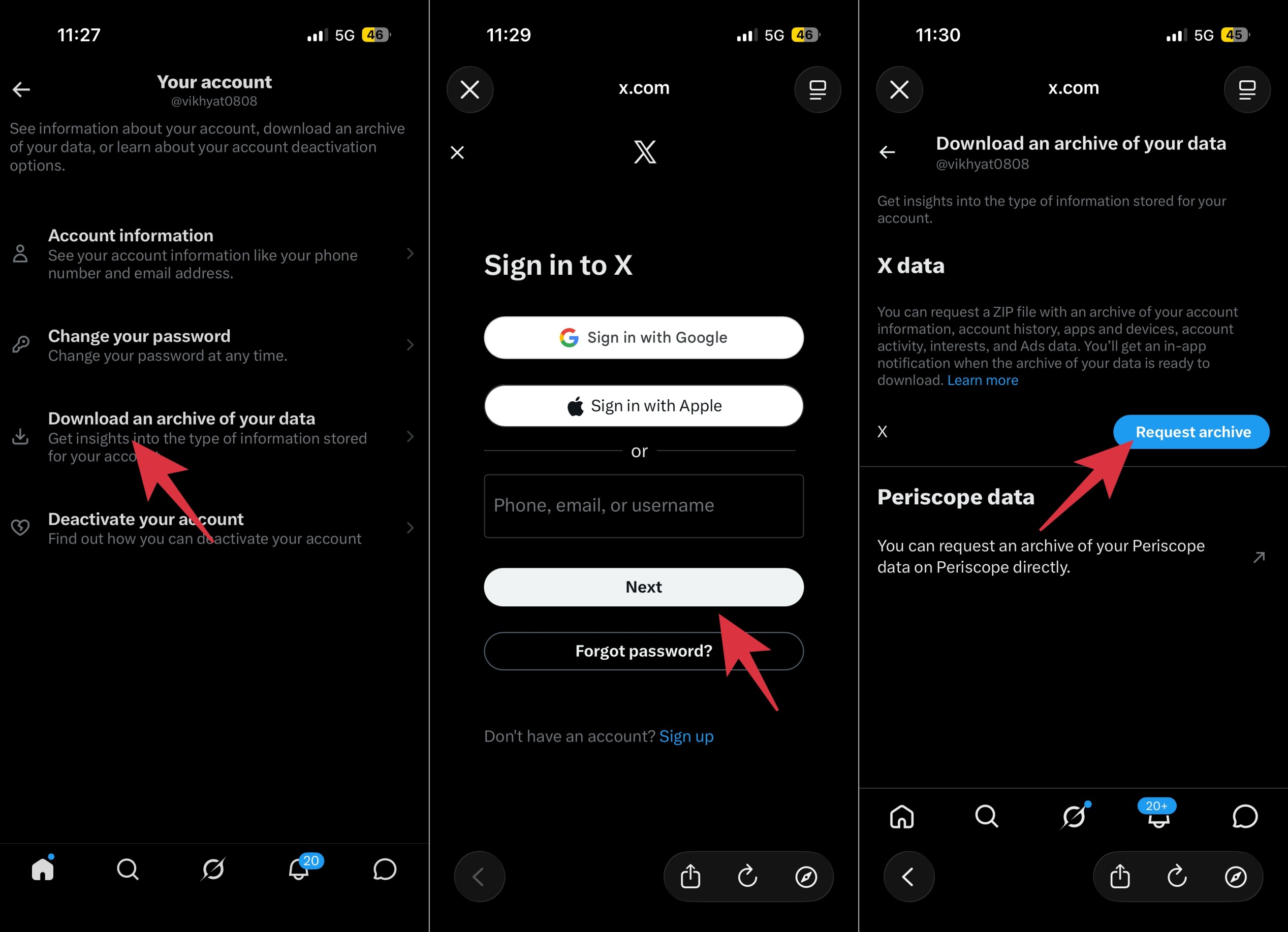
Depending on the size of your account, X may take some time to prepare the archive.
Deleting your X account does not always cancel paid subscriptions automatically. If you subscribed to X Premium through the App Store or Google Play, you should manually cancel the subscription from your Apple or Google account before deleting X.
If you are deleting your X account only because you want to free up an email address or reuse a username elsewhere, you can simply do the following instead:
This reduces the risk of losing access to something important later.
The mobile app process is fairly simple once you know where X hides the settings. Here’s how:
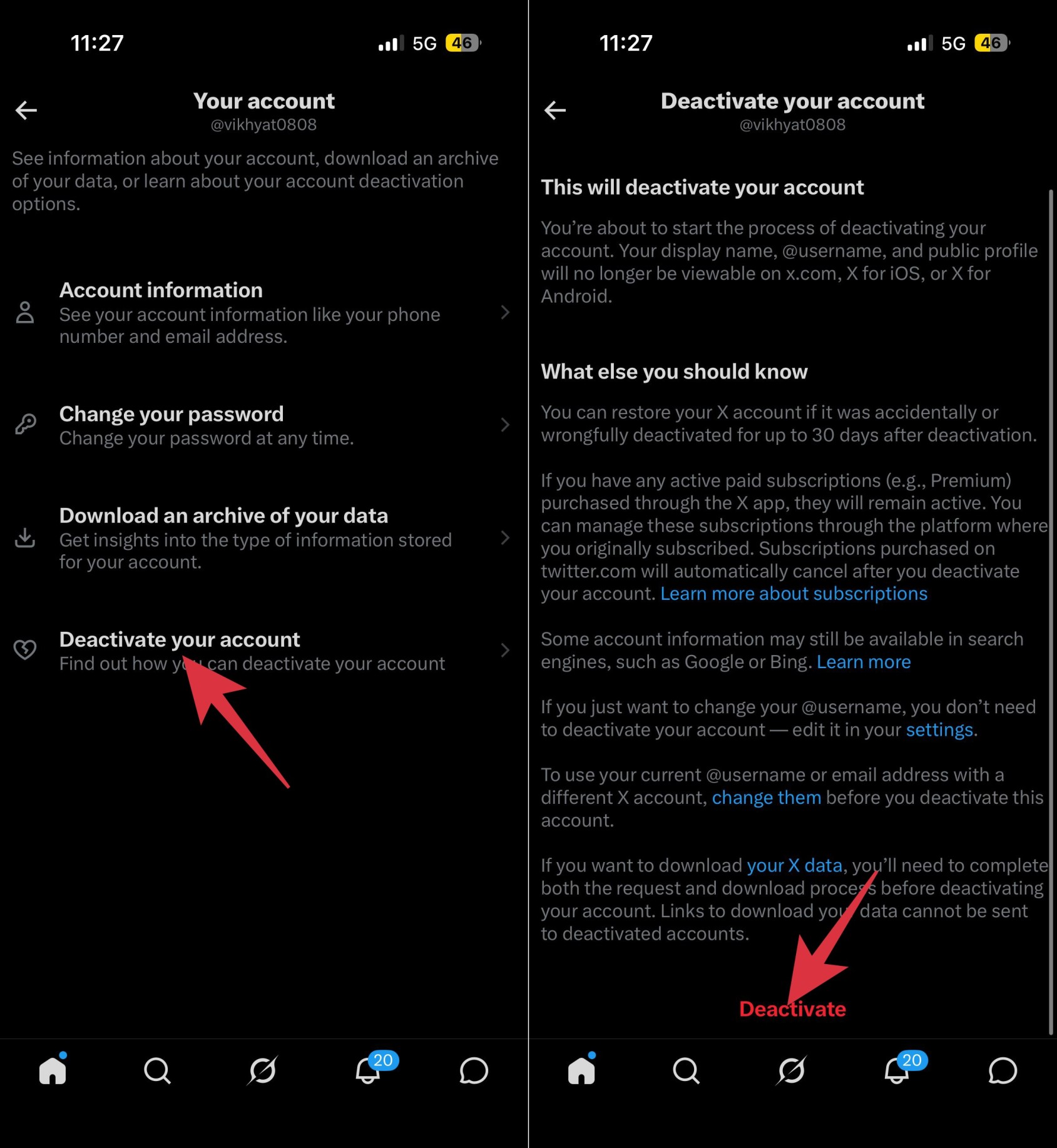
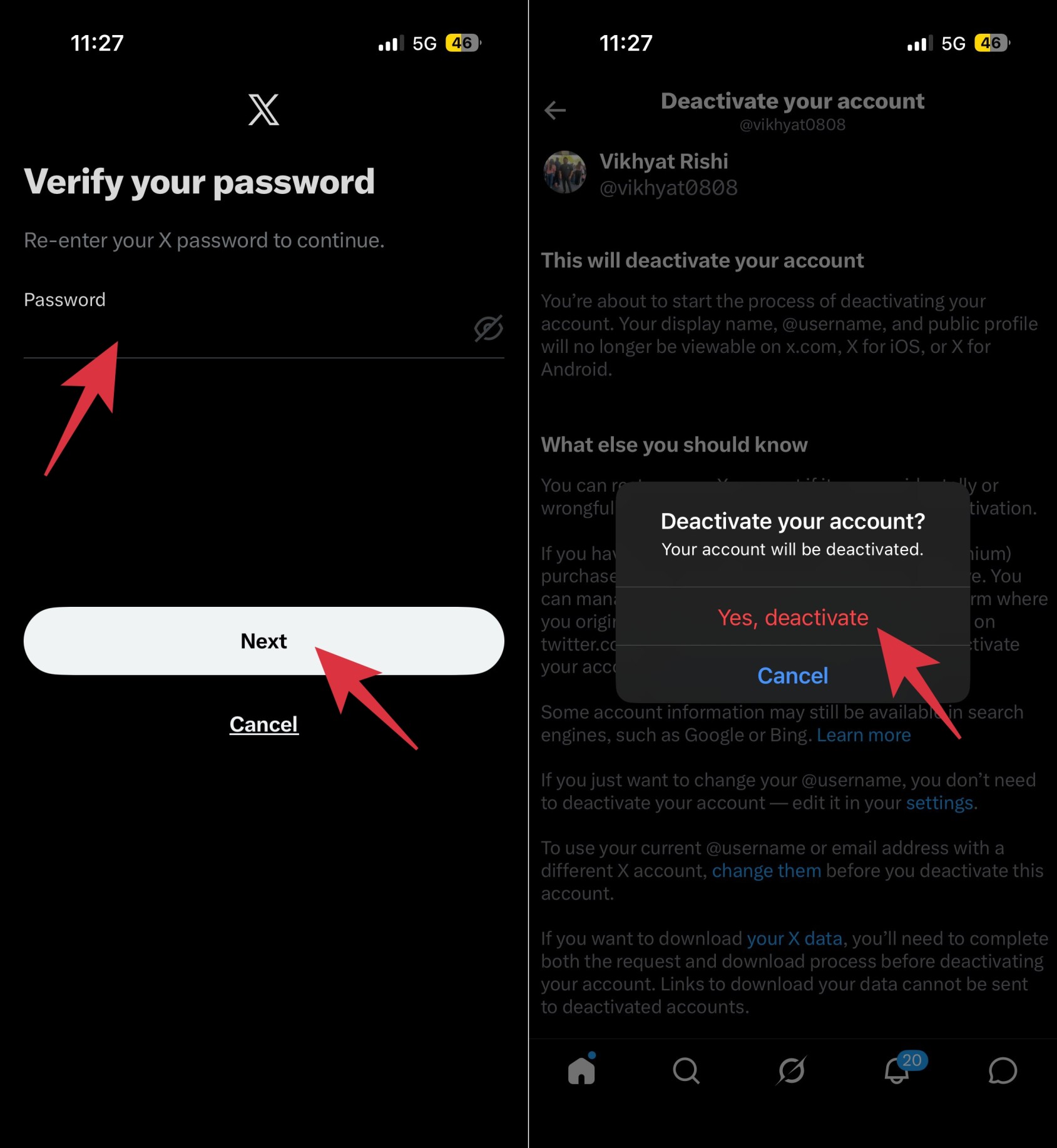
If you use X on a Mac or Windows PC, the steps are nearly identical.
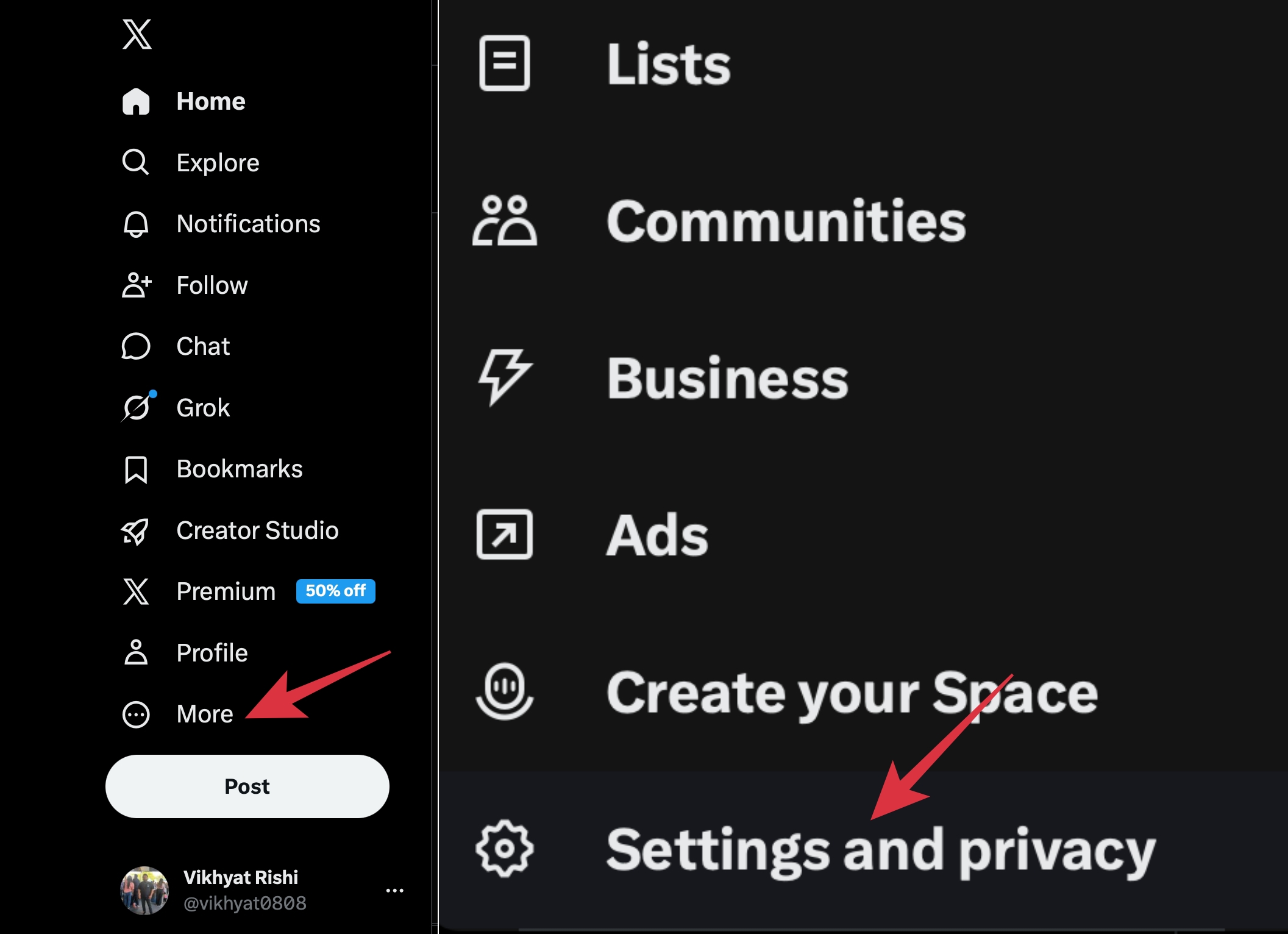
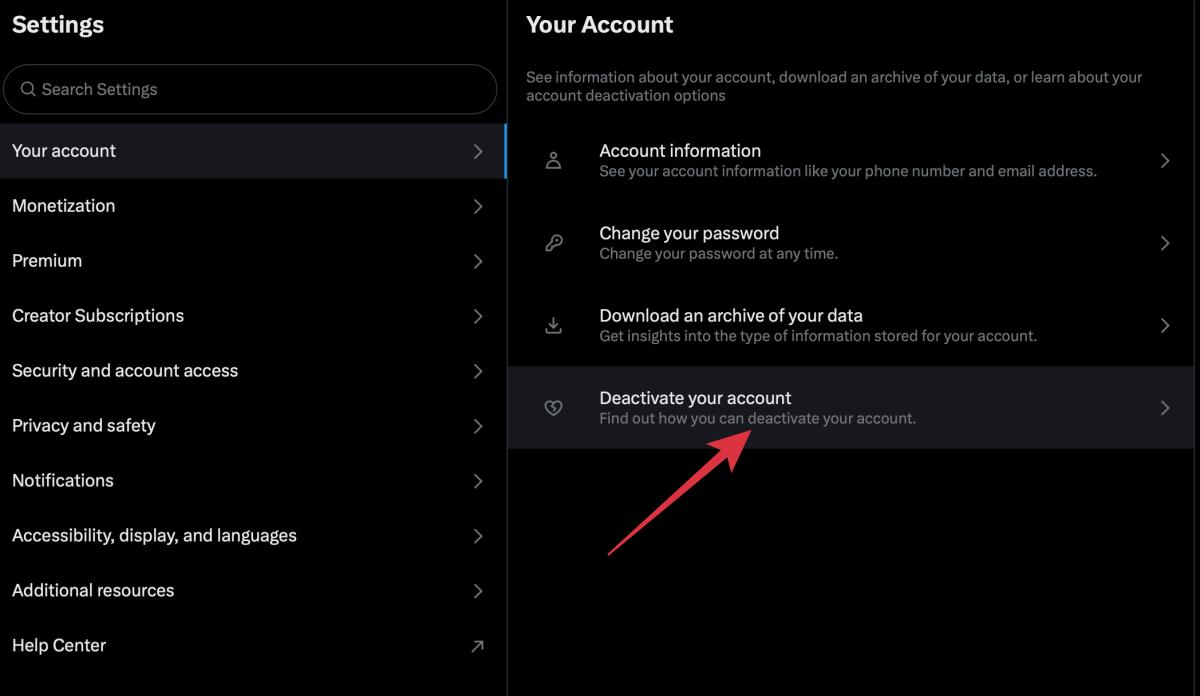
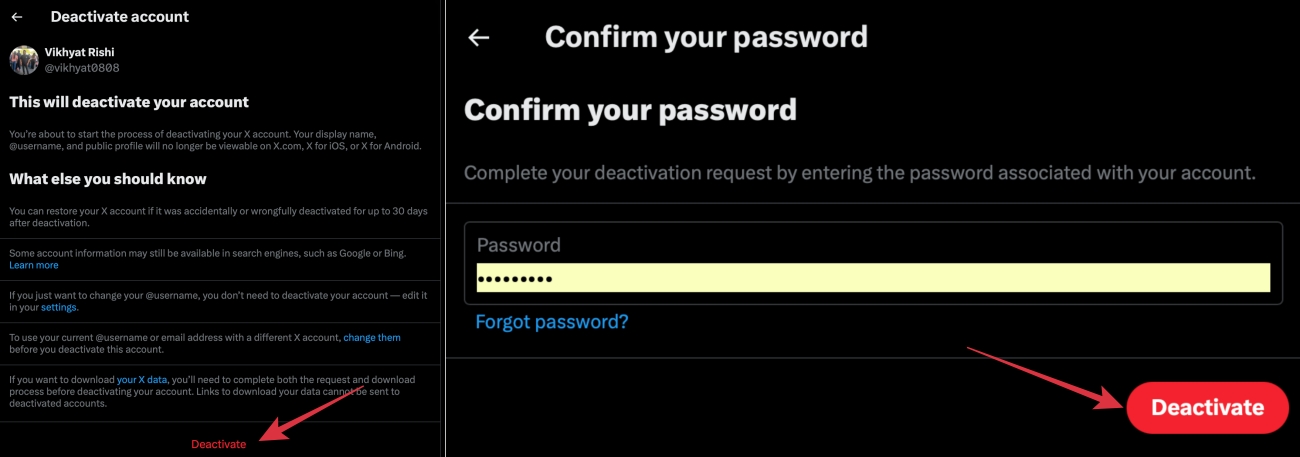
A lot of users expect their profile to vanish instantly, but X’s systems take some time to fully process deletion.
Here’s what typically happens after deactivation:
1. Your profile disappears
Other users can no longer visit your profile normally. Your tweets and media also become inaccessible from the platform.
2. Search engines may still show old results temporarily
Google and other search engines may continue showing cached versions of your profile or tweets for a short period. These results usually disappear once search engines refresh their indexes, similar to how apps temporarily store old data until you manually clear the cache or refresh them.
3. DMs may still exist in other inboxes
Deleting your X account does not necessarily remove messages already received by other users. If someone has your past DMs in their inbox, those conversations may still remain visible on their side.
4. Your username may eventually become available
After permanent deletion, your username can potentially be claimed by another user. If you want to protect a username, changing it before deletion is usually safer.
Yes, but as mentioned above, only during the 30-day recovery window. If you change your mind within the recovery window, you can simply log in to your account, confirm reactivation if prompted, and you are good to go.
Your profile, tweets, followers, and account settings are typically restored automatically. However, remember that once the 30-day period passes, recovery is no longer guaranteed.
With the creator economy booming in 2026, many longtime users feel that X has drifted far away from what originally made Twitter valuable. The platform was once known for authentic, real-time updates, meaningful communities, breaking news, and live sports discussions. Today, for many users, that experience feels increasingly diluted.
Personally, my timeline no longer feels centered around genuine conversations or useful information. Instead of seeing credible updates and thoughtful discussions, I’m constantly flooded with rage-bait and sensitive content designed purely to trigger reactions. These posts often add little to no real value and exist mainly to provoke users into replying, arguing, and sharing so creators can maximize engagement and increase their X payouts.
As monetization has become a bigger focus, viral outrage often performs better than informative content. Combined with algorithm-driven recommendations, engagement farming, and increasing ad clutter, many longtime users are choosing to leave X or spend far less time on the platform.
And that’s it. Now you know that deleting your X account is simple once you understand how the deactivation system works. The biggest thing to remember is that X gives you a 30-day recovery period before permanent deletion happens.
Before leaving the platform, make sure to download your archive, cancel subscriptions, and double-check any connected apps or services tied to your account. If you’ve shared important media on the platform over the years, it’s also a good idea to download videos or other content you may want to keep before your account disappears permanently.
What’s the biggest reason pushing you away from X in 2026? Tell us in the comments below.
You may like to read











