FaceTime Like a Pro
Get our exclusive Ultimate FaceTime Guide 📚 — absolutely FREE when you sign up for our newsletter below.

FaceTime Like a Pro
Get our exclusive Ultimate FaceTime Guide 📚 — absolutely FREE when you sign up for our newsletter below.


Your AirPods and Beats will automatically pause music, podcasts, or audiobooks when you fall asleep.
Ever fallen asleep listening to your favourite podcast only to wake up with a dead AirPods battery? Apple wants to fix that with iOS 26. The upcoming update adds a clever new feature that pauses your audio when it senses you’ve dozed off.
At WWDC 2025, Apple teased this as an AirPods feature, but deeper code reveals it’s actually baked into iOS 26 itself. That means it works not just on AirPods but also on Beats headphones – including budget models like the $70 Beats Flex and $80 Beats Solo Buds.
Here’s everything you need to know about this small but life-improving update:
When this feature is on, your AirPods or Beats will automatically pause music, podcasts, or audiobooks when you fall asleep.
They detect sleep using built-in motion sensors and accelerometers that normally track head movements for Spatial Audio and ear detection. With iOS 26, Apple uses the same tech to notice when your head stays still for a while, indicating you’ve dozed off. Once detected, your AirPods or Beats pause the audio.
This saves your place so you don’t lose track of your story, and also helps preserve battery life by turning off the headphones when not needed.
To take advantage of this new feature, you’ll need iOS 26 installed on your iPhone and the latest firmware on your AirPods or Beats. In simple terms, your iPhone must be running iOS 26, and your headphones should be updated with Apple’s latest testing firmware.
Right now, only developers enrolled in the iOS 26 beta can access this feature. A public beta is expected to roll out in July, and Apple plans to release the official version for all users in September.
For AirPods, it works only on AirPods Pro 2 and AirPods 4 as of the current developer beta. Beats support is confirmed in the code, but Apple hasn’t listed which exact models will get it. Powerbeats Pro 2 might support it because they have heart rate sensors, but it’s still unclear how other models will detect sleep. This makes it a wait-and-see feature for many users.
The option, called “Pause Media When Falling Asleep,” will appear in your iPhone Settings under the AirPods or Beats section when your headphones are connected and in use.
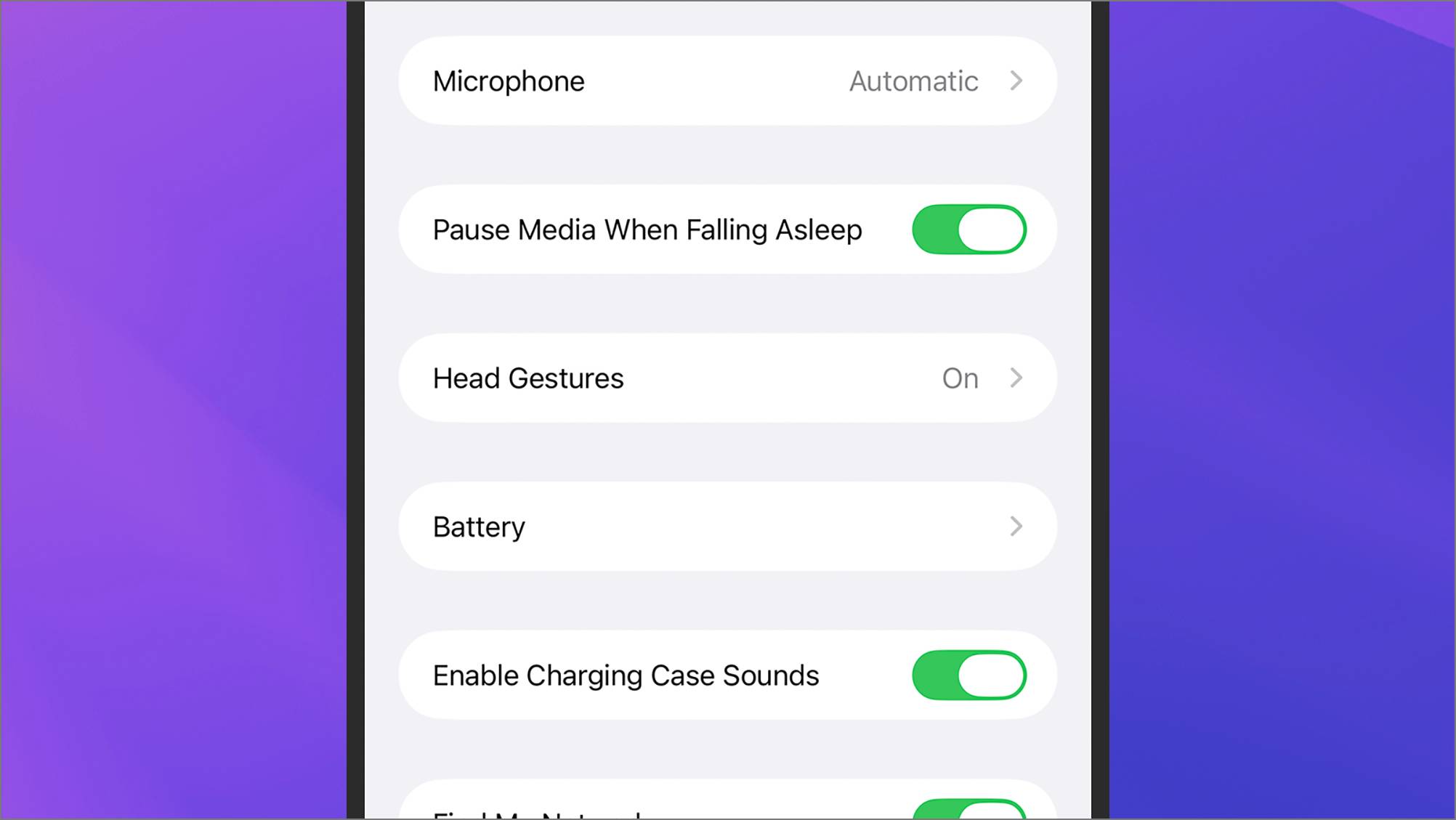
It’s enabled by default, but you can turn it off if you prefer your audio to keep playing through the night. You can also quickly check its status by tapping your connected device in Control Center or long-pressing the volume slider to access headphone settings directly.
Stay tuned as iOS 26 rolls out later this year. This tiny change might just save your sleep and your morning battery panic.
Related articles worth reading: