
FaceTime Like a Pro
Get our exclusive Ultimate FaceTime Guide 📚 — absolutely FREE when you sign up for our newsletter below.

FaceTime Like a Pro
Get our exclusive Ultimate FaceTime Guide 📚 — absolutely FREE when you sign up for our newsletter below.


The iPhone 17’s new 18MP Center Stage front camera keeps you perfectly framed in selfies, video calls, and vlogs—no more tilting, zooming, or awkward angles.
Apple has completely reimagined the selfie experience with the iPhone 17 series and iPhone Air. The new front camera now features an 18MP square sensor and a smart feature called Center Stage, designed to make group selfies effortless and keep you perfectly framed during video calls, with no need to move the phone yourself. Instead of tilting or rotating, the camera does it all, zooming, reframing, and rotating automatically.
It works across FaceTime, third-party video call apps, selfies, and even vlogs. What makes it stand out is how natural it feels. You can move, change angles, or bring friends into the shot, and the camera smoothly adapts in real time — almost like it knows what you want.
The big shift comes from the square sensor design. Unlike older 4:3 sensors, the square shape gives extra room around the edges, letting Center Stage crop and adjust without losing too much detail. This also means you can switch between portrait and landscape instantly — no awkward wrist twisting.
Apple’s AI handles the rest: tight framing when you’re solo, wide angles when friends join in.
Resolution also gets a major boost. The iPhone 17’s 18MP front camera outpaces the iPhone 16’s 12MP shooter. Even after cropping to 16:9, square, or portrait modes, photos stay crisp with rich detail.
Getting started is simple, and you don’t need to be a pro to use it:
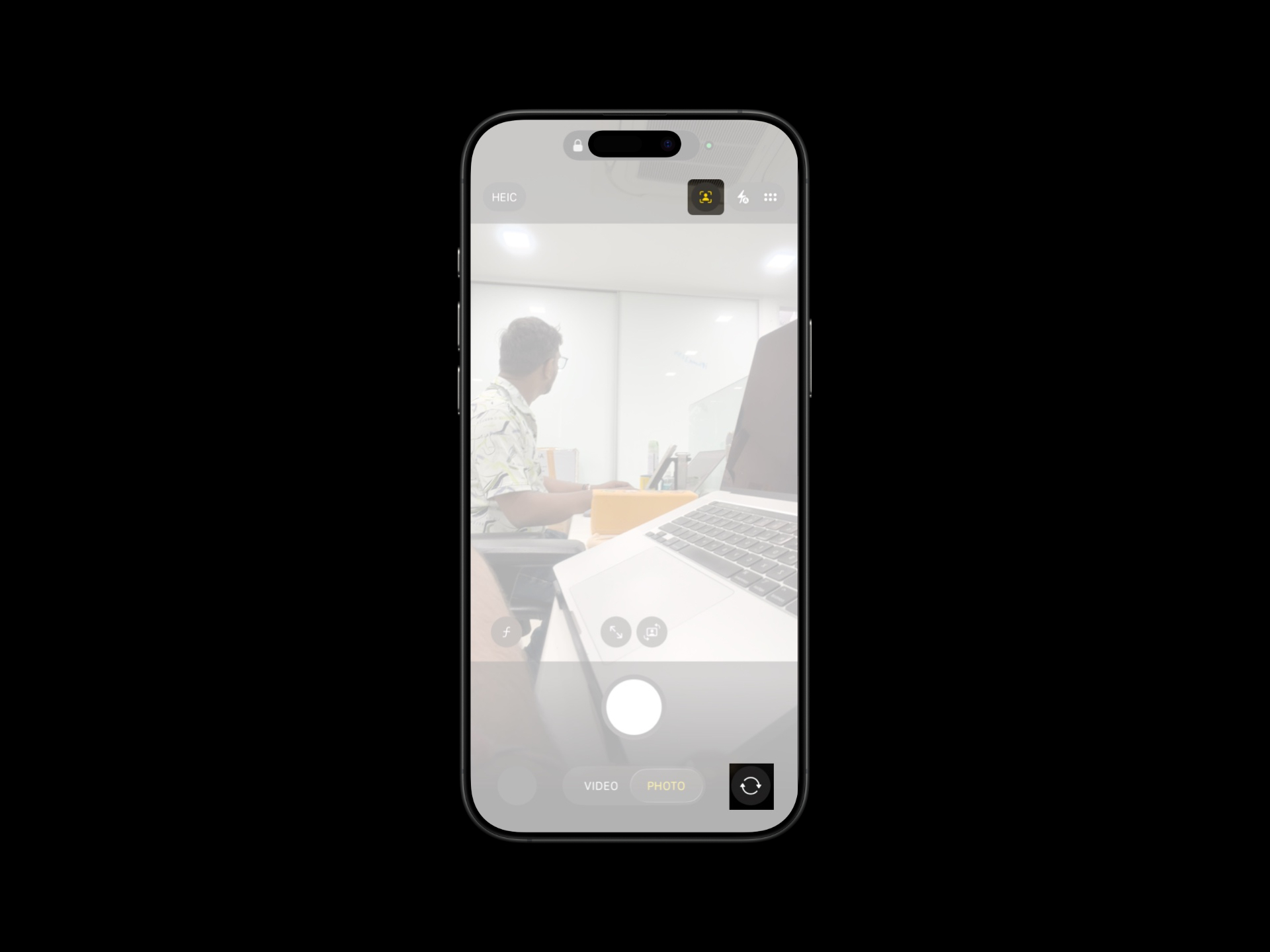
You can also control things manually:
On FaceTime, Center Stage is enabled by default. The camera pans and zooms to follow your movement and expands smoothly when friends enter the frame. It feels as seamless as on iPads and Macs, but now it’s built into the iPhone 17.
Prefer a fixed angle? You can easily turn Center Stage off under Camera Effects during a call.
Apple also added a Dual Capture mode on the iPhone 17 series and iPhone Air:
The new Center Stage front camera on iPhone 17 isn’t just another upgrade — it changes how you capture and share moments. With smarter framing, higher resolution, and creator-friendly features, you spend less time adjusting and more time in the shot.
Whether you’re hopping on Zoom, snapping group selfies, or recording your next viral clip, the iPhone 17 makes sure you stay in the spotlight.
Related articles worth reading:












