
FaceTime Like a Pro
Get our exclusive Ultimate FaceTime Guide 📚 — absolutely FREE when you sign up for our newsletter below.

FaceTime Like a Pro
Get our exclusive Ultimate FaceTime Guide 📚 — absolutely FREE when you sign up for our newsletter below.


I used Google Maps’ “Ask a Question” feature, and it completely changed how I plan trips. Here’s how it helps me get better, real-time insights.
 ByVikhyat
I was recently planning a trip to the mountains and, like every hill drive, one concern kept bothering me: parking. Not just availability, but how practical it actually is. And then there’s the bigger issue, road width. You might be confident driving, but hill stations have a way of humbling even experienced drivers.
Instead of doing what I usually do, scrolling endlessly through reviews and trying to piece together useful information, I tried something different this time.
I opened the hotel listing on Google Maps, tapped on the Ask a question option, and typed exactly what I wanted to know. “Is parking available, and are the roads wide enough for an SUV?”
What came back wasn’t a generic answer. It was specific, clear, and actually useful.
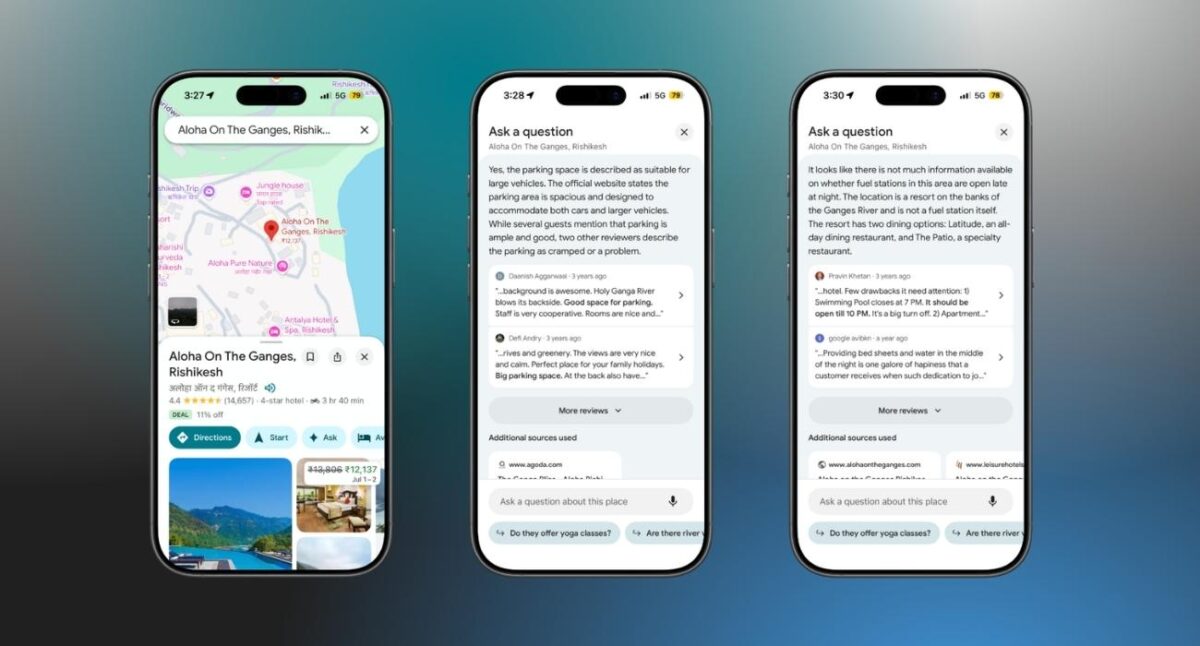
At its core, this feature uses AI to analyze existing data tied to a place listing, including user reviews, uploaded photos, and publicly available details. When you ask a question, it processes all of that information and returns a concise answer that directly addresses your query.
What makes it useful is the way it filters noise. Reviews are often scattered, inconsistent, and full of irrelevant details. This feature extracts only what matters to your question and presents it in a clean, readable format. You are no longer adapting to whatever information happens to be available. Instead, you are actively querying the data for exactly what you need.
Once I saw how effective it was for something as specific as parking and road conditions, I started using it more aggressively. I asked about fuel availability for my car, including whether XP95 or premium fuel was available nearby. I checked if there were EV charging points along my route. I even used it to figure out if nearby restaurants were practical for families, something ratings alone never fully capture.
Each time, the answers were grounded in real experiences shared by other users. That is what makes this feature stand out. It is not trying to predict or assume. It is summarizing what people have already encountered and packaging it into something you can actually use while planning.
Planning trips comes with a unique set of uncertainties. Listings often look polished, but the on-ground reality can be very different. A hotel that claims to offer parking might only have space for a couple of cars. Roads that look manageable on the map might be far narrower in reality. Fuel availability can vary across regions, and infrastructure like EV charging is still developing.
This is exactly where the “Ask a question” feature becomes valuable. It gives you access to ground-level insights before you even start your journey. Instead of relying on assumptions or incomplete information, you get a clearer picture of what to expect. That reduces friction and helps you make more confident decisions.
Google Maps “Ask a Question” feature fits into almost any situation where you need practical, experience-based information before making a decision. It works well when booking hotels in unfamiliar areas, checking parking conditions in crowded cities, planning long drives with specific fuel requirements, or choosing places that need to meet family-friendly criteria.
In simple terms, if you find yourself about to scroll through reviews looking for one specific detail, that is the exact moment to use this feature instead.
See, I am not saying that this feature makes reading reviews a waste of time. Reviews are still useful, but they require effort to interpret. You might go through twenty or thirty comments before finding one line that answers your question. Even then, you are left wondering how accurate or recent that information is.
This feature simplifies that entire process. It scans through a large volume of data in seconds and delivers a focused response. The difference is not just speed, but clarity. You are no longer piecing together fragments. You are getting a consolidated answer that reflects a broader set of experiences.
If you are already using Google Maps for navigation, adding this to your workflow is an easy upgrade. It turns the app into more than just a directions tool and makes it far more useful for real-world decision-making.
The biggest advantage is control. You decide what you want to know, and the app does the heavy lifting of finding the answer. That shift alone makes planning smoother, faster, and far less frustrating.
Have you tried the Google Maps “Ask a question” feature yet? Drop your experience or the most useful question you’ve asked in the comments.











