FaceTime Like a Pro
Get our exclusive Ultimate FaceTime Guide 📚 — absolutely FREE when you sign up for our newsletter below.

FaceTime Like a Pro
Get our exclusive Ultimate FaceTime Guide 📚 — absolutely FREE when you sign up for our newsletter below.


Set up a parent-managed WhatsApp account to help manage your child’s contacts, privacy, and group invitations.
 ByVikhyat
If you’re setting up WhatsApp for your child, you can now create a parent-managed account instead of a standard one. Once the accounts are linked, you can decide who can contact your child, approve group invitations, and manage several privacy settings.
While parents can manage these safety features, they can’t read their child’s messages. Chats, calls, photos, and other shared content remain protected by WhatsApp’s end-to-end encryption.
In this guide, I’ll walk you through the steps to set up a parent-managed WhatsApp account and show you what parents can manage after the account is linked.
A parent-managed account is a new type of WhatsApp account created specifically for younger users. During setup, the child’s account is linked to a parent’s WhatsApp account, giving the parent control over certain safety and privacy features.
The goal is to give parents greater control over account safety without compromising their child’s private conversations. Chats and calls remain end-to-end encrypted, while parents can control several account settings from their own WhatsApp account.
These controls include:
Related: WhatsApp Introduces Preteen Accounts With Strict Parental Controls
Before you begin, make sure you have:
Since you’ll need to scan a QR code to link the accounts, avoid closing WhatsApp on either device until the setup is complete.
Setting up a parent-managed WhatsApp account takes just three steps. You’ll first create your child’s account, link it to your own WhatsApp account, and then complete the setup on your child’s phone. Here’s how:
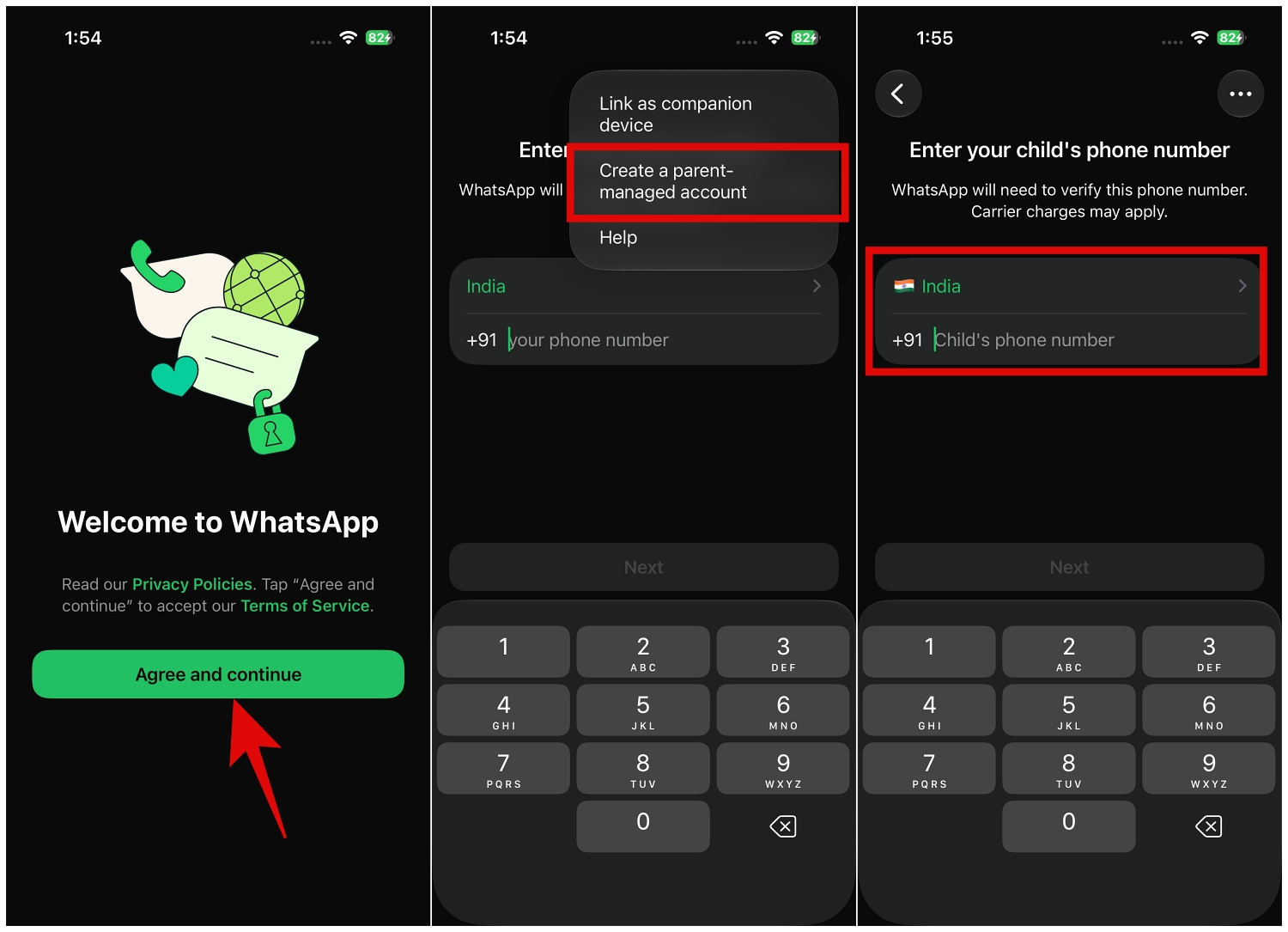
Once that’s done, the account is ready to use.
Setting up the account is just the first step. Once it’s linked, parents can manage several safety and privacy settings directly from their own WhatsApp account.
Instead of allowing anyone with your child’s phone number to start a conversation, WhatsApp lets parents decide who can contact them.
If an unknown person tries to get in touch, you can review the request before allowing future conversations.
Group chats can introduce children to people they don’t know. Parent-managed accounts let you approve or decline invitations before your child joins.
With a parent-managed account, you can approve or decline group invitations instead of discovering later that your child has joined several large groups.
Parents can also change several privacy settings, including:
Any changes require the Parent PIN, helping prevent unauthorized updates.
No. Even with a parent-managed account, parents can’t access messages, calls, or shared media. WhatsApp continues to protect conversations with end-to-end encryption.
Once the account is set up, your child can use WhatsApp while you stay in control of the most important safety settings. As your child’s needs change, you can update those controls at any time.
Have questions about WhatsApp’s parent-managed accounts? Let us know in the comments, and we’ll do our best to help.
Check out these helpful guides too: