
FaceTime Like a Pro
Get our exclusive Ultimate FaceTime Guide 📚 — absolutely FREE when you sign up for our newsletter below.

FaceTime Like a Pro
Get our exclusive Ultimate FaceTime Guide 📚 — absolutely FREE when you sign up for our newsletter below.


Apple just dropped iOS 26 beta 4, and it is the last developer beta update that sets the stage for the upcoming public beta.


Apple just dropped iOS 26 beta 4, and it is the last developer beta update that sets the stage for the upcoming public beta. After mixed reactions to the last update, this one feels like Apple rolling back a few things and introducing some small new features that we’ve all been waiting for.
Let’s break down everything new in iOS 26 beta 4.
Here are all the changes we have observed in the Developer Beta version 4 of iOS 26:
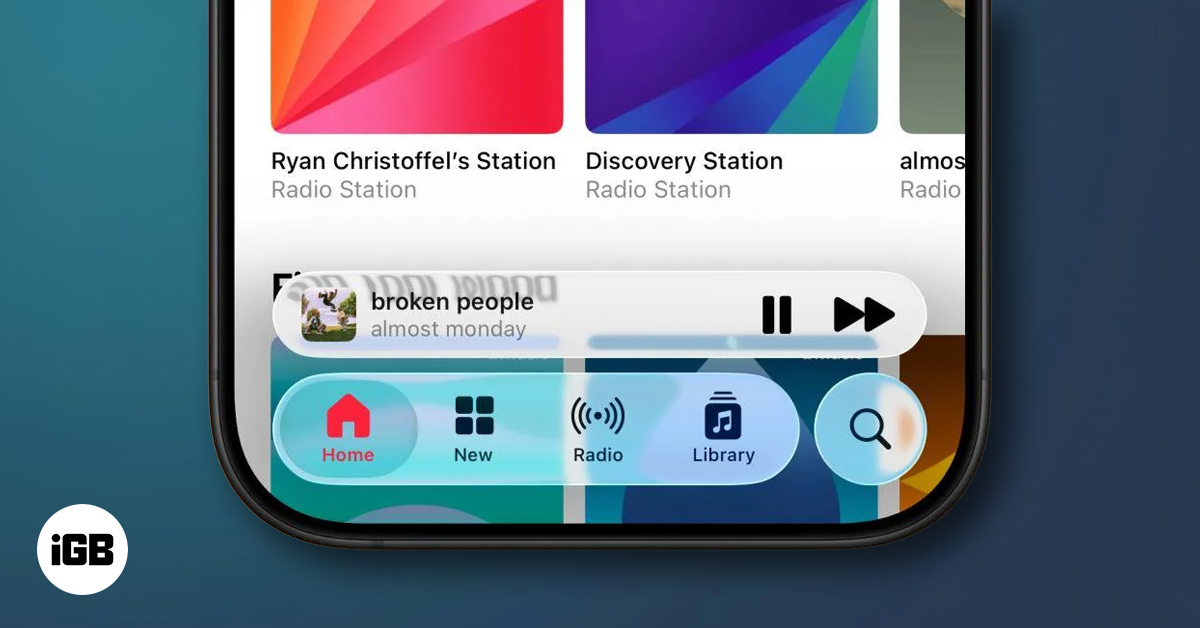
In beta 3, Apple pulled back the heavy transparency of its new “Liquid Glass” design. Things looked more frosted than fluid, and testers weren’t happy. But in beta 4, Apple brings back the shine.
The transparency is back in toolbars across system apps like App Store, Photos, Weather, and Apple Music. The tab bars feel more dynamic and show more content underneath, closer to what we saw in beta 2.
Notification Center also got a soft dynamic tint while scrolling, helping blend your notifications with the background in a bit smoother way.
Right after updating, you’ll see a fresh welcome screen for iOS 26. Apple also added new introduction screens that walk you through changes in the Camera app, Siri, and AI features. These help you understand what’s new instead of leaving you to find it yourself.
Apple has reintroduced its AI-powered notification summaries under the News & Entertainment section. These were previously pulled due to controversy, specifically, a false BBC headline generated by the AI.
Now Apple didn’t solve the issue. Rather, now you get a warning telling you that AI-generated summaries might change the meaning of original headlines, and advises you to verify facts yourself.
The Camera app now comes with a splash screen explaining what’s new. The icon itself is also tweaked; it shows more of the sensor and less of the old thick bezel design. It’s a small change, but it reflects the new direction.
iOS 26 beta 4 introduces a new dynamic wallpaper that changes colors. CarPlay also gets updated wallpaper options that match iOS 26’s new look. Some older wallpaper options have been removed in the process.
In the Phone app, there are now new settings for silencing unknown callers and controlling the new AI-based call screening features. These features ask the unknown caller for the reason before ringing your phone.
Apple usually rolls out the public beta a few days after releasing the fourth developer beta. That’s been the general pattern over the years, developer betas in June, public betas in July, and final versions in September.
Yesterday, we saw strong hints that beta 4 was coming right on schedule, and now it’s here. This also means the public beta is likely just a day or two away. While it hasn’t been officially confirmed, signs suggest it’s around the corner. Additionally, as beta 4 appears more polished than previous versions, we can expect the public version to arrive as scheduled.
If you’re planning to try it out, remember: iOS 26 supports iPhone SE (2nd gen), iPhone 11 and newer. Apple Intelligence features, however, need iPhone 15 Pro, Pro Max, or any iPhone 16 model.
iOS 26 beta 4 isn’t a big leap, but it’s a clear sign that Apple is fine-tuning the new design after user feedback. It also brings back a few features that were paused earlier, like the AI summaries, this time with clearer warnings. If nothing major breaks, this version might closely reflect what most users will see in the upcoming public beta.



