FaceTime Like a Pro
Get our exclusive Ultimate FaceTime Guide 📚 — absolutely FREE when you sign up for our newsletter below.

FaceTime Like a Pro
Get our exclusive Ultimate FaceTime Guide 📚 — absolutely FREE when you sign up for our newsletter below.


I tested the best Qi2 and MagSafe accessories for the Galaxy S26 Ultra, including chargers, power banks, wallets, and car mounts that genuinely improved daily use.
I originally thought MagSafe accessories were mostly an iPhone thing. The Galaxy S26 Ultra is an absurdly capable phone, so I didn’t think snapping magnets onto the back of it would change much. But I was wrong.
After using magnetic chargers, wallets, power banks, and car mounts with the Galaxy S26 Ultra, going back to regular accessories started feeling annoying. But there’s a catch. Most magnetic accessories for Samsung phones are still mediocre.
So, here are the best Qi2 and MagSafe accessories for the Samsung Galaxy S26 Ultra I’d actually spend my own money on again.
Most people buy magnetic accessories the wrong way. After testing a bunch of Qi2 and MagSafe gear with the Galaxy S26 Ultra, these are the things that mattered far more in real life:
The better Qi2 accessories stayed noticeably cooler during long charging sessions and didn’t need constant adjusting.
Before buying any Qi2 or MagSafe accessory, get a slim magnetic case for your S26 Ultra. Because there are no built-in physical magnets inside the phone itself. Samsung intentionally left them out because magnets can interfere with the S Pen and its digitizer system.
A Qi2-compatible magnetic case adds the magnetic ring alignment system. It makes the accessories snap into place correctly and avoids shifting. Also, a proper charging attachment means fewer disconnections, consistent 25W charging, and less heat.
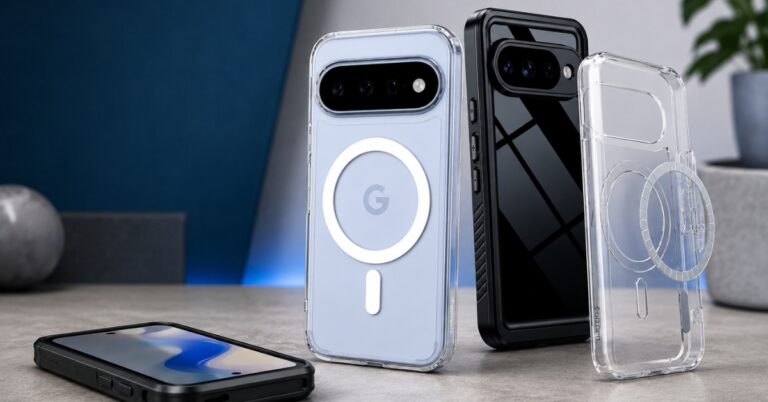
The best S26 Ultra magnetic case I’d recommend:
Always look for strong N52 magnets, raised camera protection, and grip texture in a case. This makes any MagSafe-to-Qi2 accessory work with your flagship Galaxy phone. Without it, even expensive accessories feel half-broken.
Here, I have listed all the tried and tested Qi2 and MagSafe accessories you must have for your S26 Ultra.
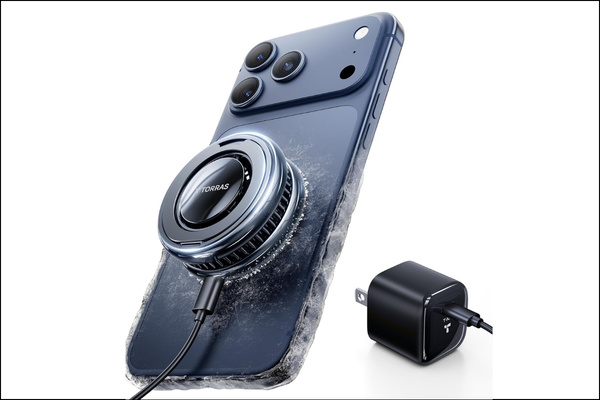
TORRAS PolarCircle made me realize wireless chargers can actually be good. The magnetic alignment is extremely satisfying. I could literally drop the phone onto the charger half-asleep, and it snapped perfectly into place every time.
What impressed me most was heat management. Compared to random wireless chargers I’ve used before, this stayed noticeably cooler during long charging sessions thanks to the built-in turbine fan and TEC semiconductor cooling chip.
The integrated 360° rotating stand makes it easy to switch between portrait and landscape viewing for video calls, movies, or desk use. You also get a 45W IceNano GaN adapter to provide 25W wireless charging speed for S26 Ultra.
Pros
Cons
Tip: If you want the safest charging option for your S26 Ultra, go for the Samsung Galaxy Magnet Wireless Charger. It’s reliable, minimal, and optimized properly for Galaxy phones.
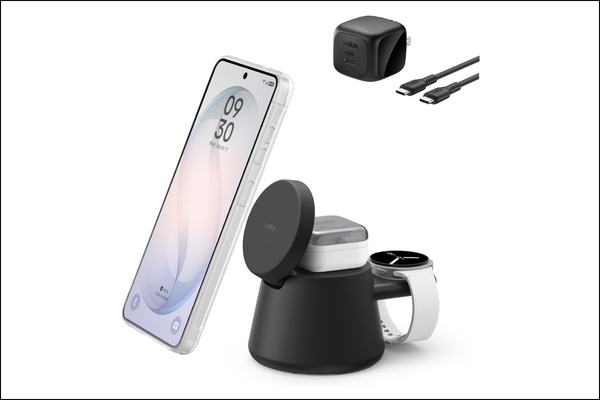
If you work at a desk, you know how quickly it gets cluttered with all the cables. To get rid of this, I got the Belkin 3-in-1 Wireless Charging Station. Instead of juggling separate chargers for my S26 Ultra, AirPods, and Galaxy Watch, everything charged from a single docking station. It includes two charging pads and a silicone holder for your watch charger.
The magnetic alignment is surprisingly strong, so I didn’t have to constantly reposition the phone. It also features Qi2 technology for consistent 25W fast charging. During testing, the charger stayed relatively cool due to Belkin’s ChillBoost passive cooling system.
The adjustable folding design is another feature I ended up liking more than expected. I could keep my Galaxy S26 upright while working, in landscape mode to watch YouTube, or in portrait mode for video calls without interrupting charging. This also bundles a 45W adapter and a 5 ft USB-C cable to complete the setup.
Pros
Cons
Bonus: If you are struggling with a messy workspace, check out these desk accessories that actually made my setup more productive.
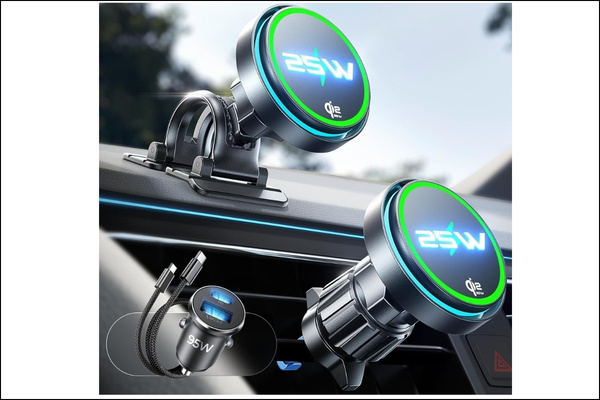
Most magnetic car mounts are terrible. Either they have an ineffective magnet, get really hot, don’t hold the battery while navigating, or shake a lot. LISEN MagSafe car mount turned out to solve all of these problems.
I tested it on rough roads, speed bumps, and aggressive turns. The S26 Ultra stayed locked in place surprisingly well. The mount supports both dashboard and air vent installation, and the setup takes only a few minutes. As it’s 360° adjustable, you can easily switch between portrait and landscape mode while driving.
Moreover, the dual ventilation and cooling fan system helped during navigation sessions with brightness maxed out. My phone stayed cooler, and charging speeds remained stable. It supports Qi2.2 25W wireless charging, which is a major upgrade. One small thing I will appreciate is the subtle LED ring that turns off automatically after a few seconds.
Pros
Cons
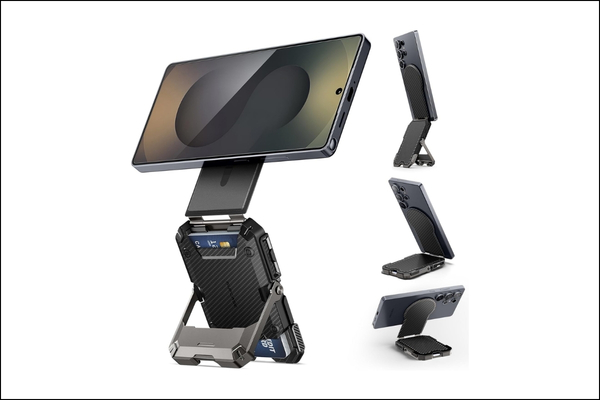
I expected to hate magnetic wallets on a huge phone like the S26 Ultra. Turns out I loved it. The SUPCASE MagSafe Wallet is both practical and durable. The first thing I noticed during testing was the magnetic strength. Once attached to a MagSafe-compatible case, the wallet feels extremely secure.
You can comfortably fit five cards, and the spring-loaded system makes it easy to retrieve cards one-handed. What really makes the SUPCASE wallet feel more useful is the built-in adjustable stand. I ended up using it constantly. The hinge feels solid instead of flimsy, and it supports multiple portrait and landscape viewing angles without wobbling.
Pros
Cons
Tip: If the SUPCASE feels bulky, the Spigen leather MagSafe wallet is the better option. It’s slim, elegant, and premium. I’d personally choose this for daily commuting.
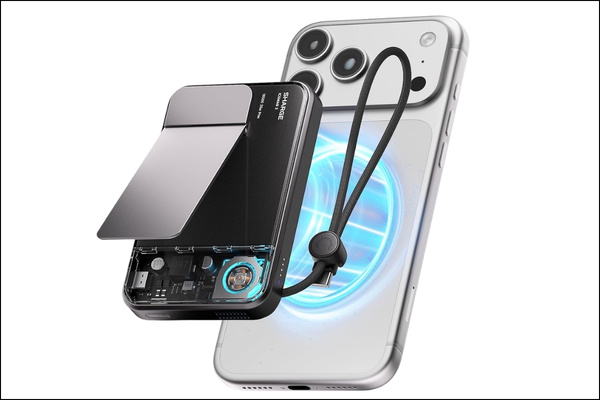
sharge ICEMAG Magnetic Power Bank is one of my must-have travel accessories. I liked the unique transparent RGB cyberpunk-style design at first glance. But after using it for a while, its thermal management and fast 25W wireless charging speed actually impressed me.
Most MagSafe battery packs get noticeably warm after about 20–30 minutes, especially during navigation, gaming, or camera use. Its built-in active cooling fan actually kept my S26 Ultra safe from overheating. sharge also added a built-in 35W USB-C cable and passthrough charging support, making it more versatile.
The magnetic connection is very secure, too. Once attached, it stays firmly locked onto the back of the phone, even while walking or using the device one-handed. I also liked the built-in aluminum kickstand in different situations.
Pros
Cons
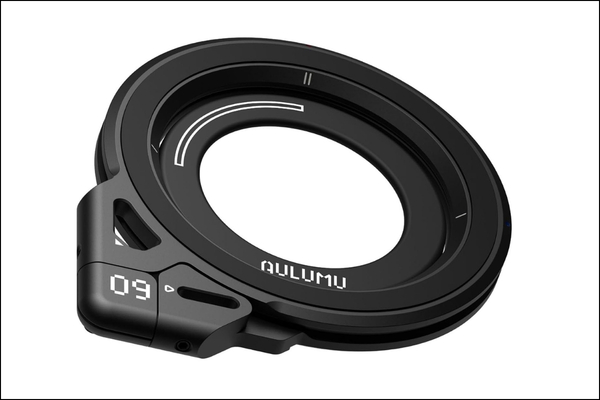
I tested the Aulumu G09 Magnetic Ring Grip for about a week on both the S26 ultra and the iPhone, and it quickly became one of those accessories. Although it looks like a simple MagSafe stand and ring holder, the brand designed it more like a compact multifunction phone utility tool.
You get strong N52 magnets that feel extremely secure. I tried using it every way possible, and the grip stayed firmly attached without wobbling or rotating. What makes the G09 stand out is its omnidirectional rotating design and double-sided magnets. You can attach and prop your phone on any surface.
Pros
Cons
Yes, but only if you buy the right ones.
Qi2 fixes one of the biggest problems with wireless charging: alignment. Instead of guessing whether your phone is positioned correctly, magnets snap everything into the ideal charging position automatically. That sounds small until you use it daily.
For me, the biggest upgrades were:
Qi2.2 also feels more mature now than early wireless charging ever did, thanks to its industry-wide standardization with Apple’s MagSafe technology.
After testing all the Qi2 and MagSafe accessories with my Galaxy S26 Ultra, I realized how the right setup enhances user experience. Charging became easier, desk setups looked cleaner, and using the phone one-handed felt more secure and comfortable.
Qi2 support also makes the Galaxy S26 Ultra feel much closer to the polished magnetic ecosystem iPhone users have enjoyed for years. If you recently upgraded to the Galaxy S26 Ultra, I’d genuinely recommend trying a few good Qi2 or MagSafe-compatible accessories.