FaceTime Like a Pro
Get our exclusive Ultimate FaceTime Guide 📚 — absolutely FREE when you sign up for our newsletter below.

FaceTime Like a Pro
Get our exclusive Ultimate FaceTime Guide 📚 — absolutely FREE when you sign up for our newsletter below.


 ByVikhyat
WhatsApp is rolling out a new feature that lets iPhone users change microphone modes without leaving an active call. First spotted by WABetaInfo, the update is rolling out gradually, so it may not be available to everyone immediately.
Previously, changing Mic Mode required opening Control Center during a call. With the latest update, those controls are now accessible directly from the WhatsApp call interface.
The new option appears under the More button while you’re on a WhatsApp call.
Tap Mic Mode, and you’ll see Apple’s built-in microphone options without leaving the call. Simply select your preferred mode, and WhatsApp applies it instantly without interrupting the conversation.
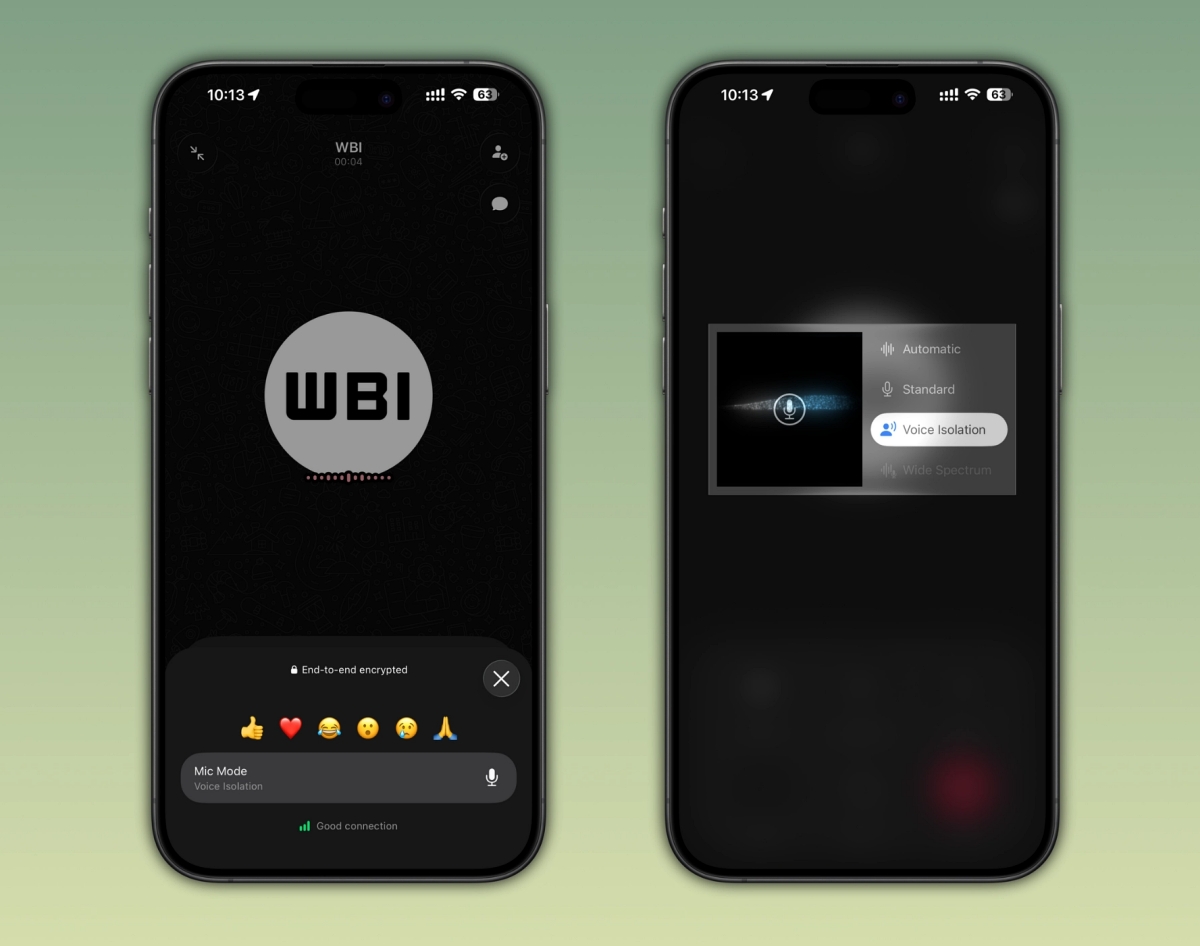
The menu includes all four microphone modes available in iOS:
Because WhatsApp uses Apple’s system-level microphone controls, switching between modes works the same way it does in FaceTime and other supported iPhone apps.
Apple offers four microphone modes on supported iPhones:
According to Apple, Voice Isolation and Wide Spectrum require iOS 15 or later and are available on the iPhone XR, iPhone XS, and newer models.
Automatic Mic Mode requires iOS 18 or later.
By bringing Mic Mode controls directly into the call interface, WhatsApp makes it much easier to adjust audio settings without interrupting an ongoing conversation.
Do you use Voice Isolation for WhatsApp calls, or do you prefer the Standard microphone mode? Let us know in the comments below.