FaceTime Like a Pro
Get our exclusive Ultimate FaceTime Guide 📚 — absolutely FREE when you sign up for our newsletter below.

FaceTime Like a Pro
Get our exclusive Ultimate FaceTime Guide 📚 — absolutely FREE when you sign up for our newsletter below.


WhatsApp is expanding Apple Watch reactions from 6 presets to the full emoji library. The new picker with recents and categories is rolling out now.
You can finally react to WhatsApp messages on your Apple Watch with any emoji, not just six presets.
WhatsApp has started rolling out full emoji reactions on watchOS, as reported by WABetaInfo. Reactions from the Watch now look just like reactions from your iPhone.
When WhatsApp launched its full Apple Watch app in November 2025, the Watch finally got proper support for reading chats, sending voice messages, and seeing call notifications without relying on plain system notifications. Emoji reactions came with it, but you were limited to six choices. Anything else meant pulling out your iPhone.
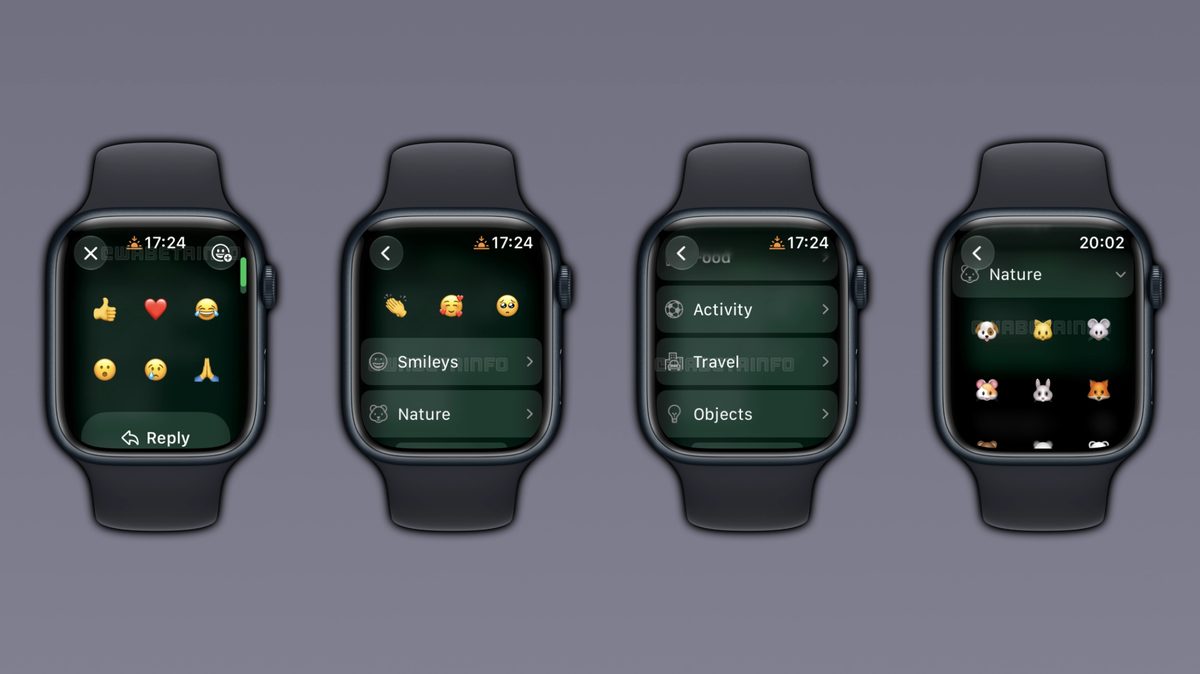
Now that limit is gone. If you long-press a message on the Watch, you’ll still see those six quick reactions first. But there’s now a button to open the complete picker.
That picker shows:
WABetaInfo says WhatsApp organizes the library into 8 categories: Smileys, Nature, Food, Activity, Travel, Objects, Symbols, and Flags. Tap a category to expand it, pick anything, and the reaction appears in the chat the same way it does from an iPhone.
On iPhone you tap the + in the reaction tray to get every emoji. The Watch version brings the same flexibility, just with a vertical scroll instead of tabs.
WABetaInfo notes this is a gradual rollout. Even though the feature is officially live, it may take a few weeks before you see the category button on your Watch. WhatsApp hasn’t listed it in the App Store changelog yet, which is normal for its staged releases.
If you don’t see it, make sure your iPhone and Watch apps are updated and check again later. There’s nothing to enable in Settings, it appears automatically when your account gets it.
For anyone who lives on the Watch for quick replies, this closes a small but annoying gap. Reactions are the fastest way to acknowledge a message without typing, and on a tiny screen knowing how to use WhatsApp on Apple Watch properly matters more than on the phone. The same long-press to react flow you use on iPhone now carries over to your wrist without compromise.