FaceTime Like a Pro
Get our exclusive Ultimate FaceTime Guide 📚 — absolutely FREE when you sign up for our newsletter below.

FaceTime Like a Pro
Get our exclusive Ultimate FaceTime Guide 📚 — absolutely FREE when you sign up for our newsletter below.


References in WhatsApp beta for iOS 26.31.10.70 point to a floating in-chat search button on iPhone, cutting the detour through the chat info screen.
WhatsApp is working on a search button that sits right inside the chat screen on iPhone, according to WABetaInfo. References to the feature showed up in WhatsApp beta for iOS 26.31.10.70 on TestFlight. Tap the button and you can search that conversation directly, without leaving it.
That fixes a genuinely annoying detour. Right now, searching inside a chat on iPhone means tapping the contact or group name at the top, scrolling the chat info screen, and then tapping Search. iPad users get a quicker route through the More button, but the iPhone app has never had an in-chat shortcut.
The new search button won’t sit on the screen permanently. It appears in the bottom-right corner once you start scrolling up through older messages and disappears again when you return to the bottom of the conversation, the same way the jump-to-latest-message arrow behaves now.
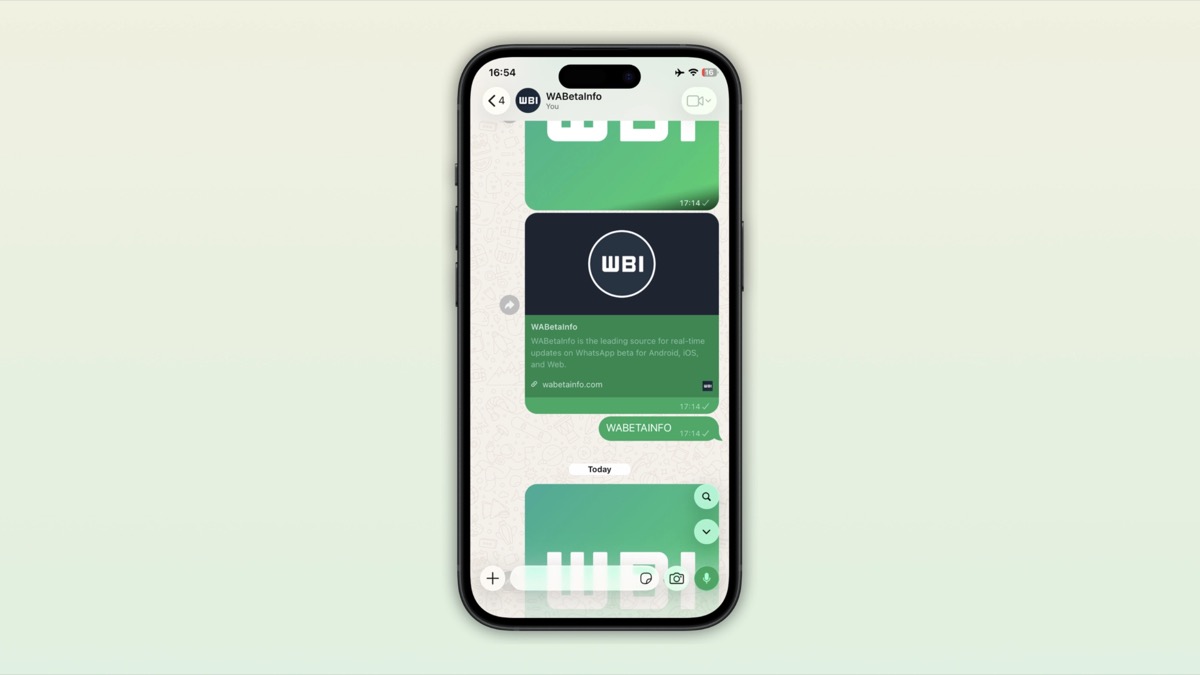
That placement makes sense. Scrolling back through months of messages is exactly the moment you give up and want to search instead, and the button will be right there when it happens.
The search itself is unchanged. The button opens the same in-chat search you get from the chat info screen today, including the calendar icon for jumping to messages from a specific date. What changes is how fast you reach it: one tap instead of a trip out of the conversation.
The feature is still under development. WhatsApp hasn’t enabled it for beta testers, and there’s no word on a release date, so it could take a while to reach the App Store version. Beta references also don’t guarantee a feature ships at all, though a search shortcut this small and useful seems like a safe bet.
WhatsApp has been steadily filling gaps in its iOS app lately, from testing Meta AI summaries for unread messages to a connected peripherals listing in Linked Devices. Until the search button arrives, the chat info screen remains the way in, and there are plenty of other WhatsApp tricks on iPhone that work today.