FaceTime Like a Pro
Get our exclusive Ultimate FaceTime Guide 📚 — absolutely FREE when you sign up for our newsletter below.

FaceTime Like a Pro
Get our exclusive Ultimate FaceTime Guide 📚 — absolutely FREE when you sign up for our newsletter below.


Instagram now lets you fix text, music, stickers and drawings on a published Story, but only for 15 minutes, and edited Stories show an Edited label.
I’ve lost count of how many times I’ve published an Instagram Story only to spot a typo, forget to add music, or notice a misplaced sticker seconds later. Until now, the only way to fix these issues was to delete the Story and reupload it, losing the views and engagement it had already received.
Instagram is finally addressing this long-standing frustration. As announced by Instagram head Adam Mosseri, you can now edit certain elements of a Story after publishing without deleting the original or losing its existing views, likes, and replies. There’s a catch, though: you have to do it within 15 minutes.
Here’s how to use Instagram’s Story editing feature, what you can change after posting, and what limitations you should know about.
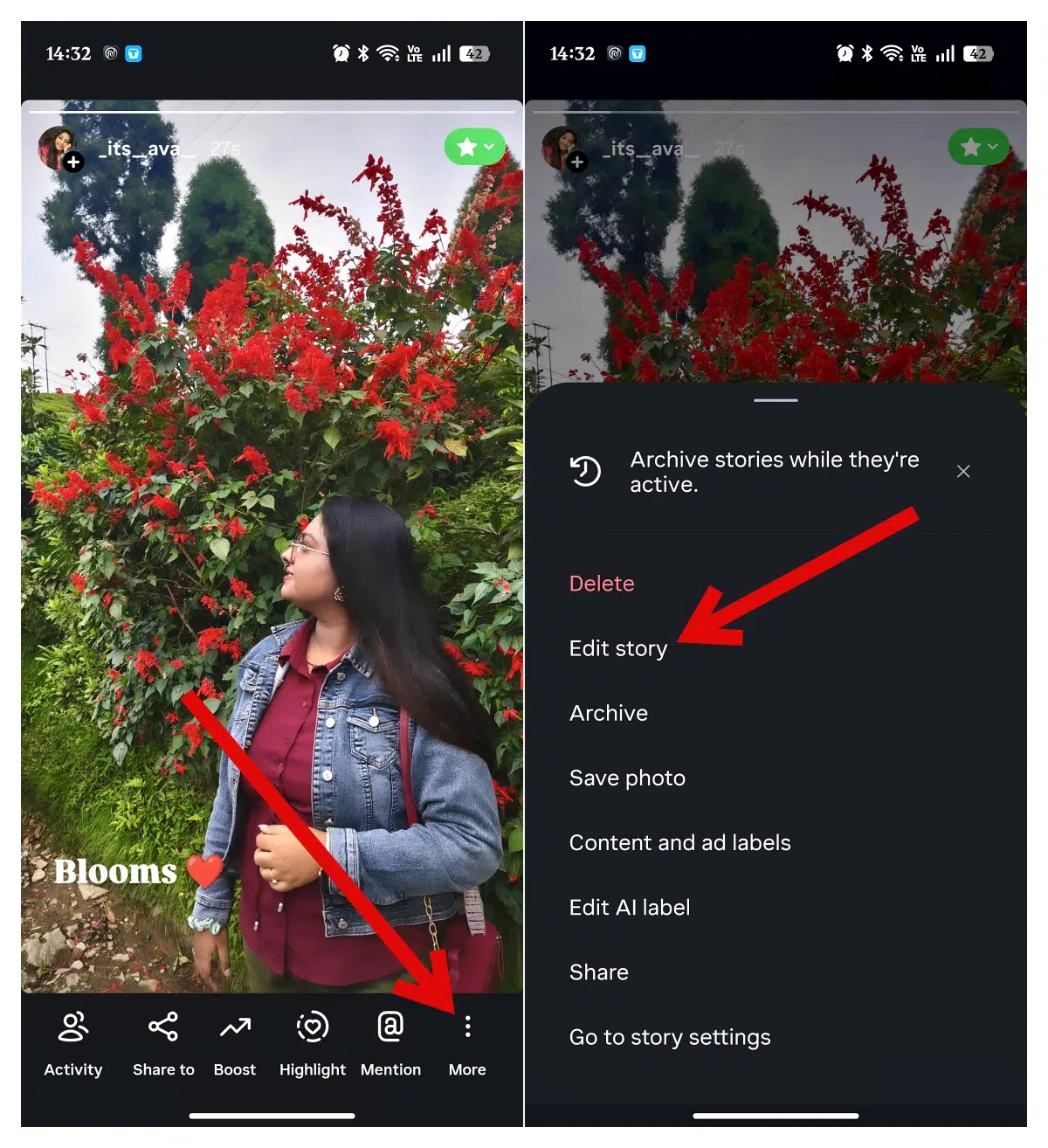
You no longer need to delete an Instagram Story just because you spotted a spelling mistake or forgot to add a song. Instagram now offers an editing option directly inside a published Story.
Follow these steps:
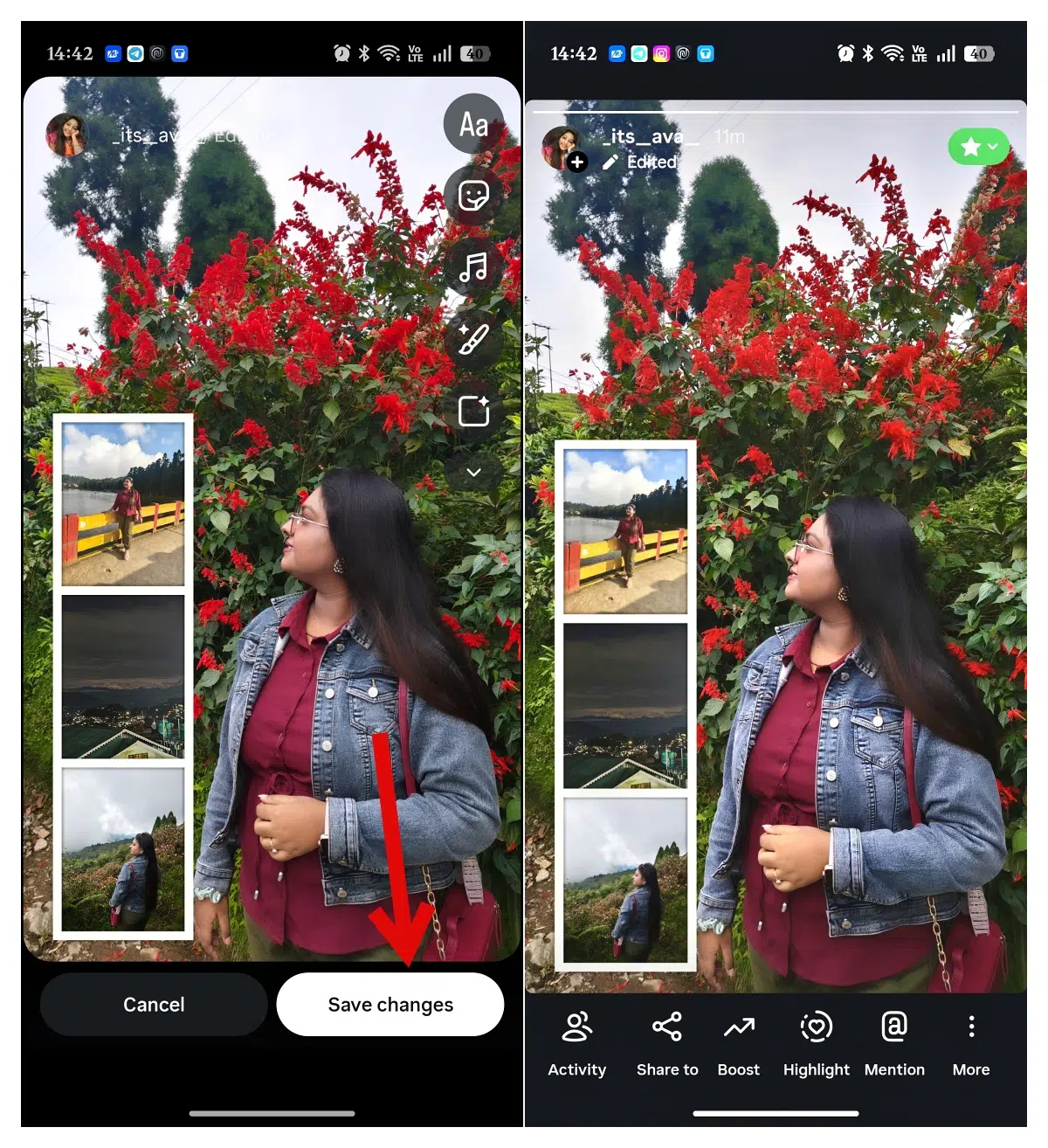
That’s it! Your changes will appear on the existing Story without requiring you to upload the entire photo or video again. Viewers will see an Edited label at the top, under your username.
I’d recommend checking your Story immediately after publishing it. The 15-minute window is short, especially if you’re sharing promotional content or multiple updates.
Instagram doesn’t let you edit your Story freely after it goes live. Instead, the update focuses on the following:
One limitation: You can’t treat this as a full editing tool. Instagram hasn’t introduced an option to replace the original photo or video through post-publication editing.
The best part of this update isn’t simply the ability to fix mistakes. It’s that you don’t have to sacrifice your existing engagement to do so.
Here’s what happens after editing:
Note: If someone has reshared your original Story, that reshare will be removed when you edit the original.
I think preserving existing engagement is what makes this update genuinely useful. Otherwise, editing would offer little advantage over simply reposting the content.
If Edit Story isn’t showing up in your Instagram app, it doesn’t necessarily mean something is wrong with the app itself. Run through these checks.
This is the first thing I’d check. Instagram only allows editing within 15 minutes of publishing. Once that window expires, you’ll have to delete and repost the Story to make changes.
Open the App Store or Google Play Store, search for Instagram, and install any available update. Running an older version could prevent you from accessing newer features.
Instagram often rolls out new features in phases. Even though the company has announced Story editing, the update may not reach everyone right away. Wait a while and check again.
Stories shared to both Facebook and Instagram don’t support the new editing option. If you regularly cross-post content, try a Story published only on Instagram.
Some interactive stickers, such as Add Yours, can also block post-publication editing. If the option is missing even though you meet the other requirements, the Story’s content could be responsible.
Post-publication editing isn’t the only improvement Instagram is bringing to Stories. The platform is also introducing a few creative additions:
These aren’t groundbreaking changes, but they make the Story creation experience a little more flexible.
I wouldn’t call this a complete solution to Instagram’s editing limitations. A 15-minute window feels surprisingly short. If you publish a Story and notice a mistake half an hour later, you have no option but to delete it and post the content again. You also can’t replace the original photo or video, so don’t expect a full editing experience.
Still, I think this is one of those small Instagram updates that can make a meaningful difference to everyday use. Being able to fix a typo, change a song, or adjust a sticker without losing existing engagement is genuinely useful.
FAQs
Yes. Instagram preserves existing views, likes, and replies when you edit a published Story. You can modify supported elements without deleting and reposting the original.
Yes. Open your published Story, tap the three-dot menu, and select Edit Story. You can change or add music within 15 minutes of publishing.
Yes. Instagram displays an Edited label on modified Stories, so viewers can tell you’ve made changes after publishing.
No. Instagram lets you edit a Story only up to 15 minutes after you post it. Once that window expires, you’ll need to delete the Story and upload it again to make changes.

As an Amazon Associate, iGeeksBlog earns from qualifying purchases.