
FaceTime Like a Pro
Get our exclusive Ultimate FaceTime Guide 📚 — absolutely FREE when you sign up for our newsletter below.

FaceTime Like a Pro
Get our exclusive Ultimate FaceTime Guide 📚 — absolutely FREE when you sign up for our newsletter below.


iOS 26 makes Wallet order tracking more useful by using Apple Intelligence in Mail to find supported shipment details from your emails. Here’s how to enable it, view your orders, and fix missing deliveries.
Order tracking is not new to the Wallet app, but that experience was limited. It worked nicely with the orders from participating merchants paid through Apple Pay. But whenever I made purchases from anywhere else, I was back digging through Mail, copying tracking numbers, and opening courier sites to view the shipment status.
iOS 26 finally fixes the most annoying part. The Wallet app now shows shipment details in one place, thanks to Apple Intelligence in Mail. In this guide, I’ll show you how to turn on order tracking in iOS 26 Wallet, where to find your orders, and what to do if your shipments are not showing up.
Order Tracking in the Wallet app is Apple’s built-in way to keep your online purchase updates in one place. This feature has already existed since iOS 16 for eligible Apple Pay purchases from participating merchants. But it felt half-finished as most sellers had their own tracking system and didn’t bother to tie up with Apple.
However, in iOS 26, Wallet can now also use Apple Intelligence to find supported order information from your emails sent from sellers, marketplaces, and courier companies. So even if an order was not added through Apple Pay, it may still appear in Wallet. No need to manually paste tracking numbers.
Note that this does not mean Wallet will track every single shipment automatically. It works with eligible purchases, supported merchants, and order emails that Wallet can understand. You will see a Found in Mail label to distinguish them.
This is the part most users will misunderstand, so let me explain it clearly.
| Feature | Apple Pay order tracking | Mail-based order tracking |
|---|---|---|
| How it works | Orders from participating merchants are added when you use Apple Pay | Wallet uses Mail and Apple Intelligence to detect order emails |
| Best for | Purchases made through supported apps and websites | Orders from emails, including stores and marketplaces that may not support Apple Pay tracking directly |
| Setup | Usually works automatically when supported | You need to enable Mail under Order Tracking |
| Limitation | Depends on merchant support | Depends on Apple Intelligence support, language, region, and email quality |
| My take | Clean but too limited | Messier, but far more useful |
In my testing, the Wallet app took a while to populate the details from Mail. It worked smoothly after receiving a fresh order confirmation or shipping email. Also, nearly all my purchases from Amazon and Best Buy were listed on Wallet.
You can also try tracking from inside Mail:
Once the feature is enabled, here is where to look:
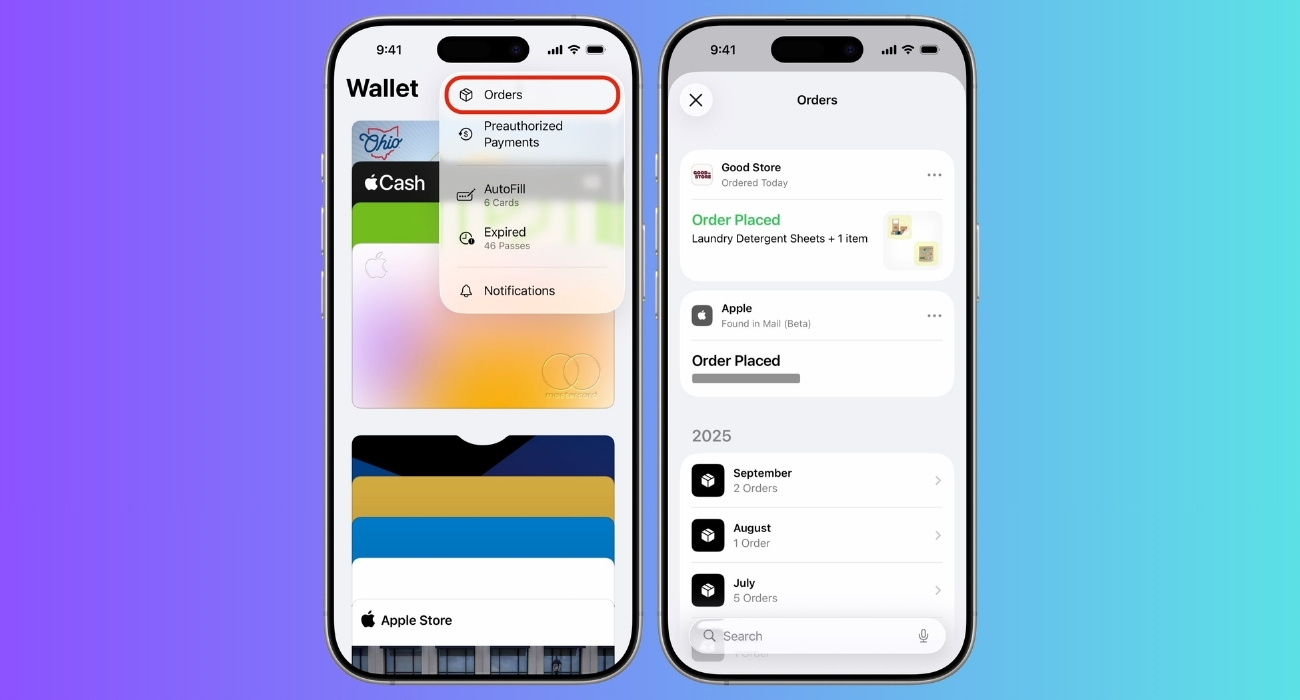
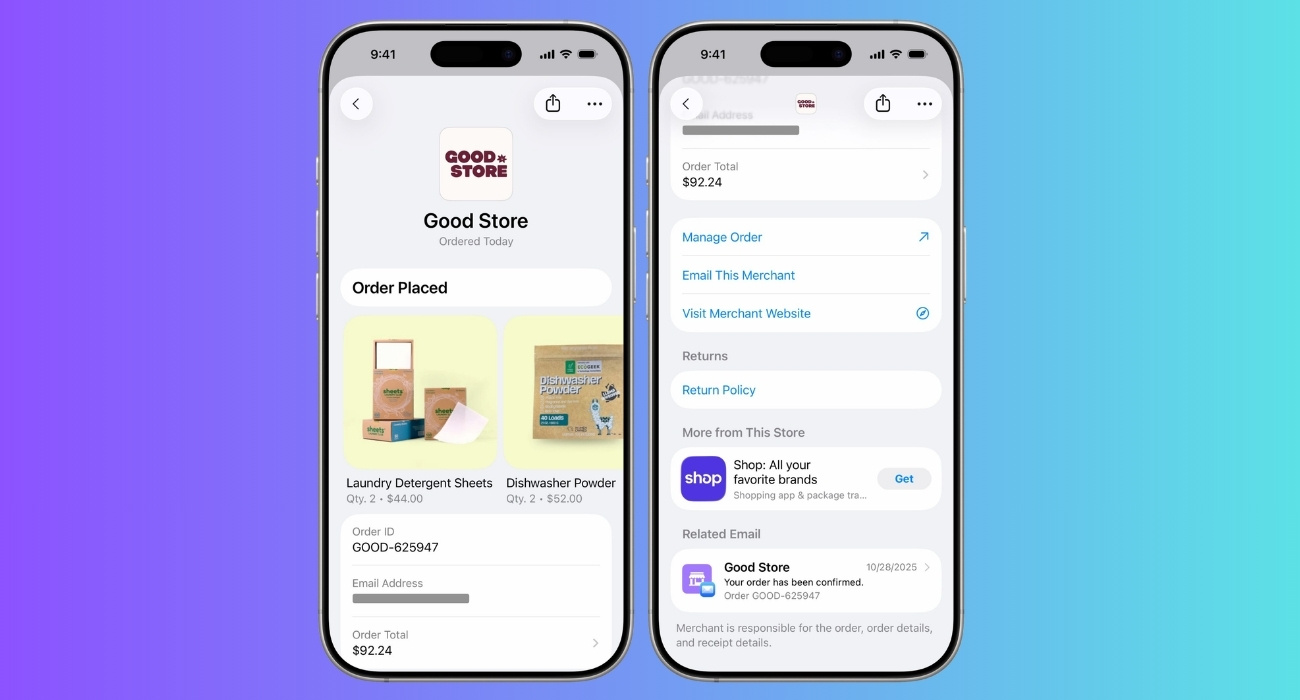
The Wallet app also lists the related emails in one thread so you can stay updated. Scroll to the Related Emails section and select an email to view its details. However, if you are bombarded with tracking alerts, you can disable them from the three-dot icon > Mute Notifications.
When I need to share the purchase information with others, I simply tap the share button in the order details instead of finding and forwarding the email. I know Wallet is still not perfect for deleting my courier apps yet, but it feels like a practical package shipment dashboard.
Tip: If you find a credit/debit card transaction in the Wallet app that you can’t remember, tap it to directly see its Order Tracking details.
If your orders are not showing in Wallet, do not assume the feature is broken immediately. It is more likely one of these things is happening.
| Reason | Fixes |
|---|---|
| Mail order tracking is turned off | Make sure Mail is enabled in Wallet & Apple Pay settings. If this toggle is off, Wallet will not use your Mail app to find order emails. |
| Your order email is not in Apple Mail | If your order confirmation lives only inside Gmail, Outlook, the Amazon app, or a merchant app, Wallet may not detect it through Mail. Go to Settings > Apps > Mail > Mail Accounts and add that email address, then check again. |
| Apple Intelligence is not available on your iPhone | Mail-based order tracking is tied to Apple Intelligence. If your device, language, or region does not support the feature, the Mail option may not appear or work as expected. |
| The confirmation email is too messy | A clean shipping email with a merchant name, tracking number, order number, and delivery estimate is much easier for Wallet to understand than a cluttered promotional email with five banners and one tiny shipping link. |
| The merchant does not support Wallet order tracking | For Apple Pay-based tracking, the seller app or website needs to participate. |
My stance: if Wallet misses one order, that does not make the feature useless. But if it misses most of your orders, it is not ready to replace a dedicated package tracker for you.
iOS 26 turns Wallet order tracking from a nice Apple Pay extra into something normal people might actually use.
The feature still has limits and doesn’t solve messy e-commerce tracking. But the direction is right. Instead of forcing me to remember where I bought something, which courier has it, and which email contains the tracking link, Wallet can now act like a central order board.
My final take is turn it on, but do not trust it blindly yet. Use Wallet for quick order checks. Use the merchant or courier app when you need returns, delivery instructions, proof of delivery, or detailed shipment history.
What do you think about this underrated Wallet feature? Share your thoughts in the comments below!
Read more:













