FaceTime Like a Pro
Get our exclusive Ultimate FaceTime Guide 📚 — absolutely FREE when you sign up for our newsletter below.

FaceTime Like a Pro
Get our exclusive Ultimate FaceTime Guide 📚 — absolutely FREE when you sign up for our newsletter below.


Hermes is getting all the attention lately, but it solves a different problem than OpenClaw. After testing both, I found Hermes better for personal workflows, while OpenClaw still wins for broader automation and messaging support.
I have been using Hermes from the day it launched, but mostly for tiny admin work: organizing files, summarizing bills, cleaning up scattered notes, and similar everyday tasks. It felt useful, but not like something that would suddenly make OpenClaw irrelevant.
However, recently Hermes took off in popularity with more users and more stars on GitHub. Some people now claim Hermes is simply better. It kind of is, but only for a particular workflow: repeated personal work where memory, reusable skills, and “do it like last time” matter more than being available in every chat app.
If you want one self-hosted assistant across WhatsApp, Telegram, Slack, iMessage, Discord, and other channels, OpenClaw still makes more sense. The question is whether you need a learning-first agent or a wider automation gateway.
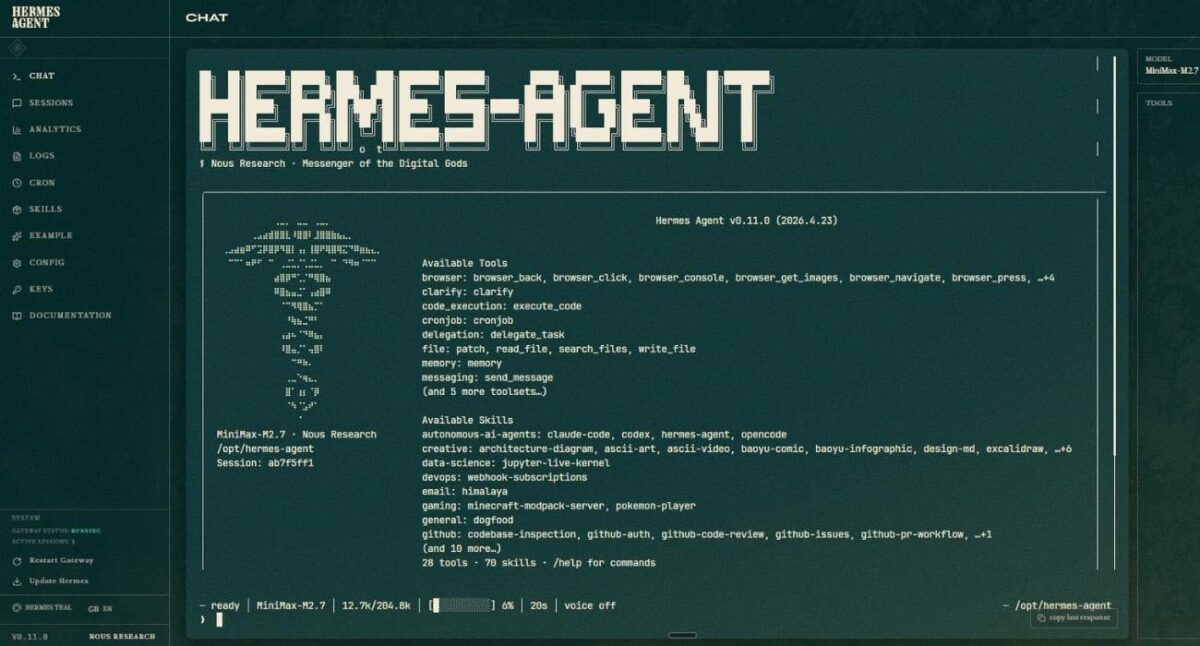
Hermes Agent is built around one strong idea: your agent should grow with you.
That matters because most agents still feel temporary. You ask for a task, it does the job, and then you explain the same preference again next week. Hermes tries to avoid that by turning repeated behavior into memory and reusable skills.
This is where Hermes has the clearer story. If you keep asking an agent to summarize reports, clean the same type of spreadsheet, prepare a publishing checklist, or run familiar local scripts, Hermes’ learning loop can save real effort over time.
It also makes switching easier than expected. Hermes includes an OpenClaw migration command that can import settings, memories, skills, allowlists, messaging settings, selected API keys, TTS assets, and workspace instructions from an existing OpenClaw setup.
One important caveat: Hermes Agent is not the same thing as Nous’ Hermes model family. The official Hermes Portal docs say Hermes 4 models are strong chat and reasoning models but are not recommended inside Hermes Agent because the agent needs rapid tool-calling behavior.
OpenClaw is still better if your agent needs to live everywhere. Its channel docs list Discord, Slack, Telegram, WhatsApp, Signal, Microsoft Teams, Google Chat, iMessage, Matrix, IRC, Mattermost, Nextcloud Talk, Nostr, LINE, WeChat, QQ Bot, Feishu, Zalo, WebChat, and voice calls through plugins.
That breadth is not a side feature. A personal agent becomes useful when it is available where the request happens. If your family uses WhatsApp, your team uses Slack, your alerts land in Discord, and your quick notes start in Telegram, OpenClaw’s gateway approach is still hard to beat.
OpenClaw also has far larger public adoption on GitHub right now. Stars and forks do not make an agent better, but they usually mean more examples, more plugins, more community fixes, and more people finding edge cases before you do.
So Hermes has not killed OpenClaw. Hermes is a sharper personal workflow tool. OpenClaw is still the broader assistant layer.
One person’s Hermes setup can beat another person’s OpenClaw setup simply because it uses a better model, cleaner tools, tighter permissions, or better memory. The reverse can also happen.
This is the same reason a ChatGPT vs Claude comparison often becomes a comparison of behavior, not raw intelligence. There is research backing that up. WildClawBench, a May 2026 benchmark for long-horizon agent tasks, found that switching the agent harness alone can shift one model’s score by up to 18 points.
That is why “Hermes is smarter” is too lazy. A better question is: which tool gives your chosen model the better environment for the work you repeat?
Any agent that can read files, use a browser, send messages, access email, run commands, or call APIs is not just a chatbot. It is software that can act. That is the larger shift behind tools like ChatGPT Agent, and it needs tighter limits.
A 2026 arXiv safety analysis of OpenClaw found that personal agents with broad local and account access create a serious attack surface. The paper focuses on OpenClaw, but the warning applies to Hermes too.
Start small. Use a test folder. Draft messages without sending permission. Use a separate browser profile. Connect one low-risk channel first. Keep approval required for shell commands, file changes, purchases, deletions, and account actions.
Use Hermes if your main problem is repetition. It is the better pick for personal memory, custom skills, terminal-heavy workflows, and tasks where you keep saying, “Do it the way I did last time.”
Use OpenClaw if your main problem is reach. It is better for a self-hosted assistant that needs to show up across many messaging apps, devices, team spaces, and automation routes.
If your current OpenClaw setup already handles your messages and automations well, do not switch just because Hermes is getting attention. Test Hermes only if OpenClaw feels too broad and not personal enough.
My answer: Hermes is better for personal productivity workflows. OpenClaw is better for an assistant who needs to be everywhere. The best choice is the one you can give limited permissions to, trust with small tasks, and expand without creating more cleanup work than it saves.