FaceTime Like a Pro
Get our exclusive Ultimate FaceTime Guide 📚 — absolutely FREE when you sign up for our newsletter below.

FaceTime Like a Pro
Get our exclusive Ultimate FaceTime Guide 📚 — absolutely FREE when you sign up for our newsletter below.


I thought Gemini Pro would be one of those upgrades that sounds impressive on paper but feels almost identical to the free version in daily use.
To find out, I spent a month using Gemini Free and Gemini Pro side by side for research, writing, coding, document analysis, and content creation. To my surprise, I found many useful tools that Google keeps behind the paywall. Features like Deep Research, NotebookLM, advanced AI models, and video generation changed how I used Gemini day-to-day.
If you’re wondering whether Gemini Pro is worth the money or what you’re actually missing by sticking with the free plan, here’s everything I learned after 30 days of testing.
Google now offers four different AI tiers, and the differences are much bigger than they were a year ago.
| Feature | Gemini Free | Google AI Plus | Google AI Pro | Google AI Ultra |
|---|---|---|---|---|
| Price | Free with Google Account | $7.99/month | $19.99/month | Starting at $99.99/month |
| Gemini 3.1 Pro | Limited access | 2x higher usage limits with video generation and Daily Brief | 4x higher usage limits with video generation and Daily Brief. | up to 20x higher usage limits than Pro with Deep Think and Gemini Spark |
| NotebookLM | Basic | More notebooks and Audio Overviews | 5× higher limits | Highest limits |
| Google Flow image and video creation | Limited access to Nano Banana Pro | 200 Google Flow Credits with access to Gemini Omni Flash | 1,000 Google Flow Credits with access to Gemini Omni Flash | 10,000 or 25,000 Google Flow Credits with access to Gemini Omni Flash |
| Cloud Storage | 15GB | 200GB | 5TB | 20TB |
| Agentic Google Search | ❌ | Limited Nano Banana access | Access to Gemini 3 Pro and Deep Search | Highest access to Gemini 3 Pro and Deep Search |
| Gemini in Gmail, Vids, and more | ❌ | ✅ | Higher limits | Highest limits |
| Gemini in Chrome | ❌ | ✅ | ✅ | ❌ |
| Jules Coding Agent | ❌ | ❌ | Higher limits | Highest limits |
| Google Antigravity | ❌ | ❌ | Higher limits | Highest limits |
| Google Home Premium | ❌ | ❌ | Standard plan | Advanced plan |
| Project Genie to create interactive worlds | ❌ | ❌ | ❌ | ✅ |
| YouTube Premium | ❌ | ❌ | Premium Lite plan | Premium Individual plan |
The table makes one thing clear: Google AI Ultra isn’t just a larger version of Pro. It’s effectively Google’s everything plan. You get the company’s most advanced AI models, highest usage limits, early access to experimental features, massive AI credit allocations, and enough cloud storage that most people will never come close to using it.
For most users, though, the real decision isn’t between Pro and Ultra. It’s between Free and one of the paid plans. After a month of testing, I found the sweet spot. Let’s explore!
Most people assume Gemini Pro is simply a smarter version of Gemini Free. After testing both side by side, I realized that’s not really what’s happening. The biggest advantage isn’t better answer quality; it’s access.
With the free version, you get to use Gemini’s basic models, yet you’re limited by lower usage caps and slower access to updates. The Pro edition offers higher access to Gemini 3.1 Pro, Thinking modes, Deep Research, and other cool features that pop up first on paid plans.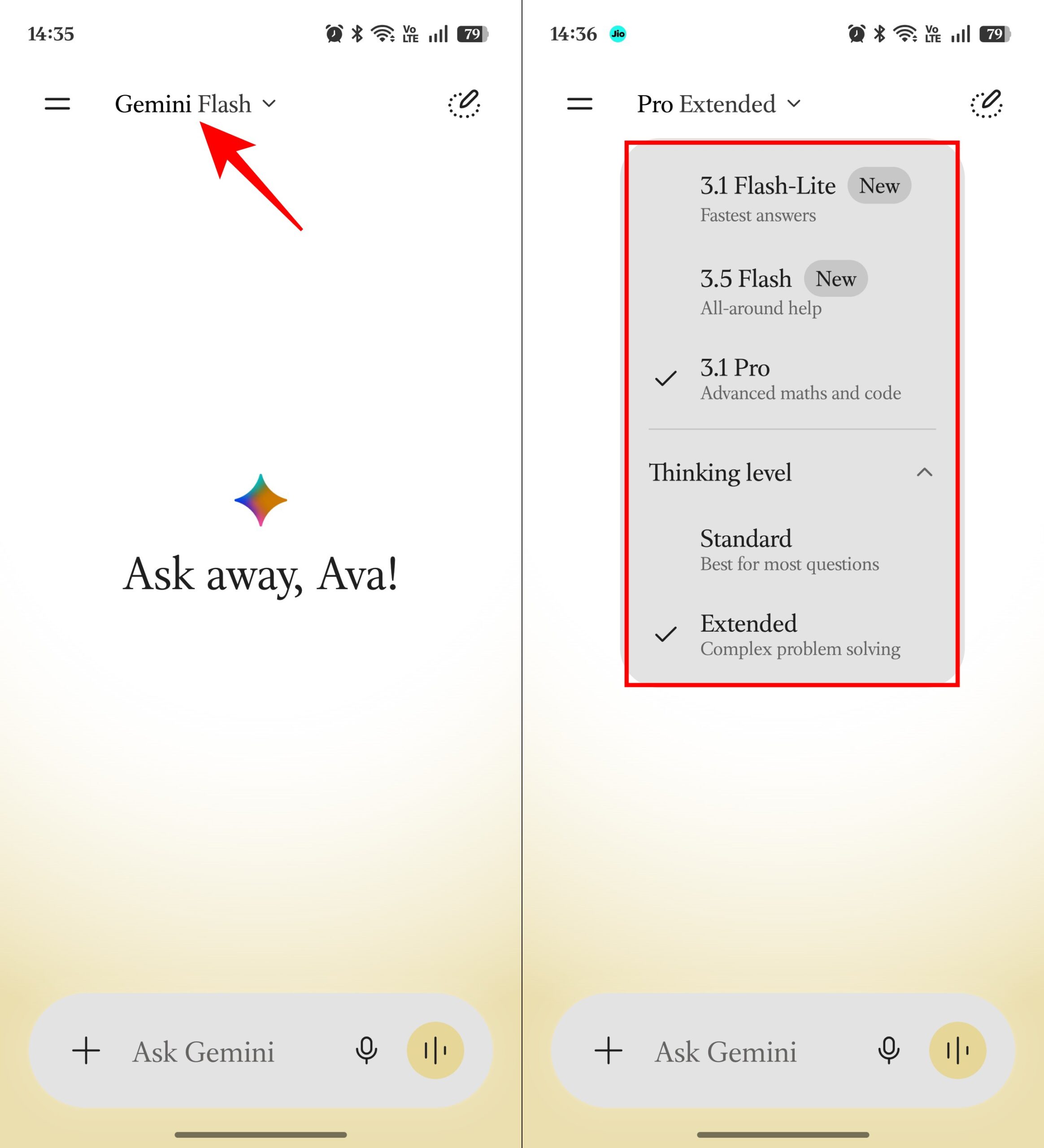
I noticed this difference a lot while working on detailed research projects. On the free plan, I had to be careful with which model I used and was worried about hitting usage limits. In contrast, Pro lets me default to Gemini 3 Pro all the time, without stressing over running out of access.
There’s also another benefit that Google doesn’t emphasize enough. Paid subscribers are often first in line when new AI features launch. Today it includes tools like Gemini Omni, Veo-powered video generation, Flow, Jules, and access to Google’s latest experimental models.
For casual users, this won’t matter much. But if you’re the kind of person who enjoys testing new AI tools, Gemini Pro feels like a backstage pass to Google’s AI roadmap.
If I had to pick just one feature from Gemini Pro, it would definitely be Google Deep Search. Before having this, my research felt like a marathon: open Google, skim through loads of articles, save the good ones, try to figure out contradictions, jot down notes, and then begin writing. It worked okay, but was slow.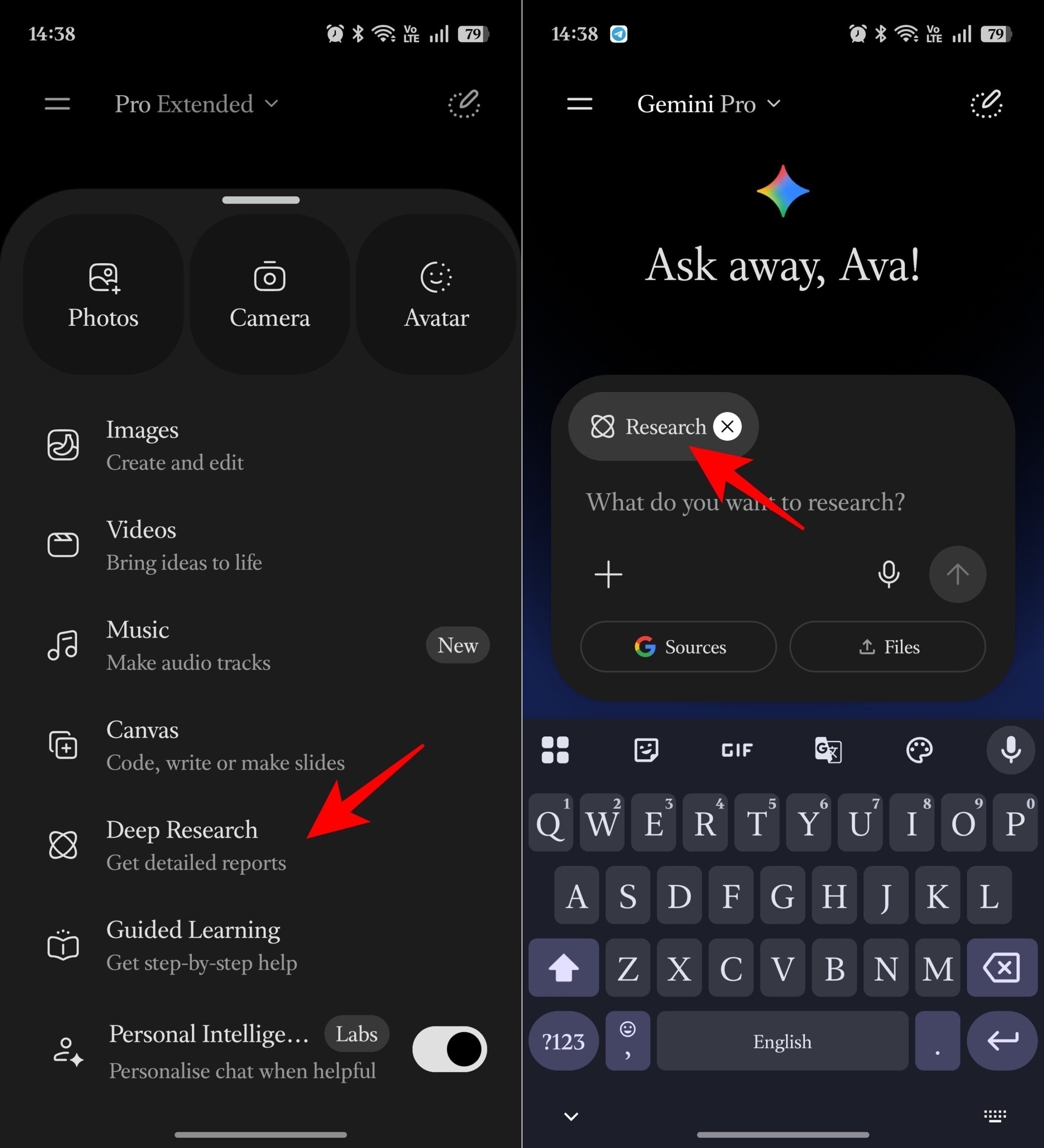
Higher access to Deep Search changed that. Instead of spending 30 to 60 minutes gathering information, I could set the model to Deep Research, then give Gemini a detailed prompt, and let it build a research plan, search the web, analyze sources, and compile everything into a structured report.
I tested it on topics ranging from AI tools and social media trends to technical software comparisons. In most cases, Deep Research produced a report that would have taken me at least an hour to create manually.
The reports usually included:
Now, Deep Search isn’t perfect. I still verify important claims and check original sources before publishing anything. Occasionally, it misses context or includes information that needs further validation.
For writers, marketers, students, consultants, and anyone who regularly works with information, that time savings adds up quickly. In my case, it easily saved several hours every week, and no other Gemini Pro feature came close.
This is the feature that made Gemini Pro feel less like a chatbot subscription and more like a creative suite.
Google AI Pro includes access to Flow, Google’s AI filmmaking tool, along with Gemini Omni, its new multimodal video creation and editing model. Together, they let you create videos from text, images, videos, and even audio references without needing traditional video editing software.
What impressed me most wasn’t the video generation itself. It was the editing workflow. For example, I could generate a scene and then tell Gemini:
Instead of generating an entirely new video each time, Omni builds on the previous version. The experience feels surprisingly similar to working with a human editor.
Flow takes things a step further. It helps you build scenes and stories using Google’s Veo video models, Gemini, and image-generation tools in one workspace. I used it to create social media clips, concept videos for articles, presentation visuals, and marketing-style content.
PS: It’s not replacing professional filmmakers anytime soon. But it dramatically lowers the barrier between having an idea and turning it into a video. And for creators, marketers, educators, and anyone who regularly publishes online, that’s one of the strongest reasons to consider upgrading from the free plan.
I subscribed to Gemini Pro expecting the flagship AI model to be the main attraction. Instead, NotebookLM ended up becoming one of the tools I used the most.
If you’ve never used it before, NotebookLM is essentially an AI-powered research assistant. You can upload PDFs, Google Docs, websites, YouTube videos, meeting notes, and other sources, then ask questions about them as if you were talking to a subject-matter expert.
The free version is already impressive. The Premium version is where it starts feeling like a serious productivity tool. As a writer, I regularly work with dozens of sources for a single article. Normally, that means switching between browser tabs and trying to remember where I saw a particular statistic or quote.
With NotebookLM, I could dump everything, including YouTube videos, into a single notebook and ask questions like:
Instead of searching through documents manually, I was searching through a knowledge hub. The real advantage of Gemini Pro is that you get higher limits, which means you can work with larger research projects.
And then there are Audio Overviews, which turn your research into a podcast-style discussion that you can listen to while walking, commuting, or doing something else. I initially thought it sounded gimmicky. After using it several times, I found myself listening to research summaries instead of rereading documents.
Google designed Nano Banana Pro for more advanced image creation and editing tasks, including infographics, diagrams, marketing graphics, and professional-looking visual content. Unlike many AI image tools that struggle with text, layouts, and precision, Nano Banana Pro is specifically optimized for those use cases.
During my testing, the biggest surprise was how well it handled practical work. I used it to generate blog illustrations, product mockups, diagrams, and visual explainers. These normally require Canva, Photoshop, or a designer. Moreover, Gemini can modify specific elements, add objects, redesign a layout, improve lighting, or create variations of an uploaded image.
Another advantage of the paid plans is usage limits. In AI Pro Mode, paid subscribers can generate up to 100 images within a 24-hour period compared to much lower limits on free accounts.
At first, I thought Gemini Pro was all about the main Gemini app. But, after a month, I realized I was equally dependent on the Gemini features within other Google apps. Honestly, that’s when the service became a real time-saver and the subscription felt worth every penny.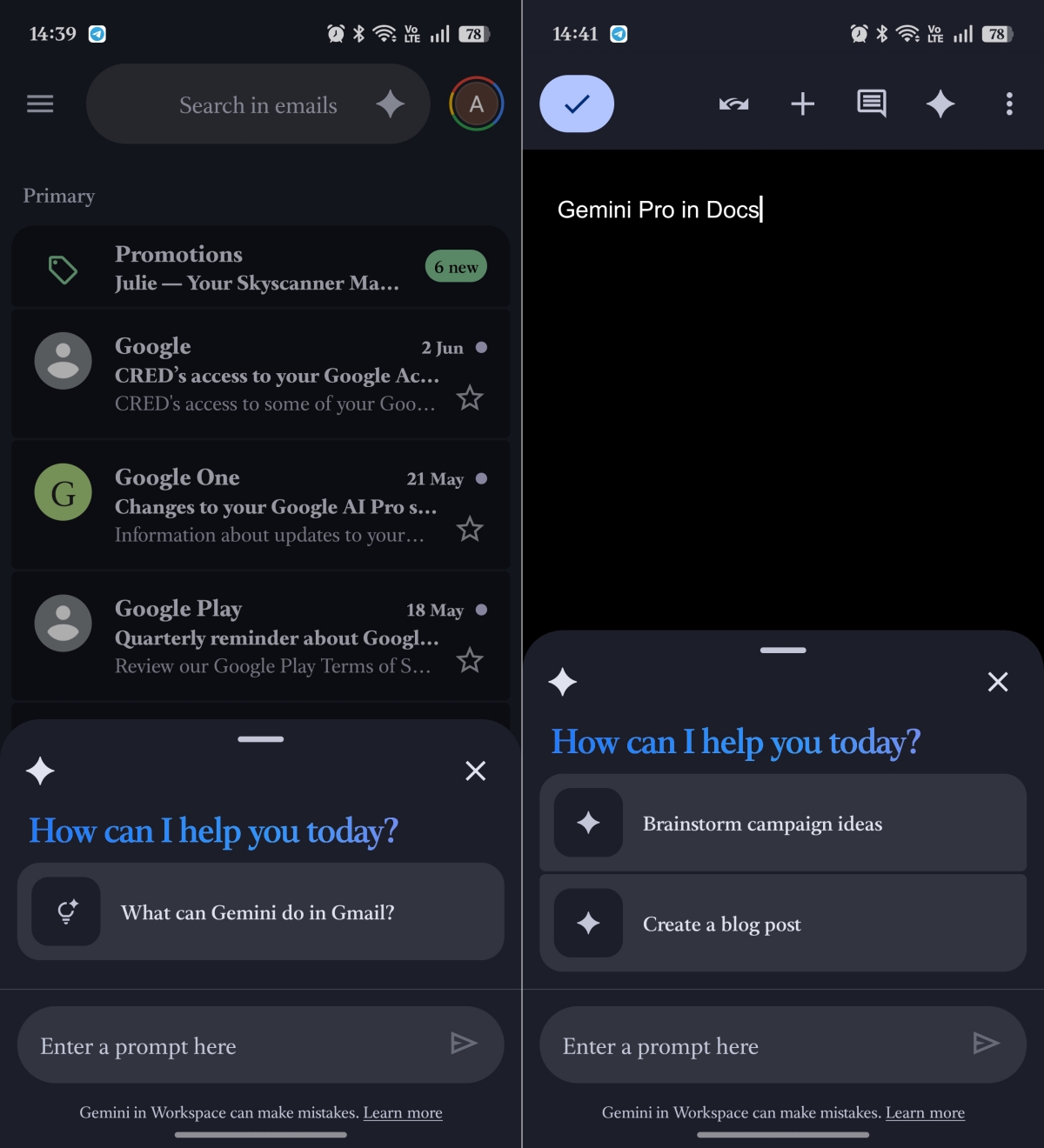
Google AI plans integrate Gemini directly into Gmail, Google Docs, Sheets, Drive, Meet, and other Workspace apps. Instead of constantly copying information between tabs, you can get AI assistance exactly where you’re already working.
For example, in Gmail, I used Gemini to:
As someone who gets dozens of emails every day, this quickly became one of my favorite features. The same thing happened in Google Docs. Rather than opening Gemini in a separate tab, I could ask it to help brainstorm article ideas, rewrite paragraphs, summarize research, expand outlines, or improve drafts without leaving the document.
I also found the Google Drive integration surprisingly useful. Rather than digging through folders, I can ask Gemini about files in Drive and get the info fast.
This sounds ridiculous until you do the math. If you already have YouTube Premium, the extra expense for Gemini is basically canceled out.
I didn’t think much about this benefit initially. After a month, I realized it changes the value equation entirely.
Suddenly, Gemini Pro isn’t competing against free AI. It’s competing against the services you’re already paying for. And that makes the upgrade easier to justify.
Not everyone should upgrade. Gemini Free remains surprisingly capable for:
Incorporating the Personal Intelligence, it’s capable of handling complex daily tasks across apps. If you’re opening Gemini a few times per week, the free plan is probably enough.
The upgrade becomes compelling when AI starts becoming part of your daily workflow.
If you are confused about whether you should upgrade to Gemini Pro, here’s a simple answer:
Upgrade if you:
Skip it if you:
At the start of this experiment, I expected Gemini Pro to be a slightly better chatbot. By the end, I realized that’s the wrong way to think about it.
The real value isn’t that Gemini Pro answers questions better. It’s that Google has quietly built an entire AI productivity stack around it. Deep Search, NotebookLM, video generation, premium models, and experimental features work together in ways that are difficult to appreciate from a pricing page.
Would I pay for Gemini Pro again? Yes, because after a month of using the premium features, Gemini Free started feeling incomplete. And that’s a much stronger endorsement than I expected to write.
What do you think about the Google Gemini Pro features? Share your opinion in the comments below!
Read More: