FaceTime Like a Pro
Get our exclusive Ultimate FaceTime Guide 📚 — absolutely FREE when you sign up for our newsletter below.

FaceTime Like a Pro
Get our exclusive Ultimate FaceTime Guide 📚 — absolutely FREE when you sign up for our newsletter below.


From traffic reports and ETA accuracy to Gemini-powered AI and offline maps, here's everything you need to know before choosing your next navigation app.
For years, I relied heavily on Google Maps to find locations and Waze to get me to there. Waze had better traffic notifications, aggressive rerouting, and a community that provided any updates from car accidents to speed traps. Whenever I headed out for something important, I always counted on using Waze.
But after Google’s latest updates to Maps, I decided to spend several weeks using Google Maps as my primary navigation app. And surprisingly, there were many of the advantages that once made Waze special no longer felt exclusive.
Here, I will share a head-to-head Google Maps vs. Waze comparison after testing both apps during daily commutes, highway trips, and unfamiliar city drives. So, you can decide which navigation app is better for your requirements.
Before making the switch, Waze had been my default navigation app for years. The answer is simple. Waze’s aim is to get drivers around traffic as efficiently as possible. It wasn’t trying to be a travel guide, a business directory, or a city discovery tool. Instead, Waze concentrated solely on driving, and that made a difference.
Waze often spotted traffic problems and aggressively searched for faster alternatives. Sometimes it would reroute me through side streets, which saved me from sitting in traffic. The app’s reporting system was another major advantage. Police sightings, speed traps, road hazards, construction zones, and stalled vehicles appeared constantly.
Google Maps played a different role in my life. I used it every day to find restaurants, check reviews, explore new places, and plan trips. Also, it supports all transportation modes, including train, bus, bike, walking, and more.
Google Maps’ latest update introduces two major upgrades: Ask Maps and Immersive Navigation.
Powered by Gemini AI, Ask Maps allows users to ask natural-language questions instead of relying on traditional searches. For example, I use it to ask for nearby places that match my specific needs to plan road trips. It also recommends places based on your preferences and saved locations. This makes finding relevant places faster and more personalized.
On the other hand, Immersive Navigation redesigns the driving experience with a realistic 3D view of roads, buildings, overpasses, and surrounding terrain. So, I could see important road details such as lanes, traffic lights, crosswalks, and stop signs, helping me navigate complex routes more confidently.
Another thing I noticed immediately was improved incident reporting. Throughout my tests, Google Maps constantly provided updates on traffic incidents, construction sites, lane closures, and other possible problems on the road. Though Waze had a more active reporting community, I never felt like I was missing any vital information using Google Maps.
Both Google Maps and Waze are owned by Google, but they serve different types of users. Here, I have compared them based on real-time traffic, faster routes, broader navigation experience, AI-powered features, and more.
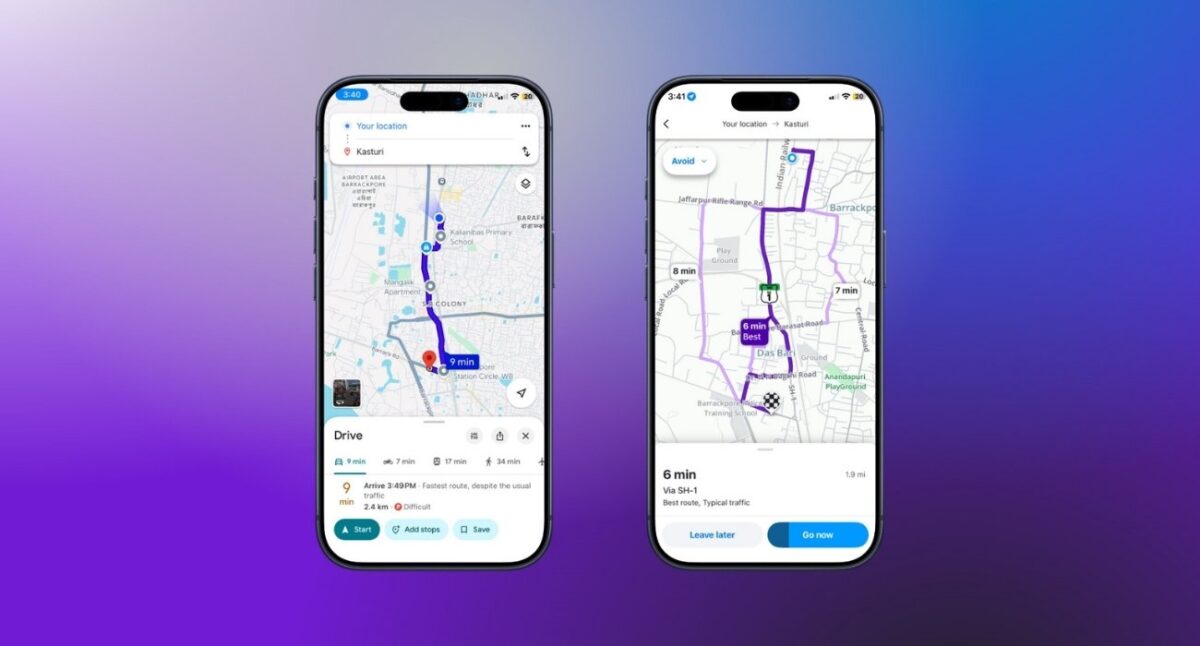
When it comes to route quality, both Google Maps and Waze excel, but they prioritize different things.
Waze shows the fastest route options based on your saved vehicle details. The moment traffic appears, it starts searching for alternatives. During my testing, Waze frequently suggested routes that involved multiple extra turns and residential roads. Honestly, that led to the destination much faster, although with more difficulties.
Google Maps takes a more balanced approach. While it also uses real-time traffic data, its route recommendations consider road types and your vehicle’s fuel efficiency and favor simplicity over constant rerouting. The 3D route previews, Street View, and detailed road information helped me navigate unfamiliar areas and multi-stop journeys.
In most cases, both applications showed quite similar arrival times using drastically different routes. If your priority is avoiding traffic at all costs, Waze usually has the edge. If you want accurate directions, detailed route guidance, and a smoother overall navigation experience, Google Maps remains the better all-around choice.
Winner: Google Maps
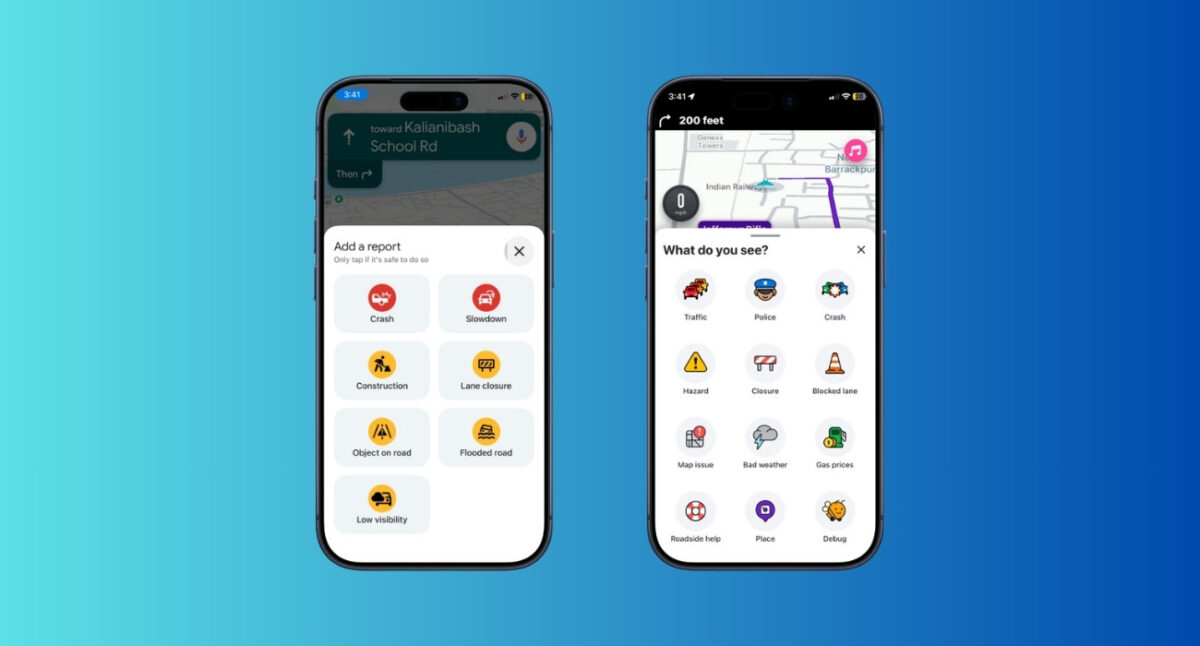
There was a time when this category belonged entirely to Waze. That’s no longer true.
Waze still has the most active driving community, and it remains the best source for real-time reports. If there’s a speed trap, police checkpoint, tolls, curves, bad weather, road hazard nearby, and other factors that might impact driving, chances are someone on Waze has already reported it. I also like its Talk to Waze feature to report anything on the road.
However, Google Maps has improved dramatically.
Throughout my testing, major incidents usually appeared on both platforms. Accidents, construction zones, traffic slowdowns, road closures, etc., were consistently visible in Google Maps. But it doesn’t automatically reroute you like Waze. Most of the time, I stick to my original route unless there is a big incident.
For most drivers, the information available inside Google Maps is now more than sufficient.
Winner: Waze (slightly)
One of the most underrated navigation features is arrival time accuracy. Saving a few minutes on the road is nice. Knowing exactly when you’ll arrive is often more valuable.
During several weeks of testing, Google Maps consistently delivered more stable arrival estimates. Its ETAs almost never fluctuated dramatically, even during heavy traffic conditions. Because the prediction system uses historical traffic trends, road conditions, route complexity, and current congestion levels.
Waze was not inaccurate per se, but constant rerouting changed ETA several times during my journey. In some cases, the app would find a faster route and improve the ETA. However, it was not always necessary.
Google Maps just seemed more reliable. Whenever I was traveling to business meetings, appointments, or the airport, I trusted its ETA rather than Waze’s.
Winner: Google Maps
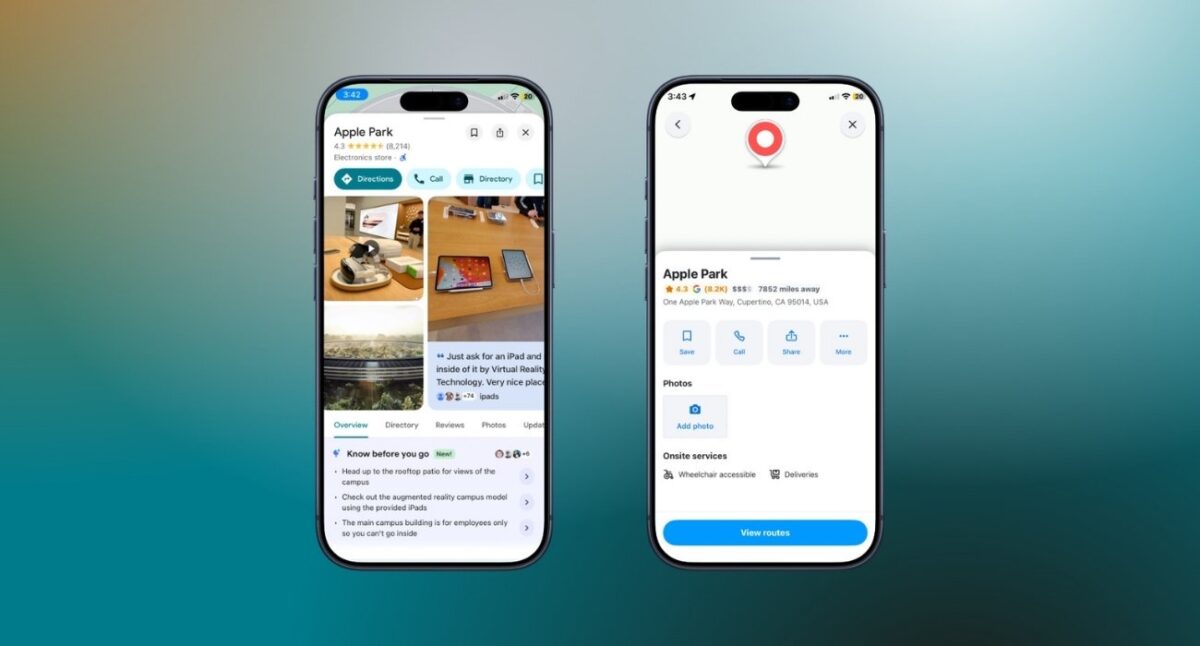
This category wasn’t close. Google Maps remains one of the most information-rich apps ever created.
Every destination comes with reviews, photos, opening hours, popular times, parking information, contact details, menus, and countless other info. Before I even start driving, Google Maps helps me decide whether a place is worth visiting. You can also explore the insides of certain buildings, satellite and terrain imagery, air quality, and 3D topographies.
Waze simply can’t compete here because it was never designed to. The difference extends to the interface as well. Waze feels like a navigation tool with plain 2D and 3D maps and easy-to-read instructions. I enjoy its built-in music player and mood setter. Google Maps feels like an entire travel platform.
Personally, I found Google Maps easier to use because everything I needed existed within a single ecosystem. I use Ask Maps to discover a place, read reviews, save it to a list, navigate there, and find nearby alternatives without ever switching apps. The Live View helped me recognize the neighborhood faster.
Winner: Google Maps
This is another area where the two apps are playing different games. Waze is focused almost entirely on driving for cars and motorcycles.
Google Maps handles driving, walking, cycling, public transit, ride-sharing services, and multimodal journeys. Whether I’m planning a trip across town or exploring a city while traveling, Google Maps gives me options beyond simply getting in a car. If you drive an EV, it has a robust system.
Public transit is particularly one of Google Maps’ strongest features. In supported cities, the app provides real-time arrival information, platform details, service alerts, and estimated travel times for buses, trains, subways, and trams.
Winner: Google Maps
Battery life used to be one of the biggest complaints about navigation apps, especially during long trips. In my testing, both apps performed reasonably well. Neither drained my phone dramatically faster than the other.
What I did notice was that Google Maps felt smoother and more optimized overall. Maps loaded quickly, route recalculations happened without delay, and the interface remained responsive even during longer navigation sessions.
The difference wasn’t huge, but Google Maps felt more polished.
Winner: Google Maps (slightly)
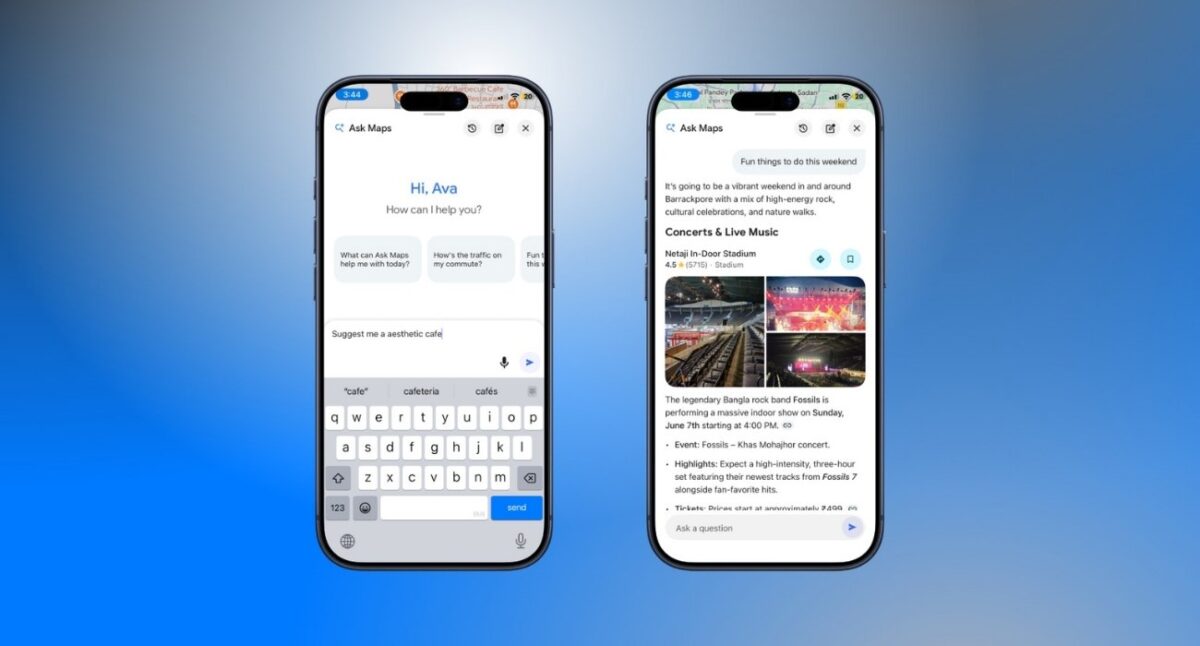
Google is investing heavily in Gemini AI across its entire ecosystem, and Maps is becoming one of the biggest beneficiaries.
Search has become more conversational, recommendations feel more personalized, and place discovery is smarter. Instead of simply helping users navigate, Google Maps is increasingly helping users decide where to go in the first place.
Waze remains focused on navigation with AI-powered conversational reporting. But the gap between the two products becomes obvious when you look at where they’re headed. Waze is refining its core experience. Google Maps is expanding into something much broader.
Winner: Google Maps
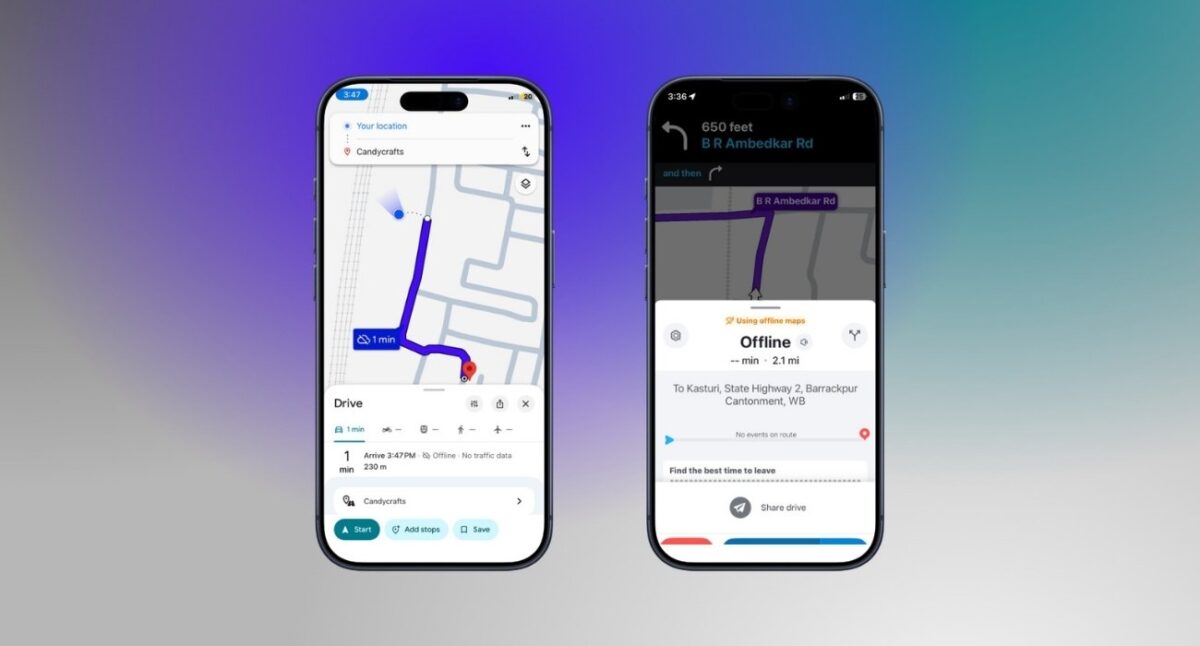
This feature doesn’t get enough attention until you need it. Whether I’m traveling through rural areas, driving in the mountains, or visiting places with unreliable cellular coverage, offline maps have saved me more than once.
Google Maps makes downloading entire regions incredibly simple. Once downloaded, those maps remain available with turn-by-turn navigation even without a connection.
Waze offers limited offline capabilities, but the experience isn’t nearly as robust. It retains some route information that was loaded before a trip begins, but there will be no real-time alerts, re-routing, or other information.
For anyone who travels regularly, Google’s offline support is a major advantage.
Winner: Google Maps
Despite switching to Google Maps, I haven’t uninstalled Waze.
There are still situations where it’s the better tool. The biggest reason is its community-driven alerts. If you’re the type of driver who wants maximum awareness of what’s happening on the road, Waze still provides information that Google Maps doesn’t always surface as effectively.
You should choose Waze if:
For heavy drivers, Waze still offers a unique experience.
For everyone else, I think Google Maps has become the stronger choice.
It offers excellent navigation, highly accurate traffic data, better destination information, superior offline support, public transit integration, and a more complete travel experience overall. Most importantly, it feels less stressful. Throughout my testing, I spent less time second-guessing routes. The driving experience simply felt smoother.
If you want one app that can handle almost every aspect of travel, Google Maps is hard to beat.
A few years ago, this comparison would have been easy. Waze was the better navigation app, while Google Maps was the better mapping app. Today, that distinction feels outdated.
Google Maps has adopted many of the features that once made Waze unique while continuing to expand far beyond navigation. It now offers a more complete experience without sacrificing much of what drivers loved about Waze in the first place.
But after spending weeks using both apps side by side, I kept arriving at the same conclusion. Google Maps isn’t just catching up anymore. For most people, it has already moved ahead. And that’s something I never thought I’d say as a longtime Waze user.
Which navigation app do you use? Let me know in the comments below!
You might also like: