FaceTime Like a Pro
Get our exclusive Ultimate FaceTime Guide 📚 — absolutely FREE when you sign up for our newsletter below.

FaceTime Like a Pro
Get our exclusive Ultimate FaceTime Guide 📚 — absolutely FREE when you sign up for our newsletter below.


Learn how to engrave your AirPods case for free, personalize it with creative ideas, and follow simple steps to add text, emojis, or a Memoji without paying extra.
 ByVikhyat


AirPods only come in white, so they can blend in with everyone else’s. Engraving helps fix that. You can add text, an emoji, or even a Memoji to the case when buying from Apple, and it’s free with a new purchase. It makes your AirPods easy to identify in shared spaces and adds a personal touch you can spot at a glance.
In this guide, you’ll learn how Apple’s engraving works, how to personalize your case at checkout, what limitations to expect, and what to do if you already own AirPods.
Apple offers free laser engraving on the AirPods charging cases when you buy directly from Apple. The engraving is subtle, permanent, and appears on the front of the charging case. It is done before the product ships, so it arrives ready to use.
You can engrave:
Rest assured, the engraving does not affect durability, charging, or warranty coverage as it is an official Apple offering.
Apple supports engraving only on AirPods purchased directly from Apple through the Apple Store app, Apple’s website, or an official Apple Store. Engraving is not available when you buy AirPods from third-party retailers, even if the product is brand-new and sealed.
Since Apple officially sells only the latest AirPods models at any given time, engraving support is limited to the models currently listed in Apple’s store. Older or discontinued AirPods models are not eligible for engraving, even if they are still available from other sellers.
At present, engraving is available on AirPods 4, AirPods 4 (ANC), and AirPods Pro (3rd generation).
The free engraving option appears during checkout while purchasing AirPods from Apple.
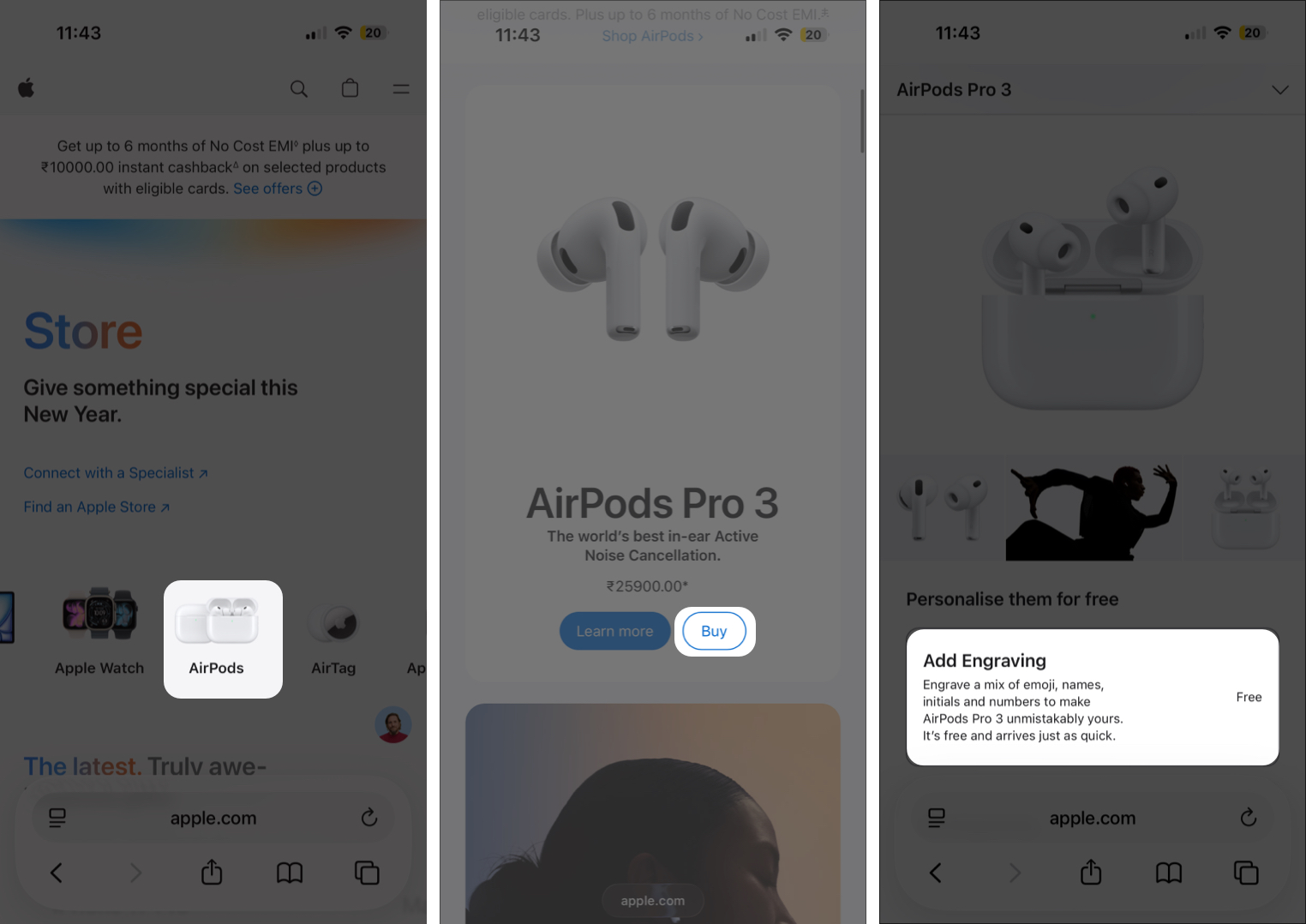
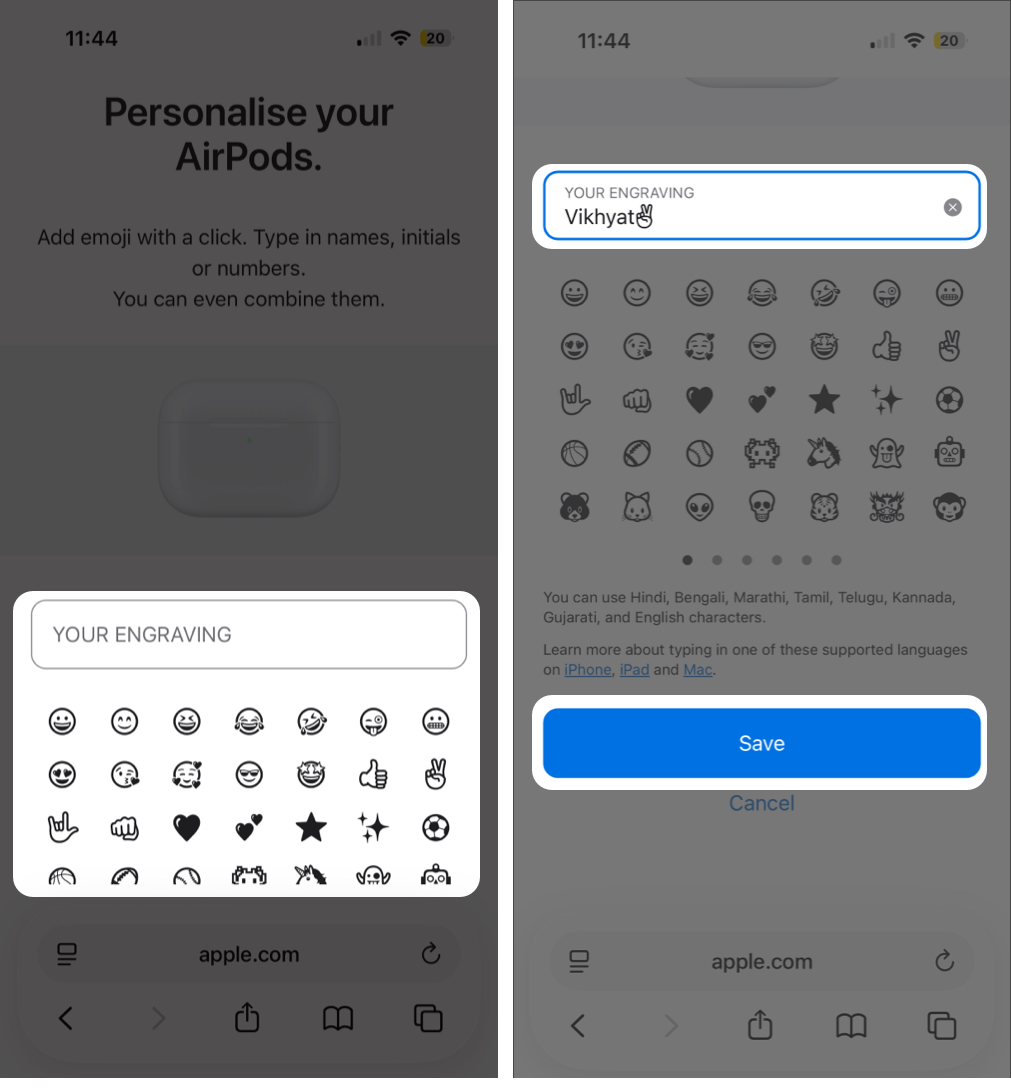
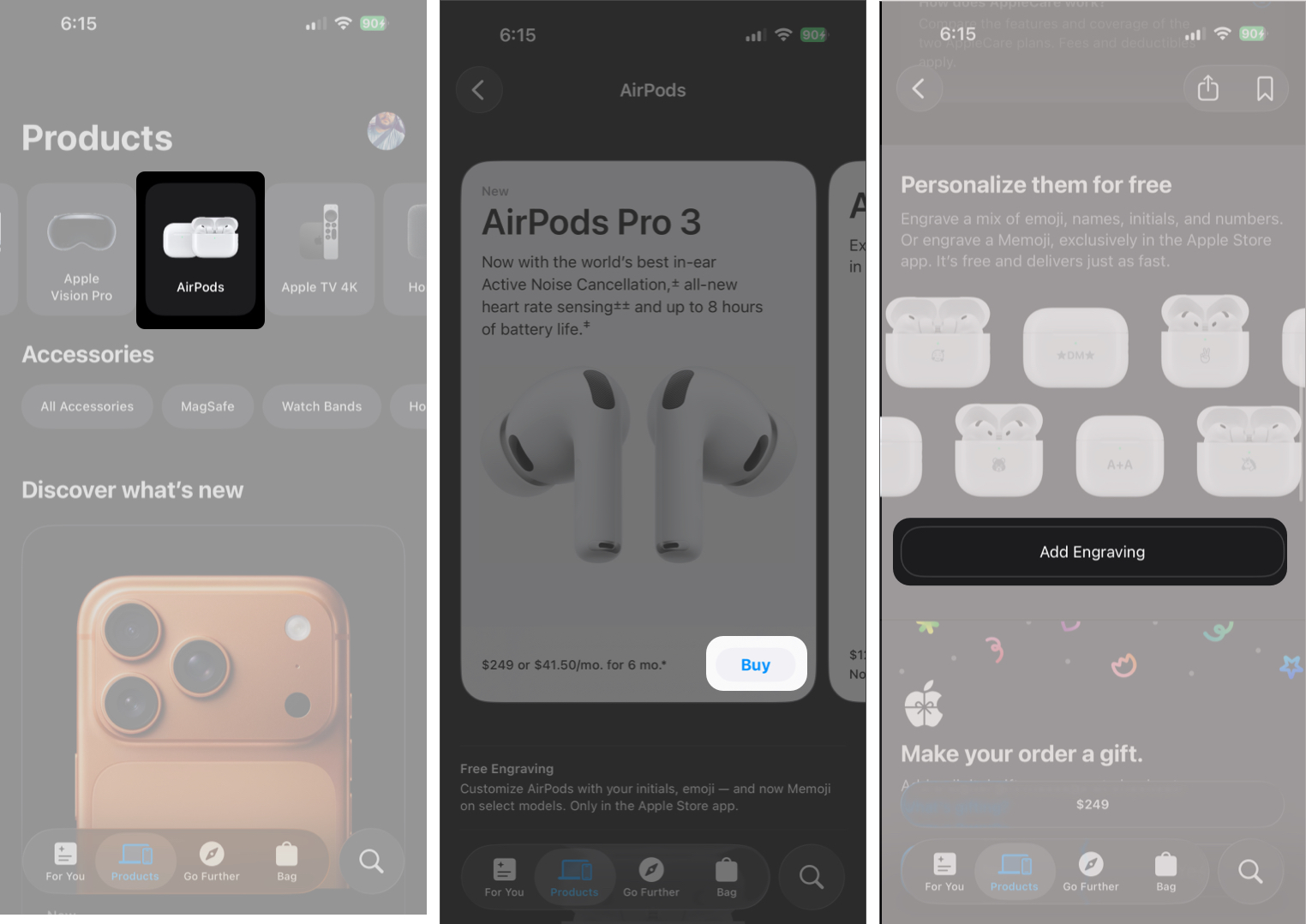
While you can add text or emoji during checkout on Apple’s website, the option to engrave your customized Memoji appears when purchasing AirPods in the official Apple Store app, and only in selected countries.
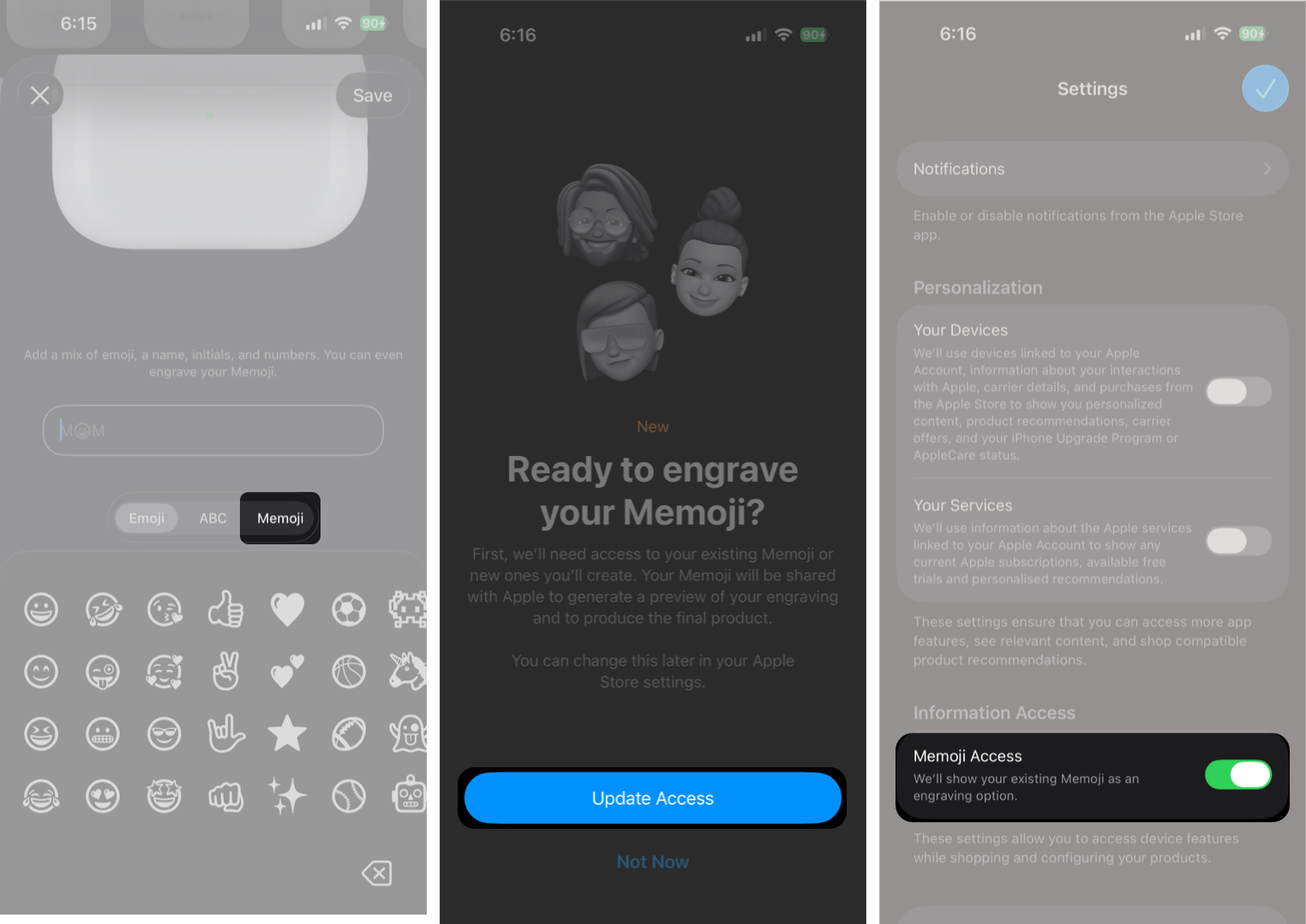
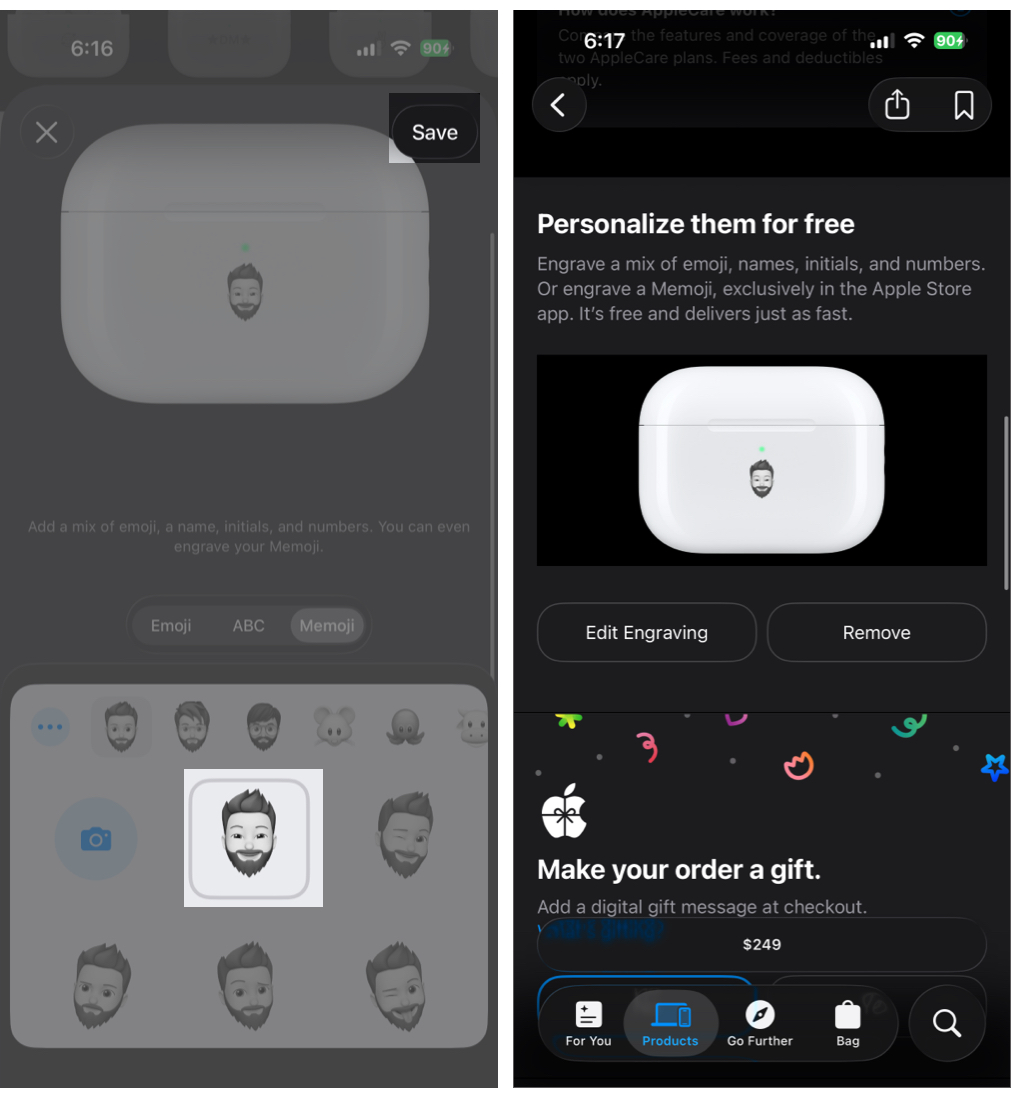
Apple has intentionally kept the engraving system a bit restrictive to maintain quality. Here’s everything you can and cannot do:
Unfortunately, no. Apple does not offer post-purchase engraving. If you already own AirPods, you have a few alternatives. Even if your AirPods case is replaced under warranty, the replacement case will not include your engraving.
You can opt for third-party laser engraving, but this is not recommended, as it may affect your warranty status. Instead, consider skins, decals, or printed cases that display text or Memoji-style artwork without altering the original case.
While engraving is a personal choice, here are a few tips you can follow to get the best out of it:
If you are buying your AirPods directly from Apple, there is no reason not to opt for engraving, since it’s literally free. Besides being free, AirPods engraving, particularly Memoji engraving, makes them stand out and helps with identification in shared environments.
AirPods charging case engraving adds a touch of your personality to your AirPods. A simple engraving makes your AirPods easier to identify, less likely to be mixed up in shared spaces, and more personal to you. Since Apple offers engraving for free when you buy directly from the Apple Store, it is a feature worth using unless a substantially better deal elsewhere outweighs the benefit.
Have you engraved your AirPods case, or are you planning to? Share what you chose and why in the comments below.
FAQs
Apple’s official engraving service does not affect your AirPods warranty or AppleCare coverage. When you order AirPods with engraving directly from Apple’s website or the Apple Store app, they are engraved before shipping as part of the manufacturing process. Engraved AirPods are treated the same as non-engraved units for warranty and service purposes.
Memoji engraving is supported only on select AirPods models and must be done using the Apple Store app on iPhone. If the Memoji option does not appear during checkout, your model or region may not support it.
Engraved AirPods cannot be returned or exchanged unless there is a manufacturing defect. Apple treats engraved products as customized items.
If your AirPods charging case is replaced under warranty or service, the replacement will be a standard case without engraving.
Apple uses laser engraving, which permanently etches the surface of the case. The engraving will not fade, although heavy scratches can reduce visibility.
You may also like: