Remix Reels Like a Pro: How to Use Instagram’s Remix Feature Creatively
Remixing Reels on Instagram lets you react, collaborate, or join trends with your own twist. Here’s how to use the Remix feature like a pro.
Key Takeaways:
- Instagram Remix lets you react or collaborate on Reels or posts with side-by-side or overlay formats using music, stickers, voiceovers, and more.
- To remix a Reel, tap the three-dot menu and select Remix, then record or edit your response with Instagram’s built-in creative tools before posting.
- You can also remix regular photo posts by using the same three-dot menu, enabling broader interaction beyond Reels.
- Control who can remix your content by adjusting permissions in Settings or disabling reuse on individual posts and Reels.
- Be mindful of remix etiquette and rights since remixing without permission or proper credit may lead to content takedowns or account issues.
Remixing a Reel on Instagram is a fun and simple way to add your voice to viral content. Whether you’re reacting to a trend, collaborating with another creator, or offering a fresh perspective, the Remix feature makes it possible, all from within the Instagram app. Best of all, you don’t need any advanced editing skills to get started.
Here’s how to remix Reels and posts on Instagram and manage your remixing preferences like a pro.
What Is the Remix Feature on Instagram?
Instagram’s Remix feature is its answer to TikTok’s popular Duet option. It lets you create a new Reel that appears side-by-side, beneath, or overlaid on another creator’s video. You can also customize it with:
- Music
- Text
- Stickers
- Filters
- Voiceovers
This tool is perfect for:
- Reacting to videos
- Launching or joining challenges
- Collaborating with other creators
- Adding commentary or creative takes
How to Remix a Reel on Instagram
If the original Reel has remixing enabled, you can easily create your version—whether you’re using an iPhone or Android. Here’s how:
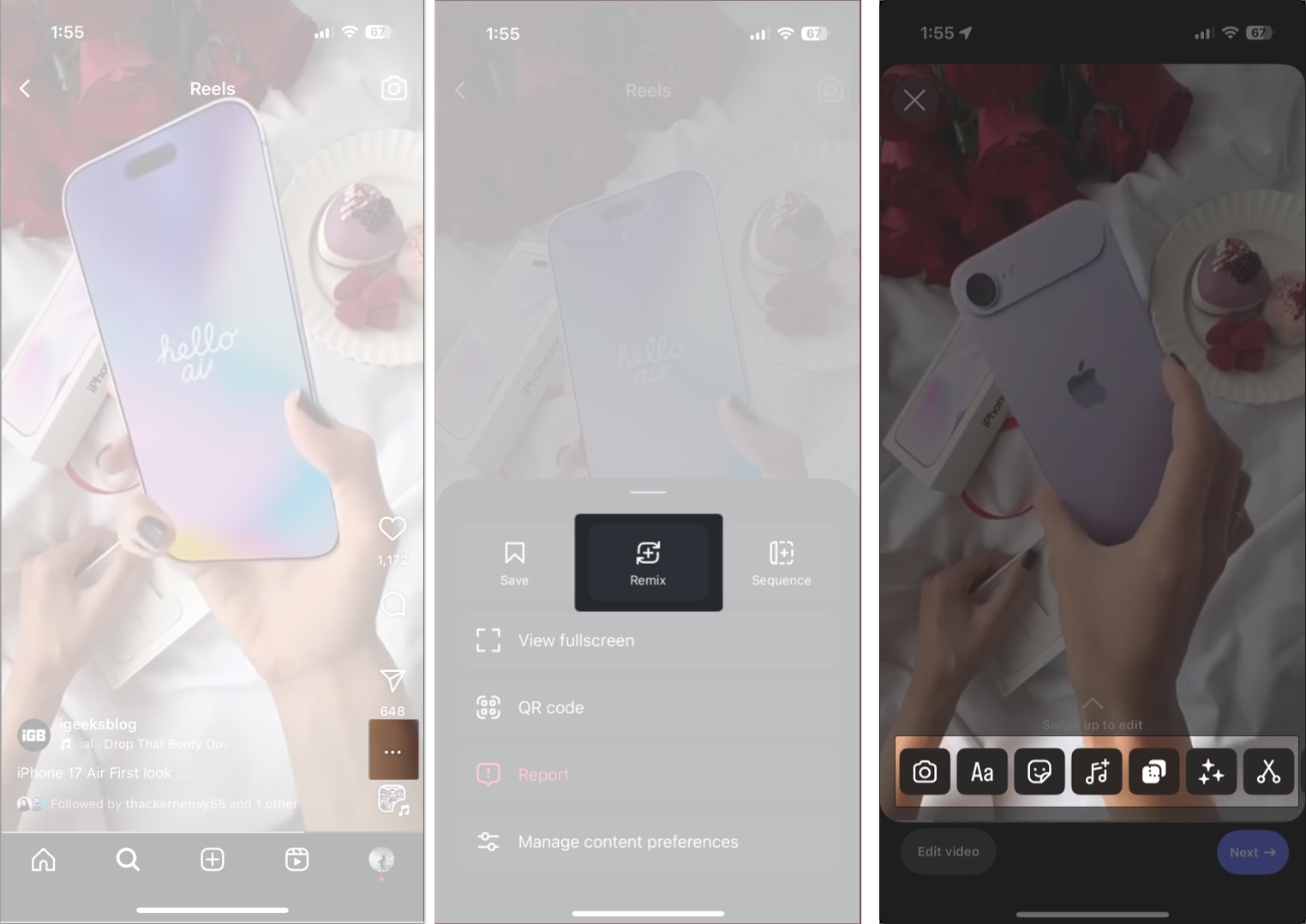
- Open Instagram and tap the Reels tab at the bottom.
- Scroll through the Reels until you find the one you want to remix.
- Tap the three-dot (More Options) button in the bottom right corner of the Reel.
- Tap the Remix button in the pop-up menu.
- Use the tools in the bottom toolbar to:
- Add music
- Apply stickers and filters
- Add text or a voiceover
- To adjust how your remix appears:
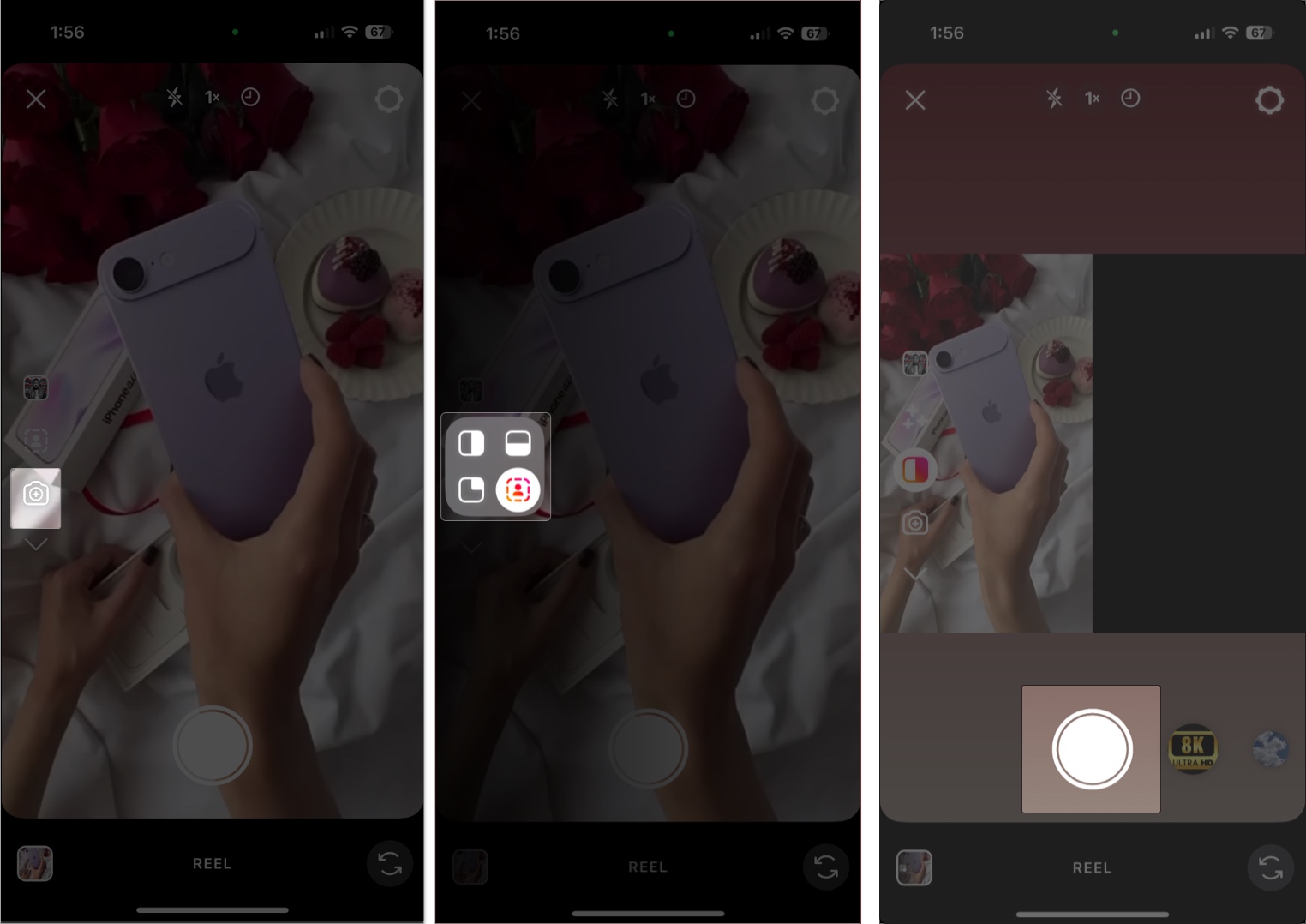
- Tap the Camera icon
- Tap Layout and choose side-by-side or picture-in-picture
- Record a new clip using the Capture button or upload from your Photo Library.
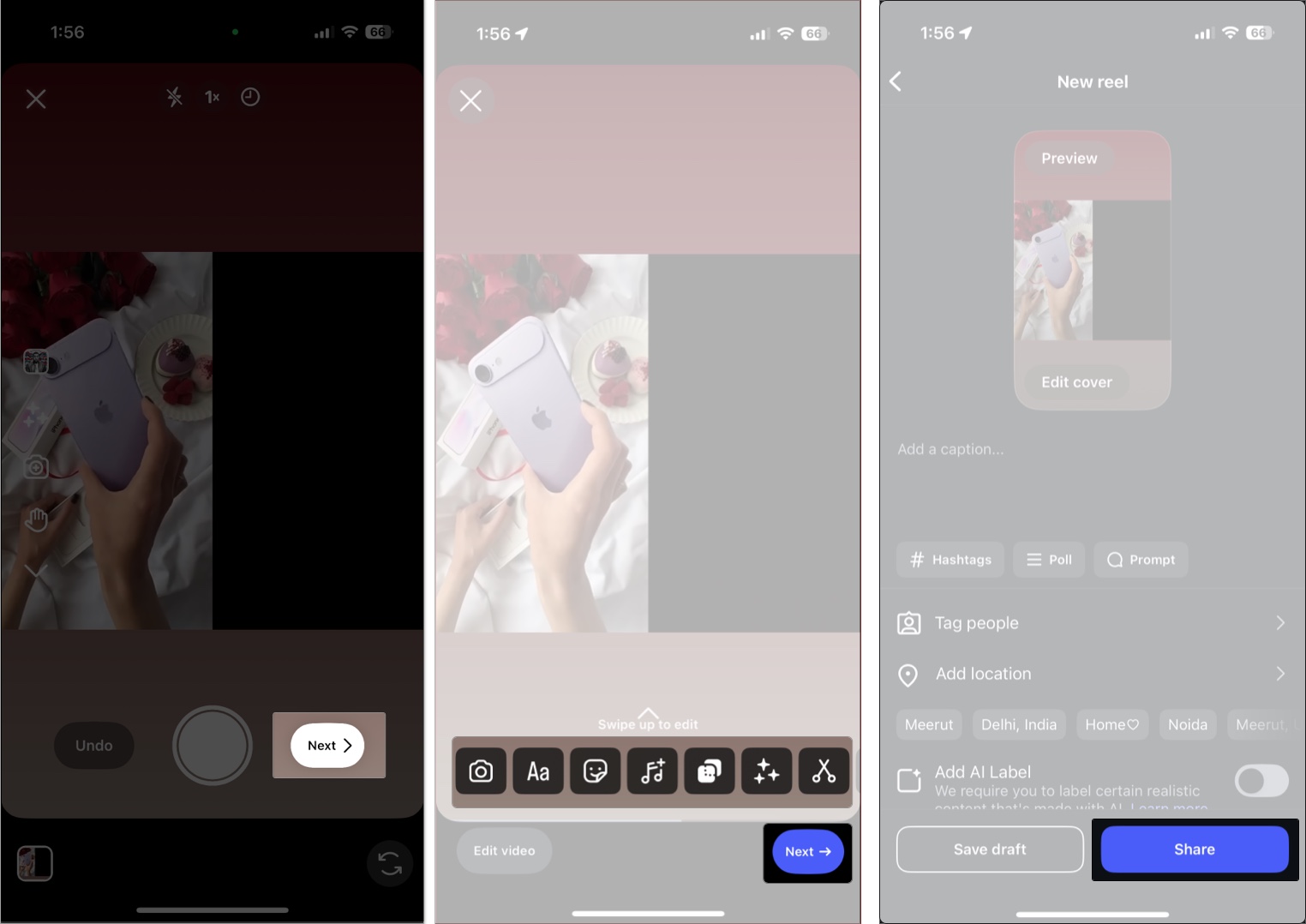
- Once done, tap Next.
- Add music, text, stickers, filters, or voiceovers just like you would with any Reel.
- Once you’re happy, tap Next, write a caption, and share it with your followers.
That’s it! You’ve just remixed your first Instagram Reel.
Related: How to Download Instagram Reels on iPhone
How to Remix a Post on Instagram
You can also remix regular posts (if remixing is enabled for them):
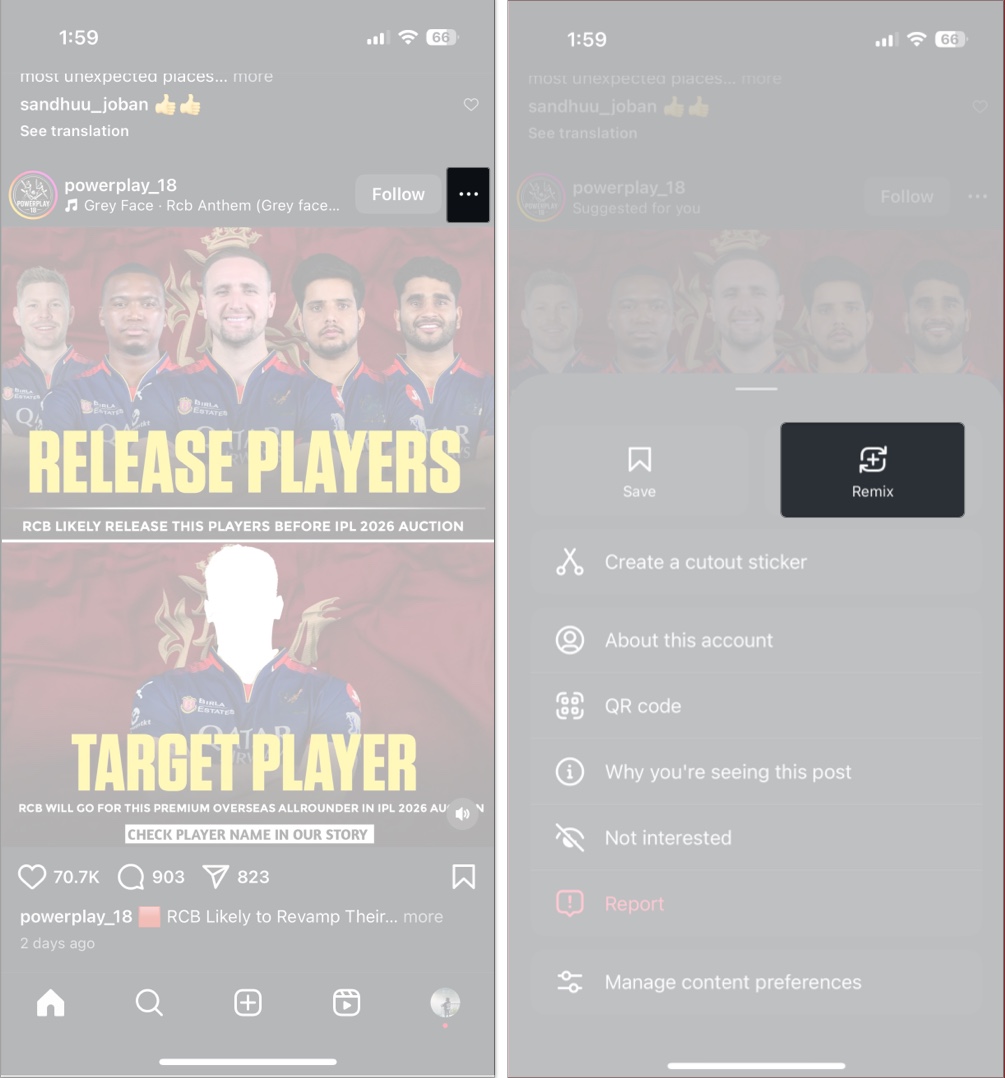
- Tap the three–dot menu at the top-right corner of the post.
- Select Remix.
- Add effects, record or upload your clip, and share it.
You’ll have access to the same creative tools as with Reel remixes.
How to Enable or Disable Remixing for Your Instagram Content
While remixing others’ content can be exciting, you might not want people to remix yours. Thankfully, Instagram gives you full control.
Disable Remixing for a Specific Reel or Post:
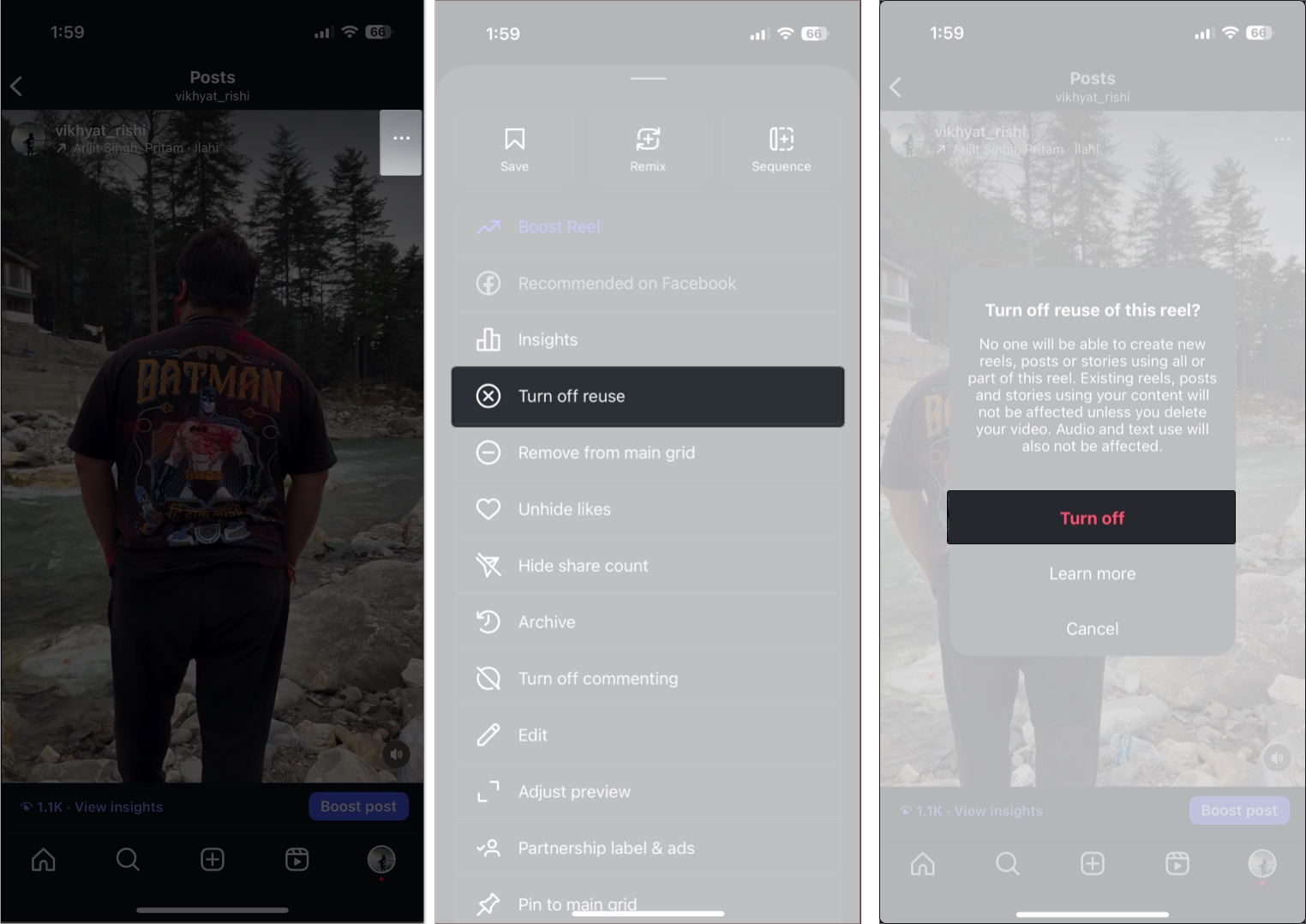
- Open Instagram and head to your profile.
- Open any Reel or post.
- Tap the three-dot button, then select the Turn Off Reuse.
- Tap Turn off to confirm.
These steps will disable remixing for the specific Reel but not for new or other existing Reels and posts.
To turn off remixing across the board on all your Reels and posts, follow these steps:
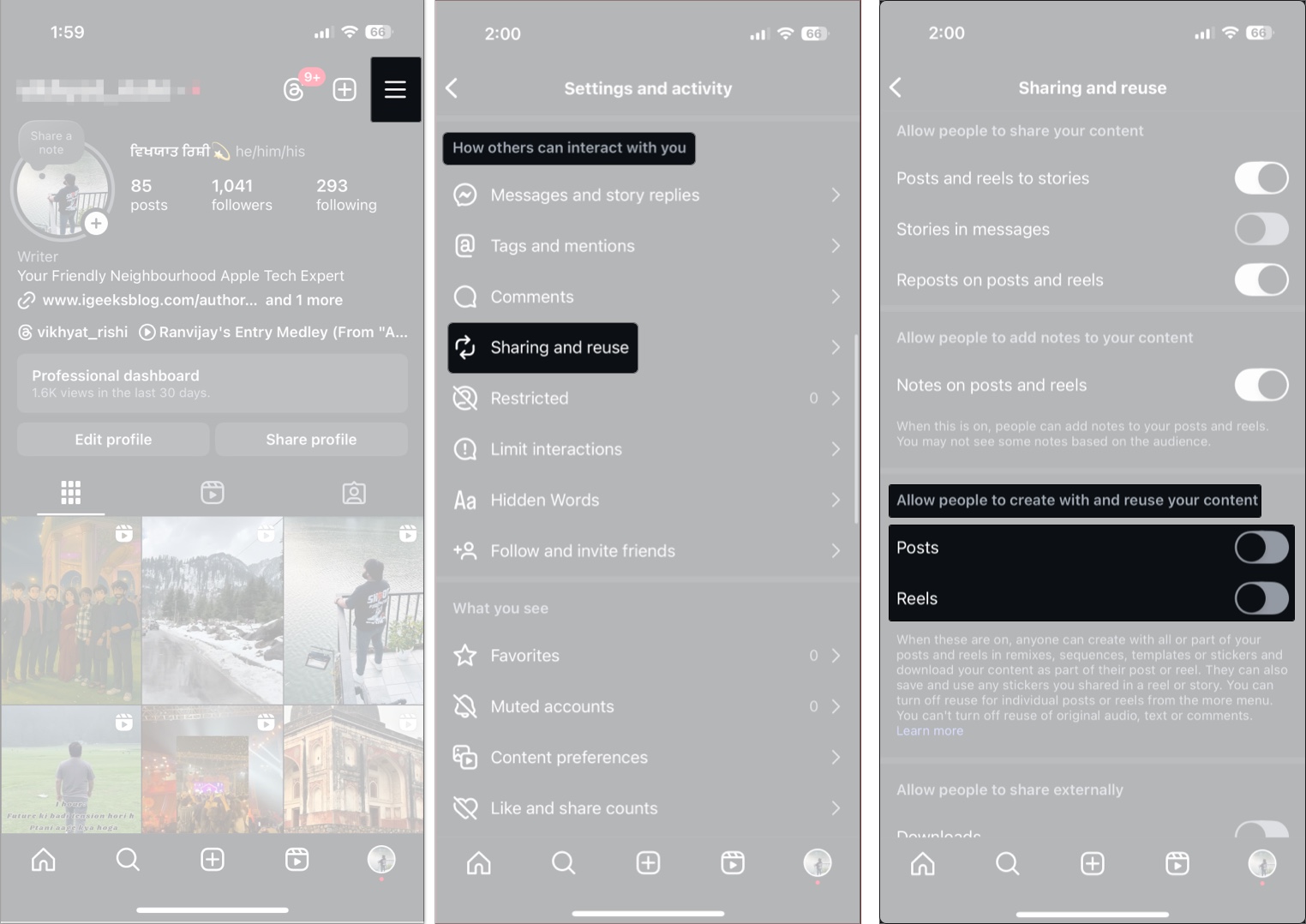
- Head to your Instagram profile and tap the Hamburger icon at the top right corner.
- Scroll down to the “How others can interact with you” section and select the “Sharing and reuse” option under it.
- Here, toggle off Reels and Posts under the “Allow other people to create with and reuse your content” section.
Once disabled, no one can remix any of your content going forward.
Final Thoughts: Ready to Remix?
Instagram’s Remix feature offers a powerful way to connect with trends, express your creativity, and collaborate with others. Whether you’re reacting, responding, or creating new challenges, the Remix tool helps you engage with your audience in dynamic ways.
Have you tried remixing a Reel yet? Drop your experience in the comments below!
You would like to read these posts as well:

- You’re still in Vanish Mode on Instagram? Here’s how to turn it off
- How to Turn Off Active Status on Instagram & Stay Hidden
- Instagram Blend: Share a personalized reels feed with friends
- Link Reels on Instagram: Everything You Need to Know