How to Change Default iPhone Apps for Calls, Messages, Email and More
With iOS 18.2, Apple now lets you easily set third-party apps as defaults for calling, messaging, browsing, and more, right from the Settings app.
Key Takeaways:
- iOS 18.2 introduces a global Default Apps feature that lets users set third-party apps for calling, messaging, browsing, and more—right from the Settings app.
- Previously restricted to the EU, the default app customization is now available worldwide, enhancing user control and flexibility.
- Supported categories include email, messaging, calling, call filtering, browser, translation (iOS 18.4+), passwords, contactless payments, and keyboards.
- To set default apps: Go to Settings → Apps → Default Apps and select your preferred app for messaging or calling tasks.
- This change marks a major shift from Apple’s historically closed ecosystem, signaling more user freedom in future iOS updates.
Until now, changing default apps on the iPhone required users to dive into individual app settings buried within the Settings app. But with the release of iOS 18.2, Apple has introduced a much more streamlined experience. The new Default Apps feature enables users to easily set third-party apps as their defaults for calling, messaging, browsing, and more, all from a single location.
Keep reading to explore how this feature works, what categories are supported, and how to set it up on your iPhone or iPad.
What Is the New “Default Apps” Feature in iOS 18.2?
Back in August 2024, Apple announced that users in the European Union would soon be able to change their default messaging and calling apps. At the time, it seemed this freedom would remain limited to EU users due to regulatory pressure. But with iOS 18.2, Apple has gone a step further and made this feature available globally.
Now, you’ll find a new “Default Apps” section within the Settings app, which lets you choose the apps you’d prefer to use for common tasks—no digging through multiple menus required.
The iOS 18.2 and iPadOS 18.2 releases also include improvements to the Apps area in Settings, first introduced in iOS 18 and iPadOS 18. All users worldwide will be able to manage their default apps via a Default Apps section at the top of the Apps area. New calling and messaging defaults are also now available for all users worldwide.
Which Default Apps Can You Change in iOS 18.2 and Later?
Apple’s support for third-party defaults was previously limited to categories like browsers and email clients. But now, with iOS 18.2 and later, the list has expanded significantly. Here’s everything you can change:
Supported Default App Categories in iOS 18.2+
- Email: Set Gmail, Outlook, or any email app as the default instead of Apple Mail.
- Messaging: Use apps like WhatsApp for messaging instead of the built-in Messages app.
- Calling: Choose VoIP apps like WhatsApp, Zoom, or FaceTime for placing calls.
- Call Filtering: Select spam-blocking apps like RoboKiller for caller ID and call blocking.
- Browser: Use Chrome, Firefox, or DuckDuckGo instead of Safari for web browsing.
- Translation: Swap Apple’s Translate app with Google Translate (available from iOS 18.4+).
- Passwords & Codes: Use third-party password managers like 1Password or Chrome.
- Contactless App: Select Google Wallet or another NFC app for tap-to-pay.
- Keyboards: Replace Apple’s native keyboard with Gboard, SwiftKey, or others.
EU-Only: More Customization Options
In addition to the above global features, Apple offers a few extra options specifically for users in the European Union:
- App Installation: Set a non-App Store marketplace as the default for opening app links.
- Navigation: Change the default navigation app to Google Maps or others.
How to Set Your Default iPhone Apps
Ready to switch your default apps? Here’s how to do it:
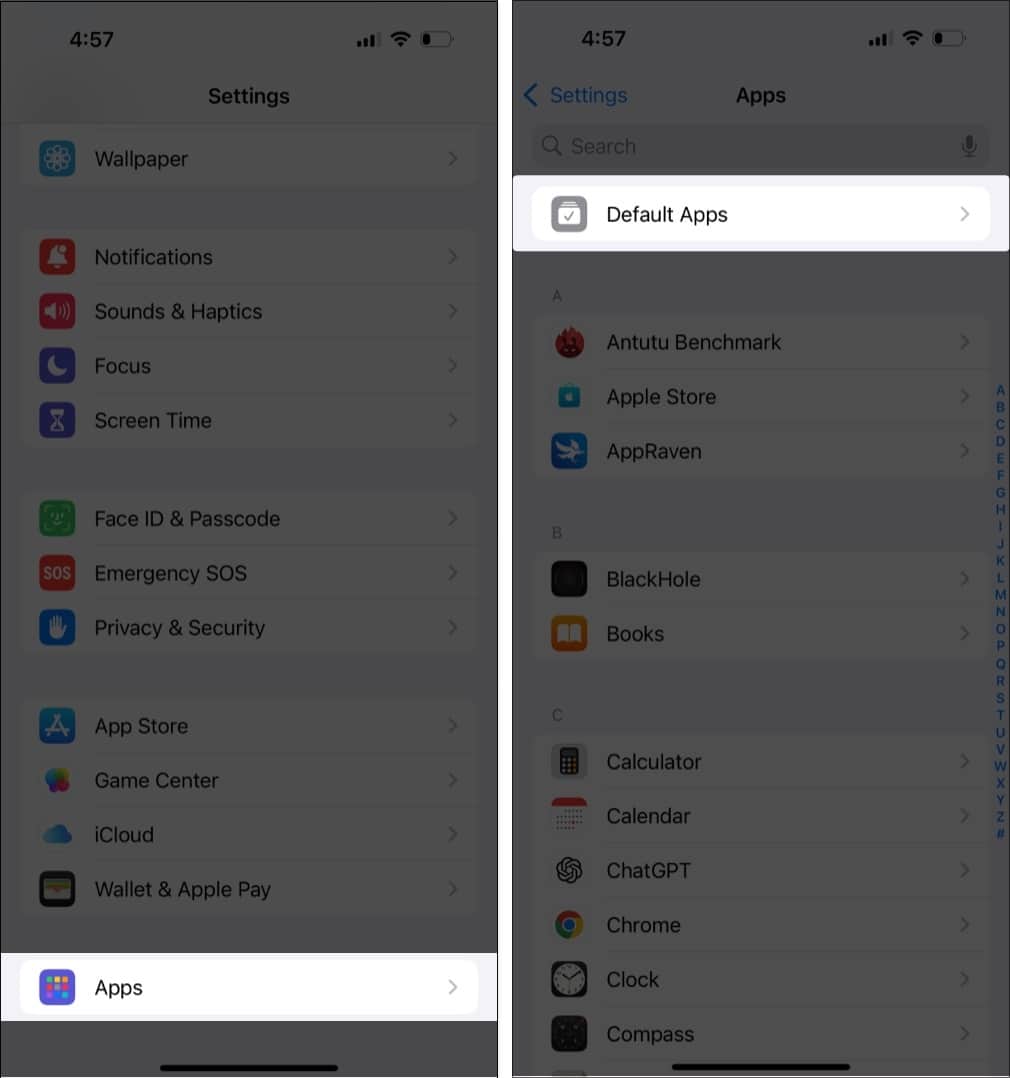
- Open the Settings app on your iPhone or iPad.
- Scroll down and tap Apps.
- At the top, tap Default Apps.
- Choose either Calling or Messaging, depending on what you want to change.
- Select the app you want to set as the new default.
Currently, only a few third-party apps support this functionality. WhatsApp is one of the first to allow itself to be set as the default for messaging and calling actions on iPhone. More apps are expected to support this soon.
Final Thoughts
The ability to customize your iPhone experience by choosing default messaging, calling, browser, and other apps is a significant shift from Apple’s traditionally closed system. While the current app support is limited, it marks a positive step toward greater user freedom and flexibility.
We’re excited to see how developers respond and how this evolves in future iOS updates.
What do you think about Apple’s new Default Apps feature? Would you switch from iMessage or the Phone app to WhatsApp or Zoom? Let us know your thoughts in the comments!
Also read:

- How to make emojis on iOS 18
- How to control someone’s screen on iPhone
- Best iOS 18 tips and tricks you should know!