FaceTime Like a Pro
Get our exclusive Ultimate FaceTime Guide 📚 — absolutely FREE when you sign up for our newsletter below.

FaceTime Like a Pro
Get our exclusive Ultimate FaceTime Guide 📚 — absolutely FREE when you sign up for our newsletter below.


I tested Gmail’s new end-to-end encryption on Android and iPhone and it turns out to be less about personal privacy. Here's everything to know!
Google has announced expanding Gmail end-to-end encryption (E2EE) to Android and iOS devices, so I thought it had finally gone full privacy mode. Five minutes into testing, I realized it’s something else.
The feature looks like a breakthrough on the surface with a clean little lock icon and a simple toggle. But it’s not for all users. Here’s how Gmail end-to-end encryption works, who can use this, and why it matters.
Let me explain it in simple terms. End-to-End Encryption (E2EE) means your message is locked before it leaves your device, and only the recipient can unlock it. Even the platform shouldn’t be able to read it.
Before this update, Gmail already used CSE on desktop. But once stored. So, it was not possible to directly send or access encrypted emails from a mobile device. I used to use third-party apps and external mail portals for additional security.
The new email system in Gmail makes use of client-side encryption on Android and iOS, meaning:
Thus, this new system helps businesses and organizations that need compliance (GDPR, data sovereignty, etc.) simplify workflow on mobile devices. No need for complex traditional encryption like S/MIME or certificates for each user.
This is where things get real, because unlike most features in Gmail, this one doesn’t start with a toggle. When I first tried enabling it, I realized quickly that only my Workspace admin has control over it.
Once that hurdle is cleared, though, the actual usage is surprisingly simple, and that contrast is exactly what defines Gmail’s E2EE experience.
You need:
Once it’s set up, the flow becomes familiar again.
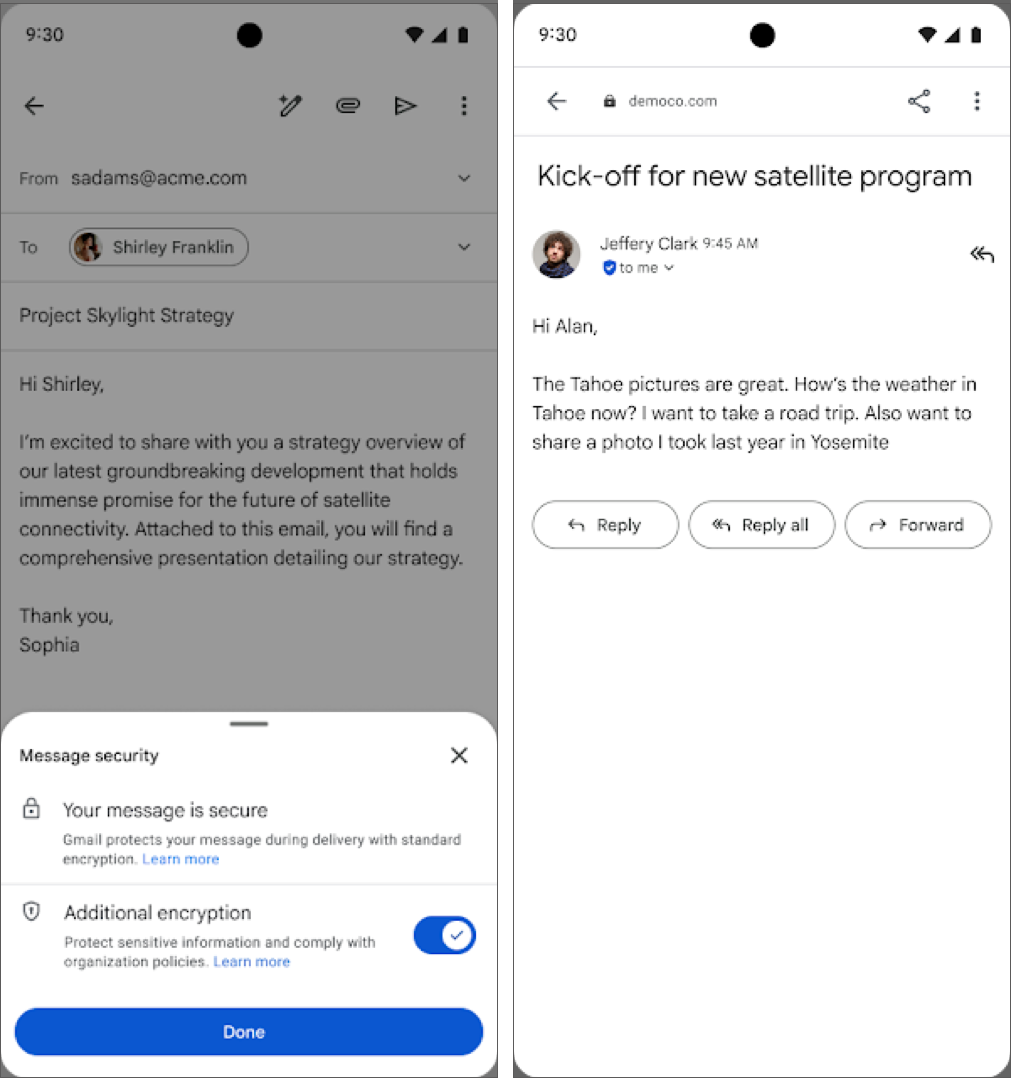
If the recipient uses Gmail (mobile or web), the email appears like a normal thread. For other email providers, Google sends a secure link instead of a standard email body. The recipient can open it in a browser, verify their identity (code or login), then read and reply securely.
That’s a big usability win!
This is where my expectations got challenged.
However, you want privacy for your personal emails, I recommend using secure apps like Proton Mail and Signal.
After testing side-by-side:
| Feature | Gmail E2EE | Proton Mail | Signal |
|---|---|---|---|
| Default E2EE | No | Yes | Yes |
| Setup complexity | Medium–High | Low | Very Low |
| Key ownership | Org-controlled | User-controlled | User-controlled |
| Metadata hidden | No | Mostly | Yes |
| Works for everyone | No | Yes | Yes |
After testing it end-to-end, here’s my clear stance:
Use it if you:
Avoid relying on it if you:
In those cases, Proton Mail still wins for email, whereas Signal dominates messaging.
After spending time with Gmail’s new encryption, I walked away with mixed feelings.
On one hand, I genuinely like what Google has done here. Once everything is set up, it’s shockingly easy to use. Just tap a lock and send.
However, not everybody can use this. It’s controlled, enterprise-focused, and still comes with boundaries. I wish this rollout to standard Gmail for all users in the near future.
Do you also want default end-to-end encryption, like WhatsApp, for your personal emails? Let me know your thoughts below!
More Like This: