
FaceTime Like a Pro
Get our exclusive Ultimate FaceTime Guide 📚 — absolutely FREE when you sign up for our newsletter below.

FaceTime Like a Pro
Get our exclusive Ultimate FaceTime Guide 📚 — absolutely FREE when you sign up for our newsletter below.


Apple pushes AirTag updates silently and on its own schedule. Here is how to check the current firmware version on any AirTag, and the steps that encourage an update to install.
Do you know Apple pushes updates to your tiny tracker often? Whether you’re using the original AirTag or the new AirTag 2, keeping the firmware up to date matters more than most people realize.
Unfortunately, downloading the latest version is not as easy as tapping an update button. In a way, it is much easier. Confused? Don’t be. In this guide, I’ll walk through how AirTag updates work, how to check your version, and get the latest firmware update.
Here’s the latest firmware version for the following AirTag models:
However, Apple hasn’t published any release notes detailing the changes the firmware entails, so I assume it likely brings some speed improvements, Bluetooth stability, Find My performance enhancements, and addresses flaws the business found in real-world scenarios.
The previous versions brought some enhancements to the anti-stalking feature.
Enough speculations! Now let’s see which firmware you have and how you can update it.
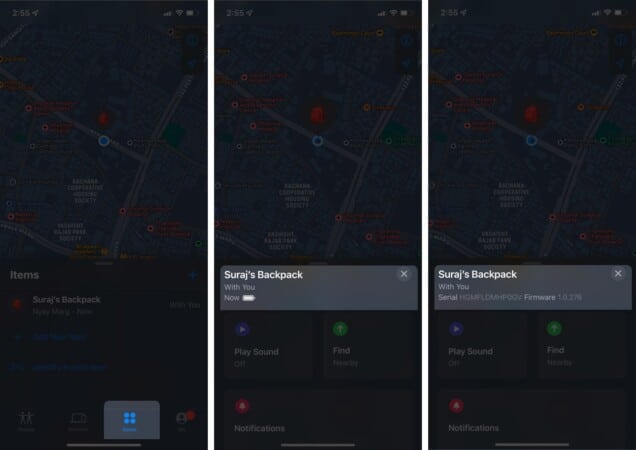
If you have the latest version, sit back and enjoy! And if you notice some significant changes, share them with us in the comment section below.
If your AirTag didn’t get the latest firmware update, read on.
Like the AirPods firmware updates, you don’t get an update menu to manage the download process. It happens over the air through your paired iPhone, and everything is automatic.
However, there is one thing you can do:
However, there is no guarantee or hacks to quicken this process. So, you might have to be patient with it and keep trying until you succeed.
Most of the time, Apple is thoughtful and insightful with its OS and devices, and I love it for this. But at times like these, the tech giant misses. Why can’t we force an update, or at least receive a notification if a firmware update is available?
What are your thoughts on the matter? Do you think Apple should incorporate such a feature for AirTags? Let me know in the comment section below.
Not well versed with the superpowers of Apple’s Find My App, read these to crack them:












