
FaceTime Like a Pro
Get our exclusive Ultimate FaceTime Guide 📚 — absolutely FREE when you sign up for our newsletter below.

FaceTime Like a Pro
Get our exclusive Ultimate FaceTime Guide 📚 — absolutely FREE when you sign up for our newsletter below.


X is rolling out AI-powered custom timelines built by Grok. Here’s how the new feature works, why it feels surprisingly addictive, and the trade-offs most users will miss.
X just flipped a switch that could fundamentally change how people experience the platform. Instead of Grok sitting quietly in the sidebar as a chatbot, X is now letting the AI build and manage your feed itself. You choose a topic, and Grok generates an entire timeline around it using posts pulled from across the platform.
At first glance, it sounds like a smarter version of Twitter Lists. In practice, it feels much bigger than that. This marks a clear shift away from the original Twitter model, where your feed was shaped mostly by who you followed and what you manually curated over time. Now, AI decides what’s relevant, what deserves visibility, and what stays in front of you.
And honestly, after testing it, the experience is surprisingly compelling. But there’s also a trade-off most people probably won’t think about until much later.
X is rolling out a new system where Grok creates personalized timelines around specific interests you choose.
Instead of relying only on:
…you can now tell Grok what you care about, and the AI assembles a feed around it automatically.
The difference is important.
This isn’t keyword filtering. Grok analyzes context, engagement patterns, and topic relationships to surface posts it believes are genuinely relevant.
According to Nikita Bier, these timelines become especially effective for topics you already interact with regularly.
There’s also a smaller but useful addition: you can now temporarily snooze categories you don’t want inside the For You feed for 24 hours, helping reduce clutter without permanently reshaping recommendations.
The setup starts with selecting topics.
X currently offers around 75 categories, including:
Once selected, Grok scans posts across X and builds a dedicated stream around those interests.
What makes it different from older recommendation systems is how aggressively it prioritizes relevance over chronology or follower relationships.
That means:
And because each topic gets pinned directly to your home tab, switching between focused feeds becomes frictionless.
During testing, the experience felt almost too good at understanding intent. The timelines become highly tuned surprisingly quickly, especially around niche interests. That’s also what makes them potentially addictive.
Here’s how the feature currently works:
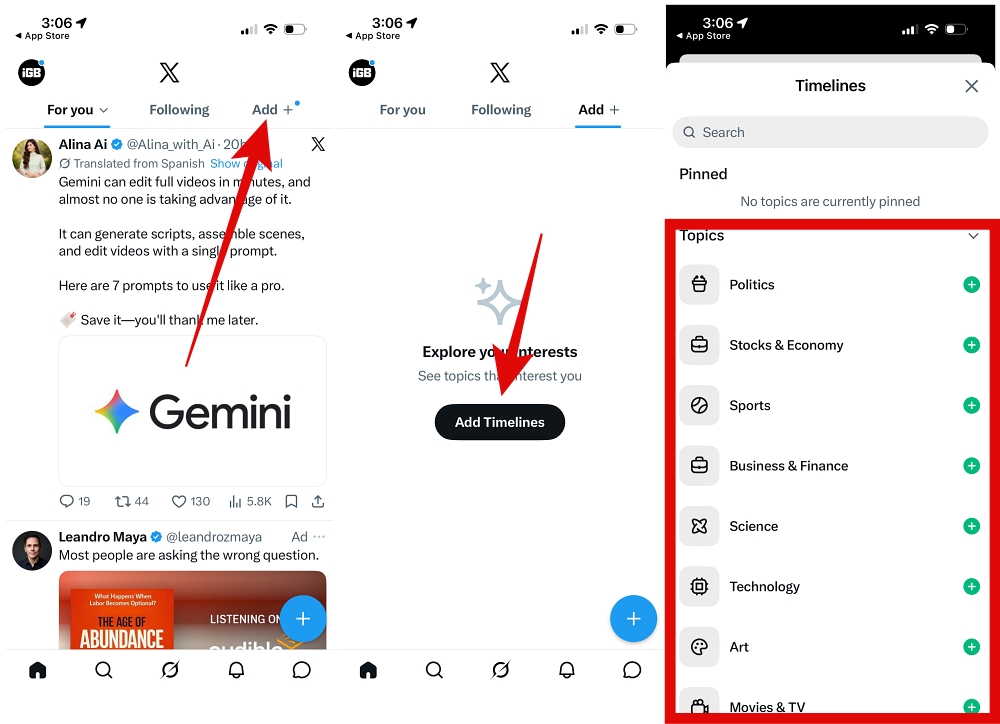
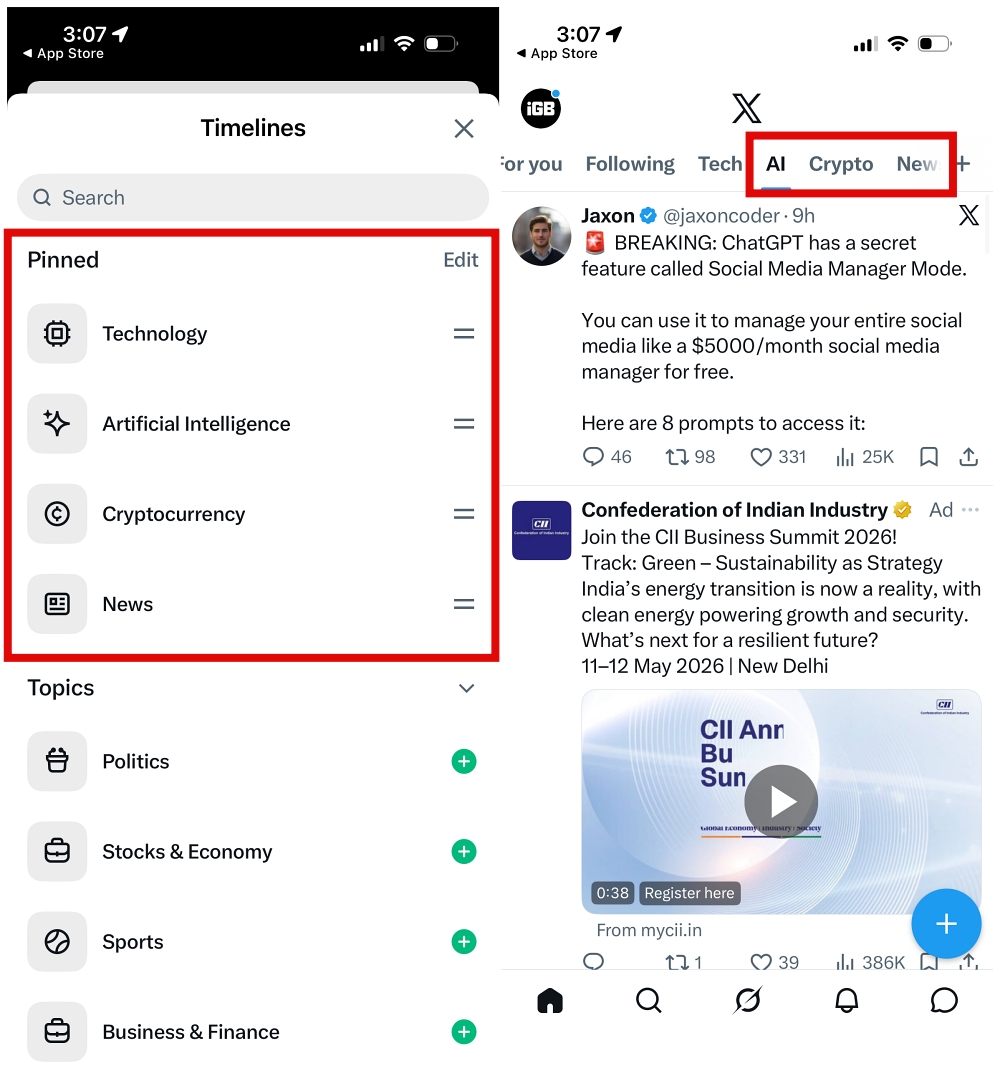
The categories go deeper than broad themes too. You’ll find highly specific interests mixed in with larger ones, which gives the feeds a more personalized feel than standard topic-following systems.
And this is only one part of what Grok is becoming on X. The AI is also expanding into features like Visual Intelligence and deeper conversational tools. If you’re exploring the ecosystem already, it’s worth learning how to use Grok on iPhone to understand where X is heading with its AI strategy.
Right now, the feature is limited.
Custom Grok timelines are:
That matters because it signals something bigger. X is increasingly separating the platform into two experiences:
In other words, AI-powered relevance is becoming part of the subscription pitch.
If you don’t have Premium, you can still shape your feed manually by following or unfollowing topics, but the AI-generated experience remains gated behind the paywall.
This is the part that feels more important long term. Because once a feed becomes genuinely good at predicting what you want to see, you stop thinking about how much influence it has.
At first glance, this looks like another feature rollout. It’s not.
X is gradually shifting from a traditional social network into an AI-driven content platform where discovery, relevance, and engagement are increasingly controlled by machine learning systems instead of user decisions.
And honestly, the experience works. It’s smoother, faster, and more personalized than manually curating feeds yourself.
But the more effective it becomes, the more important the underlying question feels: If AI decides what deserves your attention every day, how much of your perspective is still entirely your own?
FAQs
No. The feature is currently rolling out primarily to X Premium subscribers.
Yes. X allows users to create multiple AI-powered timelines around different interests and pin them directly to the home tab.
No. Grok pulls posts from across X based on relevance and context, including accounts you don’t follow.
Not yet widely. The rollout is currently focused on iOS, with Android support expected later.












