
FaceTime Like a Pro
Get our exclusive Ultimate FaceTime Guide 📚 — absolutely FREE when you sign up for our newsletter below.

FaceTime Like a Pro
Get our exclusive Ultimate FaceTime Guide 📚 — absolutely FREE when you sign up for our newsletter below.


Instagram’s new Instants feature brings disappearing photos to DMs, but not everyone wants it crowding the inbox. Here’s how to hide Instants and make your Instagram messages feel cleaner again.
 ByVikhyat
Instagram has officially introduced Instants, a new DM-focused feature that lets users share quick, disappearing photos with friends directly from the inbox. The idea is simple: capture something in the moment, send it without filters or edits, and let it disappear after it has been viewed or after 24 hours.
It is clearly built for casual, real-time sharing, borrowing a little from Snapchat and BeReal. You can send Instants to Close Friends or mutual followers, and they appear inside the Instagram messaging tab rather than on your profile, feed, or Stories.
After trying it for a while, I can see why Instagram added it, but I also understand why many users will turn it off immediately. The inbox already has enough going on, and Instants makes it feel busier if you do not actively use it.
The good news is that Instagram gives you a way to hide Instants from your inbox completely. Here’s what Instants are, how they work, and how to turn them off if you do not want them taking up space in your DMs.
Instagram Instants is a disappearing photo-sharing feature built directly into the DM section. It lets you take and send real-time photos to friends without posting them publicly.
Unlike regular photo sharing, Instants only works with Instagram’s built-in camera. You cannot upload an existing image from your phone gallery. Instagram says this is intentional because the feature is meant to feel more spontaneous and less polished.
When someone sends you an Instant, it appears as a small photo card inside the messaging tab. Once you open it, the photo disappears, similar to how Snaps work on Snapchat. Depending on the sharing settings, Instants may disappear after being viewed or after 24 hours.
You can also:
Instagram says the feature is designed to make conversations feel more casual and in-the-moment. But because Instants sit directly inside the inbox, many users feel they add more visual noise to DMs rather than improving the experience.
Note: Instagram is also testing Instants as a standalone photo-sharing app in select countries.
If you do not want Instants showing up in your inbox, Instagram has added a dedicated setting to hide them.
Here’s how to hide Instants in Instagram DMs:
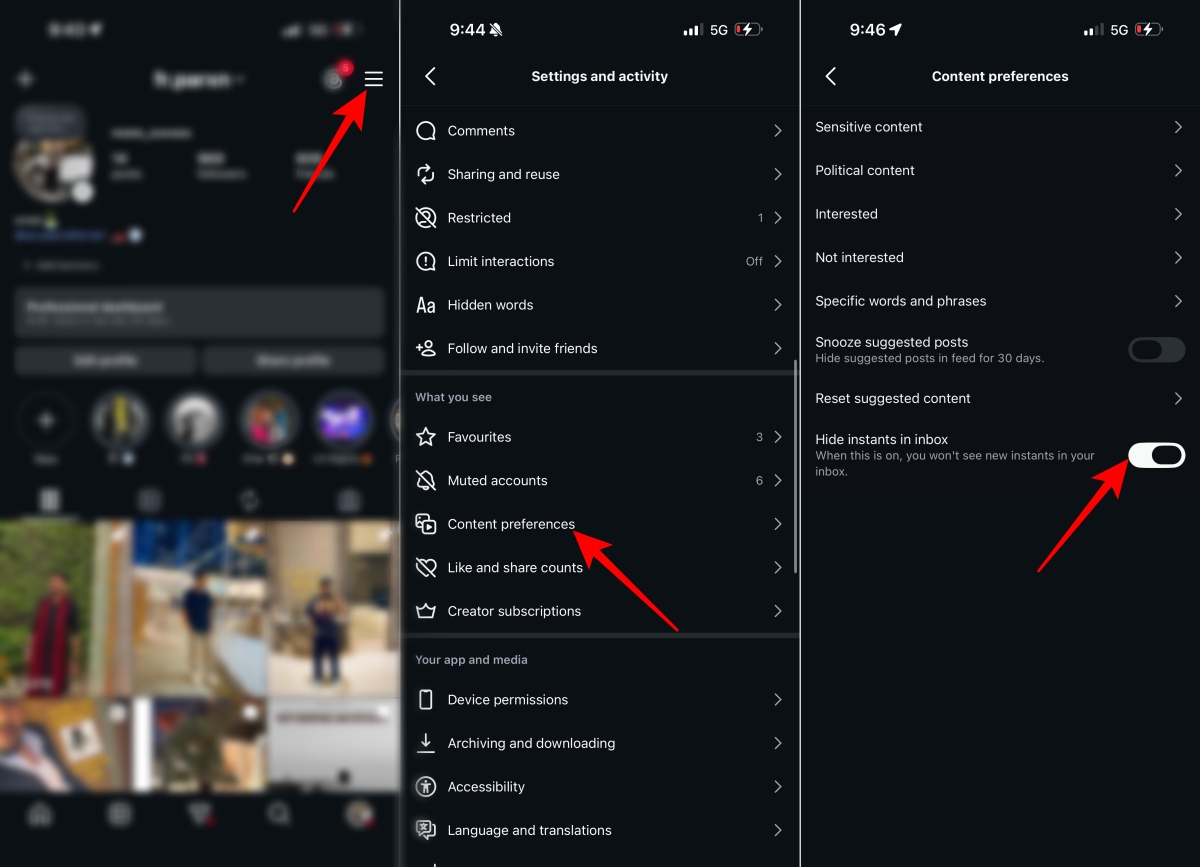
Once enabled, the Instants section will disappear from your Instagram messaging tab. Your inbox should look cleaner, and you can continue using DMs normally.
Instagram’s inbox has changed a lot over the past few years. What used to be a simple messaging tab now includes several extra layers, including Notes, Broadcast Channels, message requests, AI tools, location sharing, and now Instants.
For users who mostly use Instagram DMs for conversations, creator collaborations, client messages, or work-related chats, these extra elements can make the inbox feel crowded.
In my use, the biggest issue was not the feature itself, but its placement. Because Instants sit inside the DM area, they compete with actual conversations for attention. If you do not use disappearing photos regularly, that extra section starts feeling like clutter rather than a useful shortcut.
That is why many users started looking for ways to hide Instants soon after the feature rolled out. The feature itself may be useful for people who enjoy quick disappearing photo sharing, but it is not something everyone wants pinned inside their messaging experience.
The new hide toggle gives users a bit more control over how their inbox looks and feels.
No. Hiding Instants only removes the Instants section from the inbox interface.
It does not affect:
You can still message people normally after hiding Instants. If you change your mind later, you can return to the same Content preferences menu and turn the feature back on.
If you do not see the Hide instants in inbox option, it does not necessarily mean something is wrong with your account.
Instagram often rolls out new features gradually across accounts, regions, and devices. Some users get the setting early, while others may have to wait.
If the toggle is missing, try these steps:
Many Instagram features are enabled server-side, so even if your app is updated, the setting may not appear until Meta rolls it out to your account.
If you like quick disappearing photo sharing, Instants may be worth keeping. It makes sense for casual updates, inside jokes, spontaneous reactions, and quick visual conversations with close friends.
But if your Instagram inbox already feels too crowded, hiding Instants is the better move. It removes one more visual layer from the DM tab without breaking anything else.
I would keep it on only if you regularly send disappearing photos to close friends. Otherwise, hiding it makes the inbox feel cleaner without taking away anything important.
For most users who mainly use Instagram for regular chats, creator work, or following updates, turning off Instants can make the inbox feel cleaner and easier to manage.
Instants is Instagram’s latest attempt to make DMs feel more spontaneous and interactive. For users who enjoy disappearing photos, it may be a fun addition. But for everyone else, it can feel like unnecessary clutter inside an already busy inbox.
If the new Instants section keeps getting in the way, hiding it is quick and harmless. Once the toggle is enabled, your Instagram DMs feel cleaner, less crowded, and easier to navigate again.
Do you like the new Instants feature in Instagram DMs, or did you hide it immediately? Let us know in the comments.











