FaceTime Like a Pro
Get our exclusive Ultimate FaceTime Guide 📚 — absolutely FREE when you sign up for our newsletter below.

FaceTime Like a Pro
Get our exclusive Ultimate FaceTime Guide 📚 — absolutely FREE when you sign up for our newsletter below.


Apple Notes gets smarter with Siri AI, better organization tools, and long-overdue quality-of-life upgrades in iOS 27.
Apple Notes didn’t get the spotlight at WWDC 2026, but it quietly received some of the most practical upgrades in iOS 27. This includes four meaningful changes such as better note organization, deeper Siri AI integration, expanded Markdown support, and a refreshed interface that aligns with the refined Liquid Glass design.
None of these features is flashy on its own, but together they make Apple Notes feel smarter, more organized, and surprisingly more capable. And if you use note-taking apps like Notion or Obsidian, iOS 27 gives Apple Notes a stronger standing as your default workspace.
Here’s everything new in Apple Notes on iOS 27.
If you’ve ever created a long note in Apple Notes, you’ve probably experienced the same frustration. Everything eventually turns into a wall of text. Formatting like different headings, block quotes, bold text, checklists, etc. help. But when a note grows beyond a few hundred words, finding specific sections becomes surprisingly difficult.
This is why divider lines might become one of the best Notes features in iOS 27. Apple now lets you insert horizontal divider lines anywhere inside a note, creating clear visual separation between sections. It sounds small until you start using it.
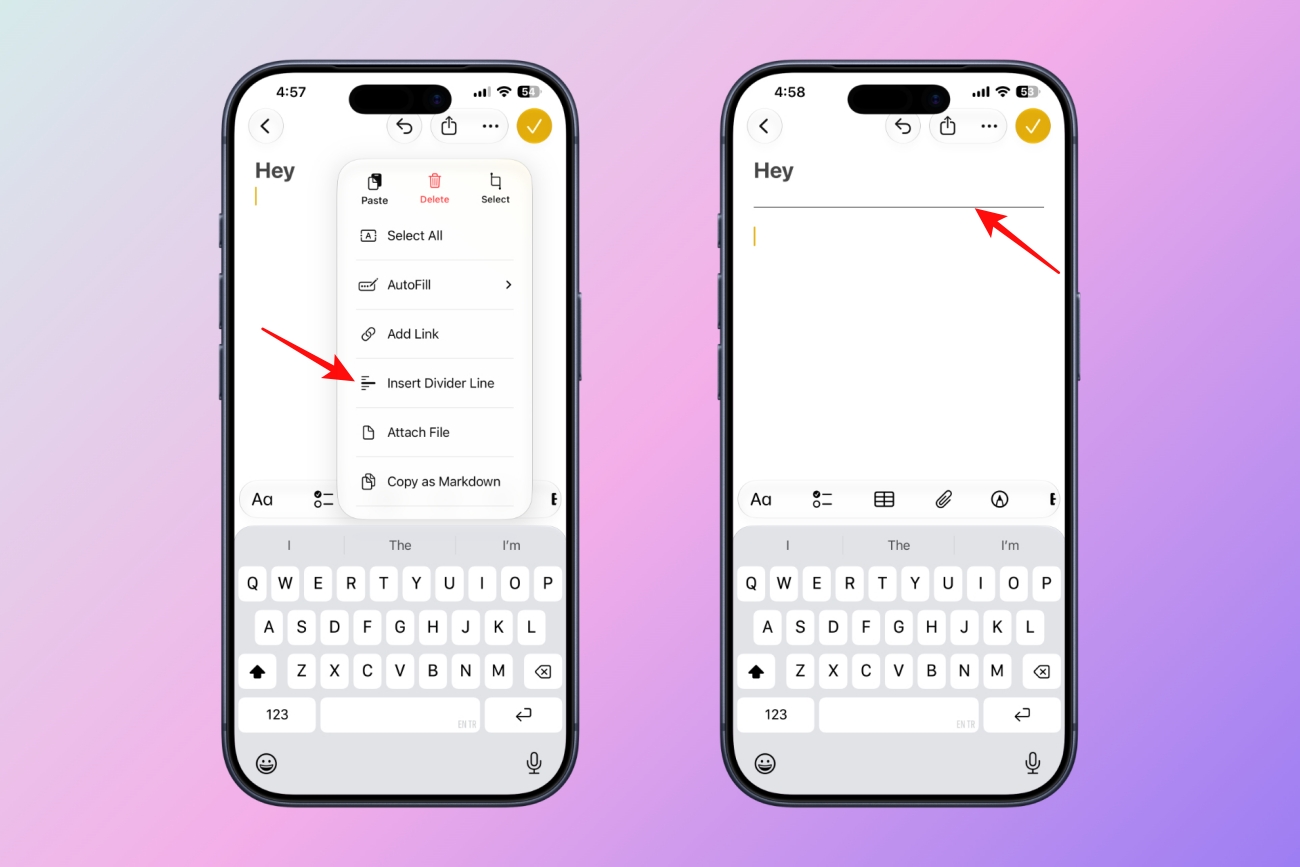
That’s it. The result is a clean horizontal line that instantly breaks up large blocks of content. This isn’t something revolutionary, but Apple should have added it years ago. I can already see this becoming indispensable for meeting notes, research documents, travel plans, and project trackers.
For years, creating notes with Siri felt like a demo feature. You could tell Siri to create a note, but the experience was basic enough that most people ignored it.
iOS 27 changes that. With the new Siri AI experience announced at WWDC 2026, Notes gains much deeper integration with Apple’s assistant. Siri can now create notes, update existing notes, and organize information with more context without leaving the conversation.
For example, you can say: “Add today’s action items from Slack to my project planning note” or “Create a note with the key things to bring in potluck that Sarah texted.”
Instead of jumping through apps, manually opening Notes, finding the correct document, and typing everything yourself, Siri AI can do everything. The best part is I pasted some meeting materials into the Siri app and asked it to format the text into a professional report and then save it as a note. It handled the actions smoothly.
This is the first time Apple’s AI strategy feels connected to a real productivity workflow and I want more of such AI features.
Apple Notes has spent years existing in an awkward middle ground. It was simple enough for casual users but lacked many features that power users expected. Markdown was one of the biggest gaps.
Apple started addressing that with Markdown import and export support in the previous release. In iOS 27, the company is expanding Markdown workflows further, making it easier to move content between Notes and developer-focused writing tools.
Now, you can paste Markdown-formatted text in notes, and it automatically converts into rich text. So no need to format it again. In addition, Notes lets you copy content with plain Markdown syntax. Simply tap the cursor and select Copy as Markdown.
For writers, developers, researchers, and anyone who lives in apps like Obsidian, GitHub, or static site generators, it’s a meaningful improvement.
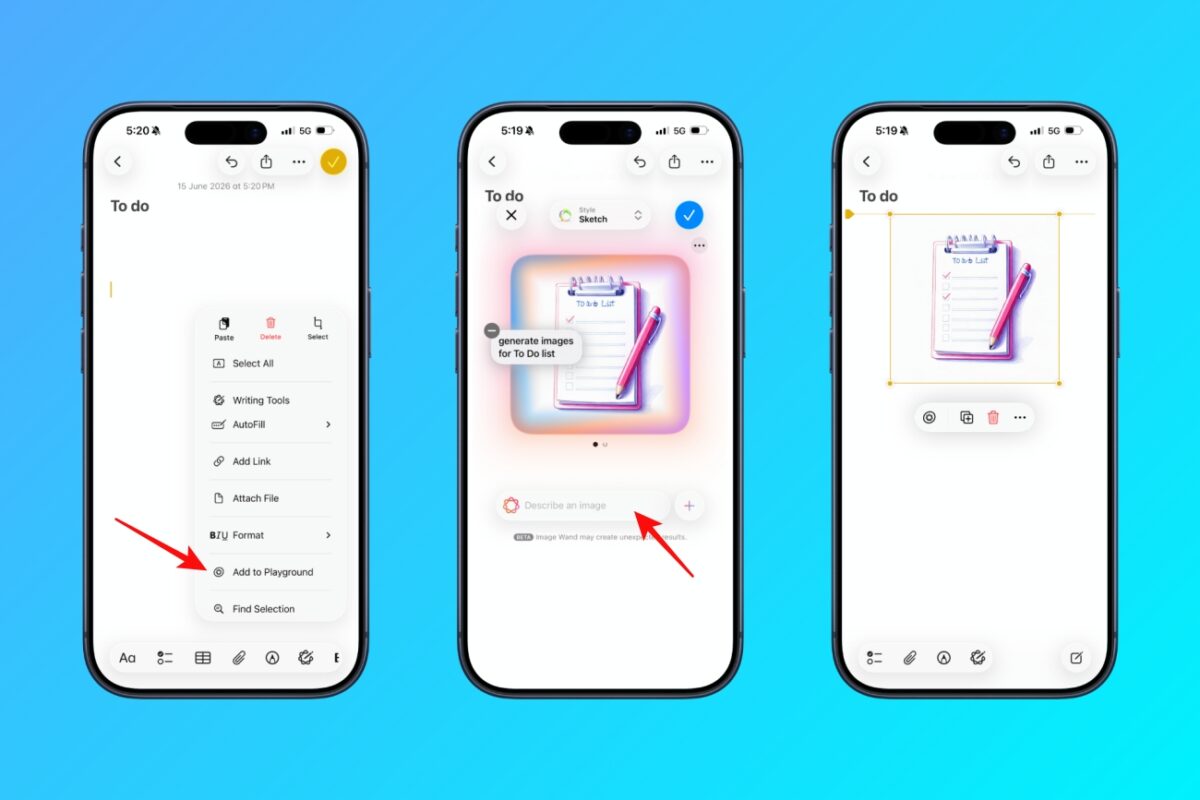
Apple is also bringing its upgraded Image Playground experience directly into Apple Notes. In iOS 27, you can generate high-quality AI images inside a note without jumping to a separate app.
What’s more interesting is that Image Playground now supports additional image styles, including photorealistic for more detailed and expressive results. This is a big step from the previous cartoon-style images Apple originally launched.
If you were expecting a complete redesign, you’re going to be disappointed.
Like the rest of iOS 27, Notes adopts elements of Apple’s evolving Liquid Glass design language. The changes are subtle but noticeable throughout the app. Icons have been refreshed, interface elements feel lighter, and shared notes receive clearer visual indicators.
One of the most welcome changes is improved visibility around shared content. Anyone who collaborates on notes with coworkers, family members, or friends knows how easy it can be to lose track of what’s shared and what isn’t.
The new Apple Notes features are available now if you’re running the iOS 27.
There is one important caveat, though. The Siri AI and Image Playground features, require Apple Intelligence support with English setup language. That means you’ll need iPhone 15 Pro and later models.
The most interesting thing about Apple Notes in iOS 27 isn’t any individual feature. It’s the direction Apple is taking. Divider lines improve organization, Siri AI improves capture, Markdown improves portability, and the visual refresh improves usability.
None of these features would headline a keynote on their own. Together, though, they make Notes significantly better. That’s why I think Apple Notes is becoming increasingly difficult to replace.
Which iOS 27 feature are you most excited about? Let me know in the comments below.
In case you missed: