
FaceTime Like a Pro
Get our exclusive Ultimate FaceTime Guide 📚 — absolutely FREE when you sign up for our newsletter below.

FaceTime Like a Pro
Get our exclusive Ultimate FaceTime Guide 📚 — absolutely FREE when you sign up for our newsletter below.


iOS 27 lets you create AI-generated wallpapers on your iPhone using Apple Intelligence and Image Playground. Here’s how it works and the best prompts to try.
For years, finding a great iPhone wallpaper usually meant browsing Pinterest, downloading images from wallpaper apps, or cycling through the same collection of photos already sitting in your library. That changes with iOS 27.
Apple now lets you create AI wallpapers directly on your iPhone using Apple Intelligence and Image Playground. Simply describe what you want and let the AI generate it for you. For the first time, your wallpaper can be something that doesn’t exist anywhere else.
After spending some time with the feature, I was surprised by how naturally it fits into the existing wallpaper workflow. Instead of feeling like another standalone AI tool you’ll forget about after a few days, it feels like a feature people will actually use.
If you’ve been wondering how to generate wallpapers with Apple Intelligence in iOS 27, this guide covers everything you need to know, including requirements, setup steps, prompt ideas, and the limitations of the new feature.
With iOS 27, Apple has integrated Image Playground directly into the wallpaper picker. Instead of choosing from the iOS 27 stock collection or your Photos library, you can now create entirely new wallpapers using text prompts. The feature supports various styles and themes, making it easy to create personalized backdrops that match your taste.
What stood out to me is Apple’s approach. Rather than hiding wallpaper generation inside a separate AI app, Apple integrated it directly into the place where people already customize their Lock Screen. That makes the feature feel less like an AI demo and more like a natural part of iOS.
Additionally, you don’t always have to generate wallpapers manually. iOS 27 can automatically create AI-generated wallpapers and place them in the Featured section. These suggestions are often based on your photos but reimagined in new artistic styles. Every AI-created wallpaper is marked with the Image Playground icon, making it easy to identify.
If you like one of Apple’s suggested wallpapers, you can simply select it and set it as your wallpaper instantly.
Before you begin, there are a few requirements you’ll need to meet.
You’ll need:
This means older devices won’t get access to the feature even if they support iOS 27.
Apple offers multiple ways to generate AI wallpapers in iOS 27, whether you want to create an image from scratch, use Image Playground directly, or expand an existing photo with Apple Intelligence.
This is the method most people will use.
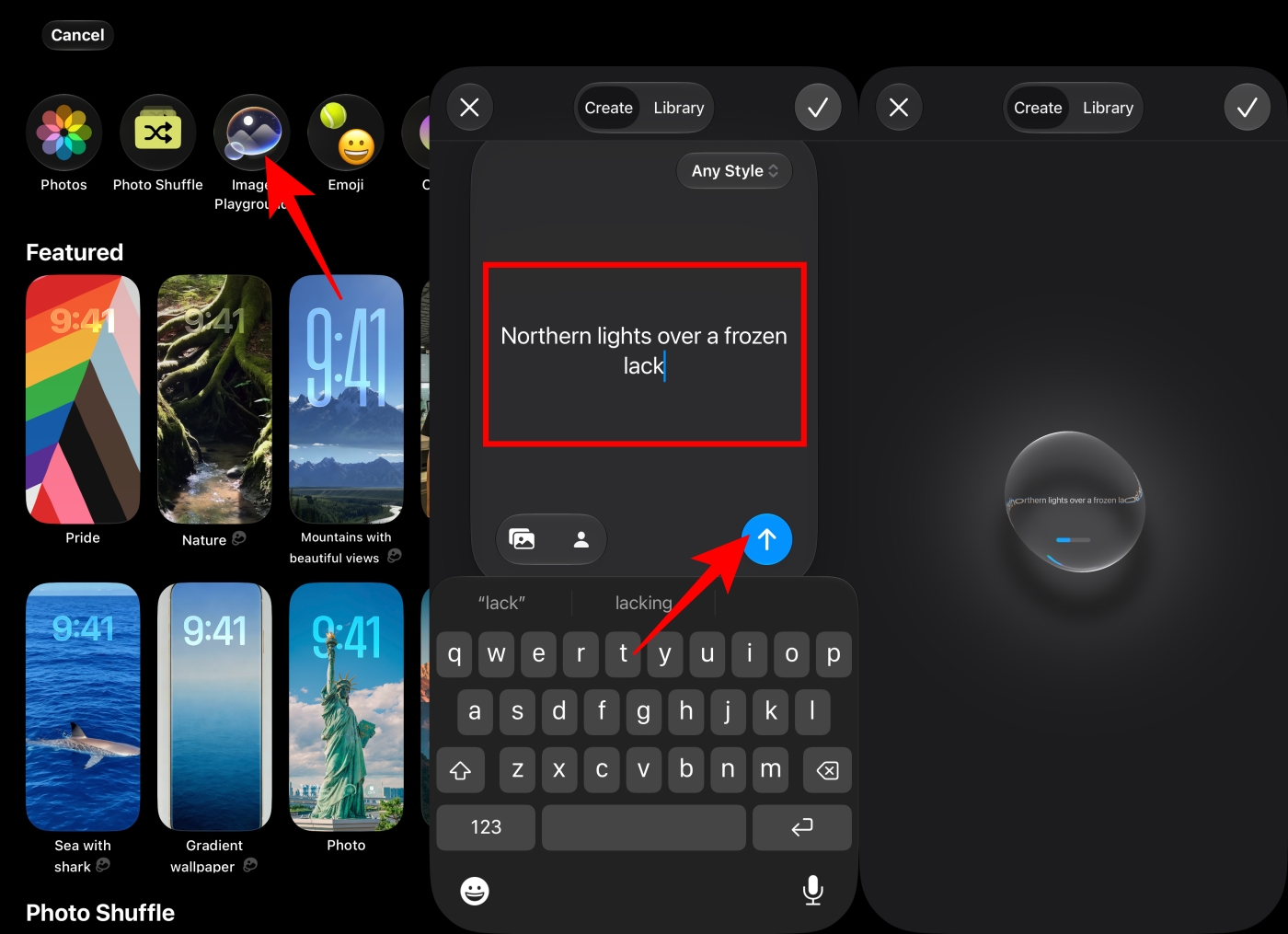
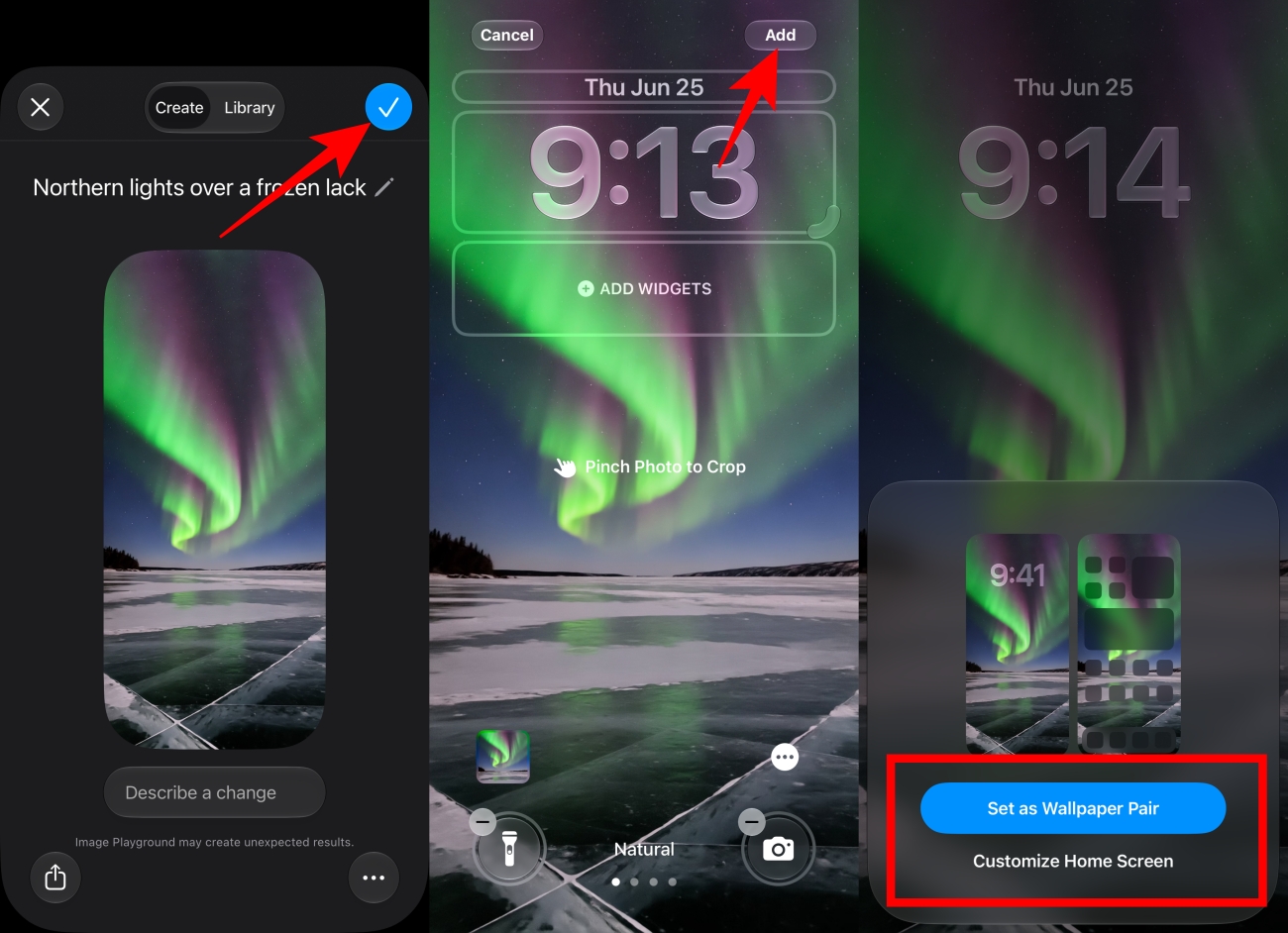
The entire process happens inside the wallpaper customization flow itself. The best part is that you can choose a specific art style or use your existing photos as a reference for more personalized wallpapers.
In my testing, generating a wallpaper usually took only a few seconds. Results varied depending on the prompt, but detailed descriptions consistently produced better images than simple one- or two-word requests.
If you want more flexibility, you can also create images directly inside the Image Playground app.
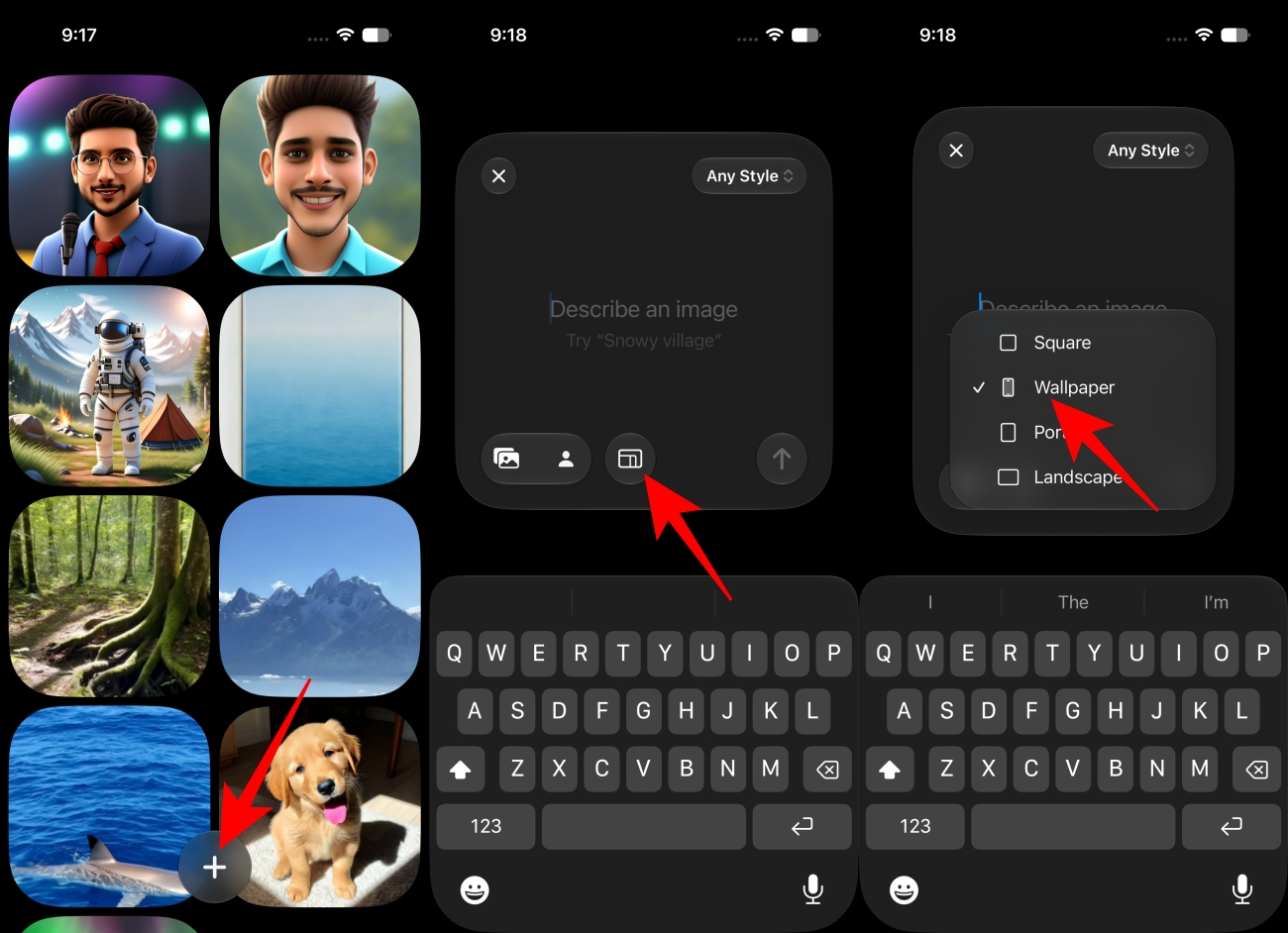
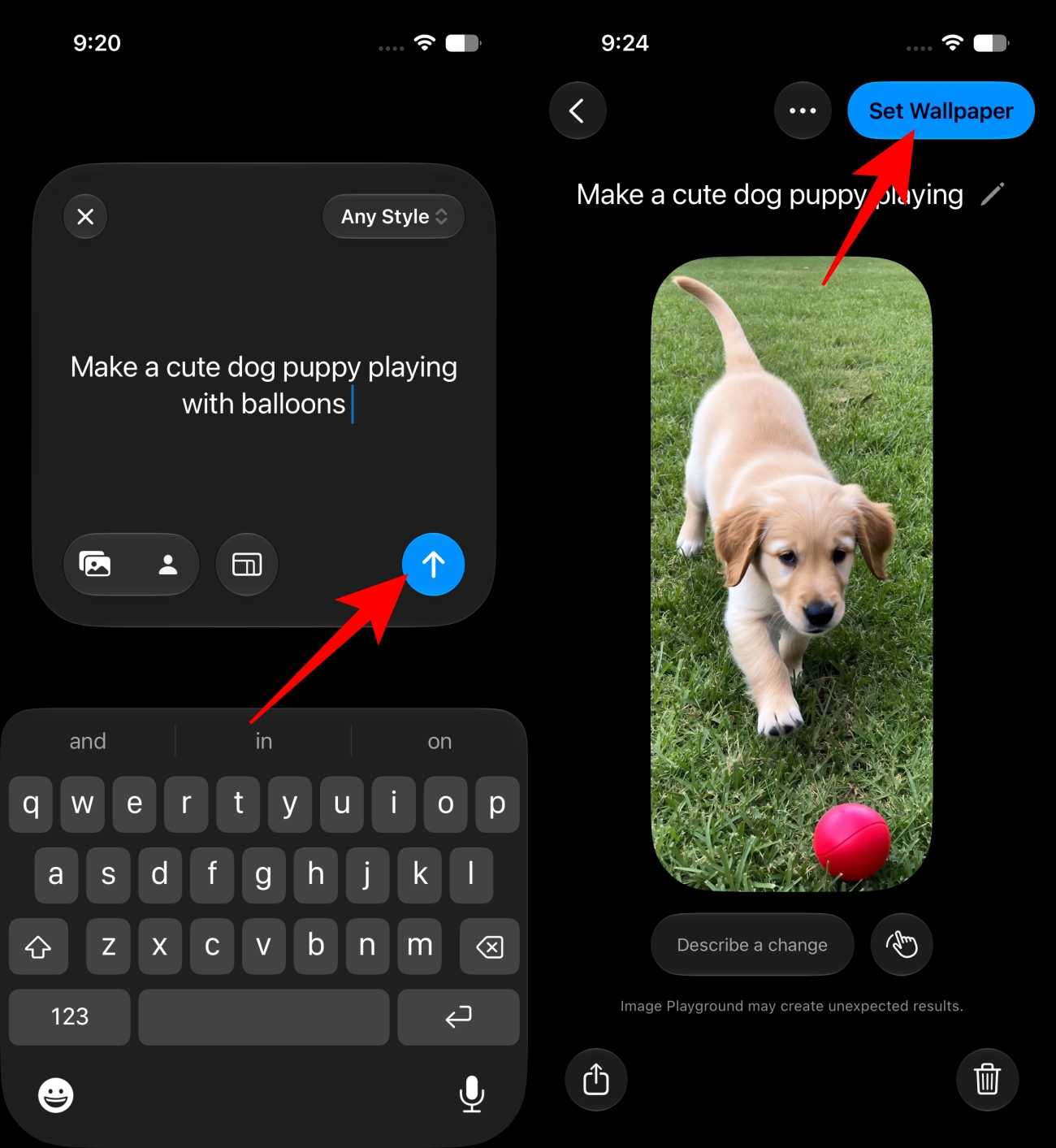
This route is the one I ended up using most often. It’s easier to experiment with multiple ideas and variations before deciding which image deserves a permanent place on your Lock Screen.
As a bonus, I also tried asking the new Siri AI to generate a breathtaking space wallpaper inside Image Playground and apply it automatically. In practice, this ended up being one of the fastest ways to create a new wallpaper.
Another useful iOS 27 Photos feature lets you expand an existing image using Apple Intelligence. This means you can finally use photos that don’t perfectly fit the Lock Screen without awkward cropping.
To use it:
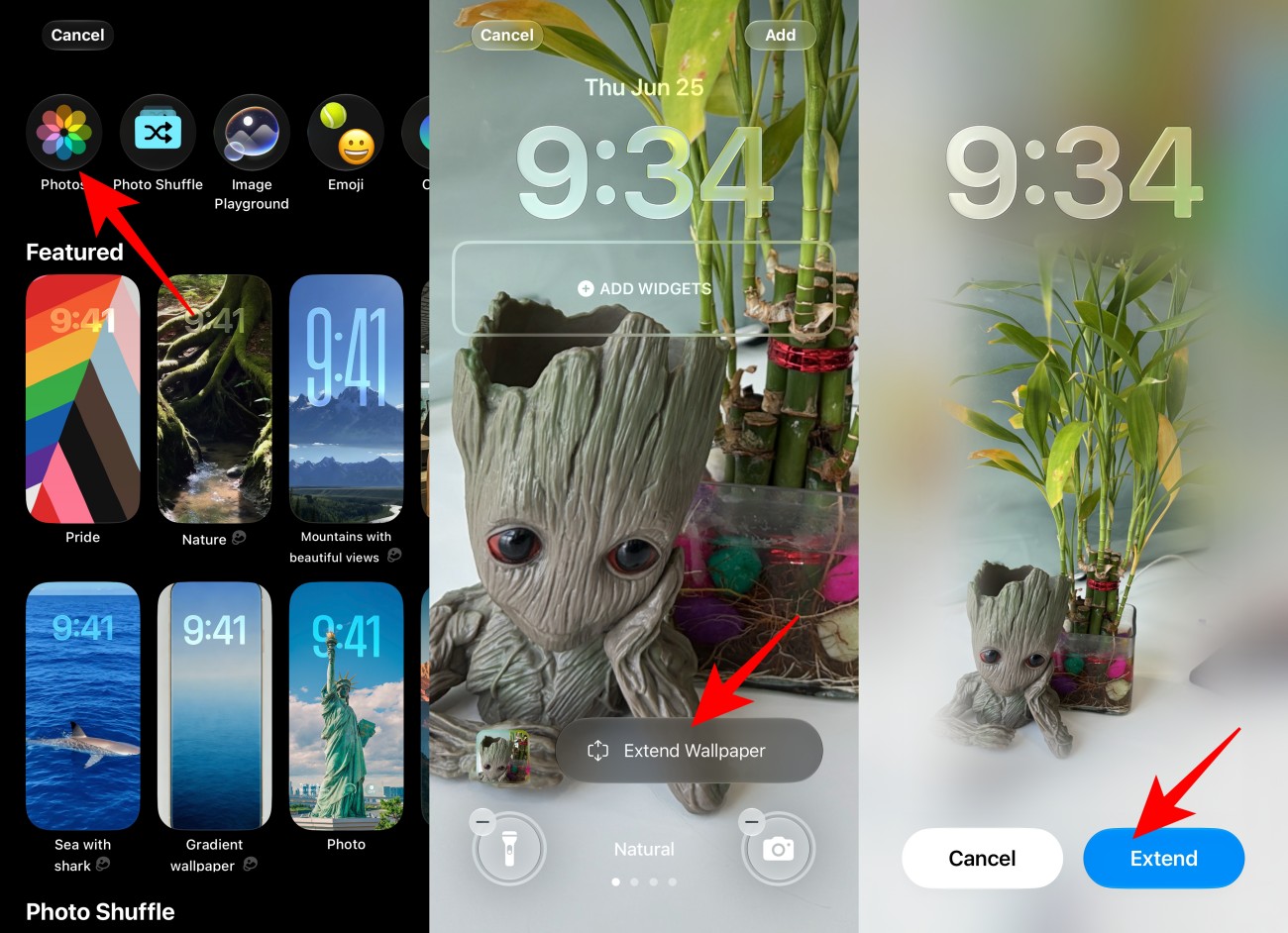
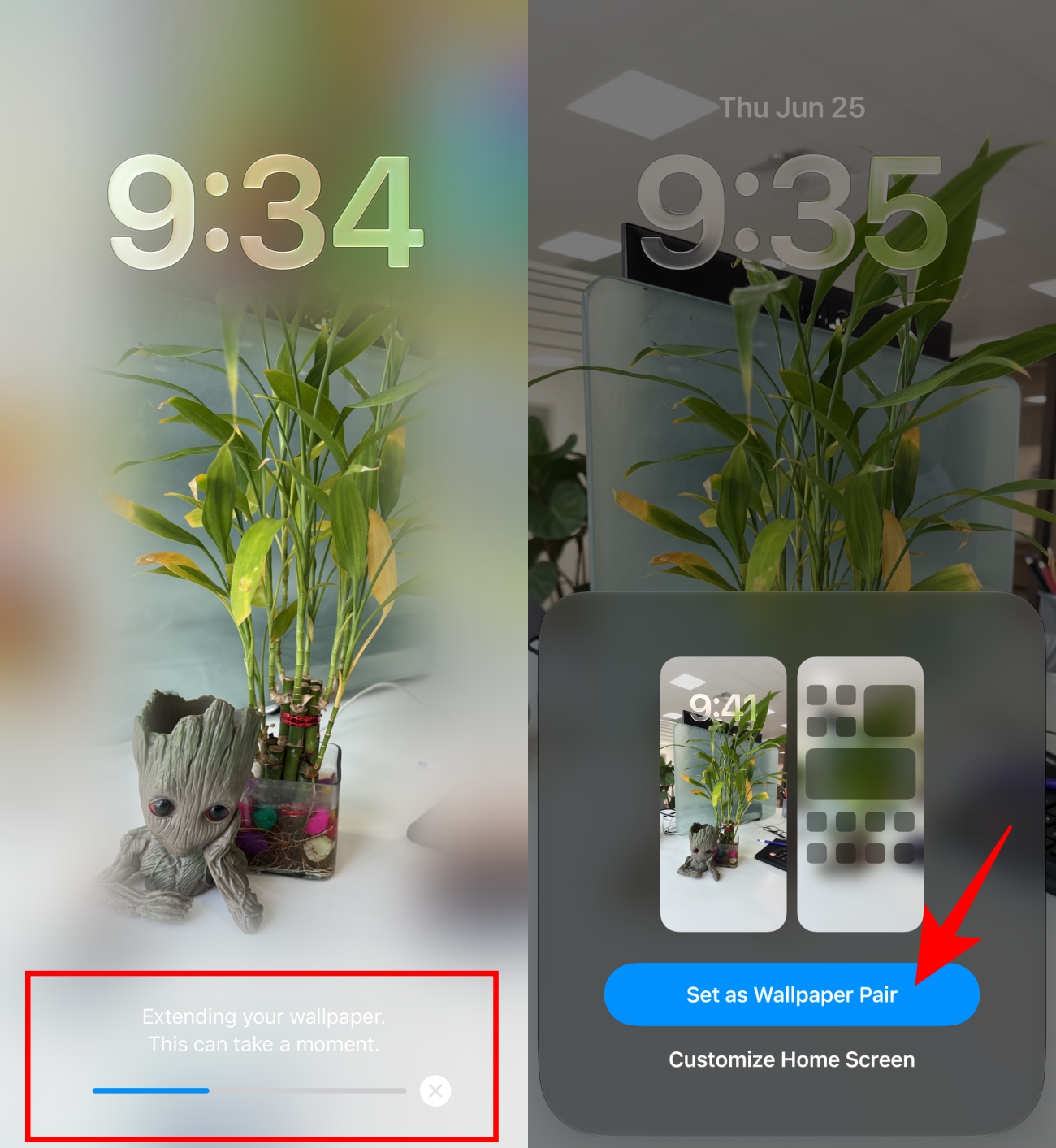
The result is often surprisingly good. It’s one of the most practical Apple Intelligence features because it repurposes photos you already have rather than requiring you to generate something entirely new.
I found this especially useful for portraits and travel photos. Instead of cropping out important parts of the image, Apple Intelligence can often extend the scene convincingly enough that it’s difficult to tell where the original photo ends and the generated content begins.
One thing I learned quickly is that vague prompts rarely produce memorable wallpapers. The best results came from combining a subject, a mood, a lighting style, and a setting into a single description.
The best wallpapers usually come from combining multiple ideas instead of relying on single-word prompts. Always include a subject and describe the mood, atmosphere, and lighting for the best results.
As impressive as the results can be, there are still a few limitations worth keeping in mind.
The new AI wallpaper creator isn’t the only upgrade coming to Image Playground in iOS 27. Apple has significantly improved its AI image generation tool, making it far more capable than previous versions.
Most notably, the app now supports generating photorealistic images. In iOS 26, Image Playground was limited to Animation, Illustration, and Sketch styles. With iOS 27, users can now generate realistic-looking images directly from text prompts.
Apple has also introduced updated image-generation models and new editing controls, making it easier to refine and customize AI-created images. The result is higher-quality output that works better for wallpapers, Contact Posters, invitations, presentations, and other creative projects.
The ability to create AI wallpapers on iPhone may seem like a small addition compared to some of Apple’s bigger AI announcements at WWDC 2026, but I can easily see it becoming one of the most-used Apple Intelligence features.
People change wallpapers all the time. The difference now is that you’re no longer limited to images that already exist. If you can describe it, there’s a good chance your iPhone can generate it.
What I like most is that Apple didn’t turn wallpaper generation into a separate destination. It sits directly inside the customization flow, which makes it feel like a natural extension of the iPhone experience rather than another AI experiment.
For anyone who enjoys personalizing their device, AI wallpapers are one of the more practical and genuinely fun additions in iOS 27.
What do you think about the new AI wallpaper feature? Let us know in the comments below.
Don’t miss these related reads:












