FaceTime Like a Pro
Get our exclusive Ultimate FaceTime Guide 📚 — absolutely FREE when you sign up for our newsletter below.

FaceTime Like a Pro
Get our exclusive Ultimate FaceTime Guide 📚 — absolutely FREE when you sign up for our newsletter below.


Learn how to use AutoMix in iOS 26 to create seamless, DJ-style transitions in Apple Music—no interruptions, just nonstop music.


Apple didn’t spend much time on it during the WWDC keynote, but tucked inside iOS 26 is a small yet notable Apple Music feature called AutoMix. It lets you play playlists where one song transitions into the next like a smart DJ mix—no awkward silences between songs, no sudden energy drops. Here’s how AutoMix works in Apple Music and how you can make the most of it.
AutoMix is Apple’s new feature that replaces the old Crossfade in Apple Music. But it doesn’t just blend tracks—it thinks about how to do it.
It analyzes the tempo and key of the songs you’re playing and uses beat matching and time stretching to create smooth, DJ-style transitions. So instead of fading one track out and then playing the next, AutoMix keeps the flow going. For example, if you’re playing a fast-paced song, the tempo may slow down slightly to match the next slower-paced track.
It’s not an Apple Intelligence feature, but it does feel smart. And yes, it works even if you’re not on the latest iPhone, as long as you’re subscribed to Apple Music.
Enabling AutoMix is easy, but there are a few things to check before you start. Here’s how to do it right.
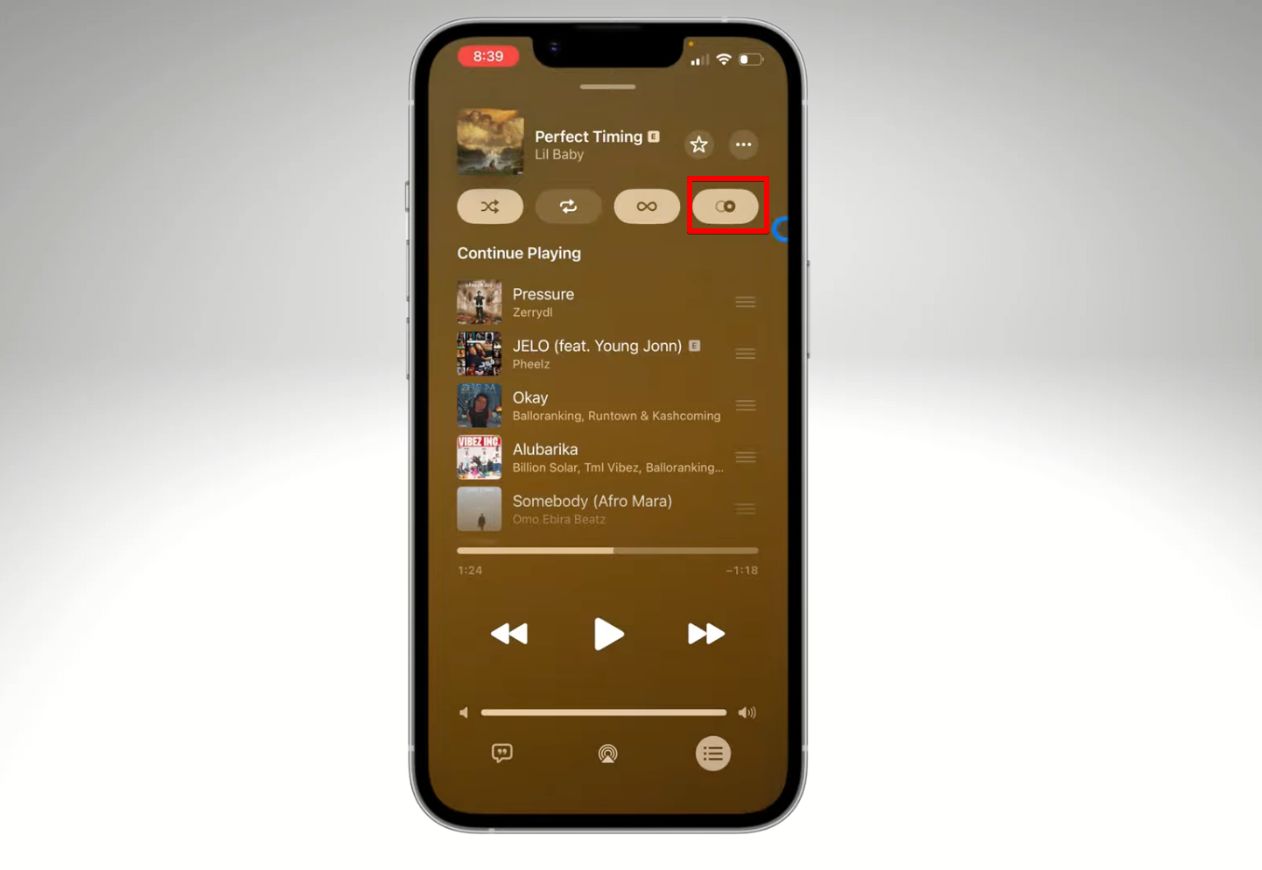
Once it’s enabled, your songs will start blending automatically—no settings to adjust, no sliders to tweak. Just play your playlist and enjoy smooth, DJ-style transitions.
AutoMix works great out of the box, but a few small tweaks can make it sound even better.
Not seeing the AutoMix option, or is it not behaving as expected? Here’s how to troubleshoot:
As fun as AutoMix is, it’s not perfect. There are some real limits.
AutoMix in iOS 26 doesn’t aim to replace professional DJ software, and it won’t match your carefully hand-picked transitions. But for most people—especially those who just hit play and vibe—it’s a solid upgrade. It gives your playlists a radio-like flow, adds a bit of personality, and makes the entire Apple Music experience feel more dynamic.
It still has room to grow, especially with AirPlay support and silence handling, but for now, it’s an easy win for casual listening. If you love your music non-stop and hate dead air, AutoMix is worth a try.
Check out other Apple Music features Apple announced in iOS 26.