FaceTime Like A Pro (eBook)

Get our exclusive Ultimate FaceTime Guide 📚 — absolutely FREE when you sign up for our newsletter below.

Does CVS Take Apple Pay? (Updated Guide)

CVS Pharmacy accepts Apple Pay. This guide will explain how to use Apple Pay at CVS, its benefits, and the forms of payment accepted at CVS Pharmacy.

Explore with AI:

Key Takeaways:

  • Apple Pay accepted at CVS stores: CVS has supported Apple Pay for in-store checkout since 2018, offering a secure and fast contactless payment option for shoppers.
  • How to pay with Apple Pay at CVS: Set up Apple Pay in the Wallet app, choose your card, authenticate with Face ID or Touch ID, and hold your iPhone near the NFC reader.
  • Why use Apple Pay at CVS: Transactions are encrypted and verified through biometrics, keeping card details private while making checkout faster and touch-free.
  • Other CVS payment options: CVS also accepts cash, credit/debit cards, gift cards, Google Pay, and Samsung Pay for in-store purchases, giving customers flexible payment choices.
  • Apple Pay limitations: You can’t use Apple Pay for online orders or prescriptions in the CVS app or website—only for in-store transactions.

Forgot your wallet but have your iPhone while shopping at CVS? No worries! With contactless payments becoming the norm, many shoppers are asking the same question: does CVS take Apple Pay? If you prefer tapping your phone or Apple Watch instead of swiping a card, here’s what you should know before heading to checkout at CVS.

Does CVS Accept Apple Pay?

Yes, CVS accepts Apple Pay at checkout in all their stores in U.S. While the pharmacy chain has actually started accepting Apple Pay for quite some time, they stopped at a point. In 2018, CVS began to accept Apple Pay again in their stores.

This makes payment easier for its customers even when they do not have their cards with them for payment. However, you can’t use Apple Pay to make orders online on the CVS app or website.

How to Use Apple Pay at CVS

If you want to use Apple Pay at CVS, you need to first set up Apple Pay on your iPhone.

Your Complete iOS 26 Playbook:

Get our exclusive Ultimate iOS 26 Guide 📚 — absolutely FREE when you sign up for our newsletter below.

To do that: open the Wallet app → tap the Add button at the upper right corner → select Debit or Credit Card → click Continue. After that, follow the on-screen prompt on the Wallet app to complete the setup.

After doing that or if you’ve already set up your Apple Pay, you can pay at CVS by using the steps below:

  1. Open the Wallet app on your iPhone or Apple Watch then select the card you want to use for the payment.
  2. Next, move your iPhone to CVS’s terminal or NFC card reader.
  3. You will get a prompt to authenticate your payment with your Touch ID, Face ID, or passcode.
  4. Keep your iPhone or Apple Watch near the terminal and your payment should read Done.
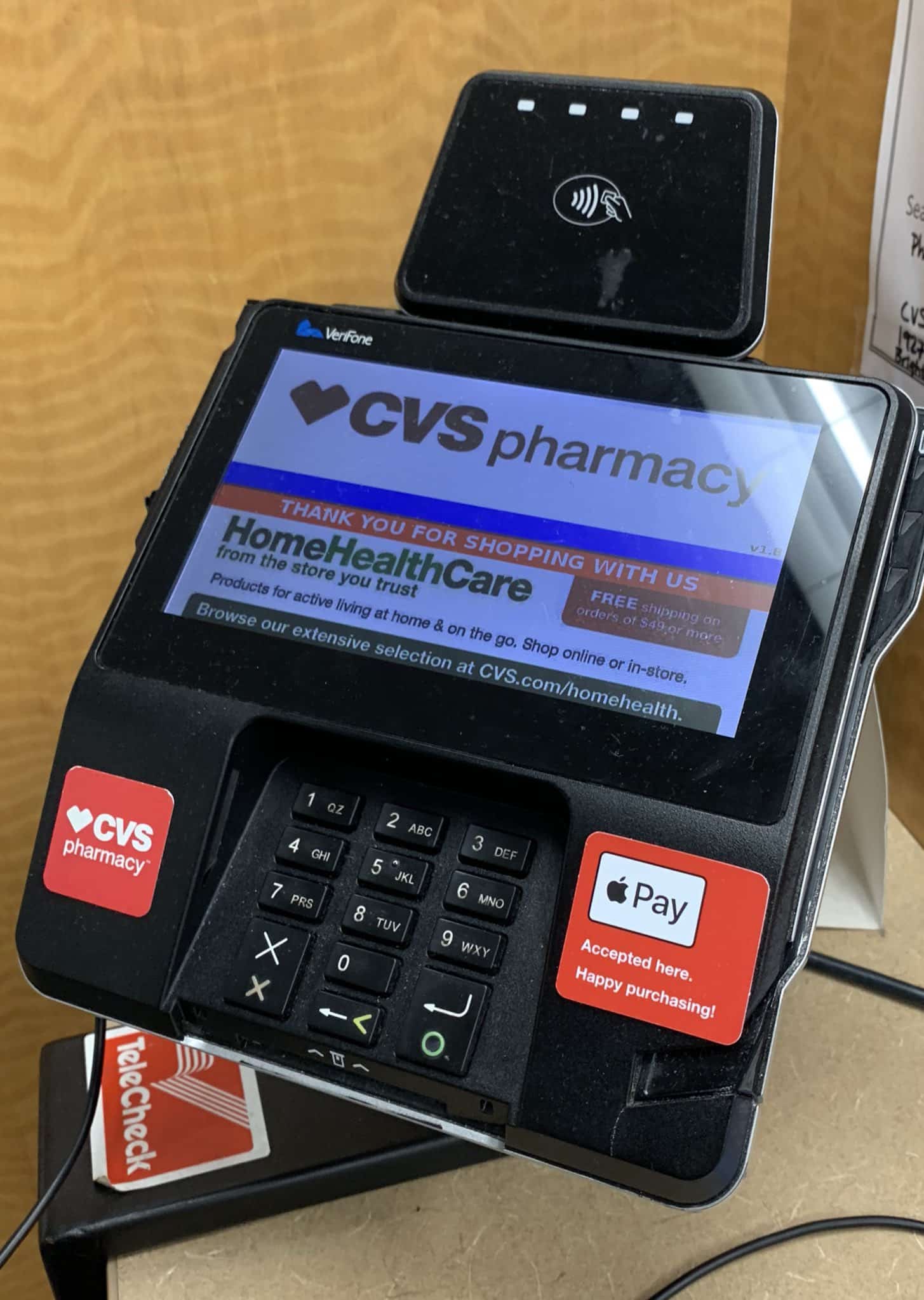
CVS payment terminal
Source: MacRumors

Benefits of Using Apple Pay at CVS

Apple Pay offers a seamless payment method when checking out at stores like CVS. While there are several notable benefits to using Apple Pay at CVS, here are the ones that are most notable:

  • Contactless Payment: With Apple Pay, you can pay for your purchases at CVS without making contact with their payment system. All you need is to move your Apple device close to the NFC reader at the checkout point and you’re good.
  • Convenience: Apple Pay allows you to make payments easily at CVS stores. With it, you won’t need to always have to carry your card around.
  • Speed: It offers arguably the fastest checkout time when making payments at checkout.
  • Security: Apple Pay uses tokenization and biometric authentication to keep payment secure. So, your saved card details are not used directly. Hence, this protects your actual card details.

What Forms of Payment Does CVS Pharmacy Accept?

CVS accepts various forms of payments including:

  • Cash
  • Debit and Credit cards (Visa, Mastercard, American Express and Discover)
  • CVS ExtraCare Card
  • FSA/HSA Cards
  • PayPal QR Codes
  • Venmo QR Codes

It also accepts all contactless payment solutions including Apple Pay, Google Pay and Samsung Pay but only in-store.

You can make payments for your purchases at CVS with Apple Pay. This eliminates having to carry your cards or cash around anytime you want to visit the store and offers several other benefits as discussed in this piece. We hope you find this guide helpful.

FAQs

Can I add CVS card to Apple Wallet?

Yes, you can. You can edit your photos and apply Photographic Styles using the Photos app on your iPhone.

Does CVS accept Google Pay?

Yes, CVS accepts Google Pay and other contactless payment solutions.

Can I use Apple Pay on CVS app?

No, you can’t. As at the time of writing this piece, CVS only accepts Apple at their stores.

Does Target take Apple Pay?

Yes, you can pay for your online and in-store purchases at Target with your Apple Pay.

Also Read:

Explore with AI:

Add Igeekblog as a preferred source on Google

Luqman Abdulkabir
Luqman Abdulkabir

Luqman has a strong passion for technology and provides troubleshooting support and how-to guides for iOS and macOS. Additionally, he keeps up with the latest Apple updates to provide useful content.

Articles: 28

FaceTime Like a Pro:

Get our exclusive Ultimate FaceTime Guide 📚 — absolutely FREE when you sign up for our newsletter below.


Leave a Reply

Your email address will not be published. Required fields are marked *