FaceTime Like a Pro
Get our exclusive Ultimate FaceTime Guide 📚 — absolutely FREE when you sign up for our newsletter below.

FaceTime Like a Pro
Get our exclusive Ultimate FaceTime Guide 📚 — absolutely FREE when you sign up for our newsletter below.


Snapchat now offers paid Memories storage plans with options up to 5TB. Here’s what’s changing, who it affects, and how to manage your saved Snaps.
 ByVikhyat


For years, Snapchat has let users save unlimited content to its cloud storage called Memories. The company has now made major changes to how it stores your saved Snaps and Stories. What used to be a free feature now requires payment once your saved content exceeds a certain limit. In short, Snapchat has introduced Memories Storage Plans, meaning you’ll now need to pay to continue saving large amounts of content in Memories.
Keep reading to learn everything you need to know about Snapchat Memories Storage Plans.
Snapchat launched Memories back in 2016, and since then, users have stored over 1 trillion Snaps, with billions more added daily. According to Snapchat, the goal is to keep Memories fast, reliable, and sustainable for the long term.
To achieve this, the company is shifting to a tiered storage model: everyone gets a generous free limit, but those who save more will need to upgrade to a paid plan.
If your saved Snaps in Memories take up less than 5GB, there’s nothing to worry about. Your saved content will remain as it is, and you can continue using Memories as usual until you cross the 5GB limit.
While you’ll need to upgrade to a paid storage plan if you have more than 5GB of content saved in Memories, Snapchat is offering a 12-month grace period for Memories that exceed this limit, starting September 26, 2025. During this time, you can either:
Snapchat offers multiple storage plans for users who need more space:
Surprisingly, many Snapchat+ users, including myself, currently have access to 1TB of cloud storage instead of the usual 250GB plan.
If you’re unsure how much space your Snaps are taking up, Snapchat makes it simple to check:
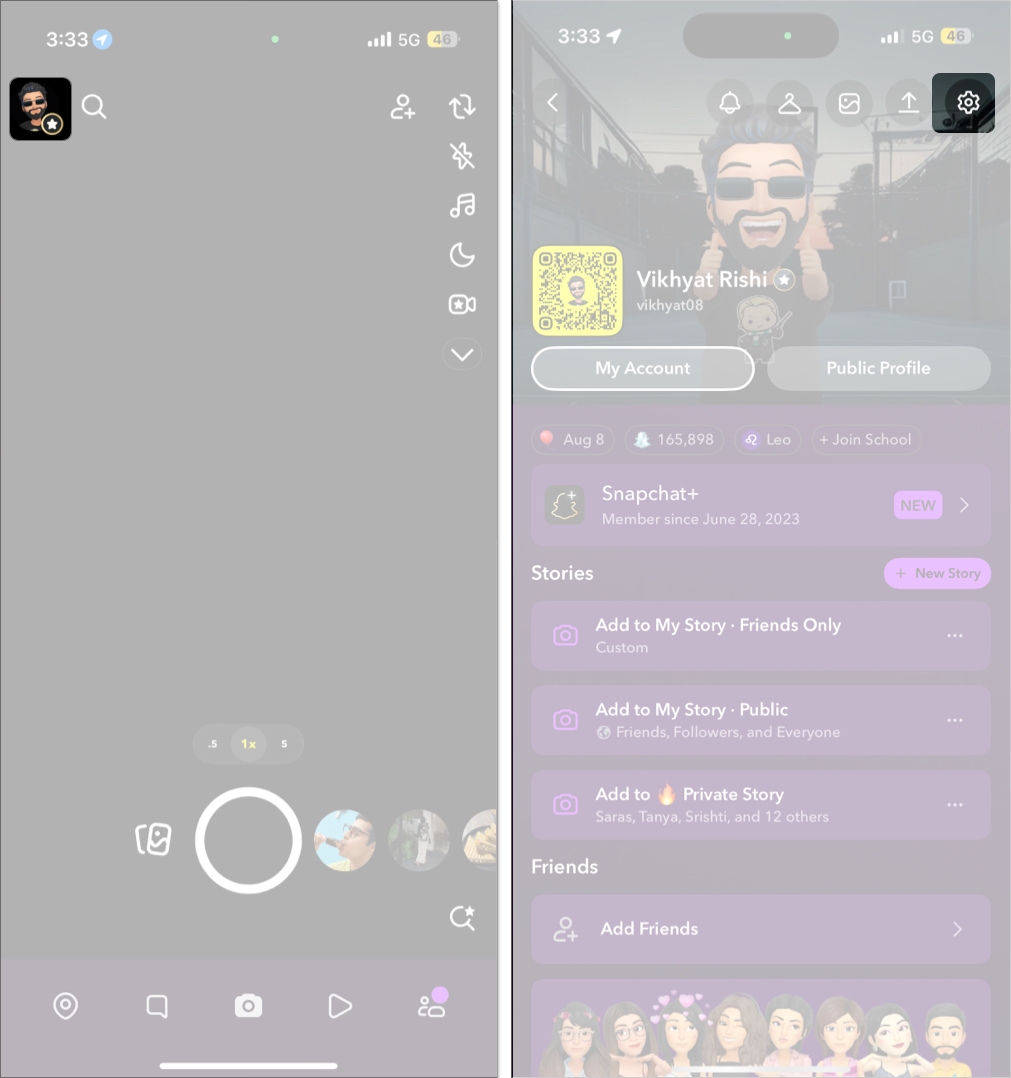
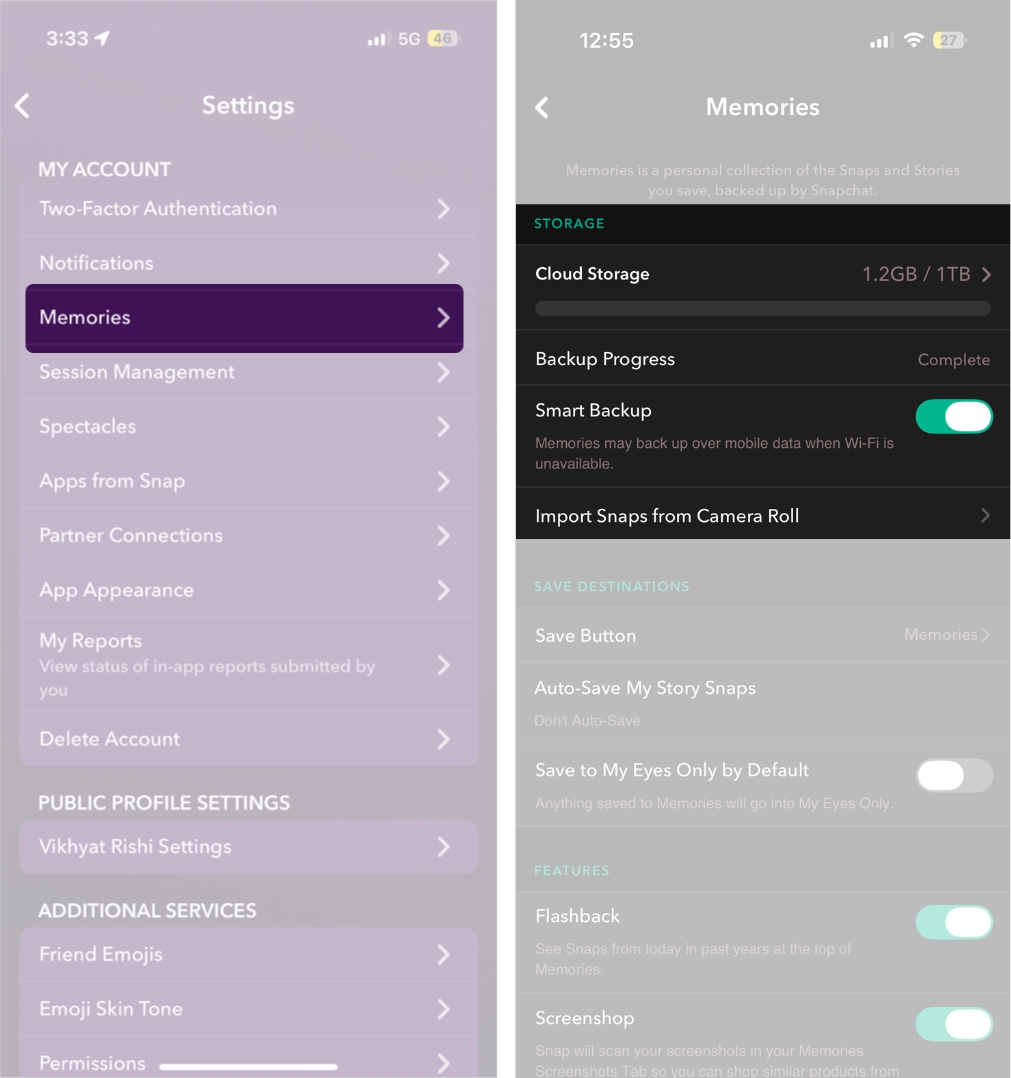
If your saved Snaps exceed the 5GB limit and you don’t want to delete them or upgrade, you’ll need to download your Memories to your device.
You can either head to Memories and manually select the saved Snaps you want to export or download all your Snapchat Memories in one go.
To download all your Snapchat Memories automatically, you’ll need to download your entire Snapchat data, since selective downloads aren’t supported.
This ensures that none of your important memories are lost, even if you choose to stay within the free plan.
Snapchat Quick Cut makes it easy to turn your Snapchat Memories into music-synced videos, helping you create eye-catching clips in just a few taps
Since Snapchat still offers 5GB of free cloud storage, most users won’t be affected, as the majority have less than 5GB of saved content. I’ve been using Snapchat for the past five years, have saved almost every Snap to Memories, and have still used only about 1.1GB of storage.
However, for creators, long-time users, or anyone who loves saving every Snap, these plans make a difference.
Snapchat’s Memories Storage Plans mark a monumental shift in how Snapchat handles your saved Snaps. The free 5GB storage is enough for most users, but for those who don’t want to miss out on anything and save almost every Snap they take, upgrading to a paid storage plan offers peace of mind.
Stop waiting and check your storage today, and decide what works best for you if you’re a regular Snapchat user.
Do you plan to upgrade your Snapchat storage or stick to the free plan? Let us know in the comments.
Don’t miss these related reads: