FaceTime Like a Pro
Get our exclusive Ultimate FaceTime Guide 📚 — absolutely FREE when you sign up for our newsletter below.

FaceTime Like a Pro
Get our exclusive Ultimate FaceTime Guide 📚 — absolutely FREE when you sign up for our newsletter below.


Siri AI arrives with iOS 27, bringing smarter conversations, personal context, web search, onscreen awareness, and powerful new AI features.
 ByVikhyat
For years, I felt Siri was becoming the forgotten assistant on my iPhone. I could use it to set an alarm, send messages, or get the weather, but the second I needed something more than that, I would use ChatGPT or any other AI tool.
That changes with iOS 27. Apple has finally delivered its long-awaited Siri AI, transforming Siri from a traditional voice assistant into a much more capable AI assistant that can understand personal context, search the web, see what’s on your screen, work across apps, and maintain conversations.
Here’s everything you need to know about Siri AI in iOS 27.
Apple released iOS 27 to the public on September 14, 2026. The update is compatible with iPhone 11 and newer, but Siri AI has more demanding hardware requirements.
You need an Apple Intelligence-compatible iPhone, starting with the iPhone 15 Pro and iPhone 15 Pro Max, iPhone 16 series, and later models. It’s also available on compatible iPad, Mac, Apple Watch, AirPods, CarPlay, and Vision Pro models.
And if you’ve installed iOS 27 but can’t find the new Siri, don’t assume something is broken. Apple is using a waitlist-based rollout.
To enable Siri AI on your iPhone:
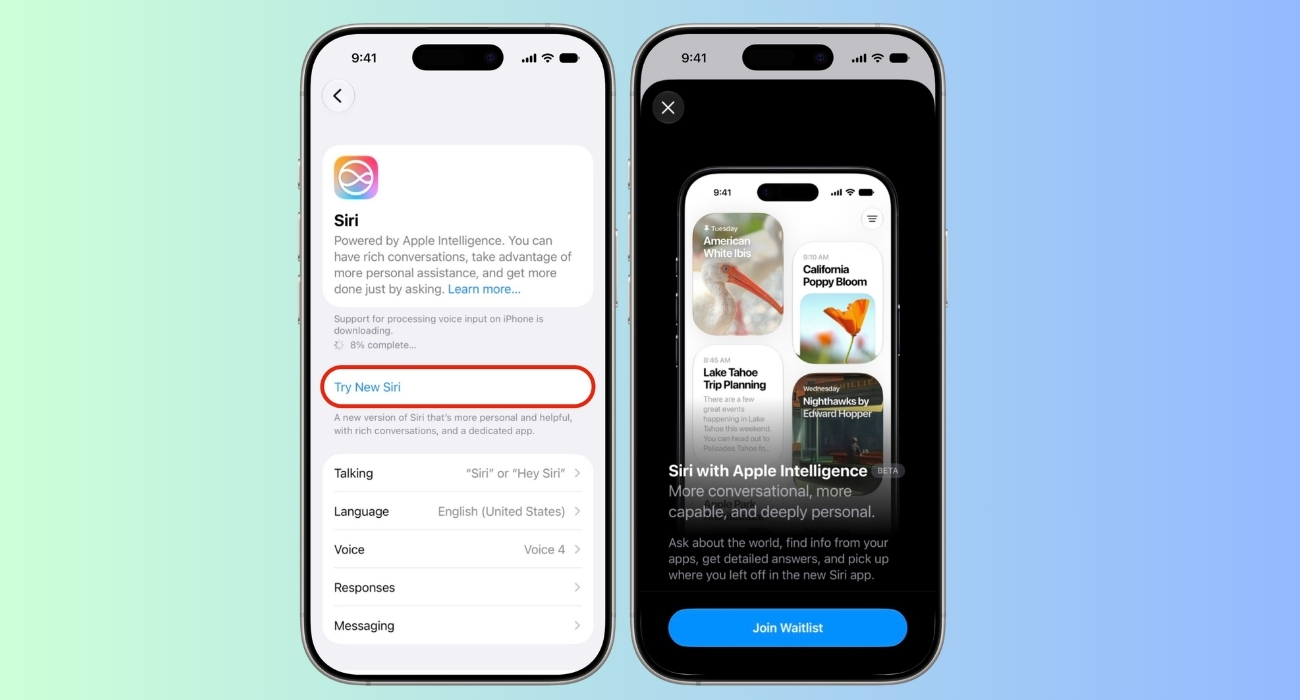
Access isn’t necessarily immediate. Some users have received Siri AI within minutes, while others have reported waiting hours or even days.
The public release of iOS 27 makes Siri AI much broader than the earlier Siri preview suggested. Using the latest Apple Intelligence, Apple has rebuilt Siri around three major capabilities:
These capabilities work together rather than functioning as isolated features. Let’s understand in detail.
One of the biggest changes is Siri’s ability to understand information stored across your Apple apps.
Apple has rebuilt the search system behind Siri using a semantic index. Instead of simply matching keywords, Siri can understand the meaning of information found in apps such as:
That means you can ask questions in a much more natural way. For example: “What was that movie my brother told me to watch last week?” or “What’s the confirmation number for my upcoming flight?”
I have also tried asking Siri to find photos from a particular event, locate information from an old email, or figure out what I need to do tomorrow based on information stored across my apps. This is what it’s like to have an assistant who knows everything about your digital life.
Siri isn’t limited to information stored on your iPhone. The new assistant can search the web to answer questions that require current or broader knowledge.
You can ask it about recipes, travel planning, homework, gardening, DIY projects, calculations, local business information, and other everyday research tasks.
The important difference is that Siri can combine this broader knowledge with information from your device. So instead of asking one assistant for information and then manually giving another assistant your personal details, Siri is designed to bring those pieces together.
Siri AI also gains on-screen awareness. If you’re looking at an image, webpage, document, or selected piece of text, you can ask Siri about it without copying the information into another app.
For example, you can:
This works across supported apps, making Siri considerably more useful when you’re already doing something on your iPhone.
Apple has also changed how Siri looks and feels on iPhone.
The new Search or Ask interface replaces the traditional Spotlight search experience and is accessible by swiping down from the middle of the display.
You can:
When Siri is processing a request, a new animation appears around the interface. Responses can appear as concise information in the Dynamic Island area.
If you need more information, you can swipe down on the response and continue the conversation. There’s also a + button that lets you attach files and images to a conversation.
Some responses also use rich information cards. For example, weather and Calendar requests can display information in a more visual format rather than returning only a block of text.
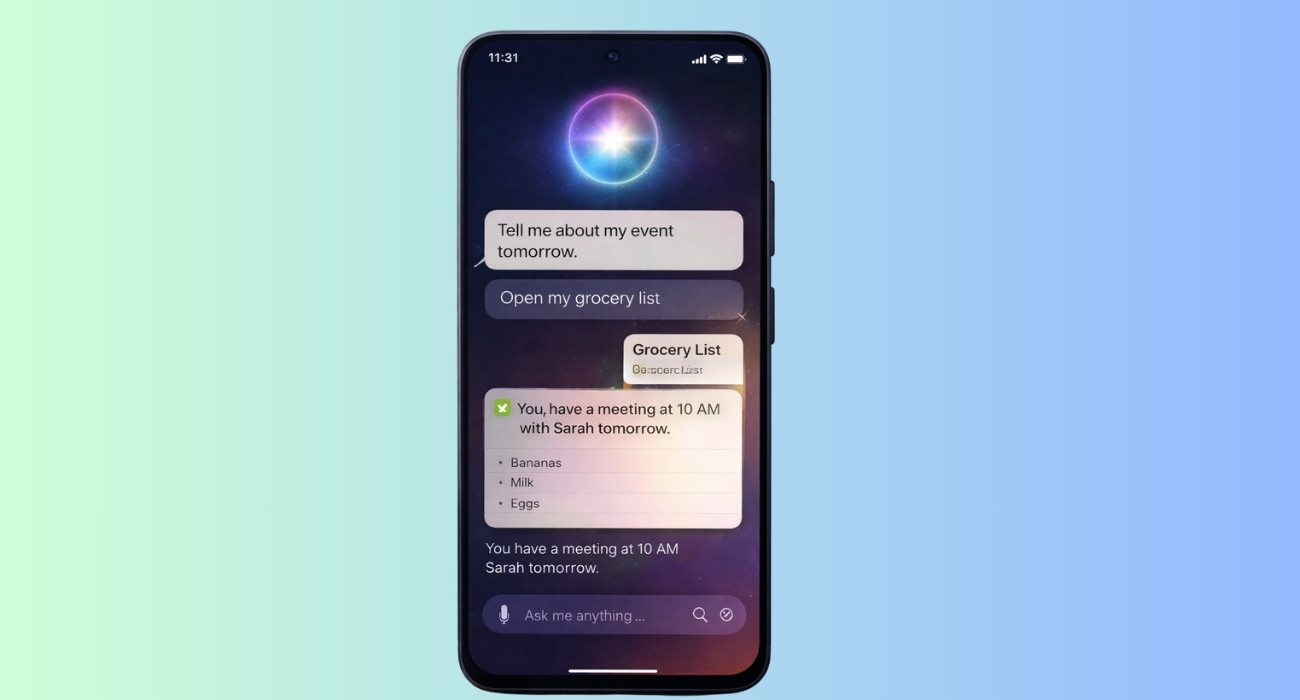
For the first time, Siri has a dedicated app. The Siri app gives you a place to start new conversations and revisit previous ones.
It includes a card-based history of recent Siri conversations, along with options to:
I like that Siri conversations can sync across Apple’s ecosystem, meaning I can start something on one device and revisit it elsewhere. This is a major departure from the old Siri experience, where most interactions felt temporary.
Apple has also integrated Siri deeply into text editing.
Write with Siri works anywhere you can type.
You can ask Siri to:
For example: “Make this email sound more professional.” or “Turn these bullet points into a paragraph.” I tried asking: “How does this email sound?” Siri then provided feedback on my writing.
The interesting part is that Siri can even adapt my writing style when generating text in Mail and Messages, making its suggestions feel more personalized. Apple has also added automatic proofreading for spelling and grammar as you type.
Must read: How to Rewrite Existing Text with Siri AI
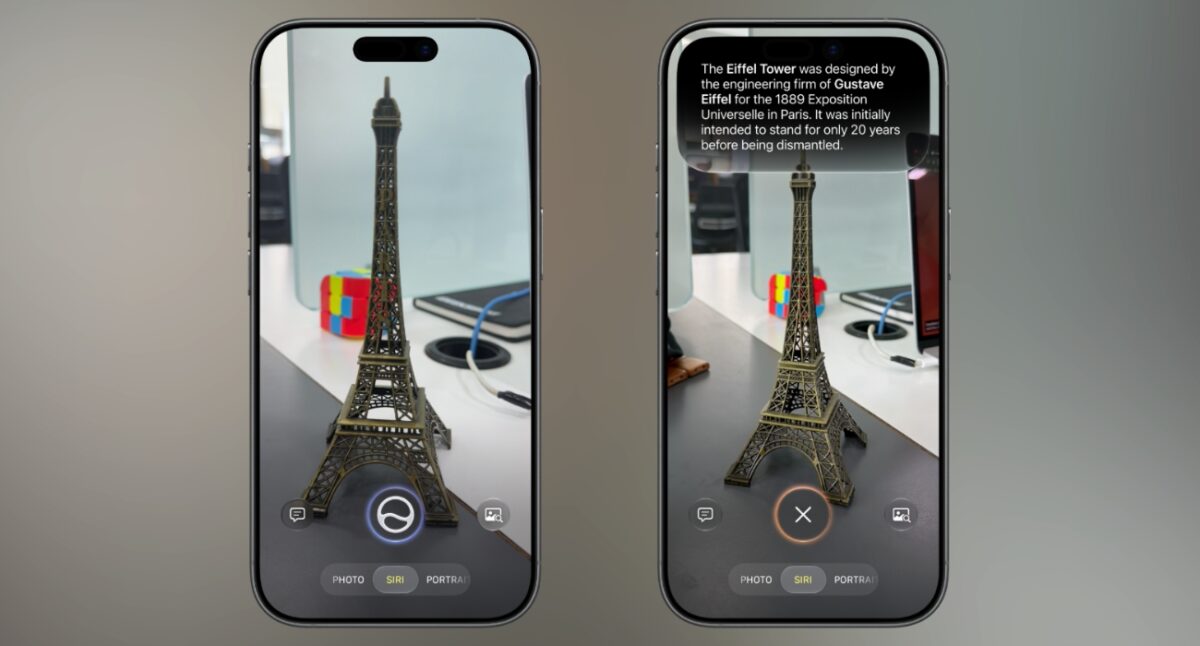
Apple has made a major change to Visual Intelligence in iOS 27.
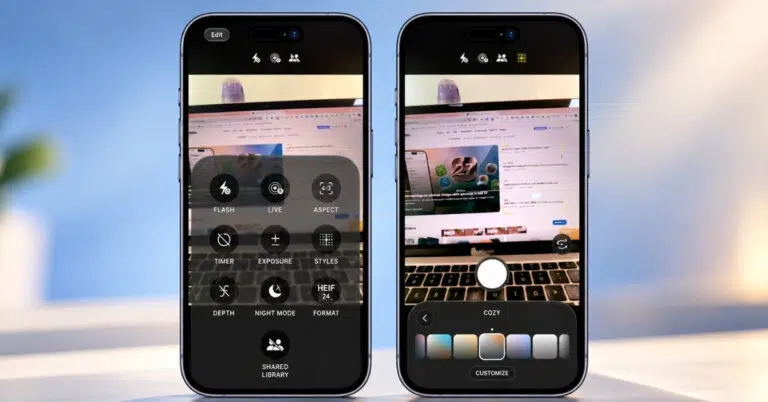
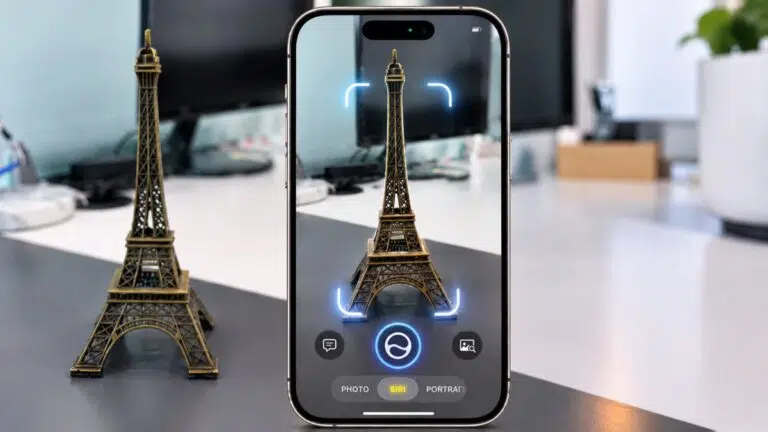
Instead of treating it primarily as a Camera Control feature, Apple has moved Visual Intelligence into the Camera app through a new Siri Mode. You can swipe to Siri Mode, point your camera at something, take a picture, and ask Siri about what you’re seeing.
Camera Control can still be used to access Visual Intelligence on supported iPhones. The integration with Siri makes Visual Intelligence considerably more useful because Siri can now search the web and answer follow-up questions directly.
Apple has added several new capabilities.
This is where Siri AI starts to feel much closer to the multimodal AI assistants that have become popular over the last few years.
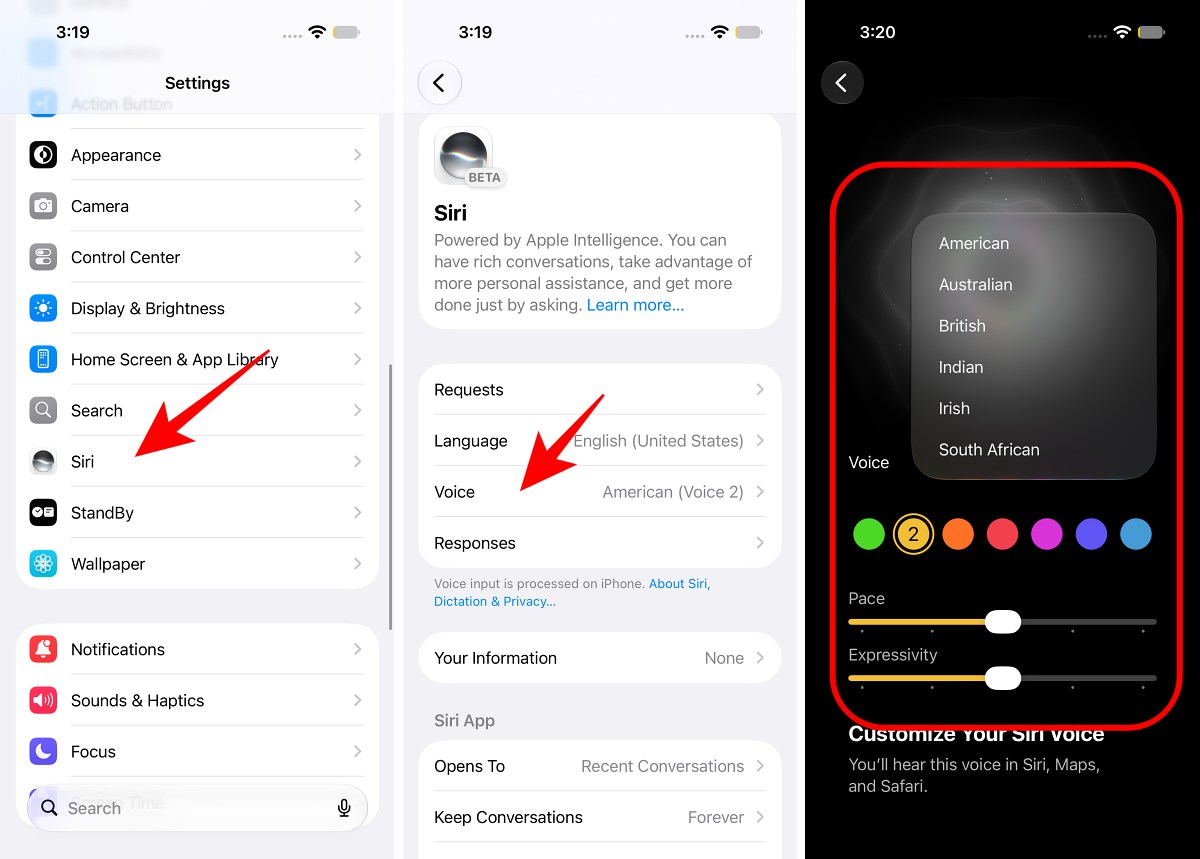
Siri’s voice is also getting an upgrade, but this feature depends on newer hardware.
The iPhone Duo, iPhone 18 Pro, iPhone 18 Pro Max, iPhone 17 Pro, iPhone 17 Pro Max, and iPhone Air have Apple’s more powerful on-device Apple Intelligence model.
On these devices, you can customize Siri’s voice emotions.
The newer on-device model can also improve system-wide dictation. Apple says Siri’s improved natural-language understanding makes dictation better at handling spelling, punctuation, capitalization, and transcription accuracy.
Because dictation is built into the keyboard, these
Siri AI uses a combination of on-device processing and Private Cloud Compute. When a request requires more processing power, Apple can send the necessary workload to Private Cloud Compute rather than processing everything directly on the iPhone.
Apple says data sent to Private Cloud Compute isn’t accessible to Apple or third parties.
The company has also expanded Private Cloud Compute infrastructure, including Apple Intelligence workloads running on Google Cloud using NVIDIA hardware.
Apple has already started expanding Siri AI beyond English.
The first iOS 27.2 beta, released on September 16, adds Siri AI support for:
Apple had previously indicated that these additional languages would arrive around October, so the iOS 27.2 beta provides an early look at the expansion.
At the launch of iOS 27, Siri AI supports English in:
Apple is expanding language support through subsequent updates.
There are also regional restrictions. Siri AI and the new Apple Intelligence features are not available in China, while Siri AI was not initially available on iPhone and iPad in the European Union.
Siri’s biggest problem was that it struggled with requests that required context, reasoning, multiple steps, or information from several sources.
iOS 27 addresses those weaknesses with Personal Context Understanding, Broad World Knowledge, Onscreen Awareness, App Actions, Visual Intelligence, Write with Siri, a dedicated Siri app, and a completely redesigned Siri interface.
And Apple is already moving beyond the initial release. The iOS 27.2 beta’s expansion shows that Siri AI’s rollout is only beginning. The question is how quickly Apple and third-party developers can turn this new Siri foundation into an assistant that people genuinely rely on every day.
Have you joined the Siri AI waitlist yet? Which new Siri feature are you most excited to try? Let me know in the comments.