
FaceTime Like a Pro
Get our exclusive Ultimate FaceTime Guide 📚 — absolutely FREE when you sign up for our newsletter below.

FaceTime Like a Pro
Get our exclusive Ultimate FaceTime Guide 📚 — absolutely FREE when you sign up for our newsletter below.


Think your AirPods Pro might be fake? Learn how to spot counterfeits with this quick and easy guide.
AirPods Pro are premium Apple accessories—but with high demand comes a flood of fakes. Some counterfeits are so well-made that even experienced users get fooled. If you’ve ever wondered whether your AirPods Pro are the real deal, you’re not alone.
In this comprehensive guide, I’ll show you exactly how to spot fake AirPods Pro. From packaging and sound quality to serial number checks and iOS compatibility—this checklist covers it all.
Identifying fake AirPods Pro isn’t just about performance—it’s about protecting your wallet, health, and privacy.
The moment you get your AirPods Pro, the box is your first clue.
Genuine AirPods Pro come in a high-quality, sturdy box. It should feel smooth, durable, and professionally printed. Fake boxes? They often feel cheap, flimsy, with dull colors or a faded logo.
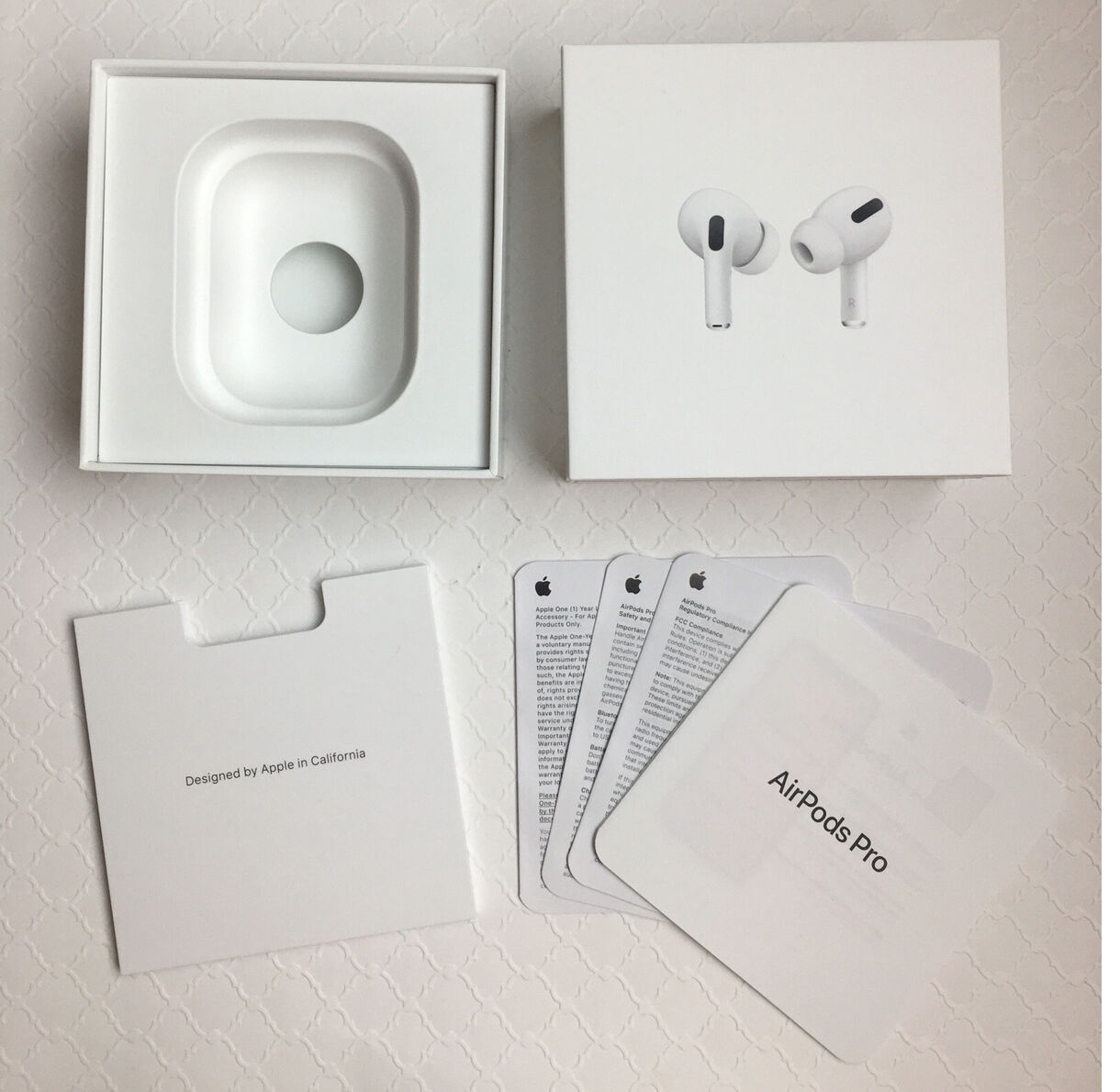
Therefore, hold the box in your hands and give it a good look. If it feels like something you’d find in a dollar store, that’s a red flag.
Apple is obsessive about details, and its box text is no exception. The font on a real AirPods Pro box is clean, evenly spaced, and perfectly aligned. Fake boxes often mess this up—letters might be too thick, too thin, or slightly off-center.
Additionally, there may be many spelling mistakes, misprints, grammatical errors, or unusual information. Compare the text to pictures of real AirPods Pro boxes online. If something looks “off,” trust your gut and dig deeper.
Serial numbers are unique identifiers for every product. The easiest way to tell if an AirPods Pro is fake is if it isn’t registered in the Apple directory.
Your AirPods serial number is under the lid of the charging case or on the side of the box. Once you have it, head to Apple’s official Check Device Coverage website. Type in the serial number, fill in the CAPTCHA and hit enter.
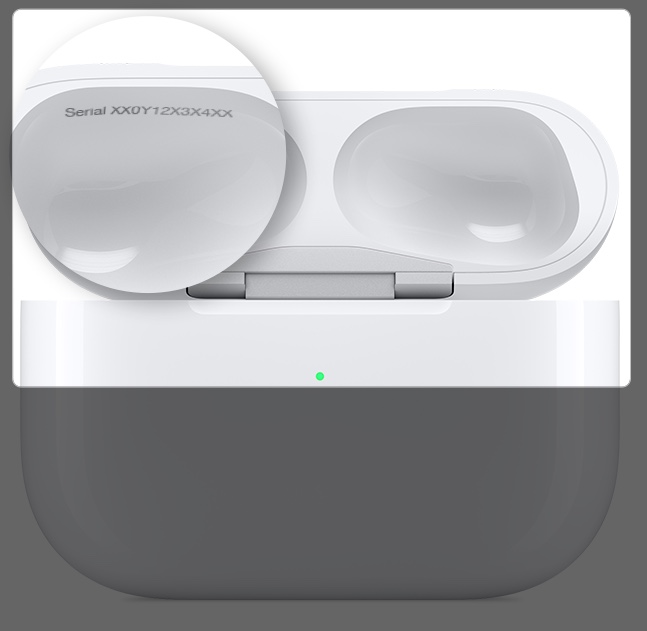
If Apple says the number is invalid, you’ve got a fake. Some sneaky counterfeiters reuse real serial numbers, so search the number and see if it’s already activated. If multiple people report the same serial being used, that’s a warning sign.
No matter the scammers’ perfection, it is impossible to completely replicate the original AirPods. So, you must carefully observe the physical appearance for the most minor mistakes.
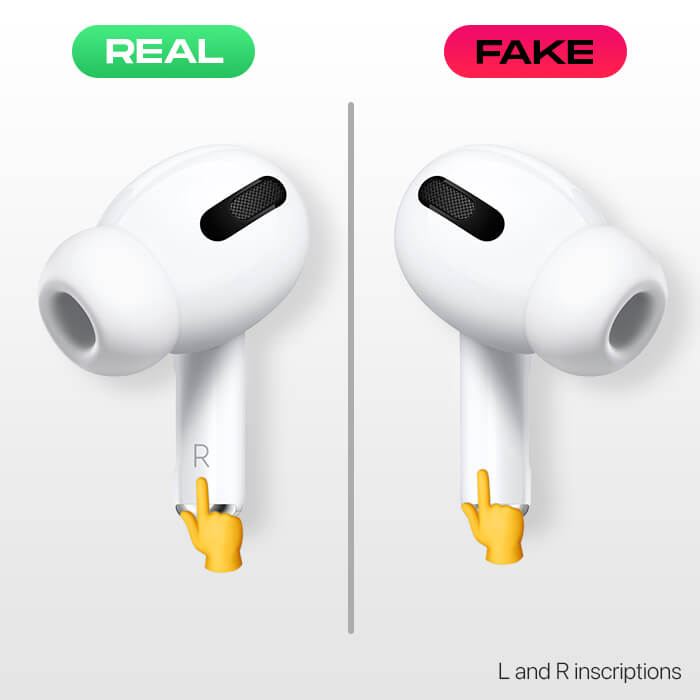
Fake AirPods Pro might look similar at a glance, but they often differ in weight or size. Real AirPods Pro have a specific heft—light but solid. If you have access to a friend’s genuine pair, compare them side by side. Fakes might feel too heavy or oddly light. A kitchen scale can help if you want to get precise.
You can also examine the AirPods’ base. These magnet-enabled sections are designated for making contact with the case while charging. If your AirPod is fake, an oval-shaped area will cover more than half of the base. In genuine AirPods Pro, this area is evenly distributed.
The LED light on the front of the charging case is a dead giveaway. On real AirPods Pro, it’s perfectly centered and glows with a smooth, clean green or amber color. Fakes often have lights that are off-center, flicker, or look like a weird bright color. Open and close the case a few times to see how the light behaves.
Apple offers a sleek customization feature on AirPods cases, which is absent from counterfeit ones. You can request to engrave a memoji, text, or emoji of your choice on AirPods Pro before purchasing. An engraved AirPod stands out from fake AirPods, and there is a low possibility that third-party websites can offer customization on fake AirPods.
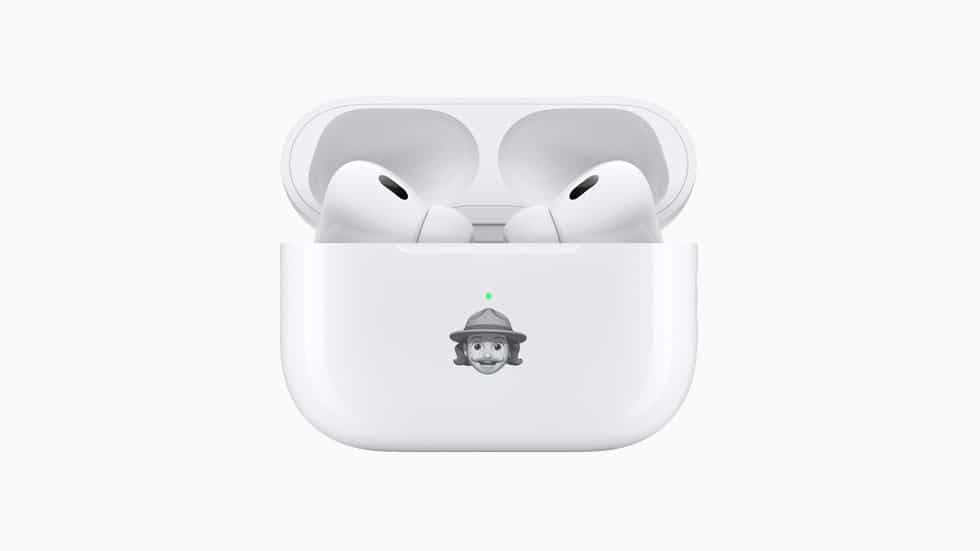
Even if the fake ones offer engravings, they might look sloppy, with uneven fonts or rough edges. Also, inspect the AirPod’s earpiece shape—real ones are smooth and oval, whereas you’ll find circular earpieces in fake AirPods Pro.
Additionally, look for the sensors that detect when the earbuds are inside the ear, pause or play the audio, or are put back in the case. AirPods Pro also has a force sensor on the stem that allows you to control playback, answer calls, and activate Siri.
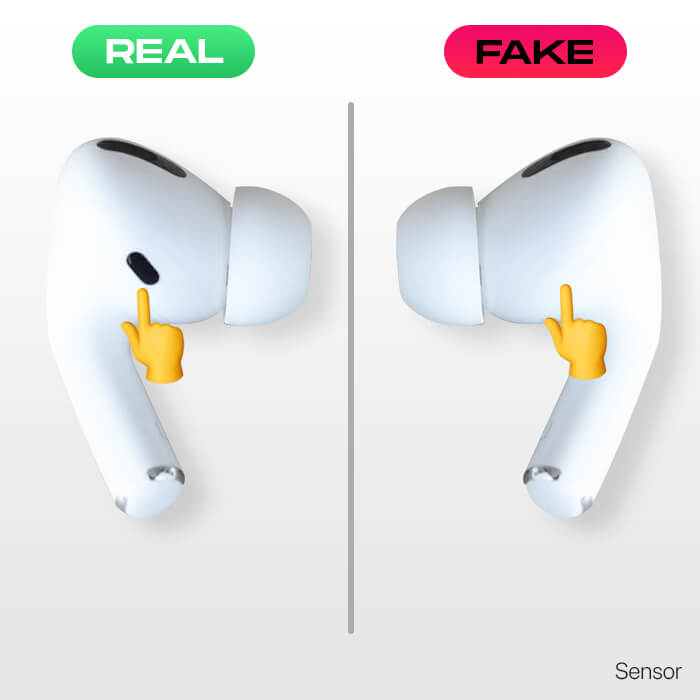
In contrast, fake AirPods Pro lacks these sensors and has a button instead of a force sensor.
Apple AirPods Pro charging case also has minute details that can help you spot the fake ones.
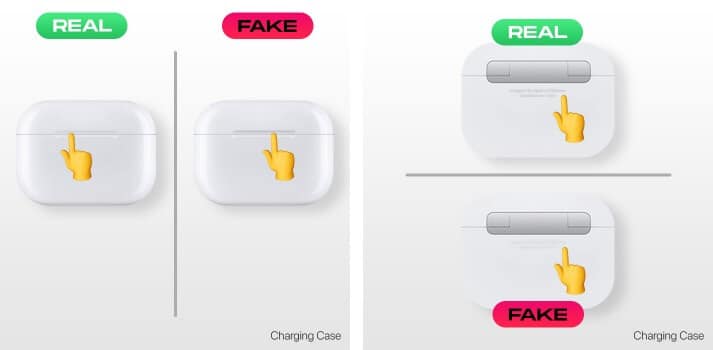
Open the charging case and close the lid slowly. A real AirPods Pro case has a magnetic feel and doesn’t snap shut loudly. Fake cases often feel wobbly, snap shut too hard, or open too easily. Play with the lid a few times to get a sense of it. If it feels cheap, it probably is.
On genuine AirPods Pro, the hinge is sleek, seamless, and moves like butter. Fake hinges might look clunky, with visible gaps or rough edges. Also, check the charging port at the bottom. It should be centered and lined up with metal plates. If it looks off-center or the cable wiggles too much, that’s a bad sign.
The AirPods Pro case supports MagSafe wireless charging. So, put it on a charger and see if it juices up.
Let’s assume that everything on the packaging is perfect to a certain level and seems original. But even if you miss out on physical details, there are still ways to spot fake AirPods Pro.
One of the coolest things about AirPods Pro is how they pair with an iPhone. Open the case near your iPhone, and a smooth pop-up animation should appear, showing the AirPods Pro and their battery levels.
Fakes might trigger a generic Bluetooth prompt or show “Cannot Verify AirPods” during pairing. This is a clear indication between fake AirPods Pro vs. real.
If you have somehow connected your AirPods to your iPhone, move to the next steps to ensure you’re getting the premium features and luxury of an Apple product.
AirPods Pro are known for their rich sound and crisp vocals. Pop in the earbuds and play a song with a good mix of highs and lows (I like testing with something like Billie Eilish or The Weeknd).
Fakes often sound flat, with weak bass or muddy vocals. If the music feels like it’s coming from a $10 pair of earbuds, you’re not dealing with the real thing.
Active Noise Cancellation (ANC) is a standout feature of AirPods Pro. Turn it on and listen in a noisy environment—like a busy café or near a fan. Real ANC blocks out most background noise, creating a quiet bubble. You can also enable Noise Cancellation from Settings > Bluetooth > your AirPods Pro.
Fakes either have no ANC or fake it with a hissing sound or muffled audio. Your AirPods Pro are likely counterfeit if you can still clearly hear your surroundings.
Apple AirPods Pro are known for their advanced features and smooth integration with iPhone.
Real AirPods Pro unlock a bunch of neat features in iOS. Connect them to your iPhone and check the Bluetooth settings. You should see options for:
If these AirPods Pro settings are missing or don’t work, your AirPods Pro is probably fake.
When you buy from a third-party reseller, the risk of getting counterfeit AirPods Pro is higher. So, proceed with caution and keep the points below in mind.
The AirPods Pro retails for around $249, and Apple rarely offers deep discounts. While you may get older models for less, the latest ones are pricey.
Therefore, if you see a new pair for $100, it’s almost certainly fake. Even during sales, legitimate discounts are usually 10-20% off. If the price seems like a steal, it’s probably a scam.
Where you buy matters. Stick to Apple’s official store, authorized resellers like Best Buy or Amazon’s official Apple storefront, or certified refurbished programs.
Avoid sketchy websites, random eBay or Facebook sellers, or street vendors. If the seller’s reviews are nonexistent or scream “scam,” run the other way.
This trick is ideal if you are using the AirPods and want to check its authenticity.
Apple regularly updates the firmware of Real AirPods Pro to address bugs and roll out new features. Connect them to your iPhone, go to Settings > Bluetooth and tap the “i” next to your AirPods Pro. You’ll see the current AirPods firmware version.
If it’s outdated and never updates (even after charging and pairing), or if it shows a bizarre version number, you’ve got a fake.
AirPods Pro are great for calls, with clear audio and minimal background noise.
Make a test call to a friend and ask how you sound. Real AirPods Pro keeps your voice crisp, even in a noisy place. Counterfeit AirPods often pick up too much background noise or sound echo-like you’re talking in a tunnel.
Counterfeit AirPods Pro retail for cheap as they use inferior materials, so it’s a good hint.
Run your fingers over the AirPods Pro and their case. Apple’s build quality is flawless—smooth surfaces, no gaps, and a premium feel. The grilles on the original AirPods Pro do not feature a boundary around the diffusers.
Furthermore, the grills in a fake AirPod are well-polished, which is not the case in a real one. If it feels like a cheap toy with plasticky texture, visible seams, or rough edges, it’s not from Apple.
Check what’s in the box. Real AirPods Pro come with:
Fakes might include flimsy manuals or generic cables that look off.
Most AirPods Pro boxes have a barcode or QR code. Use a QR code reader app to scan it. A real code should link to an Apple website or product page. It’s likely a fake if it leads to a random site, nothing at all, or a non-Apple domain.
If you’re still unsure, compare your AirPods Pro to a friend’s genuine pair. Test the sound, check the ear tip fit, and inspect the case. Real AirPods Pro feel comfortable and sounds amazing. Fakes often feel off—maybe the ear tips don’t seal right, or the case creaks. Trust your senses.
Want more help? You can take your AirPods to an Apple Store for physical inspection. If that’s not feasible, YouTube has tons of videos comparing real vs. fake AirPods Pro—search for it to see the differences up close.
Moreover, forums like Reddit or Apple’s support community is a goldmine for tips. Post a question or compare your serial number to see what others say.
If you realize you’ve been scammed, don’t panic. Follow the steps below:
It’s easy to get tricked by fake AirPods Pro — some counterfeits are very convincing. But with this guide, you now know what to look for. Take your time inspecting the box, the product, the sound, and the features. And if something feels off, trust your gut.
Have you ever dealt with a counterfeit product? Share your story in the comments—I’d love to hear how you handled it!
FAQs
Yes, many fakes can connect via Bluetooth, but the pairing process is often clunky, and you won’t get Apple’s smooth animation or iOS features.
Usually not. Real AirPods Pro integrates with Apple’s Find My network. If this feature is missing, it’s a strong sign of a fake.
Nope. Fakes either don’t update at all or show fake firmware versions that don’t match Apple’s records.
Not always. Some high-end fakes mimic the look and sound decently, but they still lack Apple’s polish, features, and reliability.
Buy from trusted sources like Apple, Best Buy, or Amazon’s official store. Avoid deals that seem too good to be true, and always check the serial number.
Read more:












