
FaceTime Like a Pro
Get our exclusive Ultimate FaceTime Guide 📚 — absolutely FREE when you sign up for our newsletter below.

FaceTime Like a Pro
Get our exclusive Ultimate FaceTime Guide 📚 — absolutely FREE when you sign up for our newsletter below.


Google now lets you change your Gmail address. Here’s what happens and how to do it.
 ByVikhyat
For years, my Gmail address felt like a mistake I couldn’t undo. I created it casually with random numbers, used it everywhere, and didn’t think much about it until I started using it for work. Suddenly, it didn’t feel professional anymore. So I did what most people do. I created a second Gmail account just for work.
That solved one problem but created another. My old account still had all my emails, subscriptions, and app logins. I couldn’t just abandon it. Managing two accounts quickly became frustrating. That’s why this new change from Google stands out.
You can now update your Gmail username without creating a new account, and after trying it, it feels like something that should have existed years ago.
At first, I assumed this would be another workaround, something like creating a new email and linking it to your old account.
But that’s not what Google is doing here.
You can actually change the username part of your Gmail address, the text before @gmail.com, while keeping your account completely intact.
When I tested this, the transition felt more like renaming an account than creating a new one.
There was no migration, no re-login chaos, nothing broke. That’s what makes this feature genuinely useful.
This is where things get simple.
What changes
What doesn’t change
From a user perspective, everything important stays untouched.
This was one of my biggest concerns before trying it.
Thankfully, your old Gmail doesn’t disappear.
That alone makes the transition much less stressful.
You may like to read: How to enable and use Gmail end-to-end encryption
The steps are straightforward and the same across devices:
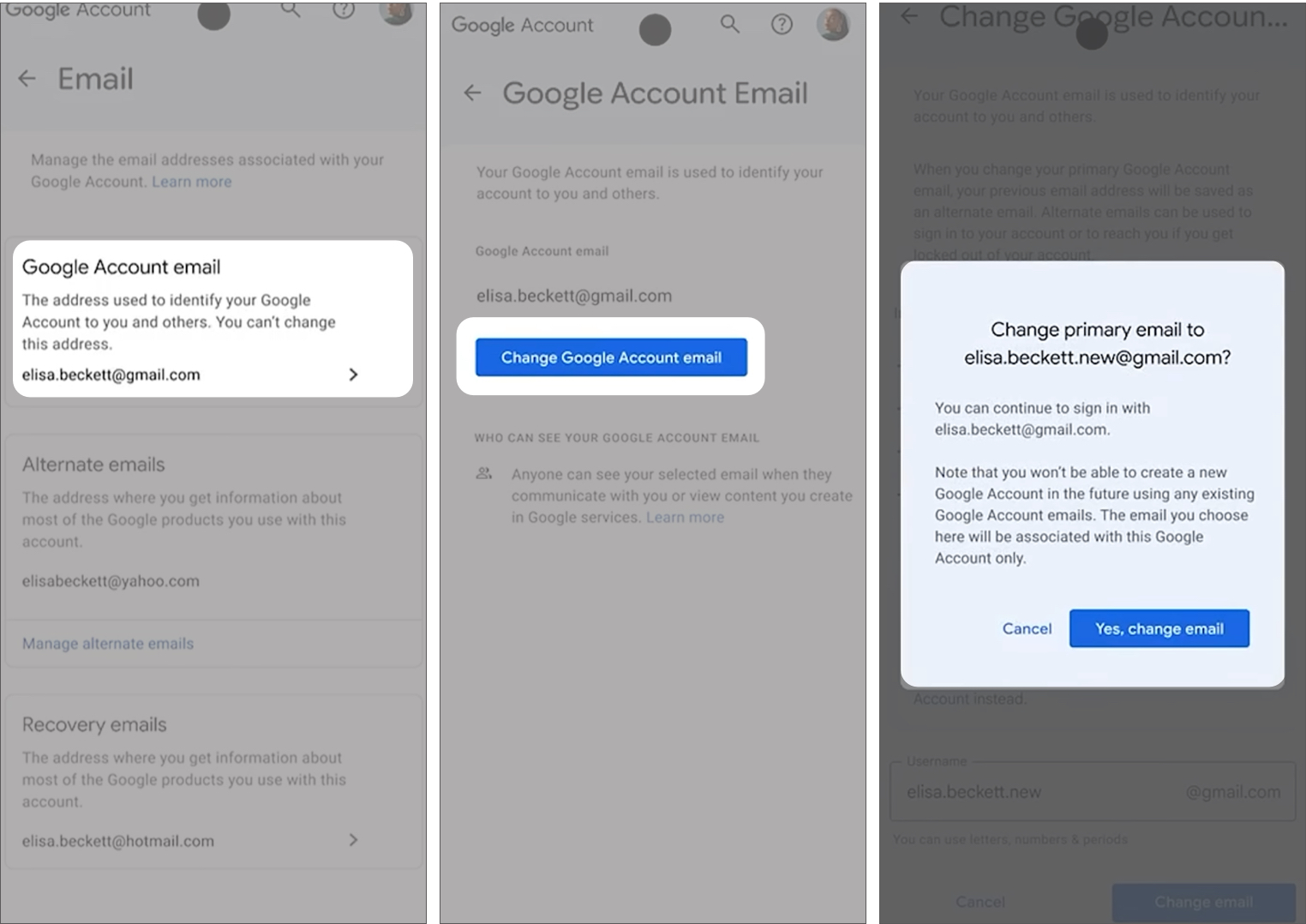
Before confirming, it’s worth noting that this isn’t something you can keep changing repeatedly. Google allows only limited changes over time, and there are restrictions on how often you can create or switch between addresses. You can switch back to a previous Gmail in some cases, but the overall flexibility is limited.
After using this feature, it feels most useful if you’ve outgrown your current email.
That was exactly my situation. The old address worked, but it didn’t represent me anymore, especially in professional settings.
Switching to a cleaner email made a noticeable difference. It feels more aligned, and I didn’t have to deal with the usual hassle of migrating data or updating dozens of logins.
If your current Gmail already looks clean, you probably won’t feel the need to change it. But if you’ve been stuck with something outdated or awkward, this solves a real problem.
This update quietly removes one of Gmail’s biggest limitations. Instead of forcing users to start over, Google now allows you to update your identity without losing your data. It’s a small change on the surface, but in real use, it makes account management much simpler.
What do you think? Would you change your Gmail address or stick with your current one? Share your thoughts.
You might also like:











