
FaceTime Like a Pro
Get our exclusive Ultimate FaceTime Guide 📚 — absolutely FREE when you sign up for our newsletter below.

FaceTime Like a Pro
Get our exclusive Ultimate FaceTime Guide 📚 — absolutely FREE when you sign up for our newsletter below.


Want to browse Instagram without anyone knowing you’re online? Here’s how to turn off your Active Status, stay hidden, and keep your activity completely private.
 ByVikhyat
You open Instagram for a few minutes to watch Reels or reply to a message, and suddenly someone texts, “You’re online but ignoring me?” That tiny green dot beside your profile picture has quietly turned Instagram into a place where people expect instant replies the moment you appear active.
This is exactly why turning off active status has become one of Instagram’s most-used privacy settings. Some users want more privacy, while others simply want to use the app without feeling constantly available.
If you want to browse Instagram without broadcasting your availability to everyone in your DMs, here’s how to disable it properly and what actually changes after you do.
Instagram’s active status tells other people when you’re using the app or when you were last active. Depending on your activity, users may see labels like “Active now” or “Active today” inside DMs, along with the green online indicator beside your profile picture.
Instagram only shows this status to people you follow, accounts you interact with regularly, and recent conversations. The problem is that many users don’t even realize the setting is enabled by default until someone unexpectedly mentions their activity.
And once that happens, you start noticing how visible your presence on Instagram really is.
Instagram has slowly become more messaging-focused over the years. For many users, DMs now feel just as central as the feed itself. Friends plan things there, creators handle collaborations there, and entire conversations happen without anyone ever posting publicly.
That shift changed the meaning of online visibility.
A green dot no longer feels harmless when people associate it with instant availability. Many users disable active status simply because they’re tired of feeling reachable all the time. Some want fewer distractions during work hours. Others just want to watch Reels without triggering conversations the moment they open the app.
It sounds minor until you turn it off and realize how much quieter the app feels afterward.
Instagram doesn’t place the setting directly inside privacy controls anymore, which is why many users struggle to find it.
Here’s how to disable it:
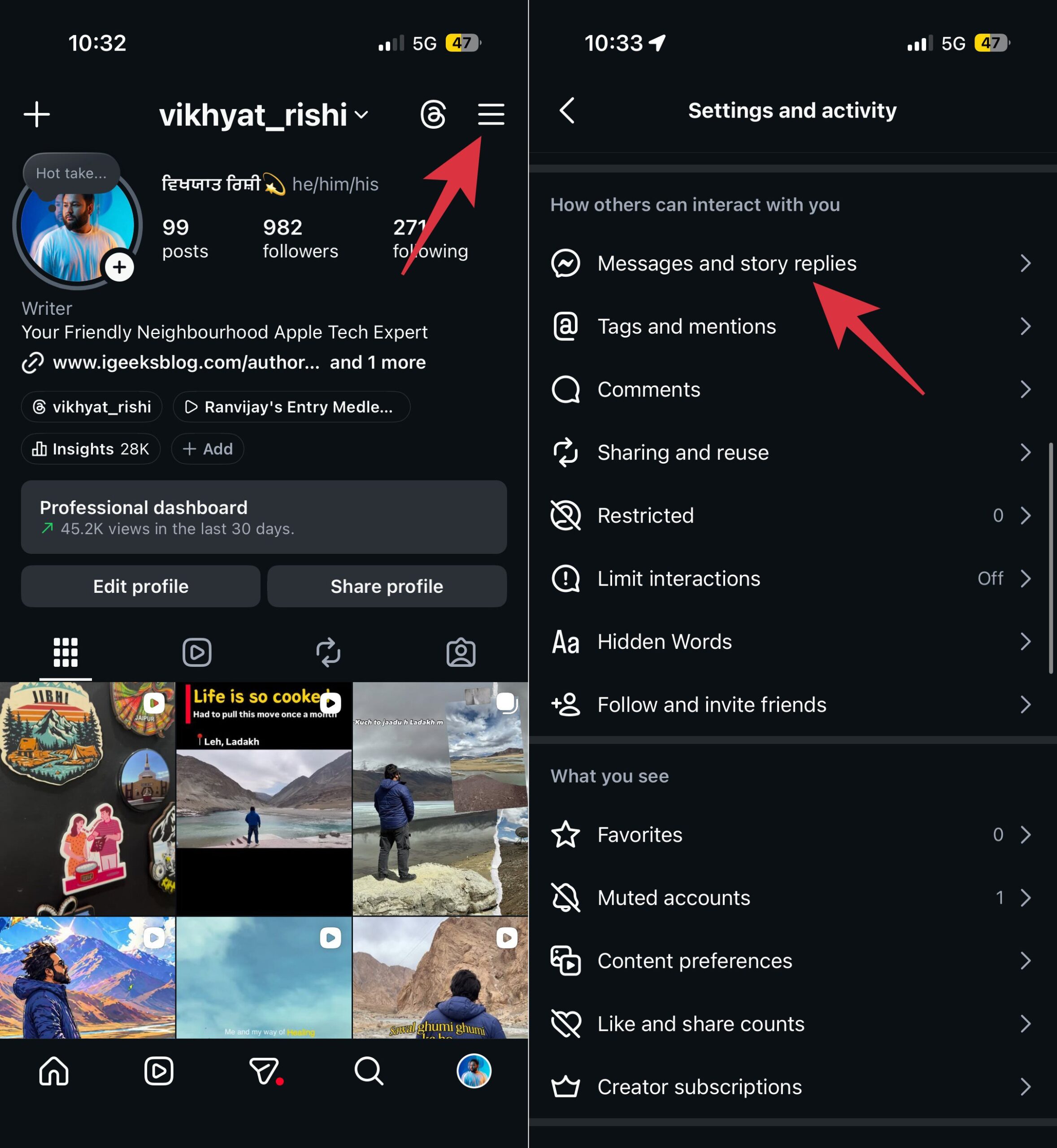
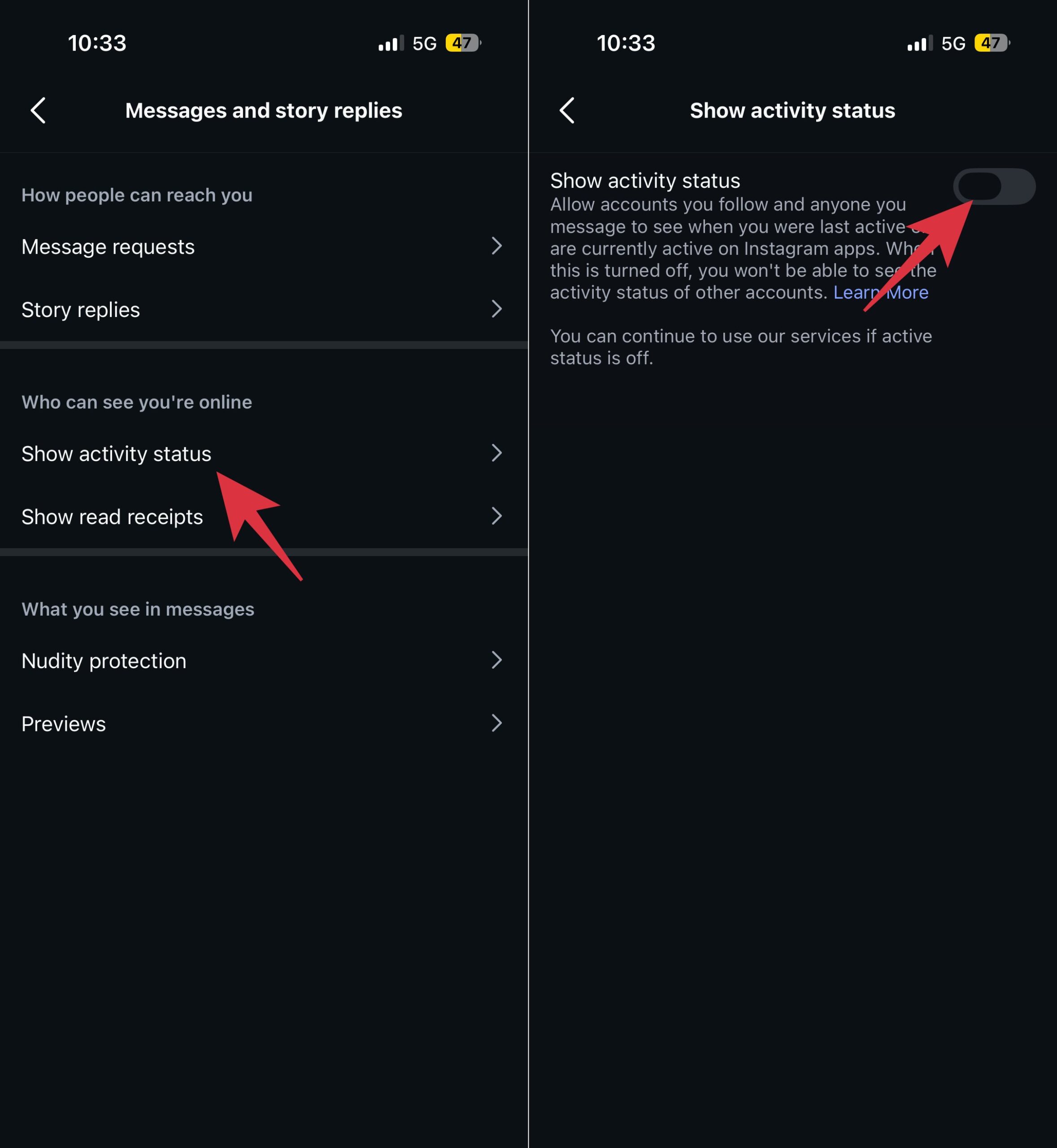
Once active status is turned off, Instagram stops showing people when you’re online or recently active. Your green dot disappears, and labels like “Active now” no longer appear inside chats.
At the same time, Instagram doesn’t make you completely invisible.
People can still:
The setting only removes Instagram’s online activity indicators. Everything else continues working normally.
When you turn off active status, Instagram also hides other people’s activity from you. That means you won’t see green dots, “Active now” labels, or when someone was last online.
At first, that can feel slightly inconvenient if you’re used to checking who’s active before sending a message. But over time, many users prefer it that way because the app stops feeling centered around everyone’s availability and response timing. Similar to how people turn off read receipts on iPhone, disabling active status removes some of that constant social visibility from everyday conversations.
No. Instagram still doesn’t allow selective active status visibility. You can either keep the feature enabled for everyone or disable it entirely. There’s currently no way to hide your online status from a specific person while remaining visible to others.
That limitation becomes frustrating for users who only want privacy from certain contacts without turning the feature off globally.
Because of that, many people end up using other Instagram privacy tools alongside it, including:
Used together, those settings make Instagram feel far less intrusive without completely disconnecting you from the platform.
People pay far more attention to online indicators now than they did a few years ago. Seeing someone active but not replying often creates unnecessary expectations and overthinking in conversations.
That’s why many users prefer keeping their activity hidden. It makes Instagram feel less distracting and takes away the pressure of appearing available every time you open the app.
Turning off active status makes Instagram feel more private and less distracting. You can still use DMs, watch Reels, and stay active on the app normally without showing people when you’re online.
If you don’t like the pressure of instant replies or constant online visibility, disabling active status is a simple setting that can make Instagram feel more comfortable to use.
What’s your biggest reason for turning off Active Status on Instagram? Tell us in the comments below.
Related Instagram Privacy Tips











