
FaceTime Like a Pro
Get our exclusive Ultimate FaceTime Guide 📚 — absolutely FREE when you sign up for our newsletter below.

FaceTime Like a Pro
Get our exclusive Ultimate FaceTime Guide 📚 — absolutely FREE when you sign up for our newsletter below.


Trying to see sensitive content on X but keep running into warnings? I found that two settings matter: one controls sensitive media in your feed, while the other affects search results. Here's how to change both on iPhone, Android, and the web.
If you have ever searched for something on X (formerly Twitter), clicked a post, and found yourself facing a “This media may contain sensitive material” warning, then you are not alone. The frustrating part is that X makes this sound more complicated than it really is.
I went looking for the setting that actually controls sensitive media, expecting to find one obvious switch. Instead, there are two controls that matter: one for media in your X feed and another for sensitive content in search results.
So if you are trying to see sensitive content on X (Twitter), including NSFW, adult, graphic, violent, or other sensitive media that X has placed behind a warning, here is the setup that matters. I have shared the steps for iPhone, Android, and browser.
First, a quick clarification: sensitive content on X doesn’t always mean violence or NSFW material.
X automatically applies sensitive-media labels to material that some users may reasonably prefer not to encounter unexpectedly. That can include things such as:
Note: Content involving sexual violence, bestiality, or necrophilia is never allowed on X, not even with sensitive content settings enabled.
X’s policies specifically allow some consensually produced adult content when it is appropriately marked as sensitive. But remember that turning on sensitive content does not mean X suddenly removes its other rules.
You are changing what your account is willing to display. You are not disabling the platform’s content policies. And that is the first mistake I see people make: they assume there is one universal “show everything” button.
This is where things get important. Changing your settings does not guarantee that every piece of sensitive or adult content will become visible.
X restricts certain adult content for users who are under 18 or who have not provided a birth date on their profile when signing up. So, if you are over 18 and still cannot see sensitive posts, do not immediately assume the account is broken.
Check these things first:
That last point is important. A sensitive-content setting cannot override an age restriction, deleted post, protected account, suspended account, or content that X has removed. In other words, the setting gives you permission to see eligible sensitive media; it does not make unavailable posts magically reappear.
This is the part that actually solved the problem for me.
I found two settings worth checking. The first controls sensitive media displayed in posts. It controls whether you see a warning blur over potentially sensitive media. The second controls Safe Search, which can hide sensitive content from your search results entirely.
If you only change the first one, you can still wonder why sensitive posts are missing from search. That is because feed visibility and search filtering are not the same thing.
Here’s the annoying part: iPhone and iPad users need to use the X/Twitter website rather than the iOS app to change this preference.
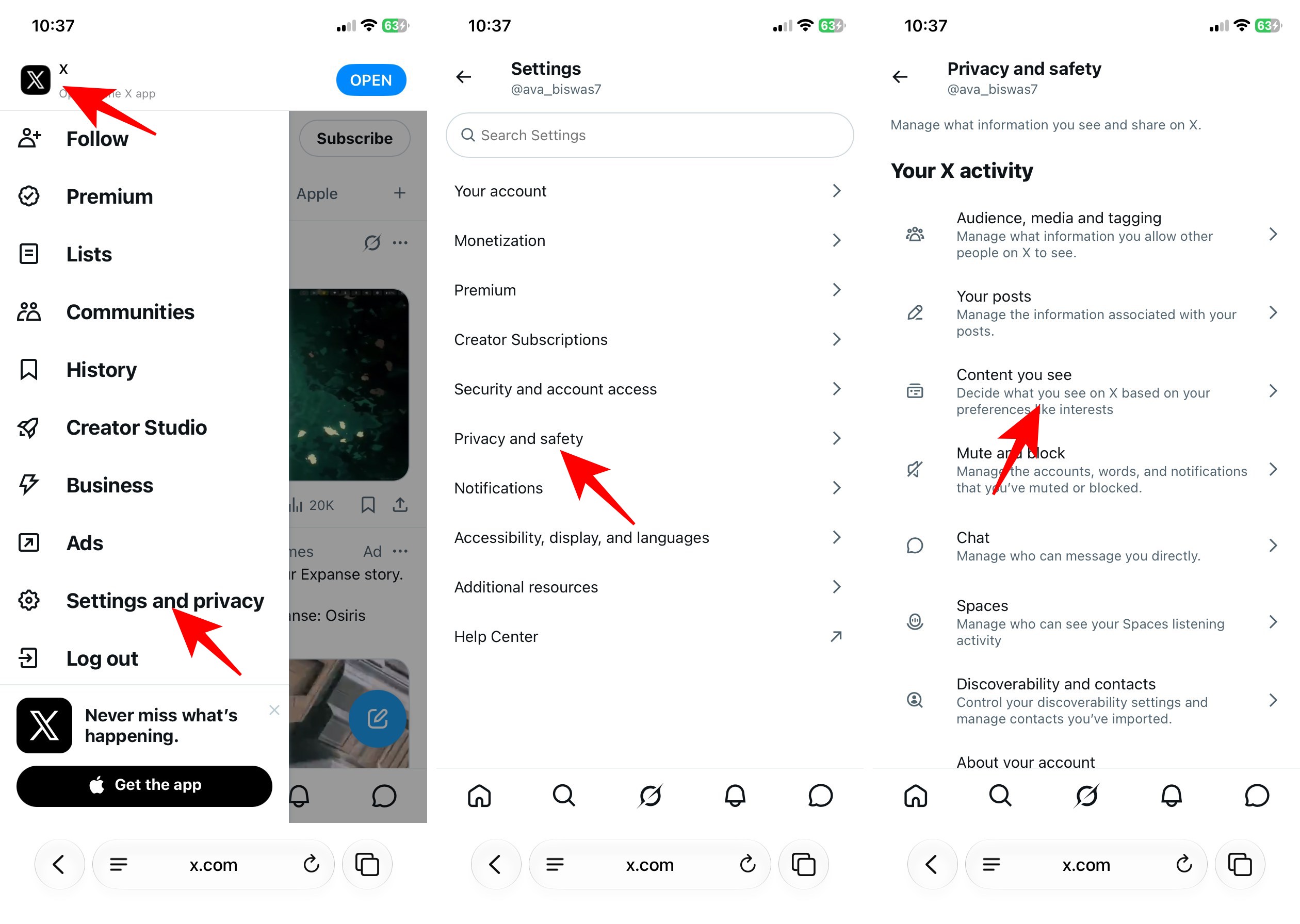

While testing the feature, I noticed that some sensitive posts behind an interstitial still can’t be clicked through in the iOS app, even though the sensitive-media preference is managed on the website. So, you need to use the web version to access content that the iOS app doesn’t show.
The good news is that the X app on Android offers sensitive content settings. Follow these steps below:


However, it doesn’t include the Safe Search settings. You need to go to the X website to disable the filter on your account.
I prefer the web version as it includes all the relevant settings in one place. And once I change the settings, it syncs my choices across the platforms.


Turning on the sensitive-media preference tells X that you are willing to see media that it has identified as potentially sensitive rather than automatically hiding it behind the default warning.
X describes these controls as a way for users to decide whether they want to see warnings over potentially sensitive media. Disabling Hide sensitive content in Search settings also allows potentially sensitive posts to be included in search results.
It does not:
X explicitly notes that search results are filtered for quality and relevance, and that not every post will necessarily appear in search. That’s why I would not describe this as a “show everything” setting.
If you’re looking for the sensitive content rules on X because you post such media yourself, the process is slightly different. X provides a setting called Mark media you post as containing material that may be sensitive


When I enabled it, people visiting my profile saw a notice indicating that my account may include potentially sensitive content. If your posts are generally safe-for-work, leave this OFF to ensure your content remains visible without warnings.
You can also mark individual photos and videos when attaching them to a post. This option is available across Android, iOS, and the web.

This lets you tag specific content without affecting your entire account. When in doubt, it’s safer to flag it—it helps avoid moderation issues. Keep in mind that marking content as sensitive may reduce its visibility. Some people might not see it, depending on their settings.
If you enabled the setting and nothing changed, work through these in order.
I advise being cautious about accessing sensitive material because it may trigger emotional distress or impact your mental well-being. In addition, interacting with posts that do not comply with X’s guidelines could result in account restrictions.
There you go. Getting your sensitive content settings unlocked isn’t that complicated once you know the little-known requirements. I get it if you’re curious or just want more control over what shows up in your feed; same here. Just keep in mind it’s a bit of a wild ride once it’s all turned on.
Also, if you use X on multiple devices, it is also worth checking the settings on each one instead of assuming everything has synced correctly. Once those are sorted, you should have a much easier time finding the content you’re looking for.
Also read:












