
FaceTime Like a Pro
Get our exclusive Ultimate FaceTime Guide 📚 — absolutely FREE when you sign up for our newsletter below.

FaceTime Like a Pro
Get our exclusive Ultimate FaceTime Guide 📚 — absolutely FREE when you sign up for our newsletter below.


Snapchat's Family Center lets parents monitor their teen's friend activity and screen time without reading private messages. Here's how to set it up and what to expect.
 ByVikhyat
Since its debut, Snapchat has grown into one of the most popular social media platforms among teenagers worldwide. Its disappearing messages, creative camera tools, and fast-paced communication style make it highly appealing to younger users. At the same time, this rapidly expanding teen audience has raised concerns among parents about online safety, screen time, and digital interactions.
To address these concerns, Snapchat introduced Family Center, a dedicated parental control feature that allows parents to gain insight into their teens’ app usage while still respecting their privacy.
Here’s everything you need to know about Snapchat parental controls.
Snapchat parental controls are available inside Family Center, a supervision dashboard designed for parents and teens aged 13 to 17.
Once enabled, parents can:
As a parent, you cannot set up parental controls on Snapchat until you meet the following requirements:
Snapchat has made it clear that Family Center only works after mutual approval between the parent and teen accounts.
Now that you know what Family Center on Snapchat is and meet the requirements to set it up, here’s how you can set up Family Center (Parental Controls) on Snapchat:
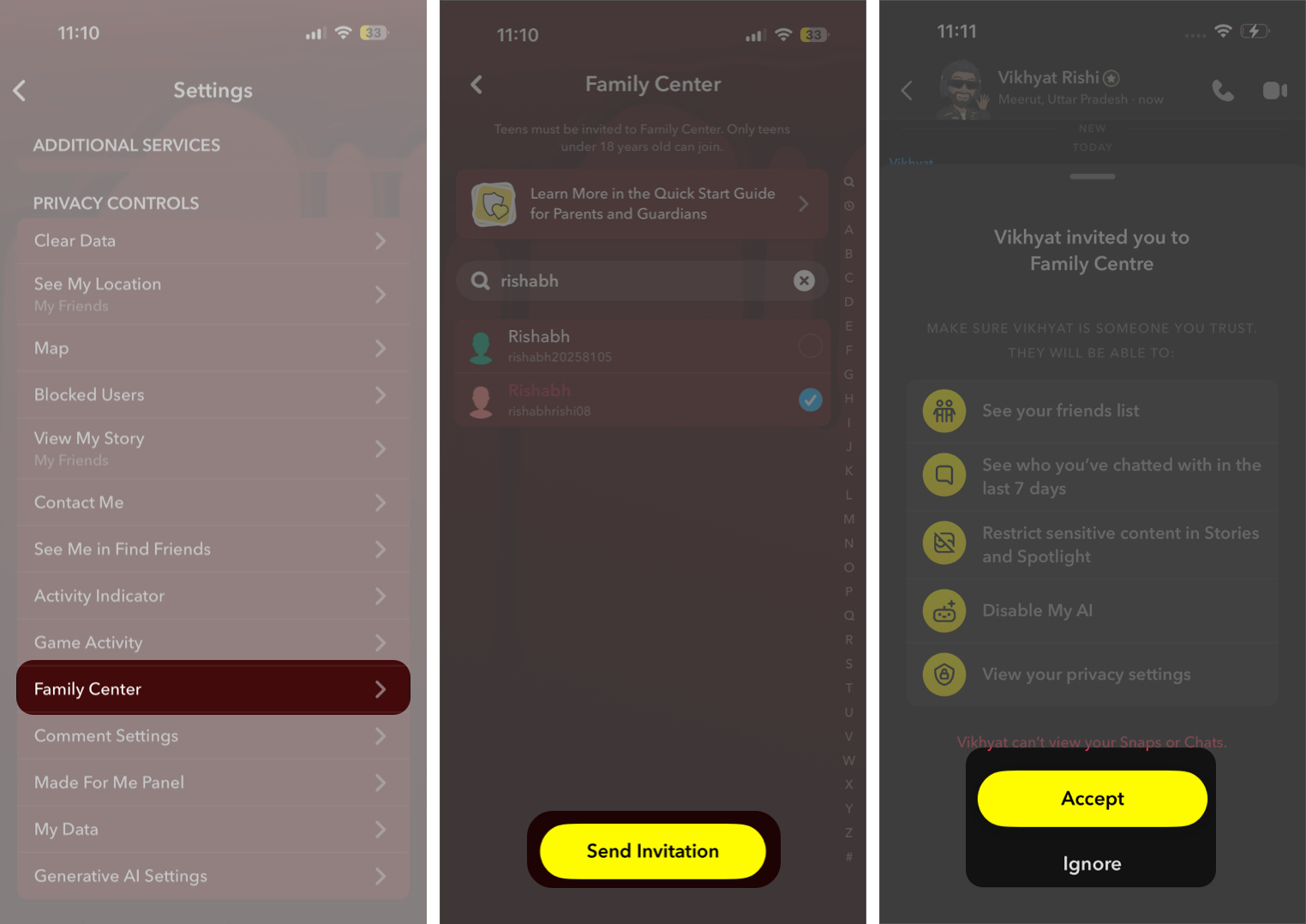
Once Family Center is set up, parents gain access to activity insights that help them understand how their teens use Snapchat without viewing private conversations. The feature focuses on awareness and safety rather than direct monitoring.
Here’s what parents can see inside Family Center:
Parents can:
Additionally, Snapchat also provides Friend Trust Signals that show how a new connection may be linked, such as through mutual friends or shared contacts, helping parents better understand unfamiliar connections without revealing message content.
Parents can see weekly screen time insights, including the average amount of time their teen spends on Snapchat and how that time is distributed across features like Chat, Camera, Snap Map, Stories, and Spotlight. These insights help families discuss app usage habits more informatively.
Family Center also gives parents access to safety and reporting tools and shows the teen’s location-sharing status when enabled by the teen.
Even with parental controls enabled, Snapchat protects teen privacy by limiting parents from:
While Family Center offers helpful insights and supervision tools for parents, Snapchat has designed it to balance safety with teen privacy. Therefore, parents should understand that these controls provide visibility rather than full monitoring.
Here are some important limitations to keep in mind:
Snapchat’s Family Center gives parents greater peace of mind by offering meaningful insights into their teen’s activity on the platform while still respecting personal privacy. Instead of enabling strict monitoring, the feature focuses on transparency and awareness, helping families stay informed without compromising trust.
Remember, it is also important for parents to have open conversations with their teens about online behavior and safety.
Are you using Snapchat Family Center for your teen? Let us know your experience in the comments.
FAQs
Snapchat does not allow parents to view message content through Family Center.
No built-in limits exist, but parents can view weekly usage insights.
Can teens remove parental supervision?
Snapchat allows teens to end supervision at any time, reflecting its consent-based design.
Also read:











