FaceTime Like a Pro
Get our exclusive Ultimate FaceTime Guide 📚 — absolutely FREE when you sign up for our newsletter below.

FaceTime Like a Pro
Get our exclusive Ultimate FaceTime Guide 📚 — absolutely FREE when you sign up for our newsletter below.


Your iPhone zoom isn’t just sharpening your shot, it’s quietly wrecking your audio behind the scenes. Here's how to fix it!
Recently, I noticed something strange while recording videos on my iPhone. Every time I zoomed in, the video looked sharper, but the audio felt off. It sounded distant, uneven, almost like it was coming from the wrong direction.
At first, I blamed the environment. But after testing it a few times, I realized the real issue: zooming itself was messing with the audio.
What’s surprising is that this isn’t a bug. It’s a built-in feature called Audio Zoom that quietly changes how your iPhone captures sound the moment you zoom in. Here’s what’s happening and how you can fix it.
Here’s the part Apple doesn’t make obvious. When you zoom while recording, your iPhone automatically enables something called Audio Zoom. There’s no prompt or indicator. It just activates in the background.
Audio Zoom tries to match your sound to the camera zoom. So when you zoom in visually, your iPhone narrows the microphone pickup range to focus on the subject.
In theory, that sounds useful.
In practice, it doesn’t always work well.
Here’s what I noticed after testing multiple clips:
The biggest problem is that you don’t notice any of this while recording. You only hear it when you play the video back.
I expected a complicated workaround, but it turns out the fix is simple. iOS 26.4 added a toggle to disable Audio Zoom, and turning it off made an immediate difference.
Here’s what to do:
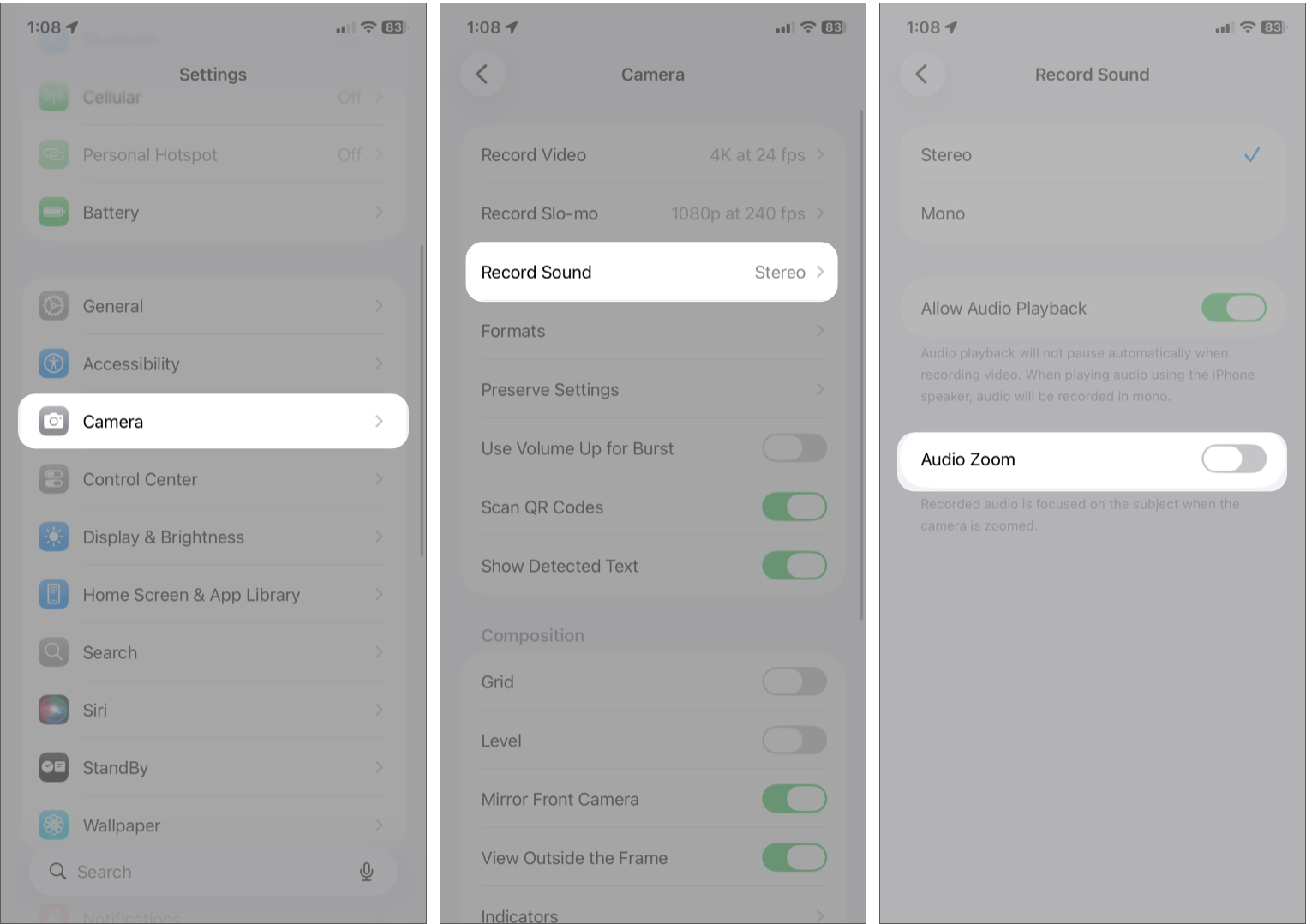
If the option is greyed out, your iPhone might be set to Mono audio. Audio Zoom only works with Stereo or Spatial Audio, so switch that first.
The improvement was noticeable right away.
If you care about natural sound, especially for events or ambient recordings, this is an easy win.
Audio Zoom isn’t useless. It works well in specific situations:
In those cases, it can actually help focus on voices. But for most recordings, it’s not ideal as a default.
After testing this across multiple videos, one thing is clear: Audio Zoom is one of those features that sounds good in theory but can hurt your results in real use.
Since it’s enabled by default, most people don’t even realize it’s affecting their recordings.
If your iPhone videos sound off when you zoom in, try turning it off. It’s a small change, but it makes a noticeable difference.
You may like to read