FaceTime Like a Pro
Get our exclusive Ultimate FaceTime Guide 📚 — absolutely FREE when you sign up for our newsletter below.

FaceTime Like a Pro
Get our exclusive Ultimate FaceTime Guide 📚 — absolutely FREE when you sign up for our newsletter below.


The Now Playing widget has long been a source of accidental taps and clutter on the iPhone Lock Screen. With iOS 27, Apple finally gives users a way to dismiss it.
 ByVikhyat
The Now Playing widget gives you quick access to music, podcasts, and video controls from your iPhone Lock Screen. It’s also surprisingly easy to hit those controls by accident while pulling your iPhone out of your pocket, checking a notification, or waking the screen, leading to an unexpected pause or skipped track.
iOS 27 addresses this annoyance with a simple new option that lets you dismiss the Now Playing widget whenever you don’t need it. Your media keeps playing in the background while your Lock Screen stays clean and free of playback controls.
Continue reading to find out how to dismiss the Now Playing widget without stopping the playback.
Before iOS 27, the Now Playing widget remained on the Lock Screen as long as iOS considered media playback active. Even if you were finished interacting with it, there was no manual option to hide it.
In iOS 27, Apple has introduced a swipe gesture that reveals a Clear button, allowing you to remove the playback controls whenever you want without stopping the media. As more features continue to arrive, it’s also worth checking whether your device has iOS 27 support before installing the update.
The change is simple, but it means you no longer have to leave playback controls on your Lock Screen after you’re done using them.
This feels natural because it connects the new feature to device compatibility rather than forcing the interlink.
You may like: What is the Hide Location feature in iOS 27?
Apple has kept the process simple, and it only takes a quick swipe. Here’s how:
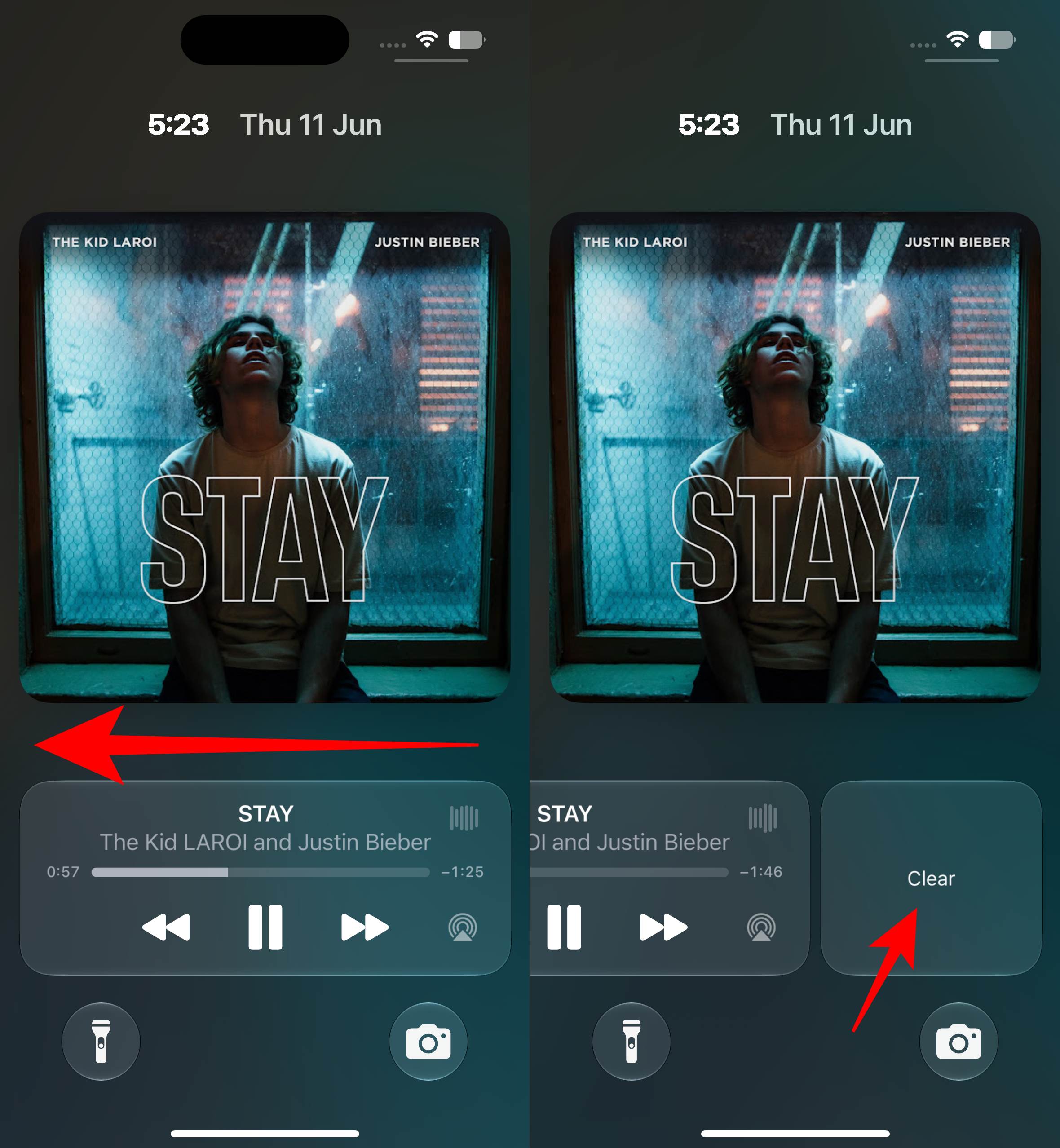
The large playback controls disappear immediately, giving your Lock Screen a cleaner look while the media continues playing in the background.
If you’re using a supported iPhone model with Dynamic Island, dismissing the Lock Screen controls also removes the compact Now Playing indicator from the Dynamic Island.
Your music or podcast keeps playing as usual, but the extra playback controls disappear from view until you need them again.
At the moment, there isn’t a dedicated button to restore the dismissed widget instantly.
In the current iOS 27, the easiest workaround is to pause playback, wait a few minutes, and then start playing again. The behavior can also vary between apps. For example, switching from a podcast to a video may cause the Now Playing controls to reappear automatically.
Apple doesn’t limit the feature to its own media apps. Spotify, YouTube Music, and other supported audio apps can also be dismissed from the Lock Screen, though the way the widget returns may differ depending on the app you’re using.
The Now Playing widget is handy when you need playback controls, but it doesn’t have to stay on your Lock Screen the entire time you’re listening. With iOS 27, you can clear it in a single swipe and keep your music, podcasts, or videos playing in the background without the extra clutter. It’s a subtle change, but one many iPhone users will probably use every day.
Which iOS 27 feature has impressed you the most so far? Tell us in the comments.
Missed This? Check It Out