
FaceTime Like a Pro
Get our exclusive Ultimate FaceTime Guide 📚 — absolutely FREE when you sign up for our newsletter below.

FaceTime Like a Pro
Get our exclusive Ultimate FaceTime Guide 📚 — absolutely FREE when you sign up for our newsletter below.


Wondering if Snapchat shows mutual friends? Here's how to check shared connections, what the mutual friends label means, and why you can't see who those friends are.
 ByVikhyat
Adding random people on Snapchat isn’t always a good idea. It’s usually better to connect with people you already know through school, work, family, or mutual friends. That’s where Snapchat’s mutual friends feature can help by giving you a little more confidence before sending a friend request.
Seeing that you share mutual friends with someone can make it easier to decide whether they’re actually someone you know or just another suggested profile.
Keep reading to learn how to check mutual friends on Snapchat, where to find these suggestions, and what the “mutual friends” label actually means.
Yes, Snapchat lets you see when you have mutual friends with another user. On the Add Friends page, some suggested profiles display an “X mutual friends” label beneath the username, indicating how many friends you have in common.
The feature is more limited than many users expect. Snapchat only shows the number of mutual friends—it doesn’t reveal their names or profiles.
That can be frustrating if you have friends from different parts of your life, such as work, school, or family. Unless you already recognize the suggested profile, there’s no way to tell which shared friend connects you.
You can check for mutual friends directly from Snapchat’s Add Friends page.
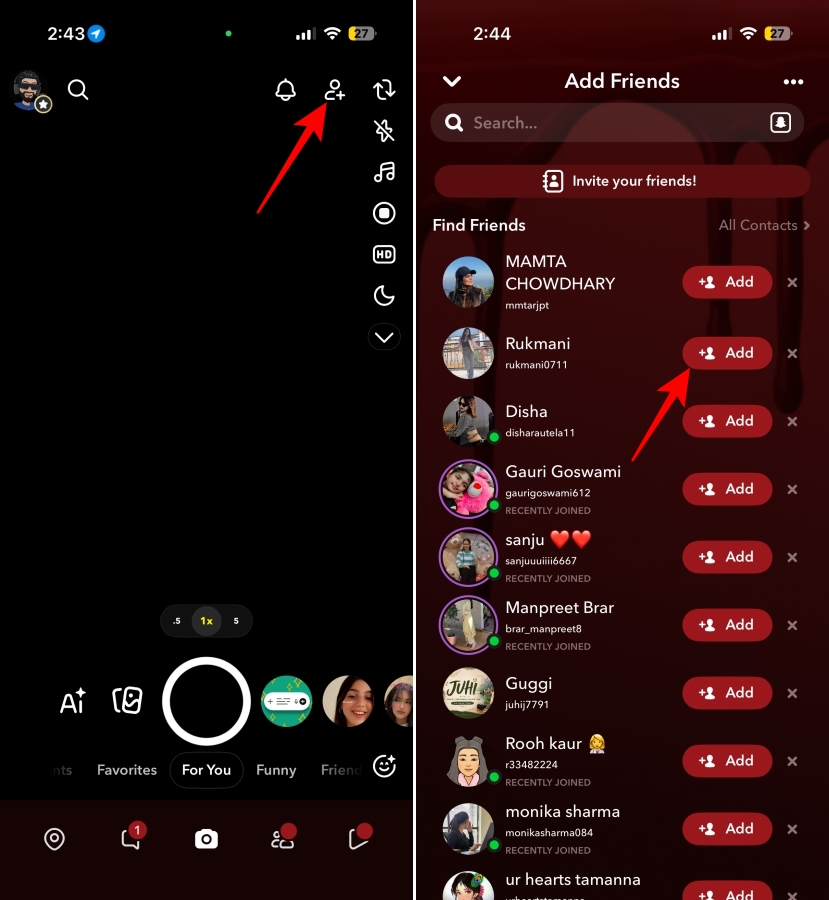
Keep in mind that not every suggestion includes mutual friends. Snapchat may also recommend people based on your contacts, shared groups, or recently created accounts.
Related: What do Snapchat symbols mean? Every icon and emoji explained
Having mutual friends doesn’t automatically mean you know someone personally. Before sending a friend request, keep these tips in mind:
That’s everything you need to know about Snapchat’s mutual friends feature. While the app doesn’t reveal who your mutual friends are, seeing the number of shared connections can still help you decide whether a suggested profile is worth adding.
Have a question about Snapchat’s mutual friends feature? Leave a comment below, and we’ll be happy to help.
You may also like to read:











