FaceTime Like a Pro
Get our exclusive Ultimate FaceTime Guide 📚 — absolutely FREE when you sign up for our newsletter below.

FaceTime Like a Pro
Get our exclusive Ultimate FaceTime Guide 📚 — absolutely FREE when you sign up for our newsletter below.


Android finally gets more app store choice inside Google Play. I walked through one to see what’s inside.
Finally, after waiting for so long, the Google Play Store is offering a way to try third-party app stores. For years, if you wanted an app outside Google Play, you had to search for the APK and sideload it yourself. Now that’s changing.
When I first saw Aptoide Games, an alternative store, available through the Play Store, it felt like Google was finally letting a competitor through its own front door. So, I decided to try it myself to see what actually happens, how the experience works, and whether having a third-party app store inside Google Play is really as big a change as it sounds.
Let’s clear up the biggest misconception first. Third-party app stores are not new to Android. Samsung has its Galaxy Store, Amazon has its own app marketplace, F-Droid has long served open-source software, and Aptoide itself has existed for years. Android has always been considerably more permissive than iOS regarding alternative software distribution.
The problem was discoverability. If you wanted a third-party app store, you generally had to find it yourself and sideload it. That meant downloading an installer from an unknown website outside the Play Store and navigating Android’s security warnings. Most users are habituated to opening the Play Store whenever they want to get a new app or game.
Google’s new system changes that equation. Starting July 22, 2026, eligible third-party US Android app and game stores could be distributed through the Play Store. Google also began making the US Play catalog available to enrolled third-party stores under its new program.
And that’s how Aptoide ended up becoming the first rival storefront to appear inside Google Play.
Google has created a dedicated route for users to discover third-party app stores.
You can find these stores through a dedicated landing page, links within Play, your account menu in Google Play, the apps category page, or by searching (e.g., for “App Store” or a specific store). Then download it like a normal app. No need to go through additional security measures.
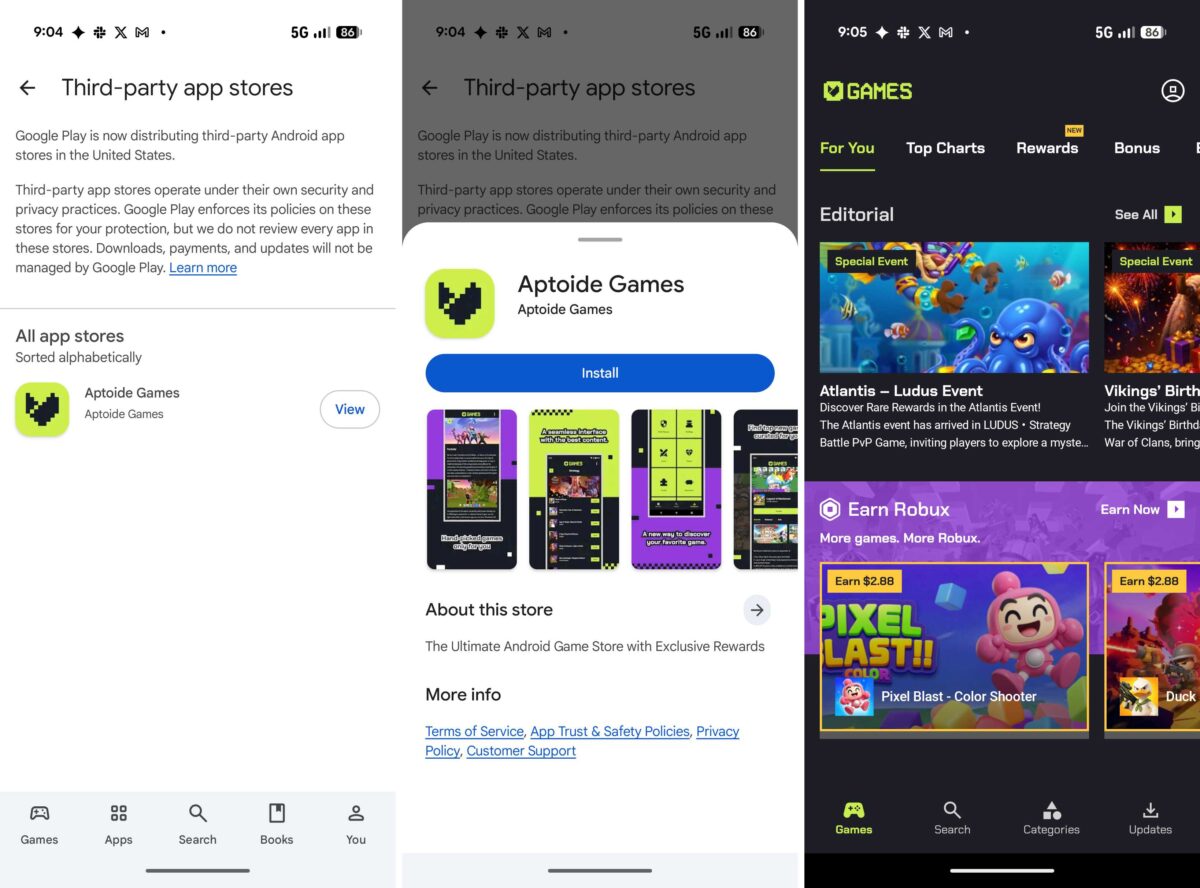
Once you install an eligible third-party store from Google Play, the experience moves into that store’s own ecosystem.
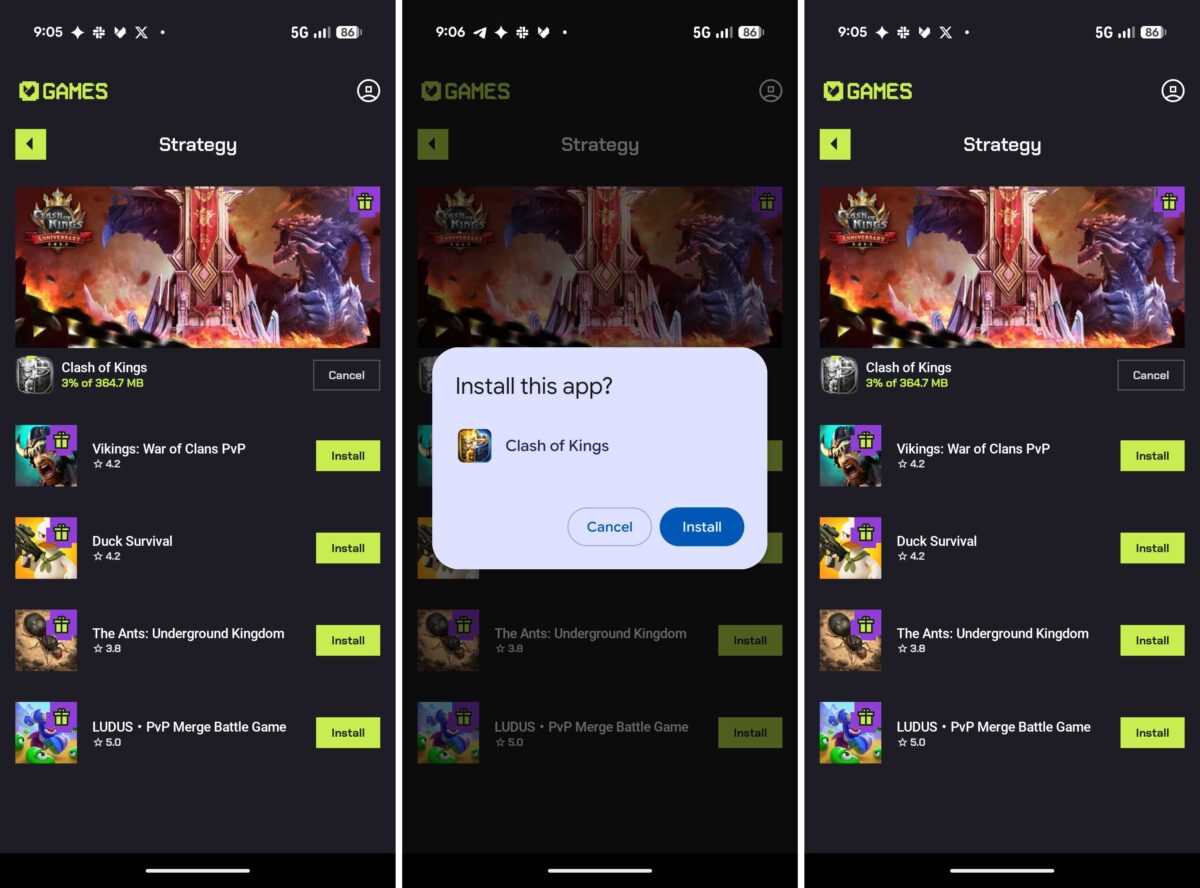
As the experience remains seamless, I expect more storefronts like the Epic Games Store, Microsoft’s Xbox mobile ambitions, the Samsung Galaxy Store, and other open-source stores to be listed sooner. That means you will get various app catalogs, regional availability, independent games, and better offers and promotions.
Note: Alternative app stores operate under their own security and privacy practices, and Google Play does not review every application distributed through them. That’s why I hesitated a bit before trying new, unknown games from Aptoide.
Here’s where things get genuinely interesting. Google isn’t merely allowing an alternative app store to sit beside Play.
Under the US program, enrolled third-party Android app stores can access the Google Play catalog. Apps and games can be offered through those stores, while the actual download can still be completed through the Play Store under the applicable terms. Google says its service fee continues to apply to those downloads.
However, the participating third-party stores must meet requirements including being legitimate marketplaces, operating as organizations, targeting US users, and maintaining trust-and-safety policies.
None of this appeared out of nowhere. The roots go back to Epic Games’ long-running legal battle with Google over Android’s app distribution and billing practices.
In October 2024, Judge James Donato ordered Google to make major changes to the Play Store, including allowing competitors to distribute their app stores through it and giving them access to Google’s app catalog, subject to the terms of the injunction.
Google filed an appeal, and the battle for change went on. However, by 2026, both Google and Epic withdrew from pursuing their settlement proposal, leaving Google to comply with the underlying court order. Google subsequently confirmed that third-party app stores would begin appearing in the US Play Store from July 22.
Competition isn’t automatically good just because it has the word “competition” attached to it.
Multiple app stores can also mean:
Right now, Google Play manages all your subscriptions and payment details. If every third-party store starts using its own payment system, your subscriptions could end up scattered across several accounts and wallets. This increases the chances of exposing your data.
I can also see how quickly things could get messy. Imagine searching for a game on Google Play only to discover it’s exclusive to another store. Now you have to download yet another app store just to play it. Do that a few times, and your phone could end up with several app managers.
My answer is: If you have a reason, absolutely.
If Google Play already has everything you need, there’s no reason to install another store just because you can.
But if you care about:
Then alternative stores are worth understanding.
Just treat them like a separate ecosystem, because that’s exactly what they are. Don’t assume Google Play’s security model follows you everywhere.
Always check the store’s reputation, pay attention to app permissions, prefer legitimate developers, and be especially cautious with modified or suspicious APKs. I will also insist that you keep Google Play Protect enabled to identify malicious behavior on your device.
For now, I am sticking to the Play Store as I use Gemini to search for apps instead of the traditional way.
For years, “Android is open” was technically true but not in practice. You could install alternative software, but the mainstream path still pointed toward Google Play. Not anymore!
If Google, Epic, Aptoide, Microsoft, Samsung, and others actually turn this opening into a real marketplace rather than a legal compliance exercise, Android users could finally get something they’ve been missing for years: a genuine choice of where their apps come from.
Are you excited to explore an alternative app store on your Android? Share your thoughts in the comments below!